
Agent teams: a lead and teammates that talk
Agent teams is an experimental Claude Code feature that runs one lead session and several teammate sessions, which share a task list and message each other directly.
Last updated: 29 Sep, 2026 · Claude Code
Subagents report back to the session that started them and never talk to each other. When workers need to share findings mid-task, a team is the tool.
Comparing subagents with an agent team
The video draws the two side by side. With subagents, the traditional hierarchy, a main agent spawns workers for coding, technical analysis and so on; each does its work alone and returns a result, and the results are combined into one report. With an agent team, the collaborative structure, a team lead spawns teammates and writes a shared task list that every teammate can see. Teammates claim tasks from it, message each other, and can pick up another task when they see an opening.
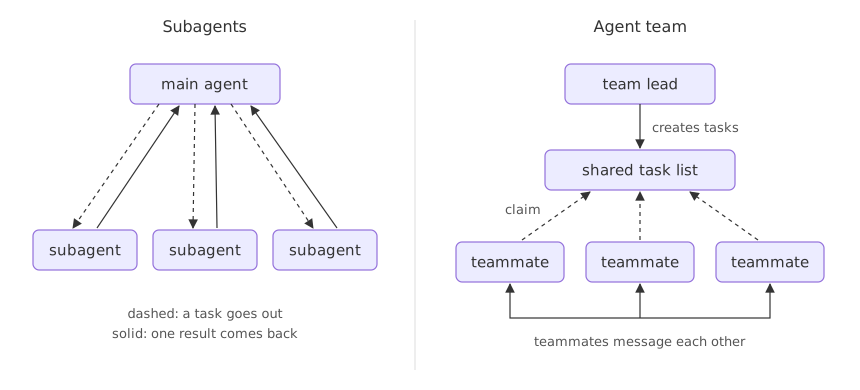
The video's warning is the cost: every teammate talks to the others as well as doing its own work, so a team spends more tokens than subagents. The docs' comparison (agent teams):
| Subagents | Agent teams | |
|---|---|---|
| Context | Own window; the result returns to the caller | Own window; fully independent |
| Communication | Return a result to the caller | Teammates message each other directly |
| Coordination | The main agent manages all the work | Messages plus a shared task list |
| Best for | Focused tasks where only the result matters | Complex work that needs discussion |
| Token cost | Lower | Higher: each teammate is a separate Claude instance |
Enabling agent teams in settings.json
The video asks Claude "What is agent teams in the Claude ecosystem?". Claude reads the project's .claude/settings.json and finds the switch already on: an environment variable, set in the settings file's env block.
{
  "env": {
    "CLAUDE_CODE_EXPERIMENTAL_AGENT_TEAMS": "1"
  }
}
Its explanation: an ordinary subagent is fire and forget. The main session spawns it, it runs once, returns a single message and disappears, with no back and forth. With the flag on you get a lead plus named teammates that stay alive across turns, message each other mid-task and coordinate around a shared task list, through tools such as SendMessage, TaskCreate and TaskUpdate. A team needs an interactive session: with -p, Claude runs ordinary subagents even with the flag on (agent teams).
TeamCreate tool and deletes it at the end. In the current release a team is set up when the session starts, a session has exactly one team, and its shared files are cleaned up automatically when the session ends, so there is no separate cleanup step.Running two reviewer teammates
Asked for a small demo on its repository, Claude sets up a two-teammate team, as the video's screen shows:
Tools loaded. I'll set up a small 2-teammate team that reviews two of the
bootcamp notebooks in parallel: notebook 6 (middleware) and notebook 7
(vectorless RAG) — then report findings back to me. Let me create the team
and its task list.

Team created. Now I'll create two tasks on the shared task list — one per
notebook.

Now I'll spawn the two teammates in parallel and assign each one a task.
They're reviewers (no edits), so I'll use the Explore agent type.
  [ ] Review 6-middleware.ipynb
  [ ] Review 7-vectorlessrag.ipynb
Each teammate claims its task, does the review, marks it complete and messages its findings to the lead. Both notebooks came back factually sound and correct for LangChain v1, with suggestions that are polish rather than fixes. Claude also made a useful observation: two independent read-only reviews sit right at the edge of where a team pays off, because the setup and messaging cost about as much as two subagents; teams earn their keep when teammates need to talk to each other. The teammates approved shutdown and the team was removed.
A writer and a reviewer on one README
The second demo needs that talking. The video asks for a README section on agent teams, written by a small team. The lead reads the README, sees an agent view section but no agent teams one, and spawns a writer (general-purpose, allowed to edit the file) and a reviewer (Explore, to fact-check the section against the real team tools). It marks the review task as blocked by the writing task, so the reviewer sees task one still open and waits; when the writer finishes, the lead wakes the reviewer with SendMessage. The section lands in the README.
Asking for a team on the link shortener
The same request on this course's project. Two files and one question that crosses them is the kind of job where teammates gain from talking:
Spawn two teammates to review this project in parallel:
- one reads store.py for ways a save can lose data
- one reads shorten.py for how the next code is chosen
Have them message each other about how the two files interact,
then report back.
The teammates appear in a panel below the prompt. Up and down select one, Enter opens its transcript so you can message it directly, and Ctrl+T shows the task list. To end one early, ask the lead, for example "Ask the store teammate to shut down".
When a team beats subagents
- Research and review, where teammates investigate different parts and challenge each other's findings.
- Debugging with competing theories, each teammate testing one and trying to disprove the others.
- A change across layers, such as an API, its tests and its docs, each owned by one teammate.
Related
- Previous: Background sessions and agent view
- Next: Headless mode and JSON output
- See also: Subagents: separate context for side tasks
- Reference: Agent teams
- Add the
envblock above to.claude/settings.jsonin a practice repository and ask Claude what agent teams are. - Ask for two reviewer teammates on two different files, then ask the same with subagents and compare the token use in
/context. - Run the link shortener prompt with
claude -pand see that no teammates are spawned.
Slow is fine. Stopping is the only problem.