
Subagents: delegating with the task tool
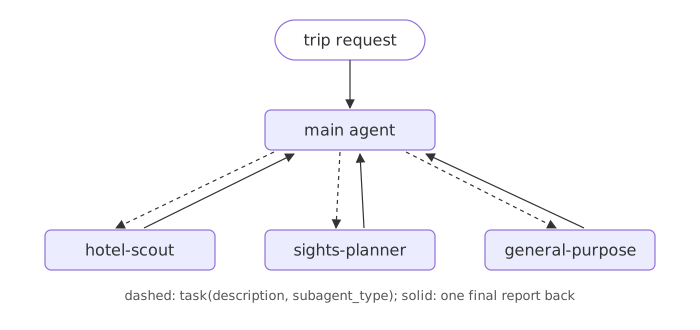
A subagent is a separate agent with its own prompt and tools that the main deep agent starts with the task tool; it works in a fresh context and hands back one final report.
Last updated: 29 Sep, 2026 · Deep Agents 0.7
Subagents and context quarantine
The video reads the docs' definition: a deep agent can create subagents to delegate work, given in the subagents parameter. They give context quarantine, keeping the main agent's context clean, and specialized instructions. Each subagent has its own context, tools and instructions, does one focused job and returns a result; the main agent understands the goal, plans, delegates, collects the results and writes the final answer. These are synchronous subagents: the main agent waits, blocked, until a subagent finishes. The example: a research report on agentic AI split between a research agent, a writing agent, a data agent and a critic.
TodoListMiddleware. Its models, openai:gpt-5.4 and groq:qwen/qwen3-32b, are both google_genai:gemini-2.5-flash in the run below.In code, a subagent is a dictionary. The video wraps its Tavily search in internet_search, then describes research_subagent: a name, a description the main agent reads to decide when to delegate, a system_prompt, its tools, and an optional model that falls back to the main agent's. Asked to research LLM gateways, the saved run first writes a to-do list with write_todos, then works through it and returns a detailed summary.
To run it, start research.py with web_search, the Tavily tool from Tools: a travel search the agent can call; it needs TAVILY_API_KEY. The agent runs on Gemini, so it also needs GOOGLE_API_KEY, the free key from Installation and setup; with the Groq line it needs GROQ_API_KEY instead. The video writes the same function again here as internet_search; the page reuses web_search.
import os
from tavily import TavilyClient
from typing import Literal

tavily_client = TavilyClient(api_key=os.getenv("TAVILY_API_KEY"))

def web_search(query: str, max_results: int = 5,
               topic: Literal["general", "sports", "news", "finance"] = "general"):
    """Run a web search"""
    return tavily_client.search(query, max_results=min(max_results, 5), topic=topic)
Add the video's code under web_search in research.py, with four changes. The first is the one above: web_search in place of internet_search. The second: both models are one google_genai:gemini-2.5-flash object with max_retries: a research run is long, so this one uses Gemini's free key and leaves Groq's daily limit for the other lessons; the Groq line from Setup works the same. Third, the subagent's prompt gains a sentence, because with only "You are a great researcher" the model wrote its report from memory without searching. Fourth, the loop prints each step shortened and the start of the summary with .text, where the video pretty-prints every message in full; .text gives plain text on every provider, while Gemini's .content is a list of parts.
from deepagents import create_deep_agent
from langchain.chat_models import init_chat_model

model = init_chat_model("google_genai:gemini-2.5-flash", temperature=0, max_retries=6)

research_subagent = {
    "name": "research-agent",
    "description": "Used to research more in depth questions",
    "system_prompt": "You are a great researcher. Search with web_search and use only what it returns.",
    "tools": [web_search],
    "model": model,   # optional, defaults to the main agent's model
}
agent = create_deep_agent(model=model, subagents=[research_subagent])
result = agent.invoke(
    {"messages": [{"role": "user", "content": "Reserach about LLM Gateways and provide me a detailed summary."}]},
    config={"configurable": {"thread_id": "skills-demo-2"}},
)

for message in result["messages"][:-1]:     # the steps, shortened
    print(f"{message.type:<5}", message.text[:200] or [(c["name"], c["args"]) for c in message.tool_calls])
print(result["messages"][-1].text[:1500]) # the start of the summaryhuman Reserach about LLM Gateways and provide me a detailed summary.
ai [('task', {'subagent_type': 'research-agent', 'description': 'Research LLM Gateways, their purpose, benefits, features, and common implementations. Provide a detailed summary of your findings.'})]
tool ## LLM Gateways: A Detailed Summary
**Purpose:**
An LLM Gateway is a smart middleware layer that acts as a unified interface between applications and one or more Large Language Model (LLM) providers
LLM Gateways serve as a crucial middleware layer, centralizing access, management, and governance of all LLM traffic between applications and various Large Language Model providers.
**Purpose:**
Their primary purpose is to simplify integration by offering a unified interface, eliminating the need for developers to manage different APIs from various providers. This also allows for easier experimentation with different models and provides a security layer for interactions with generative AI models.
**Benefits:**
* **Simplified Integration:** A single API to access multiple LLMs reduces development complexity.
* **Enhanced Security and Compliance:** Centralized authentication, access control, and data handling improve security and aid regulatory compliance.
* **Improved Performance and Cost Optimization:** Smart routing and caching boost performance and reduce costs by minimizing API calls and latency. Load balancing further optimizes performance and cost.
* **Increased Reliability and Resilience:** Features like automatic retries, failover mechanisms, and circuit breakers ensure applications function even during LLM provider outages.
* **Vendor Lock-in Prevention and Portability:** Compatibility with various models and cloud infrastructures prevents vendor lock-in and maintains portability.
* **Centralized Observability:** Provides a single view for debugging and optimizing, consolidating fragmented logs, routing decisions, latency, and cost data.
**Features:**
KThe main agent did not search itself: its one step was a task call with subagent_type research-agent and a description it wrote. The tool message is the subagent's report, headed "LLM Gateways: A Detailed Summary", and the final answer is the main agent's own summary built from it, covering purpose, benefits and features. Search results change from day to day, so your run will word it differently.
The subagent syntax
subagent = {
    "name": "hotel-scout",                 # what the main agent passes as subagent_type
    "description": "...",                  # when to use it
    "system_prompt": "...",                # its own instructions
    "tools": [search_travel],              # its own tools
}
agent = create_deep_agent(model=model, subagents=[subagent])
Two travel subagents
The trip is split the way the video splits a research report. Start trip.py with search_travel, the catalog tool from Tools: a travel search the agent can call. Everything below goes in the same file, under it.
from langchain.tools import tool

CATALOG = {
    "paris": {
        "flight": ["Return flight Delhi to Paris: 42,000 rupees"],
        "hotel": ["Seine Budget Inn, Latin Quarter: 5,200 rupees a night",
                  "Hotel Lumiere, Montmartre: 7,500 rupees a night",
                  "Le Grand Opera Hotel: 16,000 rupees a night"],
        "sight": ["Eiffel Tower summit: 3,100 rupees", "Louvre Museum: 2,000 rupees",
                  "Seine river cruise: 1,500 rupees", "Versailles day trip: 2,600 rupees",
                  "Montmartre walking tour: free"],
        "food": ["Cafe breakfast and bistro dinner: 3,000 rupees a day"],
    },
}


@tool
def search_travel(city: str, kind: str) -> str:
    """Search the travel catalog. kind is "flight", "hotel", "sight" or "food". Prices are in rupees."""
    entries = CATALOG.get(city.lower(), {}).get(kind)
return "\n".join(entries) if entries else f"The catalog has no {kind} entries for {city}."from deepagents import create_deep_agent
from langchain.chat_models import init_chat_model
model = init_chat_model("groq:openai/gpt-oss-120b", temperature=0, max_retries=6)hotel_scout = {
"name": "hotel-scout",
"description": "Finds a hotel in a city that fits a nightly budget.",
"system_prompt": "Look up hotels with search_travel. Reply with one hotel, its price per night and one reason. Use only catalog data.",
"tools": [search_travel],
}
sights_planner = {
"name": "sights-planner",
"description": "Picks sights for each day of a trip and reports their ticket prices.",
"system_prompt": "Look up sights with search_travel. Reply with one line per day: the sights and their ticket prices. Use only catalog data.",
"tools": [search_travel],
}Each subagent gets only search_travel and a prompt for its one job.
The main agent
The main agent has no travel tool of its own. Its prompt says which subagent gets which job.
agent = create_deep_agent(
    model=model,
    subagents=[hotel_scout, sights_planner],
    system_prompt="You plan trips. Give the hotel question to hotel-scout and the sightseeing to sights-planner "
                  "with the task tool. Then combine their answers in three short lines.",
)
Delegating a Paris request to two subagents
The loop prints each task call with the subagent's name and the job description the main agent wrote, each report that came back, and the final answer.
request = "Paris, 3 nights: find a hotel under 8,000 rupees a night and plan sights for 2 days."
result = agent.invoke({"messages": [{"role": "user", "content": request}]})

for message in result["messages"][1:]:
    if message.type == "ai" and message.tool_calls:
        for call in message.tool_calls:
            print("task ->", call["args"]["subagent_type"], ":", call["args"]["description"])
    elif message.type == "tool":
        print("back <-", message.text.replace("\n", " | "))
    else:
print("final:", message.text)task -> hotel-scout : Find a hotel in Paris that costs under 8,000 Indian rupees per night. Provide the hotel name, nightly price in rupees, and a brief note on location or amenities. back <- **Hotel Lumiere** – 7,500 ₹ per night | *Located in the vibrant Montmartre district, Hotel Lumiere offers easy access to the iconic Sacré‑Cœur basilica and charming cobblestone streets, while providing cozy rooms and complimentary Wi‑Fi.* task -> sights-planner : Plan sightseeing for a 2‑day trip in Paris. List each day’s attractions with brief descriptions and include ticket prices in Indian rupees (₹). back <- Day 1 – Eiffel Tower summit (₹3,100), Louvre Museum (₹2,000), Seine river cruise (₹1,500) | Day 2 – Versailles day trip (₹2,600), Montmartre walking tour (free) final: Hotel Lumiere – 7,500 ₹/night, Montmartre location, cozy rooms. Day 1: Eiffel Tower summit (₹3,100), Louvre Museum (₹2,000), Seine cruise (₹1,500). Day 2: Versailles day trip (₹2,600), Montmartre walking tour (free).
How the work was split
- Two task calls: the main agent wrote a job description for
hotel-scoutand another forsights-planner, in its own words. - Each report came back as one tool message. The subagents' own tool calls and catalog results stayed in their contexts, not in the main conversation.
- The final answer combines both reports: a hotel under the nightly budget and two days of sights with their prices.
- hotel-scout added details the catalog does not hold, such as the rooms and the Wi-Fi. Its prompt says to use only catalog data, and a model can still drift; the prices, which came from the tool, are right. The structured-output lesson next narrows what a subagent may send back.
Doing it all in one agent vs delegating
| One agent with all tools | Main agent with subagents | |
|---|---|---|
| What the main context holds | Every tool call and result | Job descriptions and short reports |
| Instructions | One prompt for everything | A focused prompt per job |
| Cost | Fewer model calls | More calls, cleaner context |
Every deep agent also has a built-in general-purpose subagent with the main agent's tools. It is there even when you define no subagents, which is why the task tool appeared in the built-in tools lesson.
Where subagents help
- Jobs with a lot of intermediate data, such as searching many pages, where only the conclusion matters.
- Parts of a task that need different instructions or tools.
- Keeping a long-running main agent's context small.
Related
- Previous: ToolRuntime and runtime context: who is asking
- Next: Subagent structured output with response_format
- Reference: Deep Agents subagents
- Ask for a hotel under 5,000 rupees a night and read what
hotel-scoutreports. - Stream the run with
subgraphs=Trueand print each namespace to see which agent is working. - Remove
sights_plannerfrom the list and see which subagent the main agent uses for sights.
You understood something today that you didn't yesterday.