
MCP tools with an LLM
A model tool definition is a tool's name, description and schema in the shape a model API expects, built from what the MCP server lists.
Last updated: 29 Sep, 2026 · MCP 2.2
The video writes client.py, which loads the tools of both servers at once. MultiServerMCPClient from langchain-mcp-adapters takes one entry per server: math with the command python, mathserver.py in args (an absolute path if the file is elsewhere) and the stdio transport; weather with its URL, http://localhost:8000/mcp, and the streamable_http transport, where the server must already be running. await client.get_tools() returns the tools of both servers, ready for a LangChain agent.
client=MultiServerMCPClient(
    {
        "math":{
            "command":"python",
            "args":["mathserver.py"], ## Ensure correct absolute path
            "transport":"stdio",
        },
        "weather": {
            "url": "http://localhost:8000/mcp",  # Ensure server is running here
            "transport": "streamable_http",
        }
    }
)

tools=await client.get_tools()
langchain-mcp-adapters requires an mcp below 2.0, so it cannot be installed next to the mcp 2.2 this course pins. LangChain 1.4 has its own MCP support, MCPAdapter from the langchain[mcp] extra. Install it now if you have not, with the pip line under Adding LangChain in Installation and setup. It takes the same two servers as an mcpServers config, the format Claude Desktop uses, and puts each server's name in front of its tools. The weather server is on port 8001, as in the Streamable HTTP lesson. Put mathserver.py and weather.py in the same folder as this client.
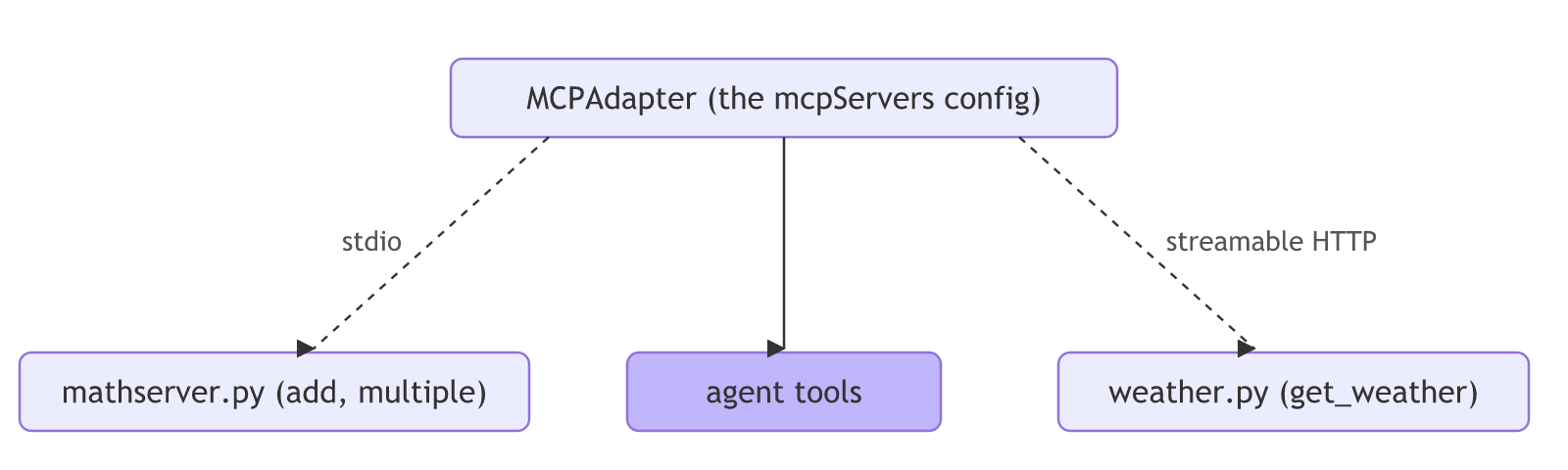
import asyncio

from langchain.mcp import MCPAdapter

servers = {
    "mcpServers": {
        "math": {"command": "python", "args": ["mathserver.py"], "transport": "stdio"},
        "weather": {"url": "http://localhost:8001/mcp", "transport": "streamable-http"},
    }
}


async def main():
    async with MCPAdapter(servers) as adapter:
        tools = await adapter.list_tools()
        for tool in tools:
            print(tool.name, "-", tool.description)


asyncio.run(main())
MCPAdapter prints a beta warning and some log lines on standard error, so 2> client.log keeps them out of the output:
python weather.py > weather.log 2>&1 &
sleep 3
python tools_client.py 2> client.log
kill $!math_add - _summary_
Add to numbers
math_multiple - Multiply two numbers
weather_get_weather - Get the weather location.Three tools from two servers, each named after its server: math_add, math_multiple and weather_get_weather, with the docstrings as descriptions, the _summary_ one included. An adapter does one job: it turns each MCP tool into the shape a model API takes. For the shop server, that shape is a short function you write yourself.
def to_model_tools(tools):
    return [
        {
            "type": "function",
            "function": {
                "name": tool.name,
                "description": tool.description,
                "parameters": tool.input_schema,
            },
        }
        for tool in tools
]- written in Streamable HTTP transport
- written in MCPServer quickstart
View the code here
from mcp.server import MCPServer

mcp=MCPServer("Weather")

@mcp.tool()
async def get_weather(location:str)->str:
    """Get the weather location."""
    return "It's always raining in California"

if __name__=="__main__":
    mcp.run(transport="streamable-http", port=8001)
from mcp.server import MCPServer

mcp=MCPServer("Math")

@mcp.tool()
def add(a:int,b:int)->int:
    """_summary_
    Add to numbers
    """
    return a+b

@mcp.tool()
def multiple(a:int,b:int)-> int:
    """Multiply two numbers"""
    return a*b

#The transport="stdio" argument tells the server to:

#Use standard input/output (stdin and stdout) to receive and respond to tool function calls.

if __name__=="__main__":
    mcp.run(transport="stdio")
from typing import Annotated, Literal

from pydantic import BaseModel, Field

from mcp.server import MCPServer
from mcp.server.mcpserver.prompts.base import AssistantMessage, Message, UserMessage
from mcp.server.mcpserver.exceptions import ResourceNotFoundError, ToolError
from mcp.types import ToolAnnotations

mcp = MCPServer("Shop support", log_level="WARNING")

ORDERS = {
    "A17": {"item": "blue mug", "status": "shipped", "total": 12.50},
    "B42": {"item": "desk lamp", "status": "processing", "total": 48.00},
}

ARTICLES = {
    "Where is my order?": "orders",
    "Changing an order": "orders",
    "How refunds work": "refunds",
    "Refunds for damaged items": "refunds",
    "Resetting your password": "account",
}


class Order(BaseModel):
    id: str
    item: str
    status: Literal["processing", "shipped", "delivered"]
    total: float


@mcp.tool(annotations=ToolAnnotations(read_only_hint=True))
def lookup_order(order_id: str) -> Order:
    """Look up an order by its id."""
    if order_id not in ORDERS:
        raise ToolError(f"No order with id {order_id!r}. Order ids look like A17.")
    return Order(id=order_id, **ORDERS[order_id])


@mcp.tool()
def search_help(
    query: Annotated[str, Field(description="Words to look for in the help articles.")],
    topic: Literal["orders", "refunds", "account"] | None = None,
    limit: Annotated[int, Field(ge=1, le=5)] = 3,
) -> str:
    """Search the help centre and return matching article titles."""
    found = [title for title, t in ARTICLES.items() if query.lower() in title.lower() and topic in (None, t)]
    return "; ".join(found[:limit]) or "No articles found."


@mcp.tool(
    title="Refund an order",
    annotations=ToolAnnotations(read_only_hint=False, destructive_hint=False, idempotent_hint=False),
)
def refund_order(order_id: str, reason: str) -> str:
    """Refund the full total of an order to the customer's card."""
    if order_id not in ORDERS:
        raise ToolError(f"No order with id {order_id!r}.")
    return f"Refunded {ORDERS[order_id]['total']:.2f} for order {order_id}: {reason}."


@mcp.resource("policy://refunds", mime_type="text/markdown")
def refund_policy() -> str:
    """The shop's refund policy."""
    return "# Refunds\n\nFull refund within 30 days of delivery. Damaged items: refund or replacement."


@mcp.resource("orders://{order_id}", mime_type="application/json")
def order_record(order_id: str) -> Order:
    """The full record for one order."""
    if order_id not in ORDERS:
        raise ResourceNotFoundError(f"No order with id {order_id!r}.")
    return Order(id=order_id, **ORDERS[order_id])


@mcp.prompt(title="Reply to a customer")
def reply_to_customer(ticket: str, tone: str = "friendly") -> list[Message]:
    """Draft a reply to a support ticket."""
    return [
        UserMessage(f"Write a {tone} reply to this support ticket:\n\n{ticket}"),
        AssistantMessage("Hello, and thank you for getting in touch."),
    ]


if __name__ == "__main__":
    mcp.run(transport="streamable-http", port=8200)
OpenAI's Chat Completions API takes tools in exactly this shape, and many other APIs accept it. Anthropic's Messages API takes name, description and input_schema at the top level, which maps even more directly. Either way, the MCP tool list already holds everything needed: no schema written by hand, unlike the tools-without-MCP lesson.
import asyncio
import json

from mcp import Client
from shop import mcp

def to_model_tools(tools):
    return [
        {
            "type": "function",
            "function": {
                "name": tool.name,
                "description": tool.description,
                "parameters": tool.input_schema,
            },
        }
        for tool in tools
    ]


async def main():
    async with Client(mcp) as client:
        listed = await client.list_tools()
        model_tools = to_model_tools(listed.tools)
        print(json.dumps(model_tools[0], indent=2))


asyncio.run(main()){
"type": "function",
"function": {
"name": "lookup_order",
"description": "Look up an order by its id.",
"parameters": {
"type": "object",
"properties": {
"order_id": {
"title": "Order Id",
"type": "string"
}
},
"required": [
"order_id"
],
"title": "lookup_orderArguments"
}
}
}- The tool arrived in the model API's shape, with
name,descriptionandparameterstaken from the MCP tool. - No schema was written by hand, unlike the tools-without-MCP lesson. The server's
list_toolsalready held all three.
Every tool costs tokens
import asyncio
import json

from mcp import Client
from shop import mcp

def to_model_tools(tools):
    return [
        {
            "type": "function",
            "function": {
                "name": tool.name,
                "description": tool.description,
                "parameters": tool.input_schema,
            },
        }
        for tool in tools
    ]


async def main():
    async with Client(mcp) as client:
        listed = await client.list_tools()
        text = json.dumps(to_model_tools(listed.tools))
        print(len(listed.tools), "tools,", len(text), "characters sent with every request")


asyncio.run(main())3 tools, 1201 characters sent with every request
Tool definitions are sent with every request, and paid for as input tokens, as LLM Fundamentals showed. A server with forty tools makes every message expensive and gives the model more ways to choose wrong. Offer the tools a task needs, with short, exact descriptions.
The MCP tool shape vs a model API's shape
| MCP list_tools | A model API | |
|---|---|---|
| Fields | name, description, input_schema | name, description, parameters |
| Where it comes from | The server | You reshape the list |
| Cost | Listed once by the server | Sent, and paid for, every request |
When to reshape the tool list
- Feeding MCP tools to any model API that takes function definitions.
- Offering a subset of tools to keep requests small and choices safe.
- Filtering by annotations, such as read-only tools for a read-only task.
Related
- Previous: MCP hosts
- Next: Tool calling with a model
- Convert the tools to Anthropic's shape: a list of dictionaries with
name,descriptionandinput_schema. - Filter
to_model_toolsto read-only tools usingtool.annotations. - Shorten
search_help's description and count the characters again.
Little by little, you're building something great.