
Decorators
A decorator is a function that takes another function and returns a new one wrapping it, so you can add behaviour before or after the original runs, applied with the @ syntax above a definition.
Last updated: 13 Oct, 2026 · Python 3.12
The Iterators and generators lesson wrote functions that pause and resume. This lesson writes functions that take and return other functions, so one piece of behaviour, such as logging or a retry, can be added to many functions without rewriting each one.
A decorator is built in three small steps: a function is a value you can pass around, an inner function can remember that value even after the outer one returns (a closure), and a decorator is that closure pattern applied with @. The lesson walks the three in that order, with a main_welcome wrapper around a course_introduction function.
A function is a value you can pass around
A function name is only a variable that holds the function. You can give it a second name, pass it to another function, or return it. Here wel is made to point at the same function as welcome, and calling wel() runs it.
def welcome():
    return "Welcome to the advanced Python course"

wel = welcome        # a second name for the same function
print(wel())Welcome to the advanced Python course
wel = welcome did not call anything; it copied the reference, so wel and welcome are two names for the one function. Because a function can be passed around like this, another function can take one as an argument and build a new function around it.
An inner function that remembers: a closure
A closure is an inner function that remembers a value from the function that made it, even after that outer function has returned. main_welcome takes a function func, defines sub_welcome_method inside that calls func between two lines, and returns that inner function. The inner function keeps hold of func.
main_welcome with an inner method that reaches the value around it. The page returns the inner function by name so you can call it yourself, which is the step right before the @.def main_welcome(func):
def sub_welcome_method():
print("Welcome to the advanced Python course")
func()
print("Please learn these concepts properly")
return sub_welcome_method # return the function, not sub_welcome_method()
def course_introduction():
print("This is an advanced Python course")
greet = main_welcome(course_introduction) # build the wrapped function
greet() # then call itWelcome to the advanced Python course This is an advanced Python course Please learn these concepts properly
main_welcome(course_introduction) returned sub_welcome_method, which had captured func as course_introduction. Calling greet() ran the inner function: it printed a line, called the captured func, and printed another. This is a decorator built by hand; the @ is a shorthand for exactly this.
Applying it with @
Writing @main_welcome above a definition is shorthand for course_introduction = main_welcome(course_introduction): it passes the function to main_welcome and rebinds the name to the wrapped version. The manual greet = main_welcome(...) step disappears.
main_welcome ... this is how you manually create a decorator. The @main_welcome line does the same wrapping the hand-written step above did.# @main_welcome is the same as course_introduction = main_welcome(course_introduction)
@main_welcome
def course_introduction():
print("This is an advanced Python course")
course_introduction()Welcome to the advanced Python course This is an advanced Python course Please learn these concepts properly
@main_welcome replaced course_introduction with the wrapped version. Calling course_introduction() now runs sub_welcome_method: it prints the opening line, calls the original course_introduction in the middle, and prints the closing line. The original function was never edited.
A common mistake: returning the call, not the function
The one error everyone hits is returning sub_welcome_method() with parentheses instead of sub_welcome_method. That calls the inner function immediately, at the moment of decoration, and returns whatever it produced, often None. The decorated name then holds that value, not a function.
    return sub_welcome_method        # correct: hand back the function itself
return sub_welcome_method() # the bug: call it now and return its result# main_welcome here ends in return sub_welcome_method() by mistake
@main_welcome
def course_introduction():
print("This is an advanced Python course")
print("course_introduction is now:", course_introduction)Welcome to the advanced Python course This is an advanced Python course Please learn these concepts properly course_introduction is now: None
The three lines printed while the file was being read, because @main_welcome ran sub_welcome_method() on the spot. It returned None, so course_introduction became None, not a function, and calling it would raise. The fix is one character: return sub_welcome_method, the function itself, not sub_welcome_method().
The general shape: wrapper(*args, **kwargs)
main_welcome wrapped a function that takes no arguments. To wrap any function, the inner function takes *args, **kwargs and passes them straight through, and it returns the original's result. This is the shape you will write most often.
def decorate(func):
    def wrapper(*args, **kwargs):
        # extra behaviour goes here
        return func(*args, **kwargs)
    return wrapper          # return the function, not wrapper()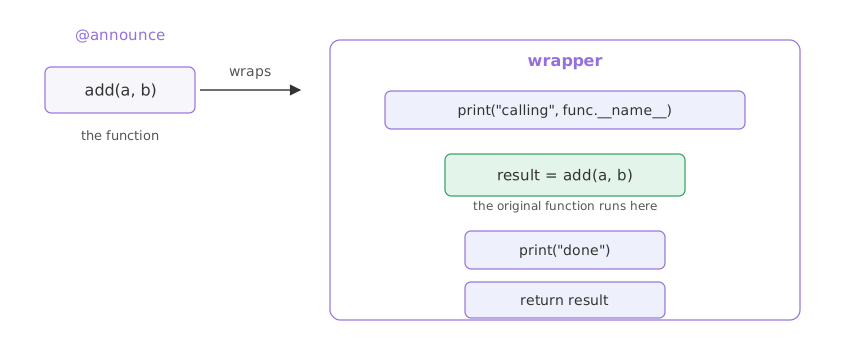
announce below wraps any function so it prints a line before and after the call. *args, **kwargs let the wrapper pass through whatever arguments the original takes, and return result hands back whatever the original returned.
def announce(func):
    def wrapper(*args, **kwargs):   # pass through whatever add takes
        print("calling", func.__name__)
        result = func(*args, **kwargs)
        print("done")
        return result
    return wrapper

@announce
def add(a, b):
    return a + b

print(add(2, 3))calling add done 5
@announce replaced add with the wrapper. Calling add(2, 3) ran the wrapper: it printed before, called the real add to get 5, printed after, and returned that 5. Because the wrapper takes *args, **kwargs, the same decorator works on a function with any arguments.
A decorator that takes arguments
To pass an argument to the decorator itself, add one more layer: a function that takes the argument and returns a decorator. repeat(3) returns a decorator that runs the wrapped function three times.
def repeat(times):
    def decorator(func):
        def wrapper(*args, **kwargs):
            for _ in range(times):
                func(*args, **kwargs)
        return wrapper
return decorator@repeat(3)
def ping():
print("ping")
ping()ping ping ping
repeat(3) ran first and returned a decorator, which then wrapped ping. One call to ping() ran the body three times. The outer layer captured times as a closure, the same idea the lesson opened with.
A retry decorator
The pattern that earns its keep in AI code is a retry: call a function, and if it raises, try again up to a limit. The flaky function here fails twice and succeeds on the third try. The Timeouts and retries lesson takes this further for real model calls.
def retry(attempts):
    def decorator(func):
        def wrapper(*args, **kwargs):
            # return on the first call that does not raise; report each failure
            for attempt in range(1, attempts + 1):
                try:
                    return func(*args, **kwargs)
                except ValueError as error:
                    print(f"attempt {attempt} failed: {error}")

            raise RuntimeError(f"gave up after {attempts} attempts")
        return wrapper
return decoratorcalls = {"n": 0} # count attempts; the first two fail
@retry(attempts=3)
def flaky_call():
calls["n"] += 1
if calls["n"] < 3:
raise ValueError("model timed out")
return "model replied"
print(flaky_call())attempt 1 failed: model timed out attempt 2 failed: model timed out model replied
- attempt 1 failed and attempt 2 failed: the first two calls raised
ValueError, which the wrapper caught and reported. - model replied: the third call succeeded, so
wrapperreturned its result and stopped retrying. - Had all three failed, the loop would have ended and the wrapper raised
RuntimeErrorwith the give-up message.
By hand vs with a decorator
| written by hand | with a decorator | |
|---|---|---|
| Where the extra code lives | pasted into every function | once, in the decorator |
| Changing the behaviour | edit every function | edit the decorator |
| Reading the function | mixed with the extra code | stays about its own job |
| Adding it to one more function | copy the code again | add one @ line |
Where decorators show up in AI code
- Retrying a model or API call that fails now and then, the decorator built above, taken further in the Timeouts and retries lesson.
- Timing or logging every call to a tool a model can use, without touching the tool's own code.
- Registering a function as a tool or a route, which many frameworks do with a decorator you put above the function.
wrapper or sub_welcome_method, never the call with (), or the decorated name becomes a value instead of a function. And give the wrapper *args, **kwargs, or it breaks the moment it wraps a function that takes arguments. The wrapper also takes over the original's __name__; functools.wraps in the standard library copies it back when that matters.Related
- Previous: Iterators and generators
- Next: Common gotchas
- Reference: decorator in the Python glossary
- Change
@repeat(3)to@repeat(2)and runping(); it prints twice. - Set
@retry(attempts=2)and makeflaky_callfail three times; the wrapper raisesRuntimeError. - Return
sub_welcome_method()frommain_welcomeand print the decoratedcourse_introduction; it becomesNone.
Every expert started right here.