
Hosting the SDK
Hosting the Agent SDK is running a service whose every session owns a separate Claude Code process, with that process's files on local disk. It is not a stateless API wrapper, and the difference drives every decision below.
Last updated: 20 Oct, 2026 · Claude Agent SDK
When your code calls query(), the SDK starts a claude process and talks to it over its standard input and output. That process owns a shell, a working directory and the session transcripts it writes. N sessions at once means N processes. The hosting page covers this in full, with Dockerfiles and Kubernetes manifests in Anthropic's hosting cookbook.
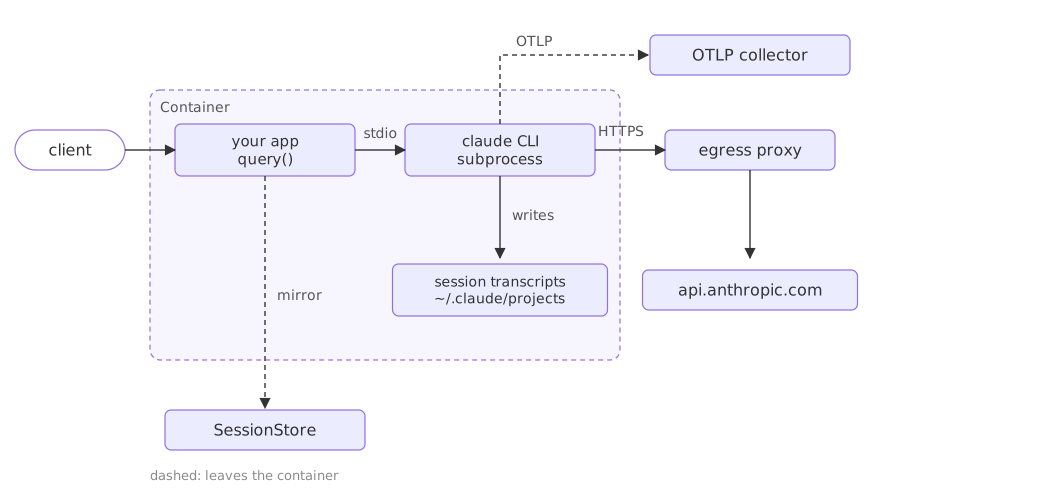
Seeing the process the SDK would start
The options you set are turned into a command line. Reading it is the quickest way to see what reaches the process and what shapes the process instead, and it runs here with no key, because nothing is started.
import shlex

from claude_agent_sdk import ClaudeAgentOptions
from claude_agent_sdk._internal.transport.subprocess_cli import SubprocessCLITransport

# a fixed cli_path keeps the printed command the same on every machine
options = ClaudeAgentOptions(max_turns=20, cwd="/work/session-a", cli_path="claude")

# _build_command is the command line the SDK hands to the operating system
started = SubprocessCLITransport(prompt="", options=options)._build_command()
print("binary:", started[0])
print("flags: ", shlex.join(started[1:]))binary: claude flags: --output-format stream-json --verbose --system-prompt '' --max-turns 20 --input-format stream-json
What the command line does and does not say
- The binary is a separate program. Both SDKs bundle a Claude Code binary pinned to the package version, so upgrading the SDK is how the process gets upgraded.
--max-turns 20went across. An option that bounds the loop has to be enforced by the side that runs the loop.--output-format stream-jsonis always there. The messages the SDK yields are those JSON lines, which is why standard output has to stay clean.cwdis missing from the flags. It is the directory the process is started in, not something it is told, and it is how two sessions are given separate filesystems.
The state that dies with the container
Three kinds of state sit on the container's own disk by default, and a restart, a scale-down or a move to another node takes all three.
| State | Where it lives by default |
|---|---|
| Session transcripts | ~/.claude/projects/, or under CLAUDE_CONFIG_DIR when that is set |
CLAUDE.md memory files | ~/.claude/CLAUDE.md for the user tier, the working directory for the project tier |
| Anything the agent wrote | The session's working directory |
A session store carries the transcripts across hosts. It mirrors transcripts and nothing further, so memory files and written artifacts need a mounted volume or a sync of their own.
Four shapes a deployment takes
| Pattern | The container's life | What it suits |
|---|---|---|
| Ephemeral | One container per task, destroyed when the task ends | One-off work: a bug fix, an invoice to read, a document to translate |
| Long-running | Persistent containers, often many sessions each | Agents that act on their own or handle a steady stream of messages |
| Hybrid | Ephemeral, hydrated from a store on start and written back | Work that spans days but sits idle between visits |
| Multi-agent | One container, several processes inside it | Agents that have to collaborate in a shared environment |
The hybrid pattern is the one where a session store stops being optional. Shutting a container down without one loses the transcript with it, and there is nothing to hydrate from when the person comes back.
# session_id comes from your own database, keyed by the user
options = ClaudeAgentOptions(resume=session_id, session_store=session_store)

async for message in query(prompt=user_input, options=options):
    ...
Working out how many agents fit on a host
Each session is a process, so a host holds as many as its memory allows: take the host's RAM, subtract the overhead, and divide by the ceiling one session reaches. The documentation gives a starting point of roughly a gibibyte of RAM, five gibibytes of disk and one CPU per agent for a freshly started instance, and calls it a floor rather than a ceiling, because memory grows with session length and tool activity. Measure your own ceiling by running a session to the length you expect under the tool load you expect, and recording the peak.
Where containers hold many sessions, put a pool of them behind a load balancer and pin each session to one container by hashing its session id. A pinned session keeps reaching the same process until that container is replaced. Token spend normally dwarfs the container bill, so size for comfort rather than squeezing.
Keeping tenants apart in one container
Settings files and memory files are read from the filesystem by default, which in a shared container is how one tenant's context reaches another tenant's session. Four options close that, and the run below shows which of them reach the process as flags and which shape the process itself.
import shlex

from claude_agent_sdk import ClaudeAgentOptions
from claude_agent_sdk._internal.transport.subprocess_cli import SubprocessCLITransport

tenant = ClaudeAgentOptions(
    cwd="/work/tenant-a", cli_path="claude", setting_sources=[],
    env={"CLAUDE_CONFIG_DIR": "/work/tenant-a/.claude",
         "CLAUDE_CODE_DISABLE_AUTO_MEMORY": "1"})

# cwd and env never appear as flags: they shape the process the SDK starts
started = SubprocessCLITransport(prompt="", options=tenant)._build_command()
print(shlex.join(started[1:]))
print("cwd:", tenant.cwd)
print("env:", sorted(tenant.env))--output-format stream-json --verbose --system-prompt '' --setting-sources= --input-format stream-json cwd: /work/tenant-a env: ['CLAUDE_CODE_DISABLE_AUTO_MEMORY', 'CLAUDE_CONFIG_DIR']
Why each of the four is there
- An empty
setting_sourcesbecomes--setting-sources=. The flag with nothing after it is how the process is told to read no user, project or local settings. CLAUDE_CODE_DISABLE_AUTO_MEMORY=1is needed as well. Auto memory loads into the system prompt whatever the setting sources say, so the empty list alone does not stop it.CLAUDE_CONFIG_DIRgives each tenant its own config directory. Without it, tenants share one global config file.cwdgives each tenant its own filesystem. Pass it on every call; the default is your application's directory, which every tenant would then share.
Egress rules belong in the same list. Per-tenant outbound addresses, credentials or domain allowlists at your proxy are what stop a tenant that has been talked into something from sending data out under another tenant's policy.
What the SDK will not do for you
| Limitation | What to do about it |
|---|---|
| A session does not time out | Bound it with max_turns, which caps the round trips rather than the clock |
| Memory grows over a long session | Cap the session length, or recycle the process from time to time |
| A wide fan-out of subagents can hit rate limits | Break the work into smaller batches instead of one wide dispatch |
| No wall-clock deadline per subagent | Cap each subagent with its own max_turns in its definition |
PATH than your shell, so an install your terminal can see is invisible to the process. The troubleshooting page has the error text for that one and for a binary built for the wrong architecture.Related
- Previous: Todo tracking
- Next: Secure deployment
- See also: Session storage with a SessionStore
- Reference: Hosting the Agent SDK
- Add
max_budget_usd=1.0to the options and look for its flag in the printed command. - Set
cwdto two different directories and confirm the flags come out identical. - Print
started[0]withcli_pathleft out, to see the binary your install would start.
Little by little, you're building something great.