
SDK, CLI and Client SDK compared
The Agent SDK, the Claude Code CLI, the Client SDK and Managed Agents are four ways to run a Claude agent, and the overview page separates them on three questions: who runs the agent, what comes built in, and how you reach it.
Last updated: 20 Oct, 2026 · Claude Agent SDK
The How the agent loop works lesson described one loop. All four of these run it. Picking the wrong one is the most expensive mistake available at the start of a project, because the loop sits in a different process each time, and moving it later means moving the tools, the permissions and the sessions with it.
Naming who runs the agent
- The Agent SDK runs the agent in a process you operate. It is a library that starts the Claude Code binary and drives it from Python or TypeScript, and it brings Claude Code's own capabilities with it: built-in tools, permissions, sessions and hooks.
- The Claude Code CLI runs the agent in a terminal, for interactive development and one-off tasks. A person is at the prompt, approving tool calls and reading the answers.
- The Client SDK does not run an agent at all. It gives direct access to the Claude API from any of its languages, and you write the tool loop yourself, or let its beta tool runner drive it for you.
- Managed Agents have Anthropic host the agent. The harness runs the loop in an Anthropic-managed cloud sandbox, or in a self-hosted sandbox on your own infrastructure, and you configure it through the Claude API, the
antCLI or the REST API.
Reading the comparison the documentation leads with
| You want to | Use | What you get |
|---|---|---|
| Embed Claude Code's agent in your own Python or TypeScript application, in a process you operate | Agent SDK | A library that runs the Claude Code binary, with Claude Code's built-in tools, permissions, sessions and hooks |
| Do interactive development or run one-off tasks from a terminal | Claude Code CLI | The terminal interface, built for daily interactive use |
| Call the Claude API directly from your own code | Client SDK | Direct access to the Claude API. You write the tool loop yourself, or let the client SDK's beta tool runner drive it |
| Have Anthropic host the agent, configured through the Claude API | Managed Agents | A hosted agent harness that runs the loop, with sessions in a managed or self-hosted sandbox |
There is a fifth route for a language neither SDK covers. The overview page says to run the CLI as a subprocess with the -p flag and --output-format json, which drives the same loop and hands back parseable output.
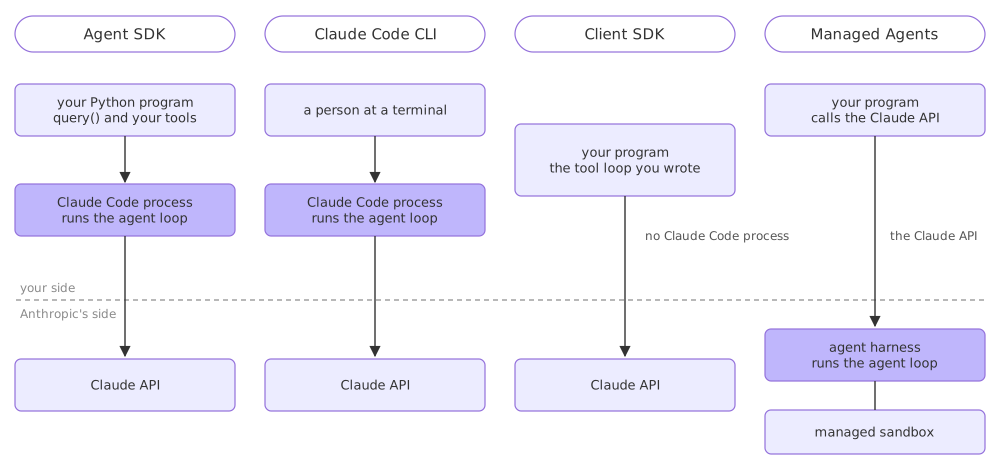
What the Agent SDK adds over calling the API yourself
The Client SDK and the Agent SDK both end at the same model. The difference is everything between your prompt and the answer. With the Client SDK you write the loop: send the messages, read the tool-use blocks, run the matching function, send the results back, and decide when to stop. With the Agent SDK that loop is the Claude Code process, and so is the rest of it:
- Tools that already exist. Reading, writing and editing files, running commands, searching a codebase and fetching the web are there before you write anything.
- Permissions as configuration. Which calls run without asking, which are refused and which come to your code is a set of options rather than a set of
ifstatements. - Sessions on disk. A conversation can be resumed tomorrow or forked into a second approach, with no store of your own.
- Hooks at fixed points. Your code runs before a tool, after it, when the agent finishes, and the loop honours what it returns.
- Context management. The loop compacts the conversation when the window fills, which is code you would otherwise write and tune.
The price is a second process and its binary. An Agent SDK deployment ships the Claude Code executable alongside your application, and that is the thing that has to exist, match the architecture and be able to run.
Choosing between the four
- A product feature that works on files or a repository wants the Agent SDK: the tools it needs are the ones already built in.
- A person doing development wants the CLI. Driving the CLI from a script to get interactive behaviour is work the Agent SDK has already done.
- A chat feature with two tools of your own and no filesystem wants the Client SDK. The Agent SDK's loop, permissions and sessions are weight you are not using.
- A team that does not want to run the agent at all wants Managed Agents, and accepts that the sandbox and the session storage sit on Anthropic's side unless they self-host the sandbox.
- A codebase in Go, Java or Ruby wants the CLI as a subprocess with JSON output, because neither SDK has a binding for it.
Related
- Previous: How the agent loop works
- Next: The messages you get back
- See also: Claude Code, the terminal interface this library drives
- Reference: Agent SDK overview
- For an agent you have in mind, write down which of the four rows in the table matches it, and the one sentence that decides it.
- List the tools that agent needs and mark the ones the SDK already ships, which is the clearest argument for or against writing the loop yourself.
- Name where the Claude Code binary would live in your deployment, and what would happen to your agent if it were missing.
Slow is fine. Stopping is the only problem.