
Trip planner: the finished deep agent
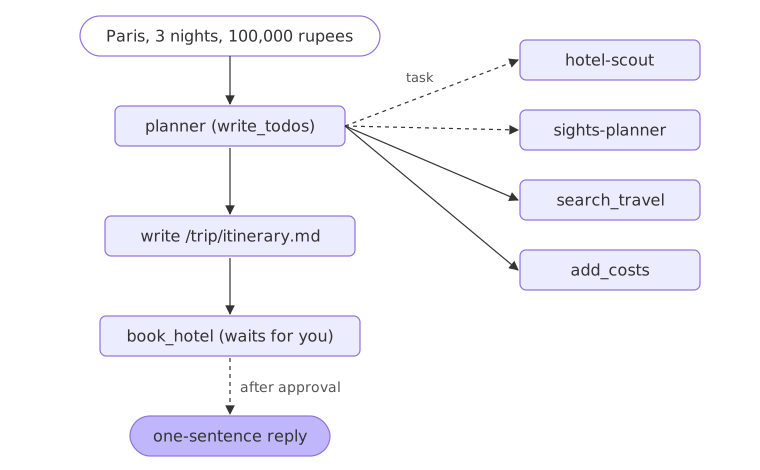
The trip planner is a deep agent that takes one request, a trip to Paris for a budget, and plans it with a to-do list, two subagents, exact totals, an itinerary file and a booking that waits for your approval.
Last updated: 29 Sep, 2026 · Deep Agents 0.7
write_todos tool unless TodoListMiddleware is added to its create_deep_agent call.The video's end-to-end project
The crash course ends by asking Claude Code for a Streamlit chatbot that uses every feature from its notebooks: a model picker, a system prompt, a choice of state, file system or store backend, the AGENTS.md memory, the skills, and the research subagents. Asked to research LLM gateways, it plans, searches, delegates and returns a long report, and it reads the report-writer skill on the way. The app is streamlit_app.py in the video's repository. It is a Streamlit app built on OpenAI models, so it is not run here. Its web search is the web_search tool from Tools: a travel search the agent can call, and Integrations: taking the trip planner to production gives the course's trip planner the same live search.
This lesson builds the course's own finished project: the Paris trip from the video's planning example, with every part it needs, in one file.
The planner's tools
Three tools, all built earlier: search_travel from Tools: a travel search the agent can call, add_costs from write_todos: planning with TodoListMiddleware and book_hotel from Human-in-the-loop: approving a booking. Save them as trip_planner.py:
from langchain.tools import tool

CATALOG = {
    "paris": {
        "flight": ["Return flight Delhi to Paris: 42,000 rupees"],
        "hotel": ["Seine Budget Inn, Latin Quarter: 5,200 rupees a night",
                  "Hotel Lumiere, Montmartre: 7,500 rupees a night",
                  "Le Grand Opera Hotel: 16,000 rupees a night"],
        "sight": ["Eiffel Tower summit: 3,100 rupees", "Louvre Museum: 2,000 rupees",
                  "Seine river cruise: 1,500 rupees", "Versailles day trip: 2,600 rupees",
                  "Montmartre walking tour: free"],
        "food": ["Cafe breakfast and bistro dinner: 3,000 rupees a day"],
    },
}


@tool
def search_travel(city: str, kind: str) -> str:
    """Search the travel catalog. kind is "flight", "hotel", "sight" or "food". Prices are in rupees."""
    entries = CATALOG.get(city.lower(), {}).get(kind)
    return "\n".join(entries) if entries else f"The catalog has no {kind} entries for {city}."


@tool
def add_costs(amounts: list[int]) -> int:
    """Add rupee amounts and return the exact total. Use it for every sum."""
    return sum(amounts)


@tool
def book_hotel(hotel: str, nights: int) -> str:
    """Book a hotel for a number of nights. This spends the traveller's money."""
    return f"Booked {hotel} for {nights} nights."
The model and two subagents
The model as in every lesson, and the two subagents from Subagents: delegating with the task tool. Each prompt now also says what to do when the catalog has nothing.
from deepagents import create_deep_agent
from langchain.chat_models import init_chat_model

model = init_chat_model("groq:openai/gpt-oss-120b", temperature=0, max_retries=6)

hotel_scout = {
    "name": "hotel-scout",
    "description": "Finds the best hotel for a trip within a nightly budget and reports its name and price.",
    "system_prompt": "Look up hotels with search_travel. Reply with one hotel, its price per night and one reason. "
                     "Use only catalog data. If the catalog has no hotels for the city, say so.",
    "tools": [search_travel],
}
sights_planner = {
    "name": "sights-planner",
    "description": "Plans which sights to see on each day of a trip and reports their ticket prices.",
    "system_prompt": "Look up sights with search_travel. Reply with one line per day: the sights and their ticket prices. "
                     "Use only catalog data. If the catalog has no sights for the city, say so.",
    "tools": [search_travel],
}
The planner agent
Every piece this project needs in one create_deep_agent call: the tools, the subagents, planning with TodoListMiddleware, approval before book_hotel, and a checkpointer for the pause. The prompt lists the steps and says what to do when the city is not in the catalog.
from langchain.agents.middleware import TodoListMiddleware
from langgraph.checkpoint.memory import InMemorySaver
from langgraph.types import Command

planner = create_deep_agent(
    model=model,
    tools=[search_travel, add_costs, book_hotel],
    subagents=[hotel_scout, sights_planner],
    middleware=[TodoListMiddleware()],
    interrupt_on={"book_hotel": True},
    checkpointer=InMemorySaver(),
    system_prompt=(
        "You are a trip planner. First write a todo list with write_todos. "
        "Give the hotel choice to hotel-scout and the sights to sights-planner with the task tool. "
        "Look up the flight and food prices with search_travel, and use add_costs for every total. "
        "Write the plan to /trip/itinerary.md: one line per day, then a cost table and the total. "
        "Then book the chosen hotel with book_hotel. Use only catalog prices. "
        "If the catalog has nothing for the city, do not write or book anything; say you cannot plan it. "
        "Your final reply is one sentence."
    ),
)
A plan function that handles the approval
plan runs a request on a thread. While the run is paused before a booking, it prints the booking and resumes with an approval. In an app this is where you would show the booking to the traveller and wait for a click.
def plan(request, thread_id):
    config = {"configurable": {"thread_id": thread_id}}
    result = planner.invoke({"messages": [{"role": "user", "content": request}]}, config=config)
    while "__interrupt__" in result:                        # the booking waits for you
        action = result["__interrupt__"][0].value["action_requests"][0]
        print("approve?", action["name"], action["args"], "-> approved")
        result = planner.invoke(Command(resume={"decisions": [{"type": "approve"}]}), config=config)
    return result
Planning the Paris trip
The video's request, run once. It makes many model calls across the planner and its subagents, and on Groq's free tier it pauses whenever the per-minute token budget runs out, so expect it to take a few minutes.
result = plan("Plan a 3-night, 4-day trip to Paris from Delhi for a budget of 100,000 rupees.", "paris")

for message in result["messages"]:
    for call in getattr(message, "tool_calls", []):
        print("step:", call["name"], call["args"].get("subagent_type", ""))
print("\nTODOS")
for todo in result["todos"]:
    print(f"  [{todo['status']}] {todo['content']}")
print("\n/trip/itinerary.md")
print(result["files"]["/trip/itinerary.md"]["content"])
print("\nREPLY:", result["messages"][-1].text)approve? book_hotel {'hotel': 'Hotel Lumiere', 'nights': 3} -> approved
step: search_travel
step: task hotel-scout
step: search_travel
step: search_travel
step: task hotel-scout
step: write_todos
step: add_costs
step: write_todos
step: write_file
step: book_hotel
step: write_todos
TODOS
[completed] Compute total costs for flight, hotel, food, and sights
[completed] Write itinerary to /trip/itinerary.md with daily plan, cost table, and total
[completed] Book Hotel Lumiere for 3 nights
/trip/itinerary.md
Day 1: Arrive in Paris, check‑in at Hotel Lumiere, enjoy a free Montmartre walking tour, dinner at a local bistro.
Day 2: Visit the Eiffel Tower summit (3,100 ₹), take a Seine river cruise (1,500 ₹), dinner.
Day 3: Explore the Louvre Museum (2,000 ₹), take a Versailles day‑trip (2,600 ₹), dinner.
Day 4: Check‑out and fly back to Delhi.
## Cost Table
- Flight (Delhi → Paris → Delhi): 42,000 ₹
- Hotel Lumiere (3 nights @ 7,500 ₹/night): 22,500 ₹
- Food (3,000 ₹ per day × 4 days): 12,000 ₹
- Sights:
- Eiffel Tower summit: 3,100 ₹
- Louvre Museum: 2,000 ₹
- Seine river cruise: 1,500 ₹
- Versailles day‑trip: 2,600 ₹
- Montmartre walking tour: free
- **Total sights:** 9,200 ₹
**Grand Total:** 85,700 ₹
REPLY: Your 3‑night, 4‑day Paris trip from Delhi is planned, costs 85,700 ₹, and Hotel Lumiere is booked.What the planner did
- It waited before booking: the first line printed is the approval. The run paused at
book_hotelwith Hotel Lumiere for 3 nights, and the booking ran only afterplanresumed it. - It delegated the hotel: two
taskcalls went tohotel-scout. It never calledsights-planner; it looked the sights up itself withsearch_travel. The prompt names both subagents, but the model chooses. - It planned, a little late:
write_todoscame after the first lookups, not first as the prompt asked, and it rewrote the list twice. The printed list is the last one, every item completed. - It added exactly: one
add_costscall. 42,000 + 22,500 + 12,000 + 9,200 is 85,700, the grand total in the file. - It wrote the itinerary to
/trip/itinerary.md: a line per day, a cost table and the total, under the 100,000 rupee budget, and the reply says so in one sentence.
A city the catalog does not have
The same planner, asked for Tokyo. The catalog has only Paris, so every lookup comes back empty. A good agent says so; it does not invent hotels. Replace the Paris lines at the end of trip_planner.py with these:
result = plan("Plan a 3-night, 4-day trip to Tokyo from Delhi for a budget of 100,000 rupees.", "tokyo")

for message in result["messages"][1:]:
    if message.type == "tool":
        print("tool :", message.name, "|", message.text.replace("\n", " ")[:110])
print("files:", list(result["files"]))
print("REPLY:", result["messages"][-1].text)tool : write_todos | Updated todo list to [{'content': 'Search flight price from Delhi to Tokyo', 'status': 'in_progress'}, {'conte
tool : search_travel | The catalog has no flight entries for Tokyo.
files: []
REPLY: I cannot plan the trip because the travel catalog lacks flight information for Tokyo.How the planner handled the missing city
- The first lookup said so: after writing its to-do list, the planner searched for the Tokyo flight and got "The catalog has no flight entries for Tokyo."
- No itinerary and no booking: the files list is empty, and no approval line printed.
- The reply says it cannot plan the trip instead of making up prices, as the planner's prompt says to do when the catalog has nothing.
The course's pieces in the planner
| Piece | In the planner | Lesson |
|---|---|---|
| Tools | search_travel, add_costs, book_hotel | Tools: a travel search the agent can call |
| Planning | TodoListMiddleware | write_todos: planning with TodoListMiddleware |
| Files | /trip/itinerary.md in state | Virtual filesystem: files in the agent's state |
| Subagents | hotel-scout, sights-planner | Subagents: delegating with the task tool |
| Approval | interrupt_on={"book_hotel": True} | Human-in-the-loop: approving a booking |
| Checkpointer | InMemorySaver, one thread per trip | Checkpointer: a thread that keeps its files |
Where to take it next
- Add the traveller's preferences under
/memories/with a composite backend, so a second trip starts from what they like. - Save the itinerary to disk with
FilesystemBackendso it can be opened and printed. - Put it behind a chat UI that streams the steps and shows the booking for approval.
Related
- Previous: MCP tools with MCPAdapter
- Next: Integrations: taking the trip planner to production
- Reference: Build a deep research agent
- Change the budget to 70,000 rupees and read whether the planner says the trip fits.
- Reject the booking instead of approving it in
plan, and read the reply. - Add
"food"entries for a second city to the catalog and plan a trip there.
Little by little, you're building something great.