
Virtual filesystem: files in the agent's state
The virtual filesystem is the set of files a deep agent reads and writes with its file tools; by default the files live in the agent's state as a dictionary of paths, not on your disk.
Last updated: 29 Sep, 2026 · Deep Agents 0.7
Where the agent's files go
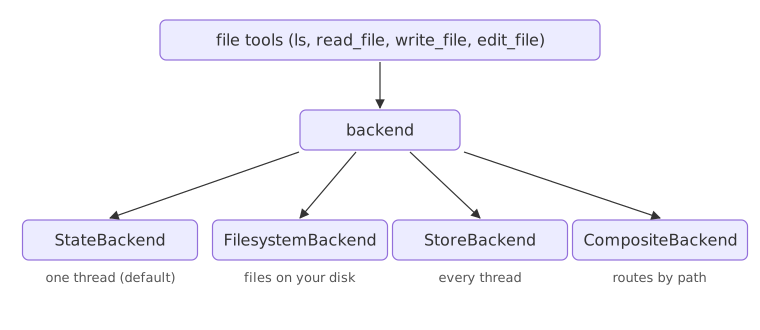
The video starts the backends section with a question. The deep agent has a virtual file system with tools to write, read, edit and delete files. Ask it to create todo.txt with some content: where does that file go? Into memory, onto the hard disk, or into a shared store? A backend is the component that answers that question. Several exist: the agent's state, the local disk, a store, a sandbox or a local shell.
The video's todo.txt example with StateBackend
The first backend is StateBackend, the default. A deep agent is a LangGraph workflow, and with this backend every file lives in the workflow's state. Passing backend=StateBackend() and passing nothing give the same agent. The video asks the agent to create /notes/todo.txt with three lines and tell it when it is done; no notes folder appears in the project. The file is in result["files"]. Then it proves the file can be read again by sending the earlier messages and the files back into a second call. The video's code follows, run on Groq with the model line swapped:
from deepagents import create_deep_agent
from deepagents.backends import StateBackend
from langchain.chat_models import init_chat_model

agent2 = create_deep_agent(
    model=init_chat_model("groq:openai/gpt-oss-120b", max_retries=6),
    backend=StateBackend(),
)
result = agent2.invoke({
    "messages": [{
        "role": "user",
        "content": (
            "Create a file at /notes/todo.txt with exactly this content:\n"
            "1. Record video\n2. Edit video\n3. Upload video\n"
            "Then tell me you've done it."
        )
    }]
})
print("--- Agent reply ---")
print(result["messages"][-1].content)

print("--- Files in state ---")
for path, data in result.get("files", {}).items():
    print(path)
    print(data["content"])

followup = agent2.invoke({
    "messages": result["messages"] + [{"role": "user", "content": "Read /notes/todo.txt back to me ."}],
    "files": result.get("files", {}),   # pass the virtual filesystem along
})
print("--- Read-back ---")
print(followup["messages"][-1].content)--- Agent reply --- The file **/notes/todo.txt** has been created with the requested content. Let me know if you need anything else! --- Files in state --- /notes/todo.txt 1. Record video 2. Edit video 3. Upload video --- Read-back --- Here’s the content of **/notes/todo.txt**: ``` 1. Record video 2. Edit video 3. Upload video ```
What the two calls show
- The reply said the file was created, and
result["files"]holds it under its path. - Each file is a dictionary with a
contentstring, plus encoding and time stamps; the loop prints the content. - The read-back worked because the second call received the old messages and
files. Withoutfiles,read_filehas no file to open: the state lived only in the first result.
StateBackend syntax
from deepagents.backends import StateBackend

agent = create_deep_agent(model=model, backend=StateBackend())   # the same as no backend
result = agent.invoke({"messages": [...]})
result["files"]            # {"/notes/todo.txt": {"content": "...", ...}}
agent.invoke({"messages": [...], "files": result["files"]})      # hand the files back
Passing files by hand vs a checkpointer
| Pass files back yourself | Checkpointer + thread_id | |
|---|---|---|
| Where the files are kept | In your Python variables | Saved by the agent after every step |
| What you send next time | Messages and files | Only the new message |
| Lesson | This one | Checkpointer: a thread that keeps its files |
Where the in-state filesystem fits
- Scratch notes during one task: a draft plan, a list of prices.
- Large tool results the agent saves out of the conversation, covered in the offloading lesson.
- Files shared between the main agent and its subagents during one run.
StateBackend never touches your disk. Looking for notes/todo.txt in your folder finds nothing; read it from result["files"].Related
- Previous: write_todos: planning with TodoListMiddleware
- Next: Checkpointer: a thread that keeps its files
- Reference: Backends: StateBackend
- Ask the agent to add "4. Share video" to
/notes/todo.txtwith the files passed back, and print the new content. - Leave
filesout of the follow-up call and read what the agent says. - Print
result["files"]["/notes/todo.txt"].keys().
Slow is fine. Stopping is the only problem.