
Conditional edges
A conditional edge lets the graph look at the state and choose which node runs next: add_conditional_edges(source, router, targets) calls your router function and goes where it returns.
Last updated: 29 Sep, 2026 · LangGraph 1.2
Choosing cricket or badminton with random_play
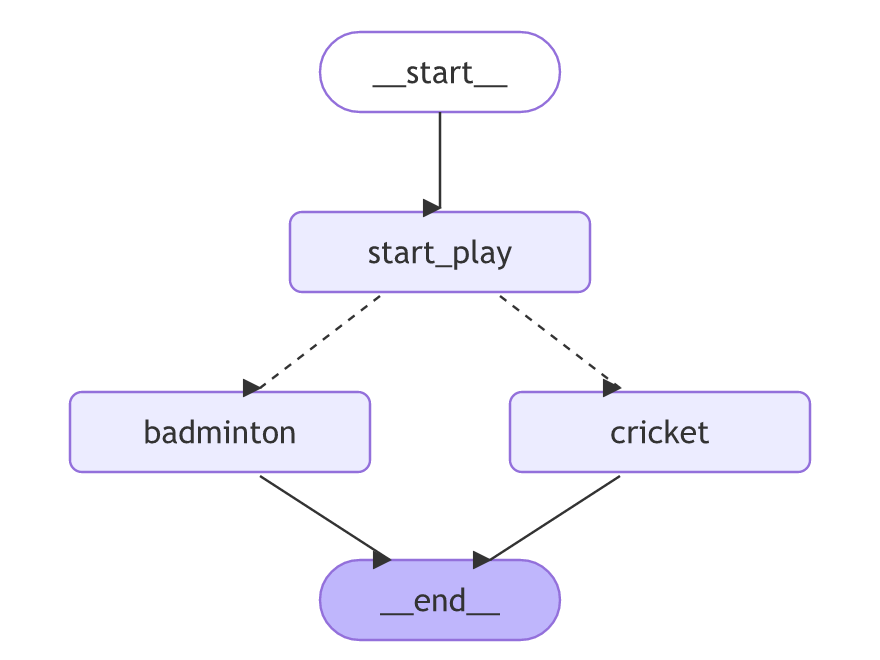
The getting-started video gives its start_play node two ways out, cricket or badminton, and lets a small function choose. random_play takes the state and is annotated to return Literal['cricket', 'badminton'], the names of the two nodes it can pick. Its logic is a coin toss: if random.random() is above 0.5 it returns "cricket", otherwise "badminton". LangGraph reads that Literal annotation to know where the run can go, which is why the video's call below has no list of targets and its drawing shows only two dashed edges.
The graph gets the three nodes, an edge from START to start_play, and add_conditional_edges("start_play", random_play), which calls random_play after start_play and goes to the node it names. Both game nodes go to END. The first compile fails with ValueError: Found edge starting at unknown node 'Badminton': the last edge was written with a capital B, and an edge must use the node's exact name. With "badminton" fixed, draw_mermaid_png shows the two conditional edges as dashed lines:
The whole example calls no model, so it runs with no key:
from typing_extensions import TypedDict

class State(TypedDict):
    graph_info:str

def start_play(state:State):
    print("Start Play node has been called")
    return {"graph_info":state["graph_info"] + "I am planning to play"}

def cricket(state:State):
    print("Cricket node has been called")
    return {"graph_info":state["graph_info"] + " Cricket"}

def badminton(state:State):
    print("My badminton node has been called")
    return {"graph_info":state['graph_info'] + " Badminton"}

import random
from typing import Literal

def random_play(state:State)-> Literal['cricket','badminton']:
    if random.random()>0.5:
        return "cricket"
    else:
        return "badminton"

from langgraph.graph import StateGraph,START,END

## Build Graph
graph=StateGraph(State)

## add all the nodes
graph.add_node("start_play",start_play)
graph.add_node("cricket",cricket)
graph.add_node("badminton",badminton)

## Schedule the flow of the graph
graph.add_edge(START,"start_play")
graph.add_conditional_edges("start_play",random_play)
graph.add_edge("cricket",END)
graph.add_edge("badminton",END)

## Complie the graph
graph_builder=graph.compile()

print(graph_builder.invoke({"graph_info":"My name is Krish"}))Start Play node has been called
My badminton node has been called
{'graph_info': 'My name is KrishI am planning to play Badminton'}Two lines print from inside the nodes, then the final state. Which game comes up changes from run to run, because random_play tosses a coin each time; the video's run landed on badminton too. The missing space in "KrishI am" comes from start_play, which adds its words with no space in front. The video shows the picture with IPython's display, which works in a notebook; this script leaves that line out, and Graph visualization with draw_mermaid shows how to draw a graph from a script.
A support desk cannot route by coin toss: a billing complaint and a crash report need different replies, and junk mail needs none. The rest of this lesson routes tickets by what they say, with the same add_conditional_edges call.
The add_conditional_edges call
def router(state):
    return "node_name"   # a node name to go there, or END to stop

builder.add_conditional_edges(source, router, ["node_a", "node_b", END])
The state
Start with the imports and the state. The state holds the incoming ticket and the reply a node will write back.
from typing_extensions import TypedDict
from langgraph.graph import StateGraph, START, END

class State(TypedDict):
    ticket: str   # the incoming message
    reply: str    # the answer a node writes
The handler nodes
Add two handler nodes, one per team. Each returns a fixed reply for now.
def billing(state):
    return {"reply": "We will refund the double charge."}

def technical(state):
    return {"reply": "Try logging out and back in."}
The router function
pick_team reads the ticket and returns where to go next: a node name, or END to stop.
def pick_team(state):
    if "win a prize" in state["ticket"]:   # junk mail
        return END                         # stop, no reply
    # a charge goes to billing, anything else to technical
    return "billing" if "charge" in state["ticket"] else "technical"
Wiring the router
Wire the two nodes, then attach the router to START with add_conditional_edges. The list at the end names every place the router might send the run. In place of the list you can pass a dictionary, the path_map, that maps each value the router returns to a node name.
builder = StateGraph(State)
builder.add_node("billing", billing)
builder.add_node("technical", technical)
builder.add_conditional_edges(START, pick_team, ["billing", "technical", END])  # router picks the path
graph = builder.compile()
Running three tickets
Run three tickets through the same graph and print each reply.
for ticket in ["charged twice", "app will not open", "win a prize now"]:
    print(repr(graph.invoke({"ticket": ticket, "reply": ""})["reply"]))
Three tickets, three paths
The same pieces in one file, ready to run.
from typing_extensions import TypedDict
from langgraph.graph import StateGraph, START, END

class State(TypedDict):
    ticket: str
    reply: str

def billing(state):
    return {"reply": "We will refund the double charge."}

def technical(state):
    return {"reply": "Try logging out and back in."}

def pick_team(state):
    if "win a prize" in state["ticket"]:
        return END
    return "billing" if "charge" in state["ticket"] else "technical"

builder = StateGraph(State)
builder.add_node("billing", billing)
builder.add_node("technical", technical)
builder.add_conditional_edges(START, pick_team, ["billing", "technical", END])
graph = builder.compile()

for ticket in ["charged twice", "app will not open", "win a prize now"]:
print(repr(graph.invoke({"ticket": ticket, "reply": ""})["reply"]))'We will refund the double charge.' 'Try logging out and back in.' ''
Why each ticket went where it did
pick_teamis a function but not a node: it is never added withadd_node, and it returns a destination, not a state update.- Returning a string sends the run to the node with that name; returning
ENDstops it. - The third ticket gets an empty reply because
pick_teamsent it straight toENDand neither reply node ran.
What the router may return
| Router returns | What happens |
|---|---|
"billing" | The billing node runs next |
END | The run stops with no further node |
A value in the path_map | Maps to the node the map names |
True / the ticket | Error, unless it is a key in the path_map |
When to branch on the state
- Routing a request by its intent (billing vs technical vs spam).
- Skipping steps that do not apply, or ending a run early.
END, or a key present in the optional path_map. Returning the ticket or True with no map is the first mistake.Related
- Previous: Graph visualization with draw_mermaid
- Next: Reducers
- Reference: Graph API: conditional edges
- Add a
generalnode and route tickets that match neither rule to it. - Make
pick_teamreturnTruewith no path_map and read the error. - Route a fourth ticket, "refund my charge", and predict the path before running.
- In the video's example, change the last edge to
graph.add_edge("Badminton", END)and read the error.
You understood something today that you didn't yesterday.