
Interrupts
interrupt() pauses a run to ask a person, and Command(resume=value) continues it with their answer. It needs a checkpointer so the paused run can be saved.
Last updated: 29 Sep, 2026 · LangGraph 1.2
Some actions are too costly to leave to a model, such as a refund or a delete. The safe pattern stops, asks a human, and only then goes on.
A human_assistance tool that pauses the run
The crash course puts the pause inside a tool. human_assistance takes a query, calls interrupt({"query": query}) and returns human_response["data"]. interrupt stops the run at that line, and the MemorySaver checkpointer keeps it. The graph is the ReAct chatbot with a Tavily search and human_assistance bound to the model. Asked "I need some expert guidance and assistance for building an AI agent. Could you request assistance for me?", the model calls human_assistance and the run pauses. The human's answer goes back in through graph.stream(Command(resume={"data": human_response}), config), and the model replies from it. graph.stream runs the graph like invoke but hands back the state after each step; with stream_mode="values" each chunk is the whole state, and Streaming covers it.
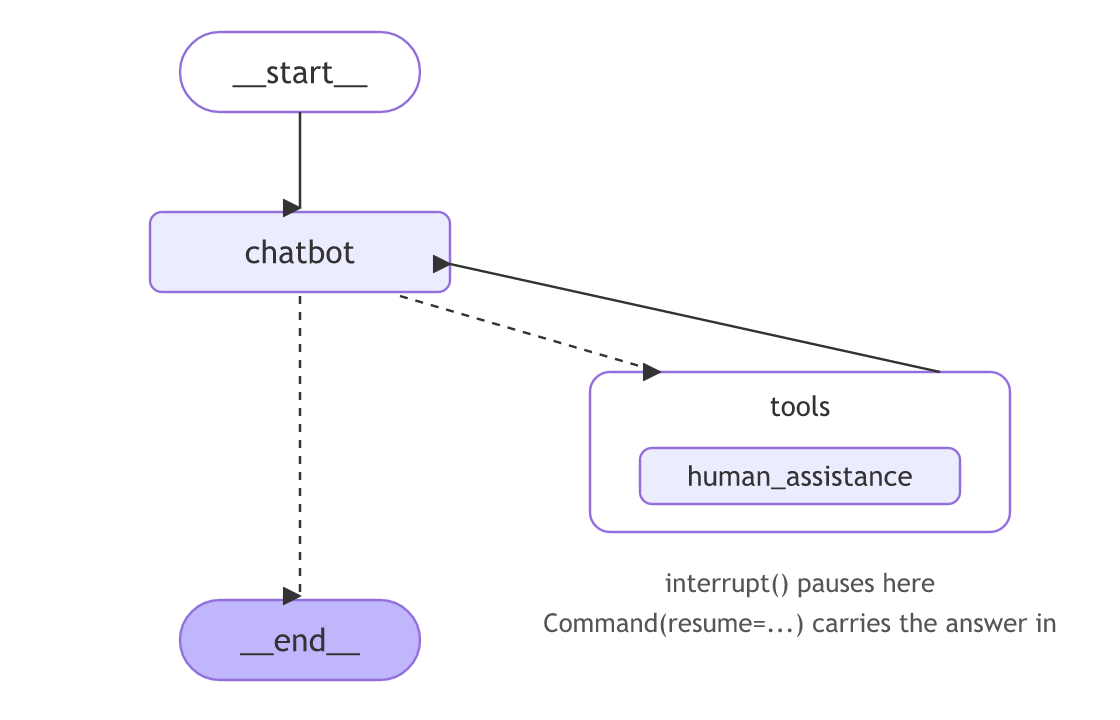
It runs below on Groq with the video's two tools: tool, the TavilySearch from ToolNode and tools_condition, which needs langchain-tavily and TAVILY_API_KEY, and human_assistance. It is a complete script: save it as its own file, such as human_graph.py, and set GROQ_API_KEY and TAVILY_API_KEY first (add the load_dotenv() lines at the top if they are in .env). The video imports tool from langchain_core.tools; the docs now import the same decorator from langchain.tools. The second loop prints the start of each message, where the video pretty-prints the model's whole reply:
from typing import Annotated
from typing_extensions import TypedDict
from langchain.chat_models import init_chat_model
from langchain_tavily import TavilySearch
from langchain_core.tools import tool
from langgraph.checkpoint.memory import MemorySaver
from langgraph.graph import StateGraph, START, END
from langgraph.graph.message import add_messages
from langgraph.prebuilt import ToolNode, tools_condition
from langgraph.types import Command, interrupt

llm=init_chat_model("groq:openai/gpt-oss-120b")

class State(TypedDict):
    messages: Annotated[list, add_messages]

graph_builder = StateGraph(State)

@tool
def human_assistance(query: str) -> str:
    """Request assistance from a human."""
    human_response = interrupt({"query": query})
    return human_response["data"]

tool = TavilySearch(max_results=2)
tools = [tool, human_assistance]
llm_with_tools = llm.bind_tools(tools)

def chatbot(state: State):
    message = llm_with_tools.invoke(state["messages"])
    return {"messages": [message]}

graph_builder.add_node("chatbot", chatbot)
tool_node = ToolNode(tools=tools)
graph_builder.add_node("tools", tool_node)
graph_builder.add_conditional_edges("chatbot", tools_condition)
graph_builder.add_edge("tools", "chatbot")
graph_builder.add_edge(START, "chatbot")

memory = MemorySaver()
graph = graph_builder.compile(checkpointer=memory)

user_input = "I need some expert guidance and assistance for building an AI agent. Could you request assistance for me?"
config = {"configurable": {"thread_id": "1"}}

events = graph.stream({"messages": user_input}, config, stream_mode="values")
for event in events:
    if "messages" in event:
        event["messages"][-1].pretty_print()

human_response = (
    "We, the experts are here to help! We'd recommend you check out LangGraph to build your agent."
    " It's much more reliable and extensible than simple autonomous agents."
)
human_command = Command(resume={"data": human_response})

events = graph.stream(human_command, config, stream_mode="values")
for event in events:
    if "messages" in event:
        m = event["messages"][-1]
print(f"{m.type}: {m.content[:150]}") # the reply is long; its start is enough here================================ Human Message =================================
I need some expert guidance and assistance for building an AI agent. Could you request assistance for me?
================================== Ai Message ==================================
Tool Calls:
human_assistance (fc_9af78fdd-a425-4ddd-a711-7c33f3ed7e96)
Call ID: fc_9af78fdd-a425-4ddd-a711-7c33f3ed7e96
Args:
query: User is seeking expert guidance and assistance for building an AI agent. Please provide detailed support and resources.
================================== Ai Message ==================================
Tool Calls:
human_assistance (fc_9af78fdd-a425-4ddd-a711-7c33f3ed7e96)
Call ID: fc_9af78fdd-a425-4ddd-a711-7c33f3ed7e96
Args:
query: User is seeking expert guidance and assistance for building an AI agent. Please provide detailed support and resources.
ai:
tool: We, the experts are here to help! We'd recommend you check out LangGraph to build your agent. It's much more reliable and extensible than simple auton
ai: Absolutely! Here’s a concise roadmap to get you started building a robust, production‑ready AI agent, along with the key resources you’ll need.
---With the search tool bound as well, the model went straight to human_assistance, as in the video's saved run. The first stream stops after the tool call: the run is paused inside human_assistance. The tool call prints twice because in the current release the last chunk of a paused run carries the messages as well as an __interrupt__ key; in the video's run it printed once. The second stream starts by repeating the state it paused in, whose last message is that tool call with no text, hence the empty ai: line. Then the expert's text arrives as the tool's result, and the model answers from it. The shop's refund below uses the same two calls without a model, so the pause is easy to follow.
The interrupt and Command API
from langgraph.types import interrupt, Command

def approval(state):
    decision = interrupt("Approve the refund?")   # pauses here
    return {"status": "approved" if decision else "rejected"}

# later, resume with the human's answer:
graph.invoke(Command(resume=True), config)
The example pauses at a refund, waits for a yes, and then finishes. Build it in five small steps.
The imports
from typing_extensions import TypedDict
from langgraph.graph import StateGraph, START, END
from langgraph.checkpoint.memory import InMemorySaver
from langgraph.types import interrupt, Command
Two names do the work here: interrupt pauses the run, and Command carries the human's answer back in. InMemorySaver is the checkpointer that saves the paused run.
The state
class State(TypedDict):
    status: str        # holds "approved" or "rejected"
The state holds one field, status. It starts empty and ends as the human's decision.
The approval node
def approval(state):
    decision = interrupt("Approve the refund?")   # pauses here and asks
    return {"status": "approved" if decision else "rejected"}  # runs after the answer comes back
interrupt("Approve the refund?")stops the run at this line and hands the question out to you.- When you resume,
decisionbecomes the value you sent back. - The node then sets
statusto "approved" for a truthy answer, else "rejected".
Building the graph
builder = StateGraph(State)
builder.add_node("approval", approval)
builder.add_edge(START, "approval")
builder.add_edge("approval", END)
graph = builder.compile(checkpointer=InMemorySaver())  # checkpointer saves the paused run
The graph runs START -> approval -> END. Compiling with a checkpointer is what lets the paused run be saved and picked up again.
Pausing and resuming
cfg = {"configurable": {"thread_id": "1"}}
first = graph.invoke({"status": ""}, cfg)        # runs until interrupt, then stops
print("__interrupt__" in first)                  # True: the run paused
final = graph.invoke(Command(resume=True), cfg)  # resume with a yes
print(final["status"]) # approved- The first
invokeruns up tointerrupt()and stops, returning a result that contains an__interrupt__marker, so the first print isTrue. - The second
invokesendsCommand(resume=True), the node continues withdecisionset toTrue, andstatusbecomesapproved.
Pause and resume end to end
The five steps in one file.
from typing_extensions import TypedDict
from langgraph.graph import StateGraph, START, END
from langgraph.checkpoint.memory import InMemorySaver
from langgraph.types import interrupt, Command

class State(TypedDict):
    status: str

def approval(state):
    decision = interrupt("Approve the refund?")
    return {"status": "approved" if decision else "rejected"}

builder = StateGraph(State)
builder.add_node("approval", approval)
builder.add_edge(START, "approval")
builder.add_edge("approval", END)
graph = builder.compile(checkpointer=InMemorySaver())

cfg = {"configurable": {"thread_id": "1"}}
first = graph.invoke({"status": ""}, cfg)
print("__interrupt__" in first)
final = graph.invoke(Command(resume=True), cfg)
print(final["status"])True approved
Why it paused then approved
- The first
invokeran untilinterrupt(), then stopped and returned an__interrupt__marker instead of finishing. - The second
invokepassedCommand(resume=True), which restarted the node and returned "approved". - This only works because the graph was compiled with a checkpointer that saved the paused state.
When to pause for a human
- Approving anything irreversible: a payment, a delete, an email to a customer.
- Letting a person edit or correct the agent before it continues.
interrupt() runs again. Keep side effects below it, and never wrap interrupt() in a bare try/except.Related
- Previous: Trim and remove messages
- Next: Review and edit tool calls
- Reference: Interrupts
- Resume with
Command(resume=False)and read the status. - Add a
printaboveinterrupt()and count how many times it runs across the two invokes.
Little by little, you're building something great.