
ToolNode and tools_condition
ToolNode runs the tools a model asked for. tools_condition is a ready-made router that goes to the tools node when the last message has tool calls, and to END otherwise.
Last updated: 29 Sep, 2026 · LangGraph 1.2
When a model asks for a tool, something has to run it and hand the result back. That is ToolNode.
Web search with TavilySearch
The LangGraph section's first tool is a web search. It adds langchain_tavily to requirements.txt, installs it with uv add -r requirements.txt, signs in at tavily.com and pastes the key into the .env file, then restarts the notebook kernel so the key is loaded. It creates the tool with TavilySearch(max_results=2) and invokes it with "What is langgraph": the result holds a title, a URL and an extract from each of two pages.
Installing langchain-tavily
Add the package to the ones from Installation and setup. It is LangChain's Tavily integration and calls Tavily's API itself, so no other Tavily package is needed:
pip install "langchain-tavily==0.2.18"Getting a free Tavily keyOptional
Sign up at app.tavily.com. The API key is on the dashboard and starts with tvly-. The free Researcher plan gives 1,000 API credits a month and needs no card; a basic search costs one credit and an advanced search two. Set the key the same way as the Groq key:
export TAVILY_API_KEY=tvly-...Or add it to the .env file under the Groq key, as the video does; load_dotenv() loads both:
GROQ_API_KEY=gsk_...
# optional, only the web search examples use it
TAVILY_API_KEY=tvly-...
The key is optional. The course's own examples, the shop's order lookup included, run with the Groq key alone. TavilySearch is the video's real-web tool, and its examples in this lesson, Agent loop, Checkpointer and Interrupts need the key. Without it, TavilySearch(max_results=2) stops with a ValidationError: "Did not find tavily_api_key, please add an environment variable TAVILY_API_KEY".
Creating the TavilySearch tool
from langchain_tavily import TavilySearch

tool=TavilySearch(max_results=2)
tool.invoke("What is langgraph")
In a script, wrap the call in print() to see it. In the video's notebook the call returns a dictionary: the query, then a results list with a title, URL, content extract and score for each of the two pages. The graph below shows the same kind of result as a tool message.
The crash course's tool graph
The LangGraph section of the video gives its chatbot two tools: TavilySearch(max_results=2), a web search, and multiply, a plain function with a docstring. llm.bind_tools(tools) lets the model ask for either. The graph has two nodes: tool_calling_llm, which invokes the model with the tools bound, and "tools", a ToolNode built from the same list.
add_conditional_edges("tool_calling_llm", tools_condition) sends the run to "tools" when the model's last message is a tool call and to END when it is not, and a plain edge takes "tools" to END.
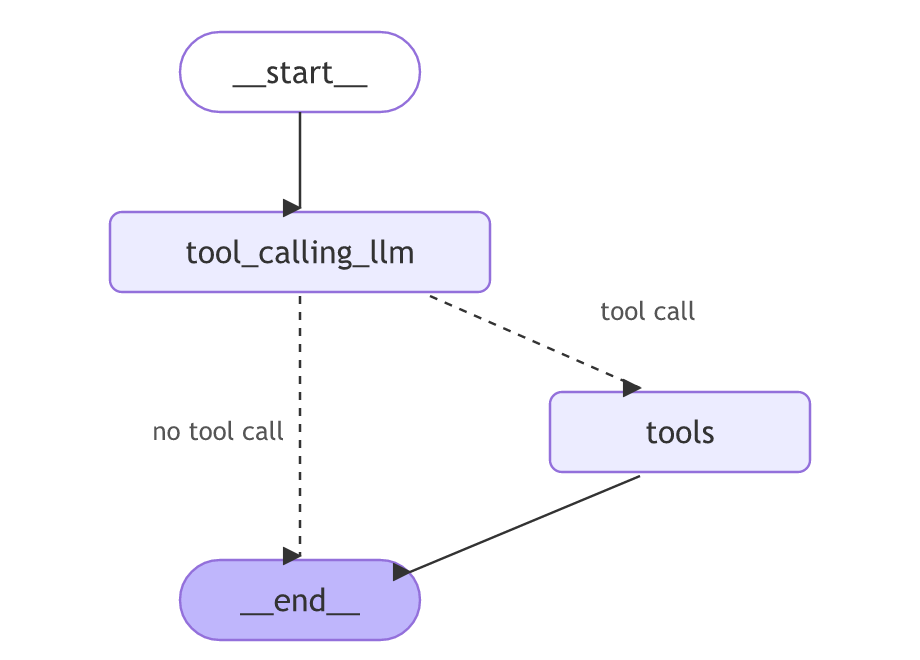
The video's first question to this graph is "What is the recent ai news". It runs below on Groq with both tools, tool and multiply, as in the video; only the model string changes. Save it as its own file, such as tool_graph.py, with the load_dotenv() lines at the top if your keys are in .env; it needs GROQ_API_KEY, TAVILY_API_KEY and the langchain-tavily package from above:
from typing import Annotated
from typing_extensions import TypedDict
from langgraph.graph import StateGraph,START,END
from langgraph.graph.message import add_messages
from langgraph.prebuilt import ToolNode, tools_condition
from langchain.chat_models import init_chat_model
from langchain_tavily import TavilySearch

class State(TypedDict):
    messages:Annotated[list,add_messages]

llm=init_chat_model("groq:openai/gpt-oss-120b")

tool=TavilySearch(max_results=2)

## Custom function
def multiply(a:int,b:int)->int:
    """Multiply a and b

    Args:
        a (int): first int
        b (int): second int

    Returns:
        int: output int
    """
    return a*b

tools=[tool,multiply]
llm_with_tool=llm.bind_tools(tools)

## Node definition
def tool_calling_llm(state:State):
    return {"messages":[llm_with_tool.invoke(state["messages"])]}

## Grpah
builder=StateGraph(State)
builder.add_node("tool_calling_llm",tool_calling_llm)
builder.add_node("tools",ToolNode(tools))

## Add Edges
builder.add_edge(START, "tool_calling_llm")
builder.add_conditional_edges("tool_calling_llm",tools_condition)
builder.add_edge("tools",END)

## compile the graph
graph=builder.compile()

response=graph.invoke({"messages":"What is the recent ai news"})
for m in response['messages']:
m.pretty_print()================================ Human Message =================================
What is the recent ai news
================================== Ai Message ==================================
Tool Calls:
tavily_search (fc_69c4d4bc-9fc5-42ee-8915-5ec5ea01129e)
Call ID: fc_69c4d4bc-9fc5-42ee-8915-5ec5ea01129e
Args:
query: latest AI news September 2026
search_depth: advanced
time_range: month
================================= Tool Message =================================
Name: tavily_search
{"query": "latest AI news September 2026", "follow_up_questions": null, "answer": null, "images": [], "results": [{"url": "https://www.youtube.com/watch?v=hrfTovN3kMw", "title": "AI News - Mid-September 2026", "content": "Aaron and Brandon announce that the Enterprise AI Show is shifting from monthly to bi-weekly AI news episodes and discuss major stories from the past two weeks. They cover Oracle’s sharply higher cloud revenue, a large GPU backlog for AI customers, questions about what “backlog” and revenue mean, and the impact and tone of Oracle layoffs, including reports of termination notices sent by early-morning email. They examine the sudden industry push to “slow down” AI development, debating whether leaders at Anthropic, Google, and OpenAI are coordinating messaging, how credible doomsday claims are, and the competitive angle with China. They also review Salesforce’s Agentforce direction, new model efforts based on NVIDIA Nemotron, evolving agent licensing, headless AI interfaces, MCP as [...] 00:00 Biweekly News Shift\n00:49 Sponsor Messages\n02:19 News Remix Kickoff\n03:18 Sports Rivalry Detour\n04:26 Oracle Cloud Surge\n05:34 Backlog Reality Check\n09:45 Layoffs And Culture\n13:02 AI Slowdown Debate\n15:27 Coordination Or Coincidence\n17:33 China Distillation Theory\n18:36 Sci-Fi Time Travel Aside\n21:45 Salesforce Outage Example\n22:21 Outages Happen\n23:14 Salesforce Bets on Agents\n25:35 Headless CRM Future\n28:16 Agent Pricing Tiers\n29:27 MCP vs APIs Debate\n32:30 GPT-6 Astra Reality Check\n34:54 Agent Swarms MMO Analogy\n37:28 Research Limits and Benchmarks\n41:31 Wrap Up and Next Steps", "score": 0.95197505, "raw_content": null, "id": "eb8cc0-00"}, {"url": "https://www.enterprisetimes.co.uk/2026/09/28/security-and-ai-news-from-the-week-beginning-21-september-2026", "title": "Security and AI news from the week beginning 21 September 2026 -", "content": "Ripjar introduced new AI capabilities within ULTRA, its intelligence engine for screening operations at financial institutions and enterprises. It says that the technology is used by 25% of Global Systemically Important Banks and 35+ Global Fortune 500 companies. Designed for compliance teams, the updates aim to improve the confidence, speed and clarity of risk identification and management.\n\nComplir has announced a new $11 million seed round to help retailers and brands better manage regulatory complexities and bring their products to market faster. The investment was led by General Catalyst alongside angel investors and specialist industry funds. It is expected to help retailers and brands navigate regulatory complexity and bring products to market faster. [...] Latest News\n News in Brief\n Security\n\n# Security and AI news from the week beginning 21 September 2026\n\nBy\n\nIan Murphy\n\n-\n\nFacebookXWhatsAppLinkedinEmail\n\nNIBS (credit image/Pixabay/ Ryan McGuire)\")AI continues to generate large revenue streams for those vendors building core software and hardware solutions. Last week, after the significant revenue surge announced by Nvidia, AMD saw its shares breach the $600 barrier. That values the company at over a trillion dollars. The key driver for this was Anthropic committing to 2 gigawatts of AMD’s MI450 GPUs. AMD is also growing its share of the AI accelerator market. While Nvidia still has over 80% of that market, the rise of AMD and maybe others will create a competitive market. [...] ShinyHunters claimed to have breached the U.S. Federal Bureau of Investigation. It says it stole data on current and former employees, which has created a lot of concern among those affected. The group used an Oracle PeopleSoft zero-day vulnerability. This gave it access to FBI job portals, human resources systems, and internal services.\n\nMicrosoft has seized 50 websites used by EvilTokens. The AI-powered phishing service has compromised over 12,000 email inboxes across 10,000 organisations since February 2026. The entire attack chain used AI, from phishing users to gain access to email, to then analysing inboxes to select new targets. It also mapped financial relationships to identify other targets for fraud attacks.", "score": 0.93952066, "raw_content": null, "id": "440a18-01"}], "response_time": 2.83, "request_id": "1e863bb4-a325-4741-9472-43784de4a4db"}The model called tavily_search with a query it wrote itself, "latest AI news September 2026", and chose an advanced search over the past month. ToolNode ran the search, and the tool message holds Tavily's JSON: two results, the number max_results allows, each with a URL, a title, an extract of the page and a score. The edge from "tools" goes to END, so the run stops there, and the model never turns the results into an answer. Search results change from day to day, so your run will find other pages.
The video then asks "What is 5 multiplied by 2". Asked it as it stands, gpt-oss-120b worked out 10 by itself and called no tool, so the question here ends with "Use the multiply tool." Run it on the same graph:
response=graph.invoke({"messages":"What is 5 multiplied by 2? Use the multiply tool."})
for m in response['messages']:
m.pretty_print()================================ Human Message =================================
What is 5 multiplied by 2? Use the multiply tool.
================================== Ai Message ==================================
Tool Calls:
multiply (fc_4b91c363-db1b-4eef-8a3b-2362623b6c7e)
Call ID: fc_4b91c363-db1b-4eef-8a3b-2362623b6c7e
Args:
a: 5
b: 2
================================= Tool Message =================================
Name: multiply
10The run stops at the tool's answer, 10. The model asked for multiply, ToolNode ran it and added a tool message, and the edge from "tools" goes to END, so the model never reads the result or writes a sentence. The video hits the same wall with "Give me the recent AI news and then multiply 5 by 10": the search runs and the multiplication never happens. Agent loop fixes it with one edge and runs that question.
Creating a ToolNode
from langgraph.prebuilt import ToolNode, tools_condition

tool_node = ToolNode([lookup_order])
builder.add_conditional_edges("call_model", tools_condition)  # to "tools" or END
The shop's ToolNode runs without a model: put it in a one-node graph and hand it a message that already contains a tool call, written by hand here, and it runs the tool. The graph above had a real model write it; writing it by hand lets you test ToolNode without a model or a key. Build it up one piece at a time.
The imports
Start with the imports. Each line brings in one piece you need.
from langgraph.prebuilt import ToolNode   # the node that runs tools
from langchain.tools import tool          # turns a function into a tool
from langchain.messages import AIMessage  # the message that carries a tool call
The tool
Define one tool. It is a plain function with the @tool decorator, which lets ToolNode find it by name.
@tool
def lookup_order(order_id: str) -> str:
    """Look up an order by id."""        # the docstring tells the model what it does
    return f"Order {order_id}: shipped."
Wrapping it in ToolNode
Wrap the tool in a ToolNode. You pass a list, so the node can hold more than one tool and run whichever one is asked for.
tool_node = ToolNode([lookup_order]) # a node that can run any tool in this listA hand-built tool call
Now build the message a model would send when it wants the tool. It has empty text, and its tool_calls list names the tool, the arguments, and an id. Building it by hand lets you test ToolNode without a model.
# an AIMessage that asks for the tool (as a model would return)
asked = AIMessage(content="", tool_calls=[
    {"name": "lookup_order", "args": {"order_id": "A17"}, "id": "call_1"}
])
Running ToolNode
Put the node in a one-node graph and run it. ToolNode reads the tool call, runs lookup_order with order id A17, and adds a ToolMessage holding the result. The last message is that result.
from langgraph.graph import StateGraph, START, END, MessagesState

b = StateGraph(MessagesState)
b.add_node("tools", tool_node)          # ToolNode as the one node
b.add_edge(START, "tools")
b.add_edge("tools", END)
graph = b.compile()

out = graph.invoke({"messages": [asked]})   # ToolNode runs lookup_order
print(out["messages"][-1].content)          # the tool's result
Running a tool call end to end
The same pieces in one file, ready to run.
from langgraph.graph import StateGraph, START, END, MessagesState
from langgraph.prebuilt import ToolNode
from langchain.tools import tool
from langchain.messages import AIMessage

@tool
def lookup_order(order_id: str) -> str:
    """Look up an order by id."""
    return f"Order {order_id}: shipped."

tool_node = ToolNode([lookup_order])

# an AIMessage that asks for the tool (as a model would return)
asked = AIMessage(content="", tool_calls=[
    {"name": "lookup_order", "args": {"order_id": "A17"}, "id": "call_1"}
])

b = StateGraph(MessagesState)
b.add_node("tools", tool_node)
b.add_edge(START, "tools")
b.add_edge("tools", END)
graph = b.compile()

out = graph.invoke({"messages": [asked]})
print(out["messages"][-1].content)Order A17: shipped.
What ToolNode did with the call
- The hand-built
AIMessagecarries atool_callforlookup_order, exactly what a model returns when it wants a tool. ToolNoderead the tool call, ran the tool, and appended aToolMessagewith the result.- The tool's return value became the
ToolMessage's content, which is the last message printed.
tools_condition in action
Call tools_condition on a state to see how it routes. When the last message has tool calls it returns the tools node's name, "tools"; when it does not, it returns "__end__".
from langgraph.prebuilt import tools_condition
from langchain.messages import AIMessage

asked = AIMessage(content="", tool_calls=[
    {"name": "lookup_order", "args": {"order_id": "A17"}, "id": "call_1"}])  # has a tool call
plain = AIMessage("Your order shipped.")                                      # no tool call

print(tools_condition({"messages": [asked]}))   # -> route to the tools node
print(tools_condition({"messages": [plain]})) # -> route to the endtools __end__
Where ToolNode fits
- The tools half of every agent: the model asks, ToolNode runs, the result goes back.
tools_conditionsaves you writing the same should-I-run-a-tool router by hand.
tools_condition expects the tools node to be named "tools". Name it something else and you must write the router yourself.Related
- Previous: Tools and bind_tools
- Next: Structured output
- Reference: ToolNode and the agent loop
- Add a second tool and a second tool call in the AIMessage. Are both results returned?
- Put a tool name in the call that no tool has, and read the ToolMessage that comes back.
Slow is fine. Stopping is the only problem.