
State
The state is the one dictionary that travels between the nodes of a graph. Every node is handed it and returns the keys it wants to change.
Last updated: 29 Sep, 2026 · LangGraph 1.2
The crash course explains state with the YouTube-to-blog workflow from its whiteboard. Each step is a node: a transcript generator, a title generator with an LLM and a prompt, and a content generator. The state holds variables that any node can read, here transcript, title and content. The first node saves the transcript, the title node reads it and saves the title, and the content node reads both. Carrying that context from node to node is why LangGraph's graph class, built in StateGraph, is called StateGraph.
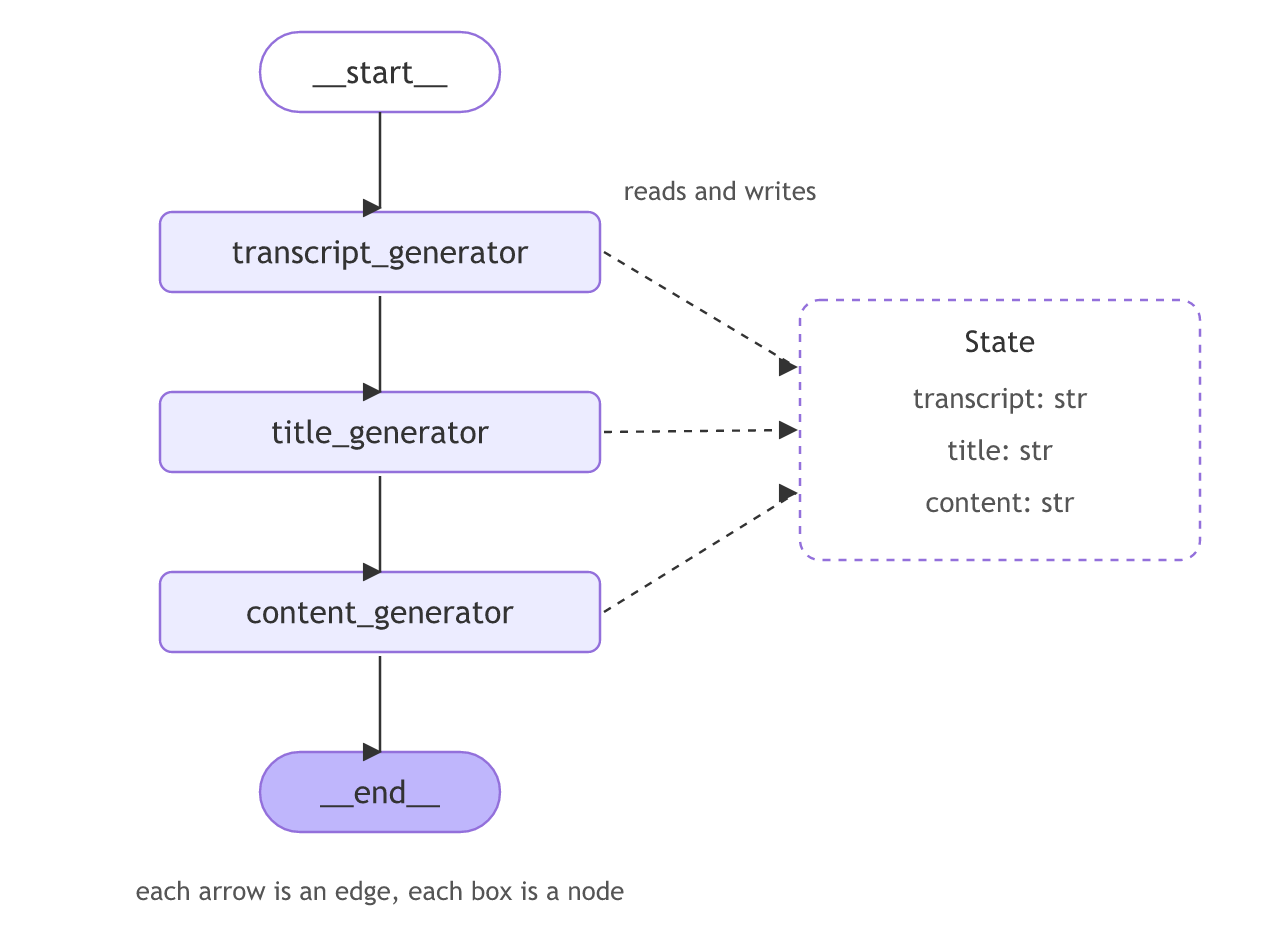
Before any graph, a node is only a function that takes a dictionary and returns a dictionary. The page starts smaller than the video's three-step workflow: one node that returns one new key is enough to see the rule.
A node reading and returning state
def greet(state):
    return {"greeting": "Hello!"}

print(greet({})){'greeting': 'Hello!'}Why the argument is called state
greet takes one argument and returns a dictionary. In a graph that argument is the shared state, so the name says what it holds.
Describing the shape with TypedDict
from typing_extensions import TypedDict

class State(TypedDict):
    ticket: str
    category: str
A TypedDict says which keys the state has and their types. It is the recommended shape: plain dictionary typing, no runtime cost. LangGraph also accepts a Pydantic model when you want values validated as they come in, at some speed cost.
TypedDict vs Pydantic for state
| TypedDict | Pydantic BaseModel | |
|---|---|---|
| Validation | None at runtime | Validates values on input |
| Speed | Fastest | Slower |
| Use when | Most graphs | You want bad input caught early |
When you declare a state
- Every graph declares a state; it is the first thing you write.
- Anything one node must pass to another goes in the state.
Related
- Previous: Installation and setup
- Next: StateGraph
- Reference: Graph API: state
- Add a
replykey toState. - Make
greetreturn two keys and print the result.
You understood something today that you didn't yesterday.