
Multi-agent supervisor
A multi-agent graph splits a job across specialised agents: a supervisor reads the request and routes it, with Command(goto=...), to the worker that handles it.
Last updated: 29 Sep, 2026 · LangGraph 1.2
One agent that does everything grows tangled. Splitting the work, one agent per job, keeps each one small, and a supervisor decides which one runs.
The video's supervisor, researcher, analyst and writer
In the supervisor architecture from the multi-agent video, one supervisor node has control. As a task comes in it decides whether to pass it to the researcher, the analyst or the writer: an article on agentic AI can go to the researcher and then the writer, a report to analyse goes to the analyst first. The state subclasses MessagesState and adds next_agent, research_data, analysis, final_report, task_complete and current_task. A supervisor step, a prompt sent to a Groq model, reads whether research, analysis and a report exist yet and names the agent that should work next, or answers done.
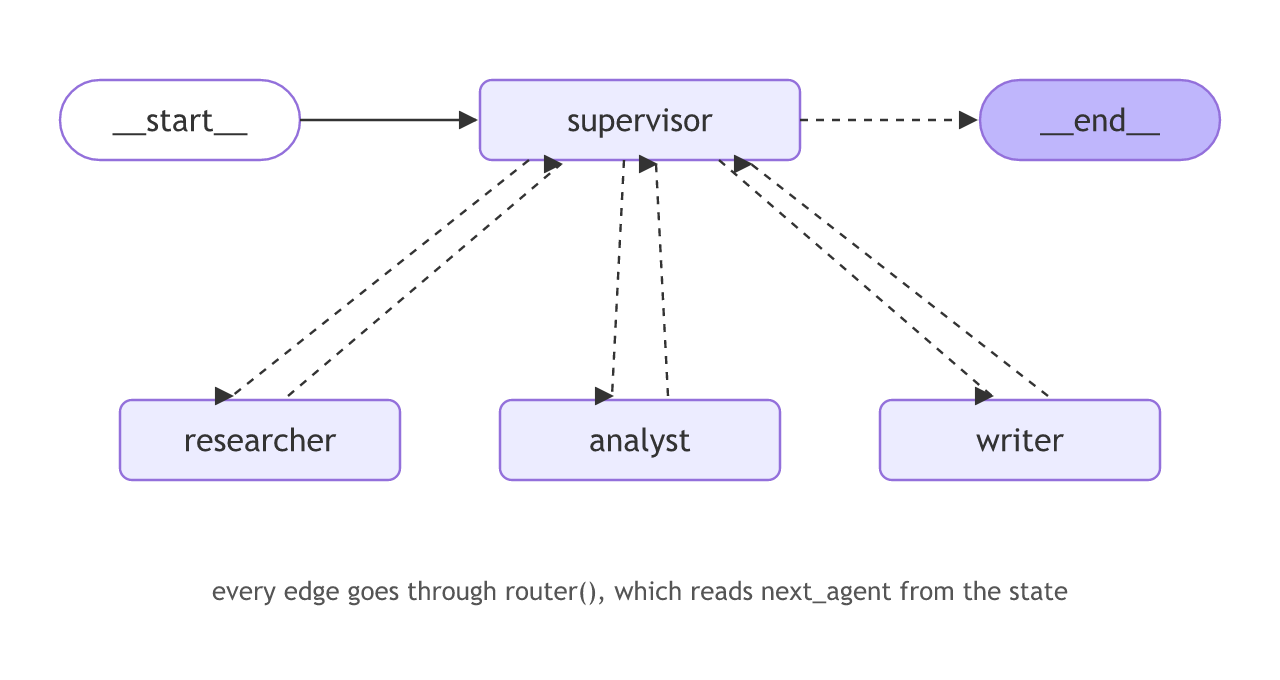
Every node's edges go through one router function. It reads next_agent from the state and returns the node to run next, or END when the task is complete; for each of the four nodes, add_conditional_edges(node, router, {...}) maps those answers to nodes. The entry is set with workflow.set_entry_point("supervisor"), which does the same as add_edge(START, "supervisor"), the form the docs use. The notebook also imports create_react_agent, deprecated since LangGraph 1.0 and never used there, so the page leaves it out.
In the video's run the work passes from the researcher to the analyst to the writer, but the saved report is an analysis of "No Task". graph.invoke was handed a HumanMessage on its own instead of {"messages": [...]}, so the question never entered the state and the supervisor had no task to work on. The shop's supervisor below takes its request inside the input dictionary, asks the model for a worker's name with structured output, and routes with Command.
The model and the two tools
One model serves the supervisor and both workers. Each worker gets its own tool, and a grounded system prompt keeps its answers to what the tool returned.
model = init_chat_model("groq:openai/gpt-oss-120b", temperature=0)  # uses your GROQ_API_KEY
GROUNDED = ("You are the support assistant for a small online shop. "
            "Answer in one short sentence, using only what the tools returned.")

@tool
def lookup_order(order_id: str) -> str:
    """Look up an order by id."""
    return f"Order {order_id}: shipped on 3 March."

@tool
def start_refund(order_id: str) -> str:
    """Start a refund for an order."""
    return f"Refund started for {order_id}."
The supervisor that routes
The supervisor asks the model which team handles the request. with_structured_output makes the model answer with one of two names, and the node returns a Command naming that worker. As in the command lesson, the Literal[...] annotation names where the node can go, so LangGraph can draw the routes.
class Route(BaseModel):
    worker: Literal["orders", "refunds"]

router = model.with_structured_output(Route)

def supervisor(s) -> Command[Literal["orders", "refunds"]]:
    route = router.invoke([
        SystemMessage("Route the customer request to the team that handles it: orders or refunds."),
        HumanMessage(s["request"]),
    ])
    return Command(goto=route.worker)   # hand the run to that worker
The workers that finish
Each worker is a real agent with its own tool. It answers the request and returns Command(goto=END) with its answer, so control does not bounce back to the supervisor.
orders_agent = create_agent(model, tools=[lookup_order], system_prompt=GROUNDED)
refunds_agent = create_agent(model, tools=[start_refund], system_prompt=GROUNDED)

def ask(agent, request):
    return agent.invoke({"messages": [{"role": "user", "content": request}]})["messages"][-1].content

def orders(s) -> Command[Literal["__end__"]]:
    return Command(goto=END, update={"worker": "orders", "answer": ask(orders_agent, s["request"])})

def refunds(s) -> Command[Literal["__end__"]]:
    return Command(goto=END, update={"worker": "refunds", "answer": ask(refunds_agent, s["request"])})
A supervisor routing two requests end to end
The whole graph in one file, with two requests: one for each team.
from typing import Literal
from typing_extensions import TypedDict
from pydantic import BaseModel
from langgraph.graph import StateGraph, START, END
from langgraph.types import Command
from langchain.agents import create_agent
from langchain.chat_models import init_chat_model
from langchain.tools import tool
from langchain.messages import SystemMessage, HumanMessage

model = init_chat_model("groq:openai/gpt-oss-120b", temperature=0)  # uses your GROQ_API_KEY
GROUNDED = ("You are the support assistant for a small online shop. "
            "Answer in one short sentence, using only what the tools returned.")

@tool
def lookup_order(order_id: str) -> str:
    """Look up an order by id."""
    return f"Order {order_id}: shipped on 3 March."

@tool
def start_refund(order_id: str) -> str:
    """Start a refund for an order."""
    return f"Refund started for {order_id}."

class State(TypedDict):
    request: str
    worker: str
    answer: str

class Route(BaseModel):
    worker: Literal["orders", "refunds"]

router = model.with_structured_output(Route)

def supervisor(s) -> Command[Literal["orders", "refunds"]]:
    route = router.invoke([
        SystemMessage("Route the customer request to the team that handles it: orders or refunds."),
        HumanMessage(s["request"]),
    ])
    return Command(goto=route.worker)

orders_agent = create_agent(model, tools=[lookup_order], system_prompt=GROUNDED)
refunds_agent = create_agent(model, tools=[start_refund], system_prompt=GROUNDED)

def ask(agent, request):
    return agent.invoke({"messages": [{"role": "user", "content": request}]})["messages"][-1].content

def orders(s) -> Command[Literal["__end__"]]:
    return Command(goto=END, update={"worker": "orders", "answer": ask(orders_agent, s["request"])})

def refunds(s) -> Command[Literal["__end__"]]:
    return Command(goto=END, update={"worker": "refunds", "answer": ask(refunds_agent, s["request"])})

b = StateGraph(State)
b.add_node("supervisor", supervisor)
b.add_node("orders", orders)
b.add_node("refunds", refunds)
b.add_edge(START, "supervisor")
graph = b.compile()

for request in ["Where is my order A17?", "I want a refund for A17."]:
    out = graph.invoke({"request": request, "worker": "", "answer": ""})
print(f"{out['worker']:<8} {out['answer']}")orders Your order A17 was shipped on March 3. refunds Refund started for A17.
How the request was routed
- For each request the supervisor asked the model which team handles it, and the model filled
Routewith one name. - The supervisor returned
Command(goto=...)with that name, so only that worker ran. - Each worker is its own agent: it called its own tool and answered from the result, then returned Command(goto=END) with the answer.
One agent vs a supervisor
| One agent | Supervisor and workers | |
|---|---|---|
| Each part | Handles every job | Handles one job |
| Routing | Inside one prompt | An explicit supervisor node |
| Growing it | The prompt gets longer | Add another worker |
When to split into agents
- A job with clearly separate tasks, such as orders, refunds and fraud.
- You want the transcript to show which agent handled each request.
- Different workers need different tools or models.
Command(goto="supervisor") instead of END sends the run back up; without a stop condition that is an infinite loop, capped by the recursion limit.Related
- Previous: Retry policies
- Next: Project: support agent
- Add a third worker, fraud, with its own tool, and add "fraud" to
Route. - Send a request that fits neither team and see which one the model picks.
- Have a worker route back to the supervisor and watch the recursion limit stop it.
Little by little, you're building something great.