
create_agent: the agent loop
create_agent is a function that puts a model and its tools in a loop: it calls the model, runs the tools it asks for, and calls it again until the model answers with text.
Last updated: 27 Sep, 2026 · LangChain 1.4
The bind_tools: asking for a tool lesson ran one round trip by hand. Doing that for every question gets repetitive, so create_agent runs the whole loop for you.
A weather agent in a few lines
create_agent, imported from langchain.agents, takes three things: a model, a list of tools and a system prompt that tells the model how to behave. The video starts with an empty tools list and the system prompt "You are a helpful assistant.", and the agent's diagram has only a start, the model and an end. Then it adds a plain function, get_weather, which takes a city and returns "The weather in {city} is sunny.", with the docstring "Get the weather for a city." It has no @tool; create_agent wraps a plain function for you, and its name, type hints and docstring are what the model reads to decide when to call it. With the tool added, the diagram connects the model to a tools node.
How the agent loop runs
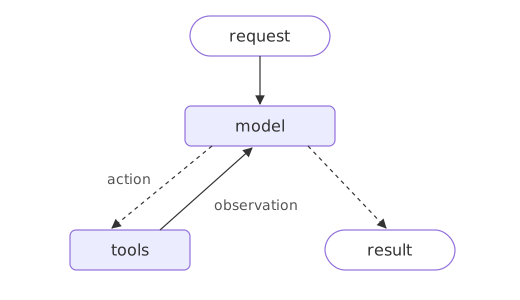
The agent takes its input as a dictionary with a messages key. Passing the question alone fails with an "expected dictionary" error, so the question goes in as {"role": "user", "content": "What is the weather like in New York?"}. The model has no current weather data, so it calls get_weather and uses what the function returns as context for the answer:
from langchain.agents import create_agent

def get_weather(city: str) -> str:
    """Get the weather for a city."""
    return f"The weather in {city} is sunny."

agent = create_agent(
    model="groq:openai/gpt-oss-120b",
    tools=[get_weather],
    system_prompt="You are a helpful assistant.",
)

response = agent.invoke({"messages": [{"role": "user", "content": "What is the weather like in New York?"}]})

for message in response["messages"]:
print(f"{message.type:<5} {message.text or message.tool_calls}")human What is the weather like in New York?
ai [{'name': 'get_weather', 'args': {'city': 'New York'}, 'id': 'fc_aa4faf42-774c-4030-8205-178cd2a3bdba', 'type': 'tool_call'}]
tool The weather in New York is sunny.
ai The current weather in New York is sunny. Enjoy the clear skies!Four messages tell the whole story, in the order the video walks through them. The question comes in as a human message. The model does not answer yet; it asks for get_weather with city set to New York, and the docstring is how it knows that tool fits. The agent runs the function, and its return value goes back as a tool message. The model reads that and writes the answer. The video runs it on OpenAI's gpt-5; here it runs on Groq, and any model string from the setup lesson works.
The rest of this lesson builds the same kind of agent for a small online shop, with a tool that looks up orders. The shop agent grows through the course: memory, middleware, human approval and guardrails are all added to it.
The create_agent call
from langchain.agents import create_agent

agent = create_agent(model, tools=[my_tool], system_prompt="...")   # model + tools in a loop
result = agent.invoke({"messages": [{"role": "user", "content": "..."}]})
Building the agent
Start agent.py with lookup_order, the tool from Tools: a function the model can call.
from langchain.tools import tool

ORDERS = {"A17": "shipped on 3 March", "C40": "waiting for stock"}


@tool
def lookup_order(order_id: str) -> str:
    """Look up an order's shipping status by its id, such as A17."""
    status = ORDERS.get(order_id)
    return f"{order_id} {status}." if status else f"{order_id} is not an order we have."
Build the agent from a model, a list of tools, and an optional system prompt. Add this below the tool in agent.py; nothing runs yet.
from langchain.agents import create_agent
from langchain.chat_models import init_chat_model

agent = create_agent(
    init_chat_model("groq:openai/gpt-oss-120b", temperature=0),  # uses your GROQ_API_KEY
    tools=[lookup_order],
    system_prompt="You are the support assistant for a small online shop. Answer in one or two short sentences, using only what the tools returned.",
)
Sending a conversation
Add these lines to the end of agent.py. The input is a dictionary because the agent carries state: messages is the conversation so far, and later lessons add more keys next to it. One question that needs a lookup runs the whole loop and returns four messages.
result = agent.invoke({"messages": [{"role": "user", "content": "Where is my order A17?"}]})

for message in result["messages"]:
print(f"{message.type:<6} {message.text or message.tool_calls}")human Where is my order A17?
ai [{'name': 'lookup_order', 'args': {'order_id': 'A17'}, 'id': 'fc_8e2dccc8-002d-40f4-b4a9-161b31ba181d', 'type': 'tool_call'}]
tool A17 shipped on 3 March.
ai Your order A17 was shipped on 3 March.A question with no order to look up ends on the first model call.
result = agent.invoke({"messages": [{"role": "user", "content": "Hello there"}]})

for message in result["messages"]:
print(f"{message.type:<6} {message.text or message.tool_calls}")human Hello there ai Hello! How can I help you today?
Reading the loop's messages
- The same four messages as the weather agent: the question, the tool call, the tool result and the answer. Text with no tool call is what ended the loop.
- The system prompt is not in the message list: the agent adds it to every model call without storing it with the conversation.
- With nothing to look up the model answers on the first call, so no tool runs and the loop ends at once. The model decides how many rounds, not the agent.
By hand vs create_agent
| By hand (bind_tools lesson) | create_agent | |
|---|---|---|
| Who runs the tools | Your code | The agent |
| Who calls the model again | Your code | The agent |
| When it stops | You decide | When the model returns text with no tool call |
When to use create_agent
- Any assistant that may need one or more tool calls before it can answer.
- A task where the number of steps is not known ahead of time and the model decides.
Related
- Previous: bind_tools: asking for a tool
- Next: Streaming steps with stream_mode
- Reference: Agents
- Ask about B22, an order the shop does not have, and read the final answer.
- Remove
lookup_orderfrom the tools and ask about A17 again. - Print
result.keys()to see what else the agent returns.
Slow is fine. Stopping is the only problem.