
MCPAdapter: tools from another program
MCP is a standard way for one program to offer tools to any agent, and MCPAdapter is the object that connects to an MCP server, lists its tools, and hands them to create_agent as LangChain tools.
Last updated: 27 Sep, 2026 · LangChain 1.4
Two servers, two transports
An MCP server is a separate program that offers tools, and any MCP client can use them. The MCP crash course builds its servers with FastMCP, imported from mcp.server.fastmcp. The first is the math server. mcp = FastMCP("Math") names the server, and each function under @mcp.tool() becomes a tool: add and multiple. The docstring is what the model reads to decide which tool to call. At the bottom, mcp.run starts the server with transport="stdio":
from mcp.server.fastmcp import FastMCP

mcp=FastMCP("Math")

@mcp.tool()
def add(a:int,b:int)->int:
    """_summary_
    Add to numbers
    """
    return a+b

@mcp.tool()
def multiple(a:int,b:int)-> int:
    """Multiply two numbers"""
    return a*b

#The transport="stdio" argument tells the server to:

#Use standard input/output (stdin and stdout) to receive and respond to tool function calls.

if __name__=="__main__":
    mcp.run(transport="stdio")
The add docstring in the video is a leftover template, _summary_. The model reads the docstring to decide when to call a tool, so in your own server write a real one, such as """Add two numbers.""".
With stdio the server uses standard input and output to receive tool calls and send back the results. It runs from a command prompt, and the client sends its input and reads the output there. That suits testing a server and a client locally.
The second server stands in for a third-party API call. weather.py creates FastMCP("Weather") with one tool, get_weather, which returns a fixed sentence, "It's always raining in California", where a real server would call a weather API. This one runs with transport="streamable-http":
from mcp.server.fastmcp import FastMCP

mcp=FastMCP("Weather")

@mcp.tool()
async def get_weather(location:str)->str:
    """Get the weather location."""
    return "It's always raining in California"

if __name__=="__main__":
    mcp.run(transport="streamable-http")
Shown as they are in the video, not run here. The video's servers import FastMCP from mcp.server.fastmcp; in mcp 2.x, the version this course installs, that class was renamed. The shop server later in this lesson uses the standalone fastmcp package and runs as shown.
- stdio: run
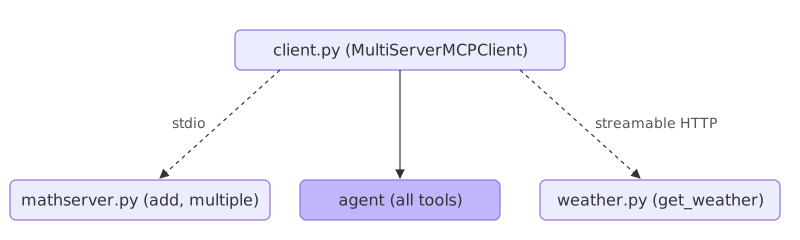
python mathserver.pyand nothing appears to happen, because the server talks through standard input and output instead of a URL. The client starts it as a child process; nothing to host. - streamable HTTP:
python weather.pystarts the server as an API service at a URL, on localhost port 8000 by default, so the tools are athttp://localhost:8000/mcp. It has to be running before the client connects, and many clients can share it.
A client that loads tools from both
The client, client.py, uses MultiServerMCPClient from langchain-mcp-adapters. It takes one entry per server: the math server with the command python, the file mathserver.py in args (an absolute path if the file is elsewhere) and the stdio transport; the weather server with its URL, http://localhost:8000/mcp, and the streamable_http transport. client.get_tools() returns the tools of both servers as LangChain tools, and create_react_agent joins them with a ChatGroq model:
from langchain_mcp_adapters.client import MultiServerMCPClient
from langgraph.prebuilt import create_react_agent
from langchain_groq import ChatGroq

from dotenv import load_dotenv
load_dotenv()

import asyncio

async def main():
    client=MultiServerMCPClient(
        {
            "math":{
                "command":"python",
                "args":["mathserver.py"], ## Ensure correct absolute path
                "transport":"stdio",

            },
            "weather": {
                "url": "http://localhost:8000/mcp",  # Ensure server is running here
                "transport": "streamable_http",
            }

        }
    )

    import os
    os.environ["GROQ_API_KEY"]=os.getenv("GROQ_API_KEY")

    tools=await client.get_tools()
    model=ChatGroq(model="qwen-qwq-32b")
    agent=create_react_agent(
        model,tools
    )

    math_response = await agent.ainvoke(
        {"messages": [{"role": "user", "content": "what's (3 + 5) x 12?"}]}
    )

    print("Math response:", math_response['messages'][-1].content)

    weather_response = await agent.ainvoke(
        {"messages": [{"role": "user", "content": "what is the weather in California?"}]}
    )
    print("Weather response:", weather_response['messages'][-1].content)

asyncio.run(main())main is async, so asyncio.run starts it, and the agent is called with ainvoke. A math question makes the agent call the math server's tools over stdio. Run with python client.py, "what's (3 + 5) x 12?" came back as a step-by-step breakdown ending in 96. "what is the weather in California?" called get_weather on the server at the URL, which returns "It's always raining in California", and the model's reply added that California in fact has a diverse climate. That is worth noticing: the model added knowledge the tool never gave it, which is why the shop agent's prompt tells it to answer only from what the tools returned.
The video's code is shown as it is written there and is not meant to be run here. Three names differ from the rest of this lesson. The video's server imports FastMCP from the official mcp package; the shop's imports the standalone fastmcp package, the same idea with @mcp.tool written without brackets. The video's client is MultiServerMCPClient from langchain-mcp-adapters; LangChain 1.4 ships MCPAdapter. And create_react_agent is LangGraph's older name for what create_agent now does. The video's Groq model, qwen-qwq-32b, has since been retired.
The shop version serves the order lookup from the tools lesson over MCP, and loads it with MCPAdapter.
MCP support is an extra of the langchain package, built on the FastMCP library, and marked beta: you will see a warning that the API may change when you import it. That warning is expected, and the code below runs despite it.
pip install "langchain[mcp]==1.4.2"Loading tools with MCPAdapter
import asyncio
from pathlib import Path
from langchain.mcp import MCPAdapter

async def main():
    async with MCPAdapter(Path("shop_server.py")) as adapter:   # a local server over stdio
        tools = await adapter.list_tools()                 # -> LangChain tools

asyncio.run(main())   # MCP clients are async
Each run also prints the FastMCP banner and may suggest an upgrade. Both are expected; keep the pinned version the course installs.
Writing the tool server
Write the tool server. This is the order lookup from the tools lesson, served over MCP by FastMCP. Save it as shop_server.py.
from fastmcp import FastMCP

mcp = FastMCP("shop")
ORDERS = {"A17": "shipped on 3 March", "C40": "waiting for stock"}

@mcp.tool
def lookup_order(order_id: str) -> str:
    """Look up an order's shipping status by its id, such as A17."""
    status = ORDERS.get(order_id)
    return f"{order_id} {status}." if status else f"{order_id} is not an order we have."
Running the server over stdio
Add these lines to the end of shop_server.py. Run as a script, it talks to its client over standard input and output.
if __name__ == "__main__":
    mcp.run()      # talk to the client over standard input and output
Connecting with a Path
Connect with a Path, list the tools, and give them to the agent. An MCP client talks to another program and waits on it, so it is async: the code runs inside an async def main() that asyncio.run(main()) starts, and every call to the server is awaited.
import asyncio
from pathlib import Path
from langchain.mcp import MCPAdapter

async def main():
    # a Path asks for a local server explicitly; a bare string would be read as a URL
    async with MCPAdapter(Path("shop_server.py")) as adapter:
        tools = await adapter.list_tools()      # the server's tools as LangChain tools
        print([tool.name for tool in tools])

asyncio.run(main())
The URL rule
Pass the server as a plain string and it is read as a URL, so the MCPAdapter(...) constructor raises before any server starts. This is the error to see before the fix.
from langchain.mcp import MCPAdapter

MCPAdapter("shop_server.py")pydantic_core._pydantic_core.ValidationError: 1 validation error for function-wrap[wrap_val()]
Input should be a valid URL, relative URL without a base [type=url_parsing, input_value='shop_server.py', input_type=str]
For further information visit https://errors.pydantic.dev/2.13/v/url_parsing
The above exception was the direct cause of the following exception:
Traceback (most recent call last):
File "main.py", line 3, in <module>
MCPAdapter("shop_server.py")
ValueError: MCP target 'shop_server.py' is not a valid URL. To run a local MCP server over stdio, ask for it explicitly with `Path('server.py')`, a `fastmcp` transport, or an `MCPConfig` — a bare string is read as a URL so that it cannot silently become a subprocess.Running the agent on the server's tools
The whole program. ainvoke is the async twin of invoke: same input, same result, but it is awaited, so it fits inside main.
import asyncio
from pathlib import Path

from langchain.agents import create_agent
from langchain.chat_models import init_chat_model
from langchain.mcp import MCPAdapter


async def main():
    async with MCPAdapter(Path("shop_server.py")) as adapter:
        tools = await adapter.list_tools()
        print([tool.name for tool in tools])
        agent = create_agent(init_chat_model("groq:openai/gpt-oss-120b", temperature=0), tools,  # uses your GROQ_API_KEY
                             system_prompt="You are the support assistant for a small online shop. Answer in one or two short sentences, using only what the tools returned.")
        result = await agent.ainvoke({"messages": [{"role": "user", "content": "Where is A17?"}]})
        print(result["messages"][-1].text)


asyncio.run(main())['lookup_order'] A17 shipped on 3 March.
MCPAdapter started the server, and list_tools turned its tool into a LangChain tool with the same name and description. The agent is built the same way as in the create_agent lesson. Everything that uses the tools sits inside the async with block, where the connection to the server is open.
How the adapter loads the tools
- The agent is built the same way as in the create_agent lesson; the tool reaching it over MCP changes nothing about how it calls it.
- The code is async, so it runs inside
async def main(), awaitslist_toolsandainvoke, and stays inside theasync withblock while it uses the tools.
A local tool vs an MCP tool
| A @tool in your code | A tool over MCP | |
|---|---|---|
| Where it lives | In your program | In a separate server program |
| Who can use it | This agent | Any MCP-speaking agent |
| Asked for with | The function | A Path or URL to the server |
When to reach for MCP tools
- Using a tool server another team wrote, from any agent framework.
- Sharing one set of tools across several agents without copying the code.
Path(...).Related
- Previous: Retrieval as a tool
- Next: Subagents as tools
- Reference: MCP
- Add a second
@mcp.toolto the server and print the tool names again. - Print
tools[0].descriptionandtools[0].args. - Ask about B22 through the MCP tool.
- Change the last line of
shop_server.pytomcp.run(transport="http"), start it, and connect withMCPAdapter("http://localhost:8000/mcp"). A string is right this time, because it is a URL.
Slow is fine. Stopping is the only problem.