
Subagents as tools
A subagent is a whole agent wrapped as a tool, so a main agent can call it, choose what to ask it, and combine what several return.
Last updated: 27 Sep, 2026 · LangChain 1.4
A supervisor and its workers
In the supervisor architecture, one supervisor node has control. As soon as a task comes in, it decides whether to pass it to the researcher, the analyst or the writer. Asked to write an article on agentic AI, it can send the task to the researcher, who then passes it to the writer. Asked to analyze a report and write it up, it sends it to the analyst first, and the analyst passes it to the writer. Every agent depends on the task the supervisor hands it.
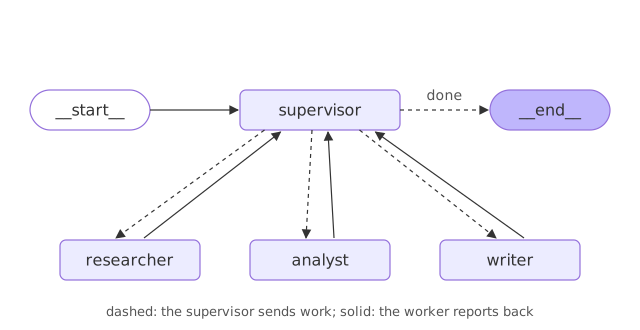
In the multi-agent crash course the graph's state holds next_agent, research_data, analysis, final_report, task_complete and current_task. A supervisor chain, a prompt joined to a Groq model, reads that state. Its prompt says "You are a supervisor managing a team of agents": a researcher who gathers information and data, an analyst who analyzes data and provides insights, and a writer who creates reports and summaries. Given whether research, analysis and a report exist yet, it names the agent that should work next, or answers done when the task is complete. The supervisor writes that name into next_agent, and the task moves through the agents one by one. The shop version calls each specialist as a tool and gets the reply straight back, which needs no graph.
The shop already has two agents: the orders agent from the create_agent lesson and the policies agent from the retrieval lesson. Now one customer asks a question that touches both.
Wrapping an agent in a tool
@tool
def ask_specialist(question: str) -> str:      # looks like any tool
    """One line the main agent reads to know when to call this."""
    reply = specialist_agent.invoke({"messages": [{"role": "user", "content": question}]})
    return reply["messages"][-1].text          # hand back only the final text
The two specialist agents
The orders specialist answers order questions with lookup_order, the tool built in Tools: a function the model can call. Put it in its own file, orders.py, so the tests in Testing an agent can import it without building a Groq agent.
from langchain.tools import tool

ORDERS = {"A17": "shipped on 3 March", "C40": "waiting for stock"}


@tool
def lookup_order(order_id: str) -> str:
    """Look up an order's shipping status by its id, such as A17."""
    status = ORDERS.get(order_id)
return f"{order_id} {status}." if status else f"{order_id} is not an order we have."- written in Documents and splitting
- written in Embeddings and a vector store
- written in Retrieval as a tool
View the code here
from langchain_core.documents import Document
from langchain_text_splitters import RecursiveCharacterTextSplitter

POLICIES = {
    "refunds.md": "Refunds go back to the card you paid with. They take up to 5 working days to arrive."
                  "\n\nYou can ask for a refund within 30 days of delivery. Opened items can be refunded if they are faulty.",
    "shipping.md": "Standard shipping takes 3 to 5 working days. Shipping is free on orders over 50 euros."
                   "\n\nExpress shipping arrives the next working day and costs 9 euros.",
    "accounts.md": "To reset your password, use the reset link on the sign-in page. Support staff never ask for your password.",
}

docs = [Document(page_content=text, metadata={"source": name}) for name, text in POLICIES.items()]
splitter = RecursiveCharacterTextSplitter(chunk_size=120, chunk_overlap=0, add_start_index=True)
chunks = splitter.split_documents(docs)
import re
import zlib

from langchain_core.embeddings import Embeddings

COMMON = {"a", "an", "and", "are", "can", "do", "does", "for", "how", "i",
          "if", "is", "it", "my", "of", "on", "the", "to", "what", "with", "you", "your"}


class WordEmbeddings(Embeddings):
    def embed_query(self, text):
        vector = [0.0] * 256
        for word in re.findall(r"[a-z]+", text.lower()):
            if word not in COMMON:
                vector[zlib.crc32(word.rstrip("s").encode()) % 256] += 1.0
        return vector

    def embed_documents(self, texts):
        return [self.embed_query(text) for text in texts]
from langchain.tools import tool
from langchain_core.vectorstores import InMemoryVectorStore
from policies import chunks
from word_embeddings import WordEmbeddings

store = InMemoryVectorStore(WordEmbeddings())
store.add_documents(chunks)


@tool
def search_policies(query: str) -> str:
    """Search the shop's policies on refunds, shipping and accounts.
    Pass the customer's question, word for word, as the query."""
    found = [doc for doc, score in store.similarity_search_with_score(query, k=2) if score >= 0.3]
    if not found:
        return "No policy covers this."
    return "\n".join(f"[{doc.metadata['source']}] {doc.page_content}" for doc in found)
Each specialist is a whole agent with its own model, tools and system prompt. last_reply sends it one question and returns the text of its final message. The code in this section goes in one file, specialists.py; the router lesson imports from it too.
from langchain.agents import create_agent
from langchain.tools import tool
from langchain.chat_models import init_chat_model      # uses your GROQ_API_KEY
from orders import lookup_order
from search import search_policies

orders_agent = create_agent(init_chat_model("groq:openai/gpt-oss-120b", temperature=0),
    tools=[lookup_order], system_prompt="Answer the order question in one short sentence, using only what the lookup_order tool returned.")
policies_agent = create_agent(init_chat_model("groq:openai/gpt-oss-120b", temperature=0),
    tools=[search_policies], system_prompt="Answer in one short sentence of plain text, using only what the search_policies tool returned. Name the source file in square brackets, like [refunds.md]. If the tool finds nothing, say the policies do not cover it.")


def last_reply(agent, question):
    return agent.invoke({"messages": [{"role": "user", "content": question}]})["messages"][-1].text
Wrapping each specialist as a tool
Wrap each specialist in @tool and add both to the end of specialists.py. To the main agent it looks like any other tool: a name, a description and one string argument. The main agent sees a short answer, not the specialist's whole conversation.
@tool
def ask_orders(question: str) -> str:
    """Ask the orders specialist where an order is."""
    return last_reply(orders_agent, question)      # only the final text comes back


@tool
def ask_policies(question: str) -> str:
    """Ask the policies specialist about refunds, shipping and accounts."""
    return last_reply(policies_agent, question)
The supervisor agent
Now the main agent. Give it the two specialist tools and a system prompt that says when to use each. When the customer's message arrives, the supervisor reads it, calls the specialists it needs, and combines their replies into one answer.
from langchain.agents import create_agent
from langchain.chat_models import init_chat_model
from specialists import ask_orders, ask_policies

supervisor = create_agent(
    init_chat_model("groq:openai/gpt-oss-120b", temperature=0),
    tools=[ask_orders, ask_policies],
    system_prompt="You are a support supervisor. Use ask_orders for order status and "
                  "ask_policies for policy questions. Call whichever the question needs; "
                  "answer in one or two short sentences, using only what the specialists returned.")
Running one question through the supervisor
One question that touches both specialists, run through the supervisor. The loop prints each message's type, then either its text or, for a tool call, the tool's name and the arguments the supervisor sent.
question = "Where is A17, and how long does a refund take?"
result = supervisor.invoke({"messages": [{"role": "user", "content": question}]})

for message in result["messages"][1:]:   # skip the question
print(f"{message.type:<4}", message.text or [(c["name"], c["args"]) for c in message.tool_calls])ai [('ask_orders', {'question': 'Where is order A17?'})]
tool Order A17 shipped on 3 March.
ai [('ask_policies', {'question': 'How long does a refund take?'})]
tool Refunds take up to 5 working days to arrive. [refunds.md]
ai Order A17 shipped on 3 March, and refunds take up to 5 working days.How the supervisor split the question
- Both specialists were called: the supervisor called
ask_ordersfor the order andask_policiesfor the refund, so each name shows on its own line. - Each specialist got only its own question: the arguments on each
ailine are what the supervisor wrote for that subagent, not the customer's whole sentence. - The final answer joins the two replies: once both specialists had answered, the supervisor combined their replies into one message.
- A subagent keeps no memory between calls by default, so each question starts it fresh.
Subagents in Deep Agents
The deepagents library, built on LangChain, packages this pattern. A deep agent can create subagents to delegate work, given in its subagents parameter. Subagents give context quarantine: they keep the main agent's context clean and carry their own specialized instructions. Each is a specialized agent with its own context, tools, memory and instructions, does one focused job and returns a structured result. The main agent understands the overall goal, plans, delegates to the subagents, collects their results and returns the final answer. With synchronous subagents, the main agent waits, blocked, until the subagent finishes. Asked to build a research report on agentic AI, the main agent might hand parts to a research agent, a writing agent, a data agent and a critic agent.
In code, a subagent is a dictionary. The video first writes an internet_search tool around the Tavily client, then describes research_subagent with a name, a description the main agent reads to decide when to delegate ("Used to research more in depth questions"), a system prompt ("You are a great researcher"), its tools and an optional model that falls back to the main agent's model. create_deep_agent takes the list in its subagents parameter. The video's version, shown here and not run in this course, needs the deepagents package and Tavily and OpenAI keys:
from deepagents import create_deep_agent

research_subagent = {
    "name": "research-agent",
    "description": "Used to research more in depth questions",
    "system_prompt": "You are a great researcher",
    "tools": [internet_search],         # a Tavily web search function
    "model": "groq:qwen/qwen3-32b",     # optional, defaults to the main agent's model
}

agent = create_deep_agent(
    model="openai:gpt-5.4",
    subagents=[research_subagent],
)
Asked to "research about LLM gateways and provide me a detailed summary", the main agent wrote a to-do list, delegated the research to the subagent, which searched the internet, and returned the summary. The subagent's searches and long results stay inside it, and only its answer goes back to the main agent, which keeps the main conversation short. That is the same reason this lesson wraps each specialist in a tool.
One agent vs a supervisor
| One agent, all tools | Supervisor with subagents | |
|---|---|---|
| Who picks the tool | One model, every turn | The supervisor, then each specialist |
| What a specialist sees | The whole conversation | Only the question it was asked |
| Combining answers | One model does everything | The supervisor joins the replies |
When to use a subagent
- One question that spans two areas, such as an order and a refund policy.
- Keeping each specialist's prompt and tools small, so each one stays reliable.
Related
- Previous: MCPAdapter: tools from another program
- Next: Router: sending each question to one agent
- Reference: Multi-agent
- Ask a question with two order ids and count the calls to
ask_orders. - Ask "How do I reset my password?" and check which specialist answers.
- Make
ask_ordersreturn the specialist's whole message list and print what the supervisor gets.
This is what real progress feels like.