
Middleware: code around the model
Middleware is code that runs at fixed points in the agent loop, such as before or after every model call, and can read the state, change it, or end the run.
Last updated: 27 Sep, 2026 · LangChain 1.4
Hooks inside the agent's loop
Middleware is a way to control more tightly what happens inside an agent. It is useful for:
- Tracking what the agent does, with logging, analytics and debugging.
- Transforming prompts, choosing tools and formatting output.
- Adding retries, fallbacks and early stops.
- Applying rate limits, guardrails and PII detection.
Think of an airport. Before you reach your gate you pass a security check, where your luggage is inspected, then immigration, where your passport is checked, then the boarding pass check. Each stop is a middleware, one, two and three, each running its own check before you move on. An agent without middleware is the plain ReAct loop: the request goes to the model, the model decides whether a tool is needed, the tool runs and gives its result back, and the model answers. Middleware adds trigger points to that loop, called hooks: before the agent, before the model, around tool calls, after the model and after the agent. At each one your code can do something, such as logging or summarization.
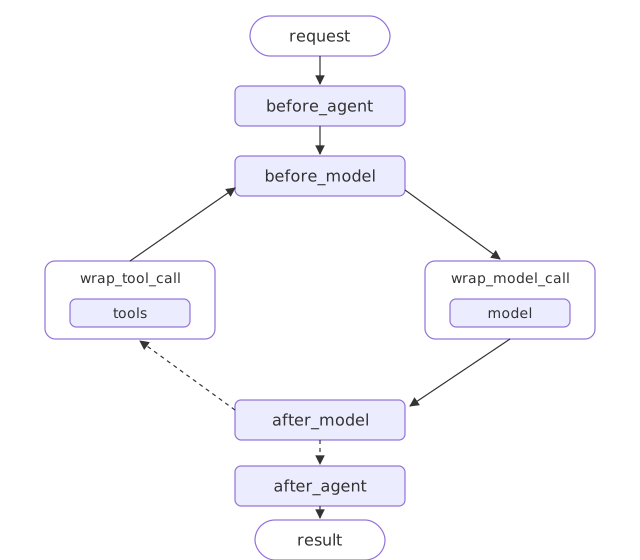
before_agent and after_agent run once per request. before_model and after_model run around every model call, so they fire again on each turn of the loop. The wrap hooks surround a single model or tool call and can change it or run it again. LangChain ships ready-made middleware for common jobs, such as summarization, human approval and PII redaction, and you can write your own.
The video explains the hooks and then moves straight on to a ready-made middleware, summarization. This lesson writes two small hooks of its own first, so you can watch exactly when each one runs; the ready-made ones come in later lessons.
The before_model and after_model hooks
from langchain.agents.middleware import before_model, after_model

@before_model              # runs before each model call
def hook(state, runtime):  # the current state and the runtime
    ...                    # return nothing to leave the state as it is

agent = create_agent(model, tools=[...], middleware=[hook])
The before and after hooks
Let's write two small hooks that only print, so we can watch when they run. A decorated function becomes middleware; it receives the current state, with its messages, and the runtime.
from langchain.agents.middleware import after_model, before_model

@before_model
def count(state, runtime):
    print("before the model:", len(state["messages"]), "messages")

@after_model
def report(state, runtime):
    last = state["messages"][-1]
    print("after the model: ", last.text or last.tool_calls[0]["name"])
The agent with the hooks
This lesson's agent answers order questions with lookup_order, the tool built in Tools: a function the model can call. Start the file with it.
from langchain.tools import tool

ORDERS = {"A17": "shipped on 3 March", "C40": "waiting for stock"}


@tool
def lookup_order(order_id: str) -> str:
    """Look up an order's shipping status by its id, such as A17."""
    status = ORDERS.get(order_id)
    return f"{order_id} {status}." if status else f"{order_id} is not an order we have."
Both hooks around a lookup
Attach both hooks to the agent with middleware= and ask one question. There are two model calls, so each hook runs twice.
from langchain.agents import create_agent
from langchain.chat_models import init_chat_model

model = init_chat_model("groq:openai/gpt-oss-120b", temperature=0)
agent = create_agent(model, tools=[lookup_order], middleware=[count, report],
                     system_prompt="You are the support assistant for a small online shop. Answer in one or two short sentences, using only what the tools returned.")

agent.invoke({"messages": [{"role": "user", "content": "Where is A17?"}]})before the model: 1 messages after the model: lookup_order before the model: 3 messages after the model: A17 was shipped on 3 March.
The hooks as steps in the loop
Streaming the same agent shows the hooks as steps of their own, named after the function and the hook.
for step in agent.stream({"messages": [{"role": "user", "content": "Where is A17?"}]}, stream_mode="updates"):
print("step:", list(step))before the model: 1 messages step: ['count.before_model'] step: ['model'] after the model: lookup_order step: ['report.after_model'] step: ['tools'] before the model: 3 messages step: ['count.before_model'] step: ['model'] after the model: A17 was shipped on 3 March. step: ['report.after_model']
What the hooks printed
- Two model calls, so each hook ran twice: the first saw one message and the model asked for
lookup_order; the second saw three and answered. - A decorated function becomes middleware. It receives the state and the runtime; returning nothing leaves the state unchanged.
- Streaming shows the hooks as steps of their own, between the
modelandtoolssteps.
before_model vs after_model
| before_model | after_model | |
|---|---|---|
| Runs | Before the model call | After the model call |
| Sees | The messages going in | The message that came back |
| Typical use | Trim or check the input | Log or inspect the reply |
| How often | Once per model call | Once per model call |
Where middleware hooks fit
- Logging or measuring every model call in one place.
- Checking or trimming the messages before they reach the model.
Related
- Previous: State beyond messages
- Next: The order middleware runs in
- Reference: Middleware
- Add an
@after_agenthook that prints the number of messages at the end. - Return
{"messages": []}fromcountand see whether the conversation changes. - Ask a question with no order in it and count how many times each hook runs.
This is what real progress feels like.