
Asking a human first
HumanInTheLoopMiddleware is a middleware that pauses an agent before a chosen tool runs and waits for a person to approve or reject the call.
Last updated: 27 Sep, 2026 · LangChain 1.4
An email agent that asks first
An autonomous agent does its work without much human intervention, which is a risk when the work is critical. The video's example is an agent that buys stocks: one mistaken purchase could mean a large loss, so the agent should ask a person to confirm before it acts. HumanInTheLoopMiddleware does this: it pauses the agent before chosen tool calls run and waits for a person to approve, edit or reject the call. It fits high-stakes operations such as database writes and financial transactions, and compliance workflows that require a person to sign off. (A fourth decision, respond, comes in the next lesson.)
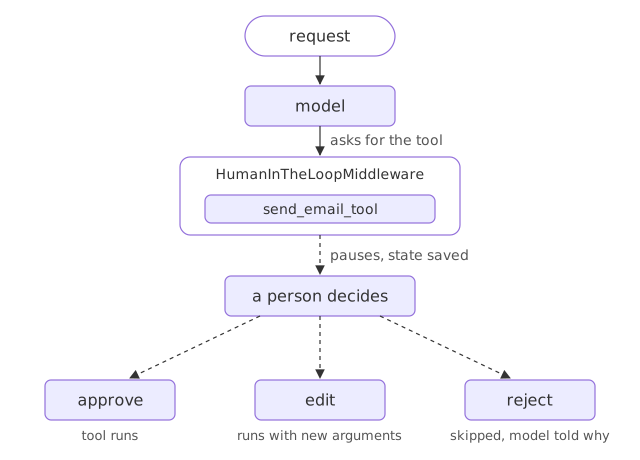
The video's agent sends email. It has two stand-in tools, one to read an email by its id and one to send an email; a real sender would need an SMTP server.
from langchain.agents import create_agent
from langchain.agents.middleware import HumanInTheLoopMiddleware
from langgraph.checkpoint.memory import InMemorySaver

def read_email_tool(email_id: str) -> str:
    """Mock function to read an email by its ID."""
    return f"Email content for ID: {email_id}"

def send_email_tool(recipient: str, subject: str, body: str) -> str:
    """Mock function to send an email."""
return f"Email sent to {recipient} with subject '{subject}'"agent=create_agent(
model="groq:openai/gpt-oss-120b",
tools=[read_email_tool,send_email_tool],
checkpointer=InMemorySaver(),
middleware=[
HumanInTheLoopMiddleware(
interrupt_on={
"send_email_tool":{
"allowed_decisions":["approve","edit","reject"]
},
"read_email_tool":False,
}
)
]
)The agent gets the model, both tools and an InMemorySaver checkpointer to save the conversation. Plain functions work as tools; create_agent wraps them. interrupt_on says where to interrupt: send_email_tool pauses for a person, who may approve, edit or reject the call; read_email_tool is False, so it runs without asking. The checkpointer is required, because a paused agent has to be saved until the decision arrives. The video uses GPT-4o; here the agent runs on Groq.
Create a config with the thread id test-approve and ask the agent to send an email to john@test.com. The run stops before the send tool, and the result carries an __interrupt__ entry describing the waiting call, because interrupt_on put a trigger on send_email_tool:
from langchain.messages import HumanMessage

config = {"configurable": {"thread_id": "test-approve"}}

result = agent.invoke(
    {"messages": [HumanMessage(content="Send email to john@test.com with subject 'Hello' and body 'How are you?'")]},
    config=config,
)
Approving
The approval goes back in as a Command, imported from langgraph.types. It resumes the workflow with the decision type approve, one of the allowed decisions, on the same config, so the agent picks up where it stopped and the email is sent:
from langgraph.types import Command
# Step 2: Approve
if "__interrupt__" in result:
    print("⏸️ Paused! Approving...")

    result = agent.invoke(
        Command(
            resume={
                "decisions": [
                    {"type": "approve"}
                ]
            }
        ),
        config=config
    )

print(f"✅ Result: {result['messages'][-1].content}")⏸️ Paused! Approving... ✅ Result: The email has been sent to **john@test.com** with the subject **“Hello”** and the body **“How are you?”**. Let me know if there’s anything else you’d like to do!
Rejecting
Rejecting uses the same code on a new thread, test-reject, with the decision type changed to reject. The tool is skipped, the model is told the user rejected the tool call, and it writes a reply without it:
config = {"configurable": {"thread_id": "test-reject"}}
result = agent.invoke(
    {"messages": [HumanMessage(content="Send email to john@test.com with subject 'Hello' and body 'How are you?'")]},
    config=config)

if "__interrupt__" in result:
    print("⏸️ Paused! Rejecting...")
    result = agent.invoke(Command(resume={"decisions": [{"type": "reject"}]}), config=config)
print(f"✅ Result: {result['messages'][-1].content}")⏸️ Paused! Rejecting... ✅ Result: I’m sorry—I wasn’t able to send that email for you. Would you like me to try sending it again, or is there anything else I can help with?
With no reason attached to the rejection, the model could only say the email was not sent. The shop agent below attaches a message to its rejection, so the model knows what to tell the customer.
Now the shop. A refund cannot be undone, so it is the call a person should confirm. The shop adds a second tool, and the model will ask for it when a customer wants a refund.
HumanInTheLoopMiddleware and a checkpointer
# the shape of it; the full agent, with its model and tools, is built below
from langchain.agents.middleware import HumanInTheLoopMiddleware
from langgraph.checkpoint.memory import InMemorySaver

approval = HumanInTheLoopMiddleware(interrupt_on={"refund_order": True})  # pause on this tool
# a checkpointer is required so the paused run can be resumed later
agent = create_agent(model, tools=[lookup_order, refund_order], middleware=[approval], checkpointer=InMemorySaver(),
                     system_prompt="You are the support assistant for a small online shop. Answer in one or two short sentences, using only what the tools returned.")
The two tools
First the two tools: lookup_order from the tools lesson, and a new one, refund_order.
from langchain.tools import tool

ORDERS = {"A17": "shipped on 3 March", "C40": "waiting for stock"}


@tool
def lookup_order(order_id: str) -> str:
    """Look up an order's shipping status by its id, such as A17."""
    status = ORDERS.get(order_id)
    return f"{order_id} {status}." if status else f"{order_id} is not an order we have."


@tool
def refund_order(order_id: str) -> str:
    """Refund an order in full. This cannot be undone."""
    return f"Refunded {order_id}."
The agent with approval
Build the agent with both tools and the middleware. interrupt_on names the tools that need a decision; True means every call pauses. lookup_order is not listed, so it runs as before.
from langchain.agents import create_agent
from langchain.agents.middleware import HumanInTheLoopMiddleware
from langchain.chat_models import init_chat_model
from langgraph.checkpoint.memory import InMemorySaver
from langgraph.types import Command

model = init_chat_model("groq:openai/gpt-oss-120b", temperature=0)  # uses your GROQ_API_KEY
approval = HumanInTheLoopMiddleware(interrupt_on={"refund_order": True})
agent = create_agent(model, tools=[lookup_order, refund_order],
                     system_prompt="You are the support assistant for a small online shop. Answer in one or two short sentences, using only what the tools returned.",
                     middleware=[approval], checkpointer=InMemorySaver())
The pause
Ask for a refund. The video's notebook checks result["__interrupt__"]. Passing version="v2" to invoke gives the same information in a tidier shape, and the rest of the course uses it.
thread = {"configurable": {"thread_id": "ravi-refund"}}
ask = {"messages": [{"role": "user", "content": "Please refund A17"}]}
result = agent.invoke(ask, thread, version="v2")

print(result.interrupts[0].value["action_requests"])
print(result.value["messages"][-1].tool_calls[0]["name"])[{'name': 'refund_order', 'args': {'order_id': 'A17'}, 'description': "Tool execution requires approval\n\nTool: refund_order\nArgs: {'order_id': 'A17'}"}]
refund_orderInvoking with version="v2" returns an object with two parts. value is the state so far, ending with the model's request to refund A17. interrupts holds what is waiting for a decision: the tool, its arguments and a description a reviewer can read. The refund has not run.
Approving
Send a decision back on the same thread with Command(resume=...).
decision = Command(resume={"decisions": [{"type": "approve"}]})
result = agent.invoke(decision, thread, version="v2")

for message in result.value["messages"]:
    if message.type == "tool" or (message.type == "ai" and not message.tool_calls):   # the tool result and the reply
print(f"{message.type:<4} {message.text}")tool Refunded A17. ai Order A17 has been refunded.
A Command with resume continues the same thread, and decisions holds one decision per paused call. After the approval the refund ran and the model answered.
Rejecting
Reject instead, with a message for the model. The model reads it as the tool's result, so it says what happened and what to pass on; without the last sentence the model tends to add advice of its own, such as whom else to contact. That thread already finished with the approval, so start a fresh pause on a new thread with the same request, then reject it.
thread = {"configurable": {"thread_id": "ravi-refund-2"}}
agent.invoke(ask, thread, version="v2")                  # pauses before the refund again

decision = Command(resume={"decisions": [{"type": "reject", "message": "Not refunded: refunds need a manager's approval. Tell the customer only that."}]})
result = agent.invoke(decision, thread, version="v2")

for message in result.value["messages"]:
    if message.type == "tool" or (message.type == "ai" and not message.tool_calls):   # the tool result and the reply
print(f"{message.type:<4} {message.text}")tool User rejected the tool call for `refund_order` with reason: Not refunded: refunds need a manager's approval. Tell the customer only that. ai I’m sorry, but refunds require manager approval before they can be processed.
A rejection never runs the tool. The model gets a tool message with the reason instead, so it can tell the customer why. Without a message, the middleware writes a default one telling the model not to try the same call again.
What each decision did
- The run paused before the refund. With
version="v2",invokereturnedvalue(the state so far) andinterrupts(the pending call); the refund had not run. - Approve runs the tool.
Command(resume=...)with{"type": "approve"}continued the thread, the refund ran, and the model confirmed it. - Reject skips the tool. The model got a tool message with the reason instead, so it could explain the refusal.
Approve vs reject
| approve | reject | |
|---|---|---|
| Runs the tool | Yes | No |
| Tool message | The tool's real result | The reason, or a default refusal |
| Model then | Uses the result in its reply | Explains why it could not act |
Where a pause for approval fits
- A refund, a delete, or any action that cannot be undone.
- A step that spends money or emails a customer, held for a person to confirm.
- A review queue where approvals arrive minutes or days after the request.
HumanInTheLoopMiddleware needs a checkpointer. Without one there is nowhere to save the paused run, and the resume has nothing to continue.Related
- Previous: More built-in middleware to reach for
- Next: Edit and respond
- Reference: LangChain agent middleware
- Ask about A17 without a refund and check that the agent does not pause.
- Print
result.interrupts[0].value["review_configs"]to see which decisions are allowed. - After the pause, print
agent.get_state(thread).nextto see where the run is waiting.
You understood something today that you didn't yesterday.