
Caching responses
A response cache is a store that remembers the answer to a request, so an identical request is answered from memory without calling the provider.
Last updated: 12 Oct, 2026 · LiteLLM 1.105
The cheap model first lowered the price of each call. A cache removes the call. Support questions, test suites and demos send the same prompt again and again, and a repeat that is answered from memory costs nothing and returns at once.
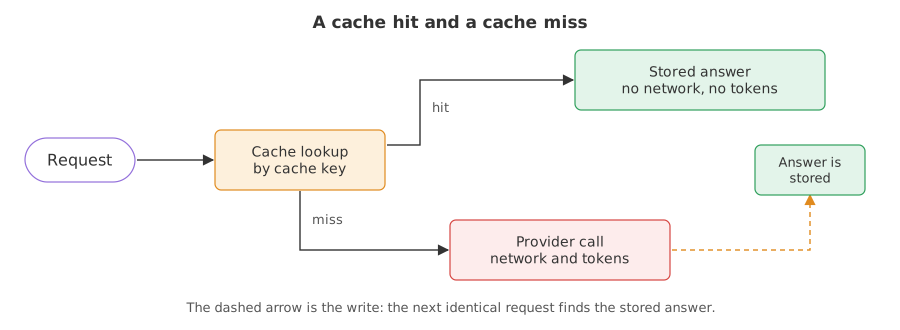
Syntax: assign a Cache to litellm.cache once, then call completion() as usual.
import litellm

litellm.cache = litellm.Cache()      # in-memory, for this Python process only
reply = litellm.completion(model="groq/openai/gpt-oss-20b", messages=messages, max_tokens=300)
reply._hidden_params.get("cache_hit")   # True when the answer came from the cache
Turning on the in-memory cache
Creating the cache
litellm.Cache() with no arguments builds an in-memory cache. It is a Python dictionary inside your process. It holds nothing before the first call and it is gone when the program exits. The LiteLLM docs call it the default cache and list it with the Redis options on the caching page.
import litellm

litellm.cache = litellm.Cache()      # every completion() call now checks it first
Reading a hit
A reply served from the cache has _hidden_params["cache_hit"] set to True. A reply that came from the provider has no such value, so .get() returns None. The cached reply also has no response_cost, because nothing was bought.
hit = reply._hidden_params.get("cache_hit") is TrueTiming four identical calls
The program sends one prompt four times and prints, for each call, whether it was a hit and how long it took in milliseconds.
import time
import litellm
from litellm import completion

litellm.cache = litellm.Cache()
messages = [{"role": "user", "content": "Name one planet. One word."}]

for call in range(1, 5):
    start = time.perf_counter()
    reply = completion(model="groq/openai/gpt-oss-20b", messages=messages, max_tokens=300)
    ms = (time.perf_counter() - start) * 1000
    hit = reply._hidden_params.get("cache_hit") is True
print(call, "hit " if hit else "miss", f"{ms:8.1f} ms", reply.choices[0].message.content)1 miss 548.2 ms Mars 2 hit 40.8 ms Mars 3 hit 2.2 ms Mars 4 hit 2.9 ms Mars
Reading the timings
- Call 1 is a miss. It went to Groq and back, so it took hundreds of milliseconds. Its time is the price of a real call.
- Calls 2 to 4 are hits. They return the same word with no network call. After the first hit they take a few milliseconds each.
- The first hit can be slower than the later ones. LiteLLM loads some of its own modules the first time it serves a hit, once per process. In repeated runs here that first hit took from tens of milliseconds to several hundred, and a hit after it took about a millisecond or two. The saving is real, but a one-call script may not show it.
- The times and the word change from run to run, so this block is marked live. The hit and miss labels do not.
Controlling the cache on one call
Three controls cover most needs. Cache(ttl=2) makes every entry expire after 2 seconds. cache={"no-cache": True} on a call skips the lookup and fetches a fresh answer. cache={"no-store": True} on a call keeps its answer out of the cache. The LiteLLM docs describe all three on the cache controls page.
reply = completion(model=model, messages=messages, max_tokens=300,
cache={"no-cache": True}) # skip the lookup, ask the providerimport time
import litellm
from litellm import completion
litellm.cache = litellm.Cache(ttl=2) # entries live for 2 seconds
messages = [{"role": "user", "content": "Name one river. One word."}]
def ask(label, **options):
reply = completion(model="groq/openai/gpt-oss-20b", messages=messages, max_tokens=300, **options)
print(label, "hit" if reply._hidden_params.get("cache_hit") else "miss")
ask("first call ")
ask("second call ")
ask("no-cache ", cache={"no-cache": True})
time.sleep(2.5)
ask("after the ttl ")
ask("no-store ", cache={"no-store": True}, temperature=0.5)
ask("no-store again ", cache={"no-store": True}, temperature=0.5)first call miss second call hit no-cache miss after the ttl miss no-store miss no-store again miss
- first call: miss, second call: hit is the plain cache at work.
- no-cache: miss says the lookup was skipped although the answer was stored.
- after the ttl: miss says the entry expired after 2 seconds, so the call went to the provider again.
- no-store: miss, then miss says the first answer was never saved, so the identical second call found nothing. It uses
temperature=0.5so that it has a key of its own.
Cached call vs provider call
| Provider call | Cached call | |
|---|---|---|
| Network | yes | no |
| Tokens billed | yes | no |
| Typical time | hundreds of milliseconds | about a millisecond once warm |
| Answer | can differ each time | the stored answer, unchanged |
| Survives a restart | not applicable | no, the in-memory cache is lost |
Where you use response caching
- A test suite that sends the same prompts on every run and should not spend tokens each time.
- A help page bot where many visitors ask the same few questions.
- Development, where you rerun a script many times while editing the code around the call.
A cache hit also needs the proxy extras. On a plain
pip install litellm of version 1.105.0 the first call worked, and the first hit raised ModuleNotFoundError: No module named 'fastapi'. Install litellm[proxy], as the setup lesson does.Related
- Previous: The cheap model first
- Next: Cache keys
- Reference: In-memory caching and Cache controls in the LiteLLM docs
- Change the prompt text between calls of the first program and watch every call become a miss.
- Set
Cache(ttl=1)in the first program and addtime.sleep(1.5)after call 2. Call 3 becomes a miss. - Add
print(reply._hidden_params.get("response_cost"))to the loop and compare a miss with a hit.
Slow is fine. Stopping is the only problem.