
Tag routing
Tag routing is a Router feature that picks a deployment by matching the tags on a request with the tags on each deployment.
Last updated: 12 Oct, 2026 · LiteLLM 1.105
Model access groups decide which models a key may call. Tags decide which deployment of a model answers. A deployment is one entry in model_list, and several entries can share a model_name, as Router: model groups and deployments showed. Without tags, Routing strategies: choosing which deployment answers chooses between them. With tags, the caller can steer the choice: a free tier to a cheap deployment, a paid tier to a strong one.
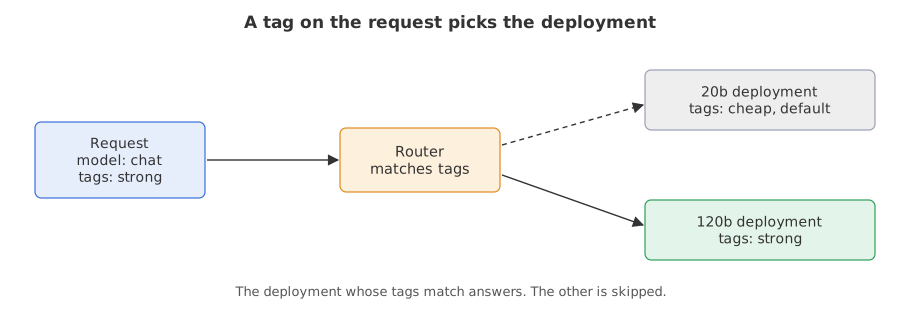
Syntax: tags go on each deployment in litellm_params. The setting enable_tag_filtering under router_settings turns the matching on.
model_list:
  - model_name: chat
    litellm_params:
      model: groq/openai/gpt-oss-20b
      tags: ["cheap", "default"]   # tags on this deployment
router_settings:
  enable_tag_filtering: true      # match request tags to deployment tags
The default tag
The tag routing page says a deployment tagged default receives all untagged requests. The library's own note on the feature adds that when no deployment has the default tag, an untagged request can go to all deployments.
Three ways to send tags
The request tags page lists them: a tags array in the request body, the same array inside metadata, or a header named x-litellm-tags holding a comma-separated list.
{"model": "chat", "tags": ["strong"], "messages": [...]}
{"model": "chat", "metadata": {"tags": ["strong"]}, "messages": [...]}
x-litellm-tags: strong,my-custom-tag
Writing the helper that starts a gateway
ops.py starts the litellm command, waits until it answers, and stops it in a finally block. call() sends a request and returns the status, body and headers. chat() sends one chat request, and extra keyword arguments such as tags become fields of the request body.
from pathlib import Path
import sys

Path("ops.py").write_text('''import json
import os
import subprocess
import sys
import time
import urllib.error
import urllib.request
from contextlib import contextmanager

KEY = "sk-gateway-1234"          # the master key written in every config.yaml


@contextmanager
def running(port, env=None):
    """Start the gateway on `port` from config.yaml, wait until it answers, stop it afterwards."""
    litellm = os.path.join(os.path.dirname(sys.executable), "litellm")
    cmd = [litellm, "--config", "config.yaml", "--port", str(port)]
    proc = subprocess.Popen(cmd, env=env, stdout=open("gateway.log", "w"), stderr=subprocess.STDOUT)
    try:
        for _ in range(90):
            if proc.poll() is not None:
                raise RuntimeError("the gateway stopped; read gateway.log")
            try:
                urllib.request.urlopen(f"http://127.0.0.1:{port}/health/liveliness")
                break
            except OSError:
                time.sleep(1)
        yield f"http://127.0.0.1:{port}"
    finally:
        proc.terminate()
        proc.wait(10)


def call(url, path, body=None, key=KEY, headers=None):
    """Send one request. Returns (status, text, headers) and does not raise on 4xx or 5xx."""
    head = dict(headers or {})
    if key:
        head["Authorization"] = f"Bearer {key}"
    if body is not None:
        head["Content-Type"] = "application/json"
    data = json.dumps(body).encode() if body is not None else None
    try:
        reply = urllib.request.urlopen(urllib.request.Request(url + path, data=data, headers=head), timeout=60)
    except urllib.error.HTTPError as error:
        reply = error
    return reply.getcode(), reply.read().decode(), {k.lower(): v for k, v in reply.headers.items()}


def chat(url, model, text="Reply with one word: ok", key=KEY, headers=None, **extra):
    """One chat request. Extra keyword arguments are added to the JSON body."""
    body = {"model": model, "messages": [{"role": "user", "content": text}], "max_tokens": 60, **extra}
    return call(url, "/chat/completions", body, key, headers)
''')
sys.path.insert(0, ".")        # lets the programs below run: from ops import running, call, chat
print("wrote ops.py")wrote ops.py
Choosing a deployment with a tag
The config has one group, chat, with two deployments. The 20b model is tagged cheap and default. The 120b model is tagged strong. The program sends five requests and prints the status and the model that answered, read from the x-litellm-model-name response header.
from pathlib import Path
from ops import running, chat

Path("config.yaml").write_text("""model_list:
  - model_name: chat
    litellm_params:
      model: groq/openai/gpt-oss-20b
      api_key: os.environ/GROQ_API_KEY
      tags: ["cheap", "default"]
  - model_name: chat
    litellm_params:
      model: groq/openai/gpt-oss-120b
      api_key: os.environ/GROQ_API_KEY
      tags: ["strong"]
router_settings:
  enable_tag_filtering: true
general_settings:
  master_key: sk-gateway-1234
""")

CASES = [
    ("no tags", {}, {}),
    ("tags: cheap", {"tags": ["cheap"]}, {}),
    ("tags: strong", {"tags": ["strong"]}, {}),
    ("header: strong", {}, {"x-litellm-tags": "strong"}),
    ("tags: unknown", {"tags": ["nonexistent"]}, {}),
]
with running(4741) as url:
    for label, extra, headers in CASES:
        status, _, reply = chat(url, "chat", headers=headers, **extra)
print(f"{label:15} {status} {reply['x-litellm-model-name']}")no tags 200 groq/openai/gpt-oss-20b tags: cheap 200 groq/openai/gpt-oss-20b tags: strong 200 groq/openai/gpt-oss-120b header: strong 200 groq/openai/gpt-oss-120b tags: unknown 200 groq/openai/gpt-oss-20b
Reading which deployment answered
- No tags went to the cheap deployment. It carries
default, so it takes untagged requests, as the page says. - The tag
strongreached the 120b model whether it arrived in the body or in the header. - An unknown tag also went to the default deployment. That is what 1.105 did here. The page does not describe this case, so check it on your own version before relying on it.
Excluding and requiring tags
The tag routing page describes two prefixes. A tag that starts with ! excludes deployments that carry that exact tag. A tag that starts with & requires it. The page's table says a request with only ! tags starts from the default-tagged deployments, or from all deployments when none is tagged default, and then removes the excluded ones. If nothing is left, the request fails.
In this config the default-tagged deployment is the cheap one. Excluding cheap on its own therefore removes the whole starting pool. The program sends that request, then two that work.
import json
from ops import running, chat

CASES = [
    ("!cheap alone", ["!cheap"]),
    ("strong and !cheap", ["strong", "!cheap"]),
    ("&strong", ["&strong"]),
]
with running(4742) as url:
    for label, tags in CASES:
        status, text, reply = chat(url, "chat", metadata={"tags": tags})
        shown = reply["x-litellm-model-name"] if status == 200 else json.loads(text)["error"]["message"][:100]
print(f"{label:18} {status} {shown}")!cheap alone 401 Not allowed to access model due to tags configuration. Passed model=chat and tags=['!cheap'] strong and !cheap 200 groq/openai/gpt-oss-120b &strong 200 groq/openai/gpt-oss-120b
Reading the exclusion results
- A request that excludes
cheapalone failed with 401. The message is the gateway's own: not allowed to access the model due to the tags configuration. The starting pool was the default-tagged deployment, and the request removed it. - Adding a positive tag fixed it.
strongtogether with!cheapchose the 120b deployment. - A required tag worked on its own.
&strongselected the deployments that carrystrong.
Tags on keys, teams and spend
The request tags page also covers tags set on a key or a team in their metadata, and tags that appear in the request_tags field of the spend logs. Its requirements say virtual keys and a database should be set up. None of it is run here. The tag routing page adds allow_fail_open in model_info, which falls back to the default-tagged pool instead of failing, and warns against using it where the constraint is a hard rule.
Tag routing vs routing strategies vs access groups
| Tag routing | Routing strategy | Model access group | |
|---|---|---|---|
| Who decides | The caller, with tags | The Router, by its own rule | The key or team settings |
| Decides | Which deployment of one name | Which deployment of one name | Which names a key may call |
| Set in | Deployment tags and request tags | routing_strategy | model_info.access_groups |
Where you use tag routing
- Free and paid tiers. A request from a free account carries
freeand reaches the cheaper deployment. - Regions or accounts. Tags such as
provider:openaikeep a request on an approved provider. - Keeping a provider out. A
!tag removes a provider for one request without editing the config.
default leaves nothing, and the request fails with a message about tags. Add a positive tag, or give the default tag to a deployment you do not exclude.Related
- Previous: Model access groups
- Next: Secret managers
- See also: Routing strategies: choosing which deployment answers for the rules the Router uses when no tag applies
- Reference: Tag Based Routing and Request Tags for Spend Tracking in the LiteLLM docs
- Remove
"default"from the cheap deployment's tags and send a request with no tags. The Router now chooses from all deployments, so the answer changes between calls. - Send the tags as
metadata={"tags": ["strong"]}instead oftags=["strong"], and read the model that answers. - Send the tags
["!cheap", "!strong"]and read the error.
Every expert started right here.