
The LiteLLM proxy
The LiteLLM proxy is a server, started with the litellm command, that offers one OpenAI-compatible HTTP API and forwards each request to the provider that you configured.
Last updated: 12 Oct, 2026 · LiteLLM 1.105
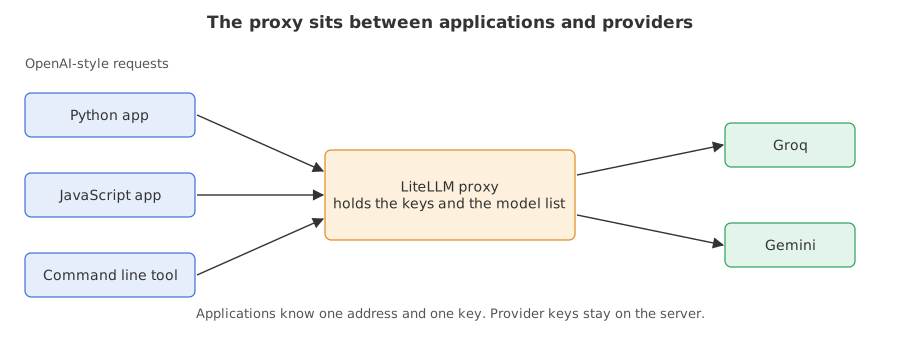
Gateway caching already used a server to share a cache. This lesson explains that server. Until now every program imported litellm and held its own provider keys. With the proxy, the keys and the model list live in one place, and a program only needs the server's address and a key for the server.
Syntax: one command starts the server from a config file. --port is the port it listens on, and the docs name 4000 as the default.
litellm --config config.yaml --port 4000Writing the proxy config
Listing the models
model_list is the same idea as the Router's. Each entry has a model_name, the name that callers will put in their request, and litellm_params, which says which real model answers and which key it needs. os.environ/GROQ_API_KEY tells the proxy to read the key from that environment variable, so the config file holds no secret.
model_list:
  - model_name: fast                         # what callers ask for
    litellm_params:
      model: groq/openai/gpt-oss-20b         # what answers
      api_key: os.environ/GROQ_API_KEY       # read from the environment
Setting the master key
master_key is the secret that callers send to prove they may use the server. LiteLLM 1.105 refuses to start without one. The next two sections show why, and Gateway keys covers keys in depth.
general_settings:
  master_key: os.environ/LITELLM_MASTER_KEY
Running the server from Python
An example needs to start the server, wait for it, call it and stop it. gateway.py does the first, second and last. It is the same file the previous lesson wrote.
Starting the process
subprocess.Popen runs the litellm command that pip installed next to your Python. The master key goes into the child's environment, and its log output is thrown away.
env = {**os.environ, "LITELLM_MASTER_KEY": KEY}
litellm = os.path.join(os.path.dirname(sys.executable), "litellm")
cmd = [litellm, "--config", config, "--port", str(port)]
proc = subprocess.Popen(cmd, env=env, stdout=subprocess.DEVNULL, stderr=subprocess.DEVNULL)
Waiting until the server answers
The server needs a few seconds to start. /health/readiness is a URL the proxy answers once it is ready, so the loop asks it once a second for up to a minute.
for _ in range(60):
    try:
        urllib.request.urlopen(f"http://127.0.0.1:{port}/health/readiness")
        break
    except OSError:
        time.sleep(1)
Stopping it in a finally block
A server that keeps running after an error holds its port. The finally block runs whether the code inside the with block succeeds or fails, so the server always stops.
try:
    yield f"http://127.0.0.1:{port}"     # the caller's code runs here
finally:
    proc.terminate()
proc.wait(10)import sys
from pathlib import Path
Path("config.yaml").write_text("""model_list:
- model_name: fast
litellm_params:
model: groq/openai/gpt-oss-20b
api_key: os.environ/GROQ_API_KEY
- model_name: smart
litellm_params:
model: groq/openai/gpt-oss-120b
api_key: os.environ/GROQ_API_KEY
general_settings:
master_key: os.environ/LITELLM_MASTER_KEY
""")
Path("gateway.py").write_text("""import os, subprocess, sys, time, urllib.request
from contextlib import contextmanager
KEY = "sk-gateway-demo-0123456789abcdef"
@contextmanager
def running(port, config="config.yaml"):
env = {**os.environ, "LITELLM_MASTER_KEY": KEY}
litellm = os.path.join(os.path.dirname(sys.executable), "litellm")
cmd = [litellm, "--config", config, "--port", str(port)]
proc = subprocess.Popen(cmd, env=env, stdout=subprocess.DEVNULL, stderr=subprocess.DEVNULL)
try:
for _ in range(60):
try:
urllib.request.urlopen(f"http://127.0.0.1:{port}/health/readiness")
break
except OSError:
time.sleep(1)
yield f"http://127.0.0.1:{port}"
finally:
proc.terminate()
proc.wait(10)
""")
sys.path.insert(0, ".") # lets the programs that follow import gateway from this folder
print("wrote config.yaml and gateway.py")wrote config.yaml and gateway.py
Starting without a master key
The first thing a new user meets is the refusal. The program removes the key from the environment and runs the server in the foreground. The server exits on its own, so the program reads what it printed and keeps only the lines that start with the refusal.
import os, re, subprocess, sys

env = {k: v for k, v in os.environ.items() if k != "LITELLM_MASTER_KEY"}
litellm = os.path.join(os.path.dirname(sys.executable), "litellm")
run = subprocess.run([litellm, "--config", "config.yaml", "--port", "4125"],
                     env=env, capture_output=True, text=True, timeout=90)
text = re.sub(r"\x1b\[[0-9;]*m", "", run.stdout + run.stderr)     # drop colour codes
print("stopped by itself:", run.returncode != 0)
print(*[line for line in text.splitlines() if line.startswith("LiteLLM proxy refused")], sep="\n")stopped by itself: True LiteLLM proxy refused to start: no master key is set, so every request would be accepted without authentication.
- stopped by itself: True says the process ended with a non-zero exit code and nobody had to stop it.
- The refusal line is the server's own message: with no master key every request would be accepted without authentication, so it will not start. The full message also prints a command that generates a key.
Calling the running proxy
With a key set, the program starts the server and sends two HTTP requests with the standard library: one for the model list and one chat request. Authorization: Bearer followed by the key is how the OpenAI API takes a key, and the proxy uses the same header.
import json, urllib.request
from gateway import running, KEY

def call(url, path, body=None):
    request = urllib.request.Request(
        url + path, data=json.dumps(body).encode() if body else None,
        headers={"Authorization": f"Bearer {KEY}", "Content-Type": "application/json"})
    return json.load(urllib.request.urlopen(request))

with running(4123) as url:
    print([m["id"] for m in call(url, "/v1/models")["data"]])
    reply = call(url, "/v1/chat/completions", {
        "model": "fast", "max_tokens": 300,
        "messages": [{"role": "user", "content": "Name one lake. One word."}]})
print(reply["choices"][0]["message"]["content"], "|", reply["model"])['fast', 'smart'] Tahoe | fast
- ['fast', 'smart'] is the list the proxy built from
model_list. Each name is amodel_name, not a provider model. - The word was written by the 20b model on Groq. It changes from run to run, so this block is marked live.
- fast after the bar is the model name in the reply: the proxy echoes the name the caller asked for.
Proxy vs SDK
| The SDK in your program | The proxy server | |
|---|---|---|
| Who needs provider keys | every program | only the server |
| Languages that can call it | Python | any language that can send HTTP |
| Where the model list lives | in each program's code | in one config file |
| Extra process to run | no | yes |
| Shared cache, budgets, logging | per program | one place for every caller |
Where you use the proxy
- A team where every service calls one address and the provider keys stay with the platform owner.
- Mixed languages, where a Python worker and a JavaScript front end need the same models.
- Swapping a provider by changing one line of
config.yamland leaving every caller alone.
finally block or under a process manager, and use a port that is free: a second server on a taken port fails to start. The proxy also needs litellm[proxy], which the setup lesson installs.Related
- Previous: Gateway caching
- Next: Using the OpenAI client with the gateway
- Reference: LiteLLM AI Gateway in the LiteLLM docs
- Change
"fast"to"smart"in the chat request. The 120b model answers. - Change
--portin the refusal program to4000. The refusal is the same, because it happens before any port is opened. - Add a third model to
config.yamlusinggemini/gemini-2.5-flash-liteand print the model list again.
You understood something today that you didn't yesterday.