
The gateway in a container
A gateway container is the LiteLLM proxy packaged as a Docker image, so the same server starts the same way on a laptop, a virtual machine or a cluster.
Last updated: 12 Oct, 2026 · LiteLLM 1.105
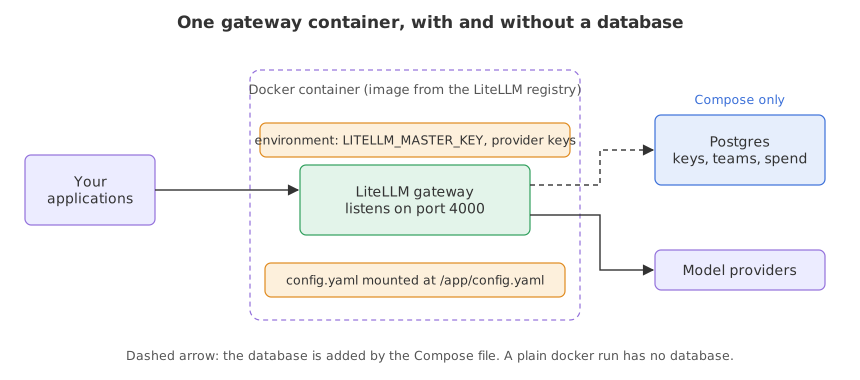
The LiteLLM proxy started the gateway with a command in your own Python environment. A company does not deploy a Python environment. It deploys an image, and this lesson shows the two ways the LiteLLM documentation starts that image: a plain container with no database, and Docker Compose with Postgres beside it. Docker is not run in this course, so the Docker commands are shown from the documentation and carry no output.
Syntax: a container is started with docker run. The config file is mounted with -v, secrets arrive with -e, the port is published with -p, and --config names the file inside the container.
docker run \
  -v $(pwd)/litellm_config.yaml:/app/config.yaml \
  -e GROQ_API_KEY=<your-groq-key> \
  -e LITELLM_MASTER_KEY=sk-<a-long-random-key> \
  -p 4000:4000 \
  docker.litellm.ai/berriai/litellm:latest \
  --config /app/config.yaml
Not run here. This block needs Docker and shows no output.
Running the image with a config file
Mounting the config and passing keys
The command above is the one on the Docker quick start page. -v maps a file on your machine to /app/config.yaml inside the container, and --config /app/config.yaml makes the gateway read it. -e sets an environment variable inside the container. LITELLM_MASTER_KEY is the root credential of the gateway, and the page says the proxy will not start without it. -p 4000:4000 publishes port 4000, the port the gateway listens on.
The provider key stays out of the file. A config line such as api_key: os.environ/OPENAI_API_KEY tells the gateway to read the key from the container's environment when it starts, so the file can be committed without a secret in it.
Knowing what this container lacks
The same page says this form has no database. Without one there is no model management in the admin interface, no virtual keys and no spend tracking. A request that carries a virtual key fails with No connected db. The page also says litellm_settings.max_budget is not a spend cap on this path. The proxy logs a one-time warning at startup when a budget is set with no database, and then carries on. A container started this way answers requests and applies the config file, and nothing more.
Adding Postgres with Docker Compose
The documentation's second option brings up the gateway and a Postgres database together from a Compose file. The page says the database stores your models, keys and spend logs. These commands download the file, write a .env with two random keys, and start both services.
curl -sSLO https://github.com/BerriAI/litellm/raw/main/docker/docker-compose.quickstart.yml
printf 'LITELLM_MASTER_KEY=sk-%s\nLITELLM_SALT_KEY=sk-%s\n' \
  "$(openssl rand -hex 32)" "$(openssl rand -hex 32)" > .env
docker compose -f docker-compose.quickstart.yml up -d
Not run here. This block needs Docker and shows no output.
LITELLM_MASTER_KEYis the root credential. The page says the admin interface athttp://localhost:4000/uiaccepts the user nameadminand this key as the password.LITELLM_SALT_KEYencrypts the provider API keys that you add in the admin interface. The page says it has no in-place rotation, so keep the generated value, which means keeping the.envfile.- The database connection is set up by the Compose file. A gateway started another way names its database with the
DATABASE_URLvariable, as the virtual keys page describes.
A gateway started from pip needs one more package to talk to that database. The prisma package is listed under the extra-proxy extra of litellm, and it is not part of litellm[proxy]. The next lesson shows what a gateway without it does when asked for a key.
Testing the config outside Docker
Starting a real gateway from Python
A container cannot be started here, but the file inside it is the same config.yaml the pip-installed gateway reads. Every example in this part starts a real gateway from a config file, calls it and stops it. A small function does the starting: it runs the litellm command in a child process with config.yaml and a port, writes its log to gateway.log, and waits until the gateway answers at /health/liveliness. Each example repeats it, so that each one runs on its own.
def start(port=4400, env=None):
    proc = subprocess.Popen(
        ["litellm", "--config", "config.yaml", "--port", str(port)],
        stdout=open("gateway.log", "w"), stderr=subprocess.STDOUT, env=env,
    )
    while True:
        try:
            urllib.request.urlopen(f"http://127.0.0.1:{port}/health/liveliness")
            return proc
        except OSError:
            time.sleep(1)
The caller stops the process in a finally block with proc.terminate(), so a failed example cannot leave a server running. Each lesson writes its own config.yaml, replacing the one before it.
Reading the master key from the environment
The Docker page passes the master key as an environment variable and not in the file. The example sets the same variable for the child process, with a config that holds no master_key line, and asks the gateway which models it serves.
import os
import subprocess
import time
import urllib.request
from pathlib import Path

import httpx


def start(port=4400, env=None):
    proc = subprocess.Popen(
        ["litellm", "--config", "config.yaml", "--port", str(port)],
        stdout=open("gateway.log", "w"), stderr=subprocess.STDOUT, env=env,
    )
    while True:
        try:
            urllib.request.urlopen(f"http://127.0.0.1:{port}/health/liveliness")
            return proc
        except OSError:
            time.sleep(1)


Path("config.yaml").write_text("""model_list:
  - model_name: careful
    litellm_params:
      model: groq/openai/gpt-oss-120b
      api_key: os.environ/GROQ_API_KEY
""")

proc = start(env={**os.environ, "LITELLM_MASTER_KEY": "sk-demo-1234"})
try:
    r = httpx.get("http://127.0.0.1:4400/v1/models", headers={"Authorization": "Bearer sk-demo-1234"})
    print(r.status_code, [m["id"] for m in r.json()["data"]])
finally:
    proc.terminate()
proc.wait()200 ['careful']
What the container run proved
- The key came from the environment. The config had no
master_keyline, and the gateway acceptedsk-demo-1234because the process was started withLITELLM_MASTER_KEYset, the way-esets it in a container. - The model group has a name of its own. The gateway lists
careful, themodel_namefrom the file, and not the provider's model string. Applications ask for the group. - The config is portable. The container reads the same file at
/app/config.yaml. What worked here with--config config.yamlis what the image gets, with the same keys supplied through-e.
Plain container vs Compose
| docker run | Docker Compose quick start | |
|---|---|---|
| Database | None | Postgres, started beside the gateway |
| Virtual keys and spend tracking | Not available | Available |
| Admin interface | No model management | Sign in at /ui |
| Budgets | max_budget not enforced | Checked against spend stored in the database |
| Use it for | A single shared model endpoint | A gateway several teams use |
Where a container gateway fits
- One shared endpoint for a team. A plain container with a config file gives every service the same model names and the same fallbacks.
- A company gateway with accounts. Compose, or any container platform with a Postgres database, adds virtual keys, budgets and logs.
- A reviewed deployment. The config file is the thing reviewed in a pull request, and the image tag is the thing promoted between environments.
latest tag. latest moves when a new release is published. A service other applications depend on should run a release you chose and tested. The page tells you to edit the downloaded Compose file to pin a specific release tag, and it does not say how to find the tag names, so read the registry or the release notes.Related
- Previous: Gateway keys
- Next: Virtual keys: a key per application
- Reference: Docker quick start in the LiteLLM docs
- Change
LITELLM_MASTER_KEYin the example to another value and call/v1/modelswith the old one. Print the status code and read what the gateway answers. - Add a second model group to the config, with the same Groq key, and print the list of ids again.
- If you have Docker, run the
docker runcommand with your own config and key, and call the container on port 4000 the same way.
Little by little, you're building something great.