
Health checks
A health check is a request that tests whether a gateway, or one of the models behind it, can still serve traffic.
Last updated: 12 Oct, 2026 · LiteLLM 1.105
Project: running the desk on a morning of tickets ended with a gateway that handled a morning of tickets. A gateway that a team depends on can stop answering overnight, or a provider key can expire while the process stays up. Health checks tell you before your users do. The health checks page splits them in two: probe endpoints that ask whether the process is alive and ready, and a model check that asks whether each configured model can answer.
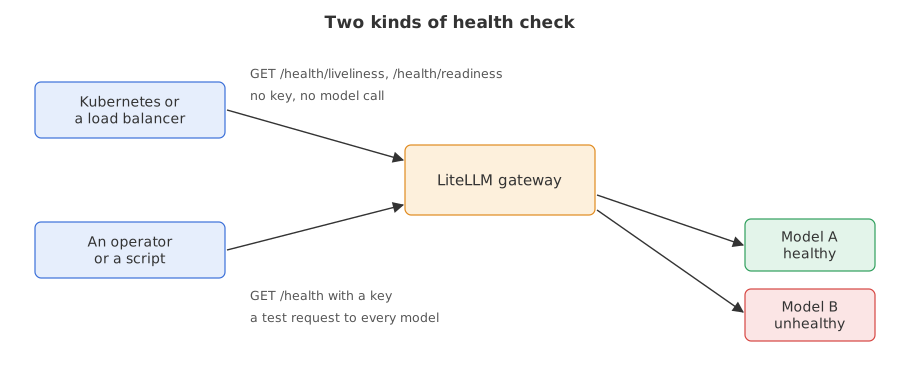
Syntax: the probes are plain GET requests with no key. The model check is a GET request with a gateway key.
GET /health/liveliness    # is the process alive? no key, no model call
GET /health/readiness     # is it ready for traffic? no key, no model call
GET /health               # does each model answer? needs a key, calls every model
Writing the helper that starts a gateway
Every program in this lesson starts a real gateway, calls it and stops it. ops.py does that: running() starts the litellm command, waits until the gateway answers, and stops it in a finally block so no run leaves a server behind. call() sends one request and returns the status, the body and the headers.
from pathlib import Path
import sys

Path("ops.py").write_text('''import json
import os
import subprocess
import sys
import time
import urllib.error
import urllib.request
from contextlib import contextmanager

KEY = "sk-gateway-1234"          # the master key written in every config.yaml


@contextmanager
def running(port, env=None):
    """Start the gateway on `port` from config.yaml, wait until it answers, stop it afterwards."""
    litellm = os.path.join(os.path.dirname(sys.executable), "litellm")
    cmd = [litellm, "--config", "config.yaml", "--port", str(port)]
    proc = subprocess.Popen(cmd, env=env, stdout=open("gateway.log", "w"), stderr=subprocess.STDOUT)
    try:
        for _ in range(90):
            if proc.poll() is not None:
                raise RuntimeError("the gateway stopped; read gateway.log")
            try:
                urllib.request.urlopen(f"http://127.0.0.1:{port}/health/liveliness")
                break
            except OSError:
                time.sleep(1)
        yield f"http://127.0.0.1:{port}"
    finally:
        proc.terminate()
        proc.wait(10)


def call(url, path, body=None, key=KEY, headers=None):
    """Send one request. Returns (status, text, headers) and does not raise on 4xx or 5xx."""
    head = dict(headers or {})
    if key:
        head["Authorization"] = f"Bearer {key}"
    if body is not None:
        head["Content-Type"] = "application/json"
    data = json.dumps(body).encode() if body is not None else None
    try:
        reply = urllib.request.urlopen(urllib.request.Request(url + path, data=data, headers=head), timeout=60)
    except urllib.error.HTTPError as error:
        reply = error
    return reply.getcode(), reply.read().decode(), {k.lower(): v for k, v in reply.headers.items()}


def chat(url, model, text="Reply with one word: ok", key=KEY, headers=None, **extra):
    """One chat request. Extra keyword arguments are added to the JSON body."""
    body = {"model": model, "messages": [{"role": "user", "content": text}], "max_tokens": 60, **extra}
    return call(url, "/chat/completions", body, key, headers)
''')
sys.path.insert(0, ".")        # lets the programs below run: from ops import running, call, chat
print("wrote ops.py")wrote ops.py
Checking the probe endpoints
A probe is a cheap request that an orchestrator repeats every few seconds. An orchestrator is a tool such as Kubernetes that starts programs and restarts them when they fail. The health checks page says the probe endpoints answer "is the gateway process up and able to serve traffic?" without making any model call.
The liveness probe
/health/liveliness answers 200 while the process is up. The page says /health/liveness, the Kubernetes spelling, is an alias and that both are real routes. No dependency is checked.
The readiness probe
/health/readiness answers 200 when the worker can take traffic. Its db field is connected, disconnected, or Not connected when no database is configured. With a database configured and unreachable, the page says readiness returns 503, so the orchestrator stops sending traffic to that copy.
The model check
/health accepts any valid gateway key. The page says it runs a real test request against every configured model, so it costs a few tokens per model. It returns a list of healthy deployments and a list of unhealthy ones.
Running the probes and the model check
The config has two models. good uses the course key. bad uses a key that Groq will reject. model_info.id gives each deployment a name that the report repeats. The program calls the three probe URLs without a key, then calls /health with the master key and prints one short line per deployment.
import json
from pathlib import Path
from ops import running, call

Path("config.yaml").write_text("""model_list:
  - model_name: good
    litellm_params:
      model: groq/openai/gpt-oss-20b
      api_key: os.environ/GROQ_API_KEY
    model_info:
      id: good
  - model_name: bad
    litellm_params:
      model: groq/openai/gpt-oss-120b
      api_key: gsk_not_a_real_key
    model_info:
      id: bad
general_settings:
  master_key: sk-gateway-1234
""")

with running(4701) as url:
    for path in ["/health/liveliness", "/health/liveness", "/health/readiness"]:
        status, text, _ = call(url, path, key=None)      # the probes take no key
        print(path, status, text)
    report = json.loads(call(url, "/health")[1])         # /health takes a key
    print("healthy:", [e["model_id"] for e in report["healthy_endpoints"]])
    for e in report["unhealthy_endpoints"]:
print("unhealthy:", e["model_id"], "|", e["error"].splitlines()[0][:100])/health/liveliness 200 "I'm alive!"
/health/liveness 200 "I'm alive!"
/health/readiness 200 {"status":"healthy","db":"Not connected"}
healthy: ['good']
unhealthy: bad | litellm.BadRequestError: GroqException - {"error":{"message":"Invalid API Key","type":"invalid_requeReading the probe and model results
- Both liveness spellings answered 200 with
"I'm alive!". They are the same check under two names. Neither touched a model. - Readiness answered 200 with
"db":"Not connected". This gateway has no database, and the field says so instead of failing. - The model check split the two deployments.
goodis in the healthy list.badis in the unhealthy list, with the provider's own error text. The first line of that text is what the program printed. - The probes passed while a model was failing. A 200 from
/health/livelinesssays the process is alive. It says nothing about the models, which is why the model check exists.
Handing the probes to Kubernetes
The health checks page gives this pair of probes for a gateway on port 4000. The first restarts the container when it stops answering. The second removes it from rotation until it is ready.
livenessProbe:
  httpGet:
    path: /health/liveliness
    port: 4000
readinessProbe:
  httpGet:
    path: /health/readiness
    port: 4000
Running model checks in the background
By default the page says /health tests every model on each call, which spends tokens each time. Two settings under general_settings move the testing to a timer: the gateway tests every model every health_check_interval seconds and /health returns the last result. The page names a longer default for the interval. The next example sets 15 seconds so a run stays short.
general_settings:
  background_health_checks: true   # test every model on a timer
  health_check_interval: 15        # seconds between rounds
Routing around a model that fails its check
The health check driven routing page adds one more setting. With enable_health_check_routing: true, a deployment that fails its background check is taken out of the pool before a user request reaches it. The page says background checks must be on for this to work. Without it, the Router only finds out a deployment is broken after a user request fails.
general_settings:
  background_health_checks: true
  health_check_interval: 15
  enable_health_check_routing: true   # skip deployments that fail their check
router_settings:
  num_retries: 0                      # no silent retry, so a bad pick shows as an error
num_retries: 0 matters for the demonstration. The Router normally retries a failed call on another deployment, as Retries: trying again when a provider refuses shows, and the retry would hide the bad pick. Here the group pool holds the working model and the model with the rejected key. The program starts a gateway with the routing flag off, then another with it on. Each one waits for the first background round, then sends eight requests and counts the status codes.
import json
import time
from collections import Counter
from pathlib import Path
from ops import running, call, chat

TEMPLATE = """model_list:
  - model_name: pool
    litellm_params:
      model: groq/openai/gpt-oss-20b
      api_key: os.environ/GROQ_API_KEY
  - model_name: pool
    litellm_params:
      model: groq/openai/gpt-oss-120b
      api_key: gsk_not_a_real_key
general_settings:
  master_key: sk-gateway-1234
  background_health_checks: true
  health_check_interval: 15
  enable_health_check_routing: {routing}
router_settings:
  num_retries: 0
"""

for routing in ["false", "true"]:
    Path("config.yaml").write_text(TEMPLATE.format(routing=routing))
    with running(4702 if routing == "false" else 4703) as url:
        while "unhealthy_endpoints" not in json.loads(call(url, "/health")[1]):
            time.sleep(2)                              # wait for the first background round
        tally = Counter(chat(url, "pool")[0] for _ in range(8))
print("health check routing", routing, dict(tally))health check routing false {401: 1, 200: 7}
health check routing true {200: 8}Reading the effect of health check routing
- With the flag off, requests could reach the rejected key. The Router picks between the two deployments at random. In the captured run one of the eight came back with status 401. The count changes on every run, and a run can show none.
- With the flag on, all eight answered 200. The first background round marked the deployment with the rejected key unhealthy, and the Router stopped choosing it.
- The page lists a safety net. It says that when every deployment of a group is unhealthy, the filter is bypassed so traffic keeps flowing rather than returning no deployment. That case is not run here.
Probes vs the model check vs health check routing
| Probe endpoints | GET /health | Health check routing | |
|---|---|---|---|
| Needs a key | No | Yes, any valid key | No, it is a setting |
| Calls a model | No | Yes, one test request per model | Yes, on the background timer |
| Answers | Is the process alive or ready? | Which models work right now? | Which deployments may receive traffic? |
| Read by | Kubernetes or a load balancer | An operator or a script | The Router, on every request |
Where you use health checks
- Container orchestration. The liveness and readiness probes decide when a gateway copy is restarted or removed from rotation.
- A morning check. One call to
/healthsays which provider keys expired overnight. - Several deployments behind one name. Health check routing keeps a failed one out of the pool without waiting for users to hit it.
/health/liveliness or /health/readiness, not at /health. The model check sends a real request to every model on every call, so a probe that fires every few seconds spends tokens all day, and one slow provider can make the whole gateway look dead.Related
- Previous: Project: running the desk on a morning of tickets
- Next: Prometheus metrics
- See also: Cooldowns: resting a failing deployment for how the Router rests a deployment after failed requests
- Reference: Health Checks and Health Check Driven Routing in the LiteLLM docs
- Change the key of
badtoos.environ/GROQ_API_KEYin the first program and run it again. The unhealthy list comes back empty. - Call
/health?model=goodwith the master key. The page says?model=<model_name>checks a single model. - Call
/health/readiness/detailswith the master key and print the body. It adds the gateway version and the active callbacks to the short readiness answer.
Little by little, you're building something great.