
Tool calling: when the model asks for data
Tool calling is a feature of chat models that lets the model ask your program to run a function and send back the result, so the answer can use data the model was never trained on.
Last updated: 12 Oct, 2026 · LiteLLM 1.105
Endpoints beyond chat listed what LiteLLM can call besides chat. This lesson stays with chat and adds tools. A model cannot look up an order or read a database. It can write out a request for one, and your program does the lookup. LiteLLM sends the same tool description to every provider. It hands the request back in one shape.
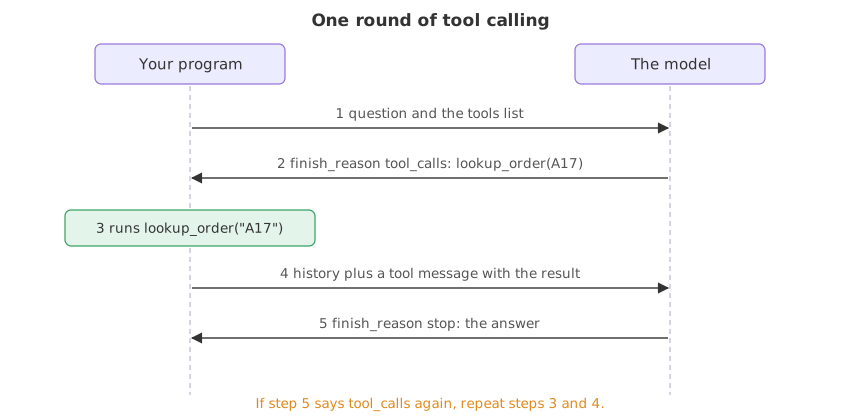
The model never runs anything. It answers a question with a request, your program runs the function, and the result goes back to the model as one more message. That exchange can happen more than once before the model gives its answer.
Syntax: pass tools to completion(), then read tool_calls on the reply message.
response = completion(
    model="groq/openai/gpt-oss-20b",
    messages=messages,       # the conversation so far
    tools=TOOLS,             # the functions the model may ask for
    max_tokens=1000,         # reasoning models spend tokens thinking first
)
message = response.choices[0].message
message.tool_calls           # None for an answer, a list for a request
Describing a tool to the model
The tool description
A tool is a dictionary in the OpenAI shape. The name is what the model writes back when it wants the tool. The description is the text the model reads to decide when the tool fits, so it should say what the tool does and give an example id. parameters is a JSON Schema that says which arguments exist and which are required.
TOOLS = [{
    "type": "function",
    "function": {
        "name": "lookup_order",                    # what the model writes when it wants this tool
        "description": "Look up one order by its id, such as A17.",
        "parameters": {                            # JSON Schema for the arguments
            "type": "object",
            "properties": {"order_id": {"type": "string"}},
            "required": ["order_id"],
        },
    },
}]
Reading the model's request
The question below is about one order. The model has no order data, so it should reply with a request instead of text. finish_reason says which of the two it was. function.arguments arrives as a JSON string, not a dictionary. max_tokens is 1000 because a gpt-oss model spends part of its budget reasoning before it writes anything. A small budget comes back with no content at all.
from litellm import completion

response = completion(
    model="groq/openai/gpt-oss-20b",
    messages=[{"role": "user", "content": "Where is my order A17?"}],
    tools=TOOLS,
    max_tokens=1000,
)
choice = response.choices[0]
call = choice.message.tool_calls[0]
print(choice.finish_reason)
print(choice.message.content)
print(call.function.name, call.function.arguments)tool_calls
None
lookup_order {"order_id":"A17"}- finish_reason is
tool_calls, so this reply is a request, not an answer. - content is
None. The model wrote no text, only the request. - function.arguments holds the order id the model pulled out of the question, as JSON text.
json.loadsturns it into a dictionary.
Sending the result back
One reply is not always enough. Ask about two orders and the model may request one, wait for its result, and then request the other. A program that answers after a single round would stop at a message with no text. The fix is a loop that runs while the reply still carries tool_calls.
Running the function
The function here is a dictionary lookup. In a real program it would query a database or call an API.
ORDERS = {"A17": "shipped on 3 March", "C40": "waiting for stock"}

def run_tool(call):
    order = json.loads(call.function.arguments)["order_id"]
    return ORDERS.get(order, "no such order")
Adding the request and the result to the history
Two messages go back: the model's own request, copied unchanged, and a tool message with the result. The tool message carries the tool_call_id of the request it answers, which is how the model matches results to requests.
messages.append(message.model_dump(exclude_none=True))   # the model's request
for call in message.tool_calls:
    messages.append({
        "role": "tool",
        "tool_call_id": call.id,       # which request this answers
        "content": run_tool(call),
    })
Looping until the model answers
The loop calls the model, stops when the reply has no tool calls, and otherwise runs the tools and goes round again. A turn limit keeps a confused model from looping forever.
for turn in range(4):                          # a limit, not an expectation
    response = completion(model=model, messages=messages, tools=TOOLS, max_tokens=1000)
    message = response.choices[0].message
    if not message.tool_calls:                 # no request: this is the answer
        break
    # ... add the request and the results, as shown above
Two models answering the same two-order question
The same loop runs against gpt-oss-20b on Groq and gemini-2.5-flash-lite. The system message keeps each answer to one line per order, so the model reports only what the tool returned. Each line printed before the answer shows one turn.
import json
from litellm import completion

ORDERS = {"A17": "shipped on 3 March", "C40": "waiting for stock"}
TOOLS = [{"type": "function", "function": {
    "name": "lookup_order",
    "description": "Look up one order by its id, such as A17.",
    "parameters": {"type": "object",
                   "properties": {"order_id": {"type": "string"}},
                   "required": ["order_id"]},
}}]

for model in ["groq/openai/gpt-oss-20b", "gemini/gemini-2.5-flash-lite"]:
    messages = [
        {"role": "system", "content": "Answer in one short line per order, using only the tool results."},
        {"role": "user", "content": "Where are my orders A17 and C40?"},
    ]
    for turn in range(4):
        response = completion(model=model, messages=messages, tools=TOOLS, max_tokens=1000)
        message = response.choices[0].message
        asked = [call.function.arguments for call in message.tool_calls or []]
        print(model, "turn", turn, response.choices[0].finish_reason, asked)
        if not message.tool_calls:
            break
        messages.append(message.model_dump(exclude_none=True))
        for call in message.tool_calls:
            order = json.loads(call.function.arguments)["order_id"]
            messages.append({"role": "tool", "tool_call_id": call.id,
                             "content": ORDERS.get(order, "no such order")})
print(message.content)groq/openai/gpt-oss-20b turn 0 tool_calls ['{"order_id":"A17"}']
groq/openai/gpt-oss-20b turn 1 tool_calls ['{"order_id":"C40"}']
groq/openai/gpt-oss-20b turn 2 stop []
A17: shipped on 3 March
C40: waiting for stock
gemini/gemini-2.5-flash-lite turn 0 tool_calls ['{"order_id": "A17"}', '{"order_id": "C40"}']
gemini/gemini-2.5-flash-lite turn 1 stop []
The order A17 was shipped on 3 March. The order C40 is waiting for stock.- gpt-oss-20b asked for one order per turn. It requested A17, got the result, then requested C40, so the answer came on the third turn.
- gemini-2.5-flash-lite put both requests in one reply. Its first turn carries two entries in
tool_calls, and the loop answers both before going round again. - The loop did not change. It handles one request or several, because it always works through
message.tool_callsas a list.
One call per reply vs several
| One call per reply | Several calls in one reply | |
|---|---|---|
| Seen on | gpt-oss-20b | gemini-2.5-flash-lite |
| Turns for two orders | Three: two requests, then the answer | Two: one reply with both requests, then the answer |
| What your loop needs | To go round again after each result | To answer every entry in the list before going round |
| Safe code | A loop over message.tool_calls | The same loop |
Where you use tool calling
- Looking up live data. Order status, stock levels or a customer record that no model was trained on.
- Doing arithmetic or date maths. The model asks a calculator function and quotes its result.
- Taking an action. Creating a ticket or sending a message, with your program deciding whether to allow it before it runs.
tool_calls is not an answer, and its content is empty. Code that prints message.content after one call shows None for any question that needs more than one lookup. Loop until tool_calls is empty, and cap the number of turns.Related
- Previous: Endpoints beyond chat
- Next: Structured output your code can read
- See also: Exceptions: one set for every provider for what a failed tool call looks like when the provider refuses the request
- Reference: Function calling in the LiteLLM docs
- Ask about one order,
Where is my order C40?, and count the turns each model needs. - Change
range(4)torange(2)and run gpt-oss-20b again. It ends without an answer and printsNone. - Ask about an order that is not in
ORDERS, such asZ99, and read how the model reports theno such orderresult.
Slow is fine. Stopping is the only problem.