 LiteLLM overview
LiteLLM is an open-source Python library and server that lets one program call more than a hundred model providers through the OpenAI request format, and adds retries, fallbacks, caching and cost tracking on top.
Last updated: 12 Oct, 2026 · LiteLLM 1.105
A language model is called over the internet. Every provider that sells one has its own request shape, its own error names and its own way of counting tokens. A program that talks to two providers carries two sets of code. LiteLLM puts one function in front of all of them, and the same package can also run as a gateway that a whole company's applications call. This course teaches both, from a single call to a gateway that a support team runs.
Who builds LiteLLM, its licence and the version used
BerriAI develops LiteLLM, and its README carries a Y Combinator W23 badge. The package metadata lists the MIT licence and calls it a library to interface with LLM API providers. The README calls it an open source AI Gateway for 100+ LLM providers. Some gateway features sit in a separate paid Enterprise tier under a commercial licence. Each lesson that touches one says so. Every example here runs on LiteLLM 1.105.0 with Python 3.10 or later.
import litellm

print(len(litellm.provider_list), "entries in the provider list")
print(litellm.provider_list[0].value, litellm.provider_list[1].value, litellm.provider_list[3].value)165 entries in the provider list openai chatgpt jina_ai
The list includes a few variants of one provider, such as a text-completion form of OpenAI. The count is a little higher than the number of companies. Each entry is a name that can start a model string, such as groq. Providers and keys: the model string shows how that string is read.
The problem of one provider per code path
A request to OpenAI, Google and Anthropic asks for the same thing, an answer to some messages, in three different shapes. The system prompt sits in different places. The token limit has different names. The answer is read from different fields, and a bad key is reported in different words. Why LiteLLM: one interface for every provider calls two providers directly to show the difference. It then makes the same two calls with one function.
Two ways to run LiteLLM: the SDK and the proxy
- The SDK is the Python package.
litellm.completion()runs inside your own process, so there is nothing to deploy. The Router belongs here too: it spreads calls over several deployments and handles retries, fallbacks and cooldowns. - The proxy is a server, started from the same package with the
[proxy]extra. Applications send it requests in the OpenAI format, and it applies keys, budgets, caching and the Router for all of them. The LiteLLM documentation calls it the AI Gateway.
The gateway landscape: where LiteLLM sits places both next to the other gateways, and The words you will meet defines each term used above.
What the eight parts build
- Why a gateway explains the problem, names the alternatives, defines the vocabulary and installs LiteLLM. It ends with Installation and setup.
- The SDK, call by call takes one call apart: the response object, the model string, aliases, streaming, cost, exceptions, callbacks and endpoints other than chat. It starts with completion(): your first call.
- Tools, shapes and a model of your own adds tool calling, structured output, images and sound, and a provider you write yourself. It starts with Tool calling: when the model asks for data.
- The Router groups deployments under one name and adds routing strategies, retries, fallbacks and cooldowns. It starts with Router: model groups and deployments.
- Paying less sends easy questions to a cheap model and caches answers in three ways. It starts with The cheap model first.
- The gateway starts the proxy, calls it from the OpenAI client and compares the three ways to call a model. It starts with The LiteLLM proxy.
- Running it for a company adds virtual keys, the admin UI, guardrails, observability, MCP tools and one configuration file. It starts with The gateway in a container.
- The gateway you would run builds the gateway a support team runs, the desk application that calls it, and a morning of tickets through both. It starts with Project: the gateway a team runs.
The learning path through all 41 lessons
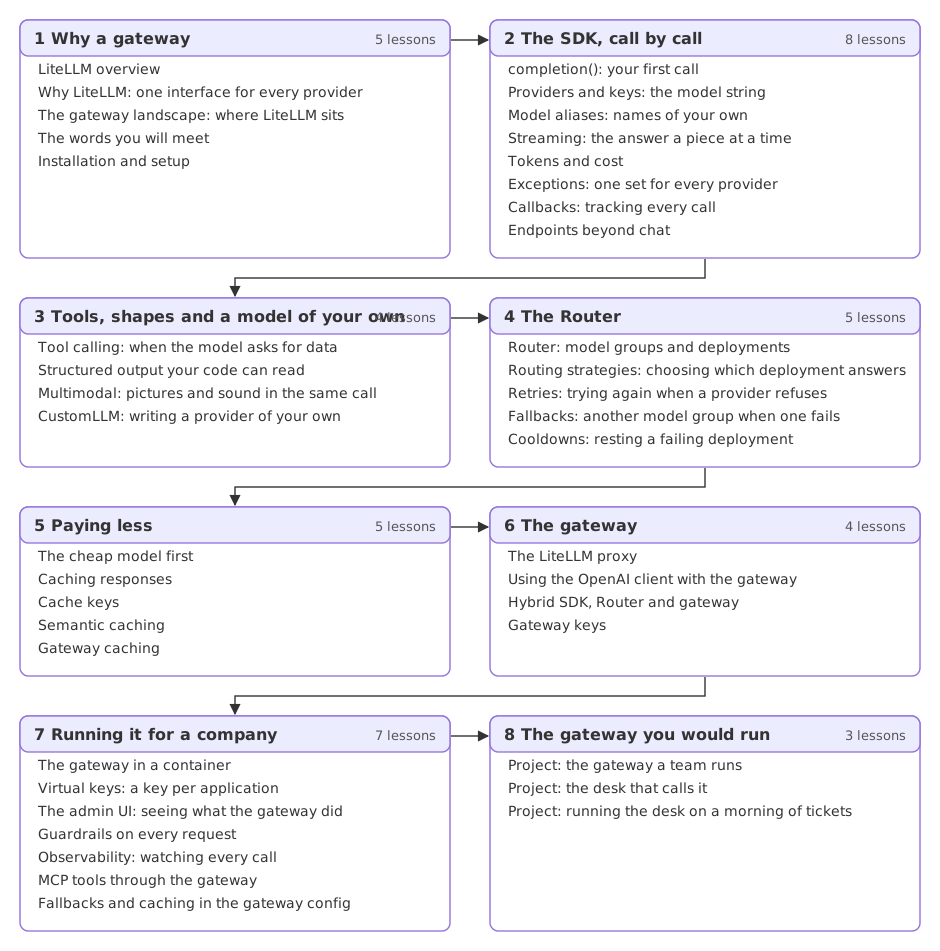
Read the parts in order. The Router lessons assume the call and its errors from the SDK part, the caching lessons assume the Router, and the gateway part assumes all three.
Finding a lesson by part
The models, keys and tools the examples run on
Calls go to real models. Two free keys are enough: one from Groq, for groq/openai/gpt-oss-120b and groq/openai/gpt-oss-20b, and one from Google AI Studio, for gemini/gemini-2.5-flash-lite. Installation and setup shows how to get both and makes the first call. No OpenAI key is needed anywhere. Anything that needs Docker, Redis, a database or a paid provider is shown as code. A plain line says it is not run here, and no output is claimed for it.
Who the LiteLLM course is for
- Python developers who call more than one model provider, or expect to, and want one calling style.
- Backend and platform engineers who need one place for keys, limits, fallbacks and spending across several applications.
- AI engineers who build agents and want a model to be a setting they change, not code they rewrite.
What to know before starting
- Basic Python: functions, dictionaries, imports and
trywithexcept. Python for AI covers them. - What an API call is: a request, a response and a key. APIs for AI covers it.
- A terminal and a way to run a Python file or a notebook.
Reading the LiteLLM documentation alongside
The official LiteLLM documentation is the reference for everything taught here. Each lesson names the page for its topic in its Related list. The providers page lists every provider with its model strings.
Related
- Next: Why LiteLLM: one interface for every provider
- See also: LLM gateways in the generative and agentic AI course
- Reference: LiteLLM documentation and the LiteLLM repository
Every expert started right here.