
LLM gateways
An LLM gateway is a layer between an application and its model providers that gives every model one call format and handles fallbacks, routing, caching, cost tracking and guardrails in one place.
Last updated: 08 Oct, 2026 · LiteLLM 1.104
Each provider has its own SDK, its own errors and its own prices. An app that calls them directly repeats that work, and it stops working when its one provider does. A gateway moves that work out of the app and into a single place that every app shares.
What a gateway does for an app
The video's story: a startup has a chatbot on one provider, a RAG app on a second and a third app on a third. Each needed its own integration code, so each failed on its own terms when its provider did. The video recalls an OpenAI outage in November 2023, when apps tied to that one provider stopped answering. With a gateway in the middle, the apps send every request to one address, and the gateway forwards it to a provider. Which provider, and what to do when one fails, is a change of configuration and not of app code.
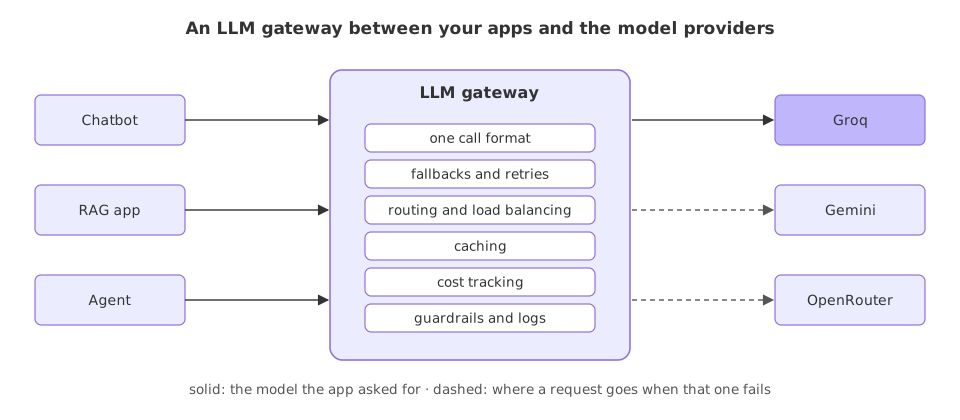
The video lists eight capabilities. The sections below show the unified API, fallbacks, cost tracking, routing, caching and a guardrail in code.
| Capability | What it does |
|---|---|
| Unified API | One function and one message format for every provider |
| Fallbacks | Move to a backup model when the first one fails |
| Smart routing | Send each kind of request to the model that suits it |
| Load balancing | Spread requests over several keys or deployments behind one name |
| Caching | Answer a repeated request from storage and skip the model call |
| Observability | Log every call with its prompt, reply, tokens and cost |
| Guardrails | Keep sensitive input from reaching a provider |
| Evals | Plug an evaluation framework into the same traffic |
Calling two providers with one function
The video's gateway is LiteLLM, an open-source Python library that also runs as a server. Its completion() takes a model string and a list of messages and returns the same response object for every provider. The string is the provider's name, a slash and the model: groq/openai/gpt-oss-120b or gemini/gemini-2.5-flash. The video uses OpenAI, Anthropic and Gemini 1.5 models; the page uses Groq and Gemini 2.5 Flash, which need only a Groq key and a Gemini key.
pip install litellm==1.104.0LiteLLM is its own install, separate from the LangChain packages. It reads GROQ_API_KEY for Groq; for Gemini, the run below used the GOOGLE_API_KEY from the Gemini setup and LiteLLM accepted it.
from litellm import completion

messages = [{"role": "user", "content": "Explain RAG in one sentence."}]

completion(model="groq/openai/gpt-oss-120b", messages=messages)    # Groq
completion(model="gemini/gemini-2.5-flash", messages=messages) # Gemini: only the string changesThe video's models in this part are OpenAI's gpt-4o-mini and Gemini 1.5 Flash, and its fallback list names them. The page keeps the same two ideas with current models.
Adding a fallback
fallbacks is a list of model strings. LiteLLM tries the primary model first, and only when that call raises an error does it move to the next entry in the list. The app sees one response either way. Here the primary is a model name that does not exist, so the call has to fall back.
response = completion(
    model="groq/not-a-real-model",               # primary: this model does not exist
    messages=messages,
    fallbacks=["gemini/gemini-2.5-flash"],       # tried when the primary fails
)
Reading the cost of a call
completion_cost turns a response into dollars using LiteLLM's built-in price table. The provider name is passed so the lookup uses the right row of that table.
from litellm import completion_cost

completion_cost(completion_response=response, custom_llm_provider="gemini")   # dollars for this call
Running a call that falls back and reports its cost
One call, with both pieces together. LiteLLM writes the failed first attempt to the terminal's error stream; the printed lines below are the standard output.
import litellm
from litellm import completion, completion_cost

litellm.suppress_debug_info = True               # hide the "Give Feedback" banner on errors

response = completion(
    model="groq/not-a-real-model",               # primary: this model does not exist
    messages=[{"role": "user", "content": "Explain RAG in one sentence."}],
    fallbacks=["gemini/gemini-2.5-flash"],       # tried when the primary fails
)
usage = response.usage
print("answered by:", response.model)
print(response.choices[0].message.content)
print("tokens in/out:", usage.prompt_tokens, usage.completion_tokens)
print("thinking tokens:", usage.completion_tokens_details.reasoning_tokens)
print("cost: $", round(completion_cost(completion_response=response, custom_llm_provider="gemini"), 6))answered by: gemini-2.5-flash RAG enhances a large language model's responses by first retrieving relevant information from an external knowledge base and then integrating it into the prompt to generate more accurate and contextually informed outputs. tokens in/out: 8 934 thinking tokens: 897 cost: $ 0.002337
Reading the fallback call
- answered by: gemini-2.5-flash. The primary,
groq/not-a-real-model, does not exist, so the call failed and LiteLLM moved to the entry infallbacks. The failed first attempt was written to the terminal's error stream, not to the printed lines. - The reply has the usual shape. It is read with
response.choices[0].message.content, as for any provider, so the app's code does not change when a fallback answers. - 8 tokens in, 934 out, 897 of them thinking tokens. Gemini 2.5 Flash reasons before it answers, and its thinking tokens are part of the output count. Only the remaining 37 tokens are the reply you read.
- Cost: $0.002337. LiteLLM computed it from its price table. Almost all of it is the output side: output tokens are priced higher than input tokens, and the thinking tokens are billed as output.
Naming models with a Router
The video's router gives each job an alias: a cheap fast model, a stronger one for code, a balanced one in between. The app asks for the alias and the router decides which deployment answers. Each entry in model_list is a model_name, the alias the app uses, and litellm_params, which says which model and key stand behind it. Fallbacks, retries and a timeout belong to the router too.
import os
from litellm import Router

router = Router(model_list=[
    {"model_name": "fast", "litellm_params": {"model": "groq/openai/gpt-oss-20b", "api_key": os.environ["GROQ_API_KEY"]}},
    {"model_name": "smart", "litellm_params": {"model": "groq/openai/gpt-oss-120b", "api_key": os.environ["GROQ_API_KEY"]}},
], fallbacks=[{"fast": ["smart"]}], num_retries=1, timeout=30)

router.completion(model="fast", messages=[{"role": "user", "content": "Say hi in 3 words."}])
Several entries can share one alias. The router then spreads requests over them, a random pick by default (simple-shuffle); least-busy, latency-based-routing and cost-based-routing choose by load, speed or price instead.
Caching a repeated request
With a cache on, a request identical to an earlier one is answered from storage and the model is not called, so it costs nothing and returns at once. Cache(type="local") keeps entries in memory in one process; Redis is the choice when several servers share a cache. The match is on the exact request. A question that only resembles an earlier one is a miss, and catching those needs a semantic cache. In 1.104.0 a cache hit also needs the proxy extras, installed with pip install "litellm[proxy]".
import litellm
from litellm import completion
from litellm.caching.caching import Cache

litellm.cache = Cache(type="local")               # in memory, this process only
kw = dict(model="groq/openai/gpt-oss-20b", caching=True,
          messages=[{"role": "user", "content": "What does LLM stand for? One line."}])
first = completion(**kw)                           # goes to the model
second = completion(**kw)                          # same request: answered from the cache
Running the gateway as a server
The same model list can live in a config.yaml and run as a server with litellm --config config.yaml. Every app then calls the gateway's address with any OpenAI-compatible client and the alias as the model name, and nothing in the apps names a provider. The server expects a master key, set here from an environment variable.
model_list:
  - model_name: fast
    litellm_params:
      model: groq/openai/gpt-oss-20b
      api_key: os.environ/GROQ_API_KEY
  - model_name: smart
    litellm_params:
      model: groq/openai/gpt-oss-120b
      api_key: os.environ/GROQ_API_KEY
router_settings:
  fallbacks: [{"fast": ["smart"]}]
general_settings:
  master_key: os.environ/LITELLM_MASTER_KEY
Hosted gateways do this job as a service, with nothing to run: the video's notebook names OpenRouter, Cloudflare AI Gateway, Portkey, Helicone and Kong AI Gateway next to LiteLLM.
| Option | Runs where |
|---|---|
| LiteLLM | Your machine or your server, as a library or a proxy |
| OpenRouter | Hosted: one key for many models |
| Cloudflare AI Gateway | Hosted on Cloudflare, in front of the provider |
| Portkey | Hosted, with an open-source gateway |
| Helicone | Hosted, with a self-hosting option |
| Kong AI Gateway | Part of Kong Gateway, on your own infrastructure |
Blocking a prompt before the gateway call
A guardrail that has to stop a request belongs in code that runs before the call. LiteLLM's input_callback hooks observe a call as it is made: a hook that raises an error does not stop the request, and the call still reaches the provider. The reliable place for a check is your own function in front of completion, or a guardrail configured on the proxy. This one refuses a prompt that looks like a card number before anything is sent.
import re
from litellm import completion

CARD = re.compile(r"\b(?:\d[ -]?){13,16}\b")                # 13 to 16 digits, with optional spaces or dashes

def guarded_completion(**kwargs):
    text = " ".join(m["content"] for m in kwargs["messages"])
    if CARD.search(text):                                   # your own check, before the gateway call
        raise ValueError("blocked: the prompt looks like it holds a card number")
    return completion(**kwargs)
The Guardrails lesson covers checks on both sides of a model call.
Direct provider calls vs a gateway
| Direct SDK calls | Through a gateway | |
|---|---|---|
| Switching model | A code change in every app | A change of string or config |
| Provider outage | The app fails with it | Falls back to another model |
| Cost and logs | Added to each app | One place for every app |
| Extra moving part | None | One more service, or one more library, to run |
Where you use a gateway
- Several apps on one set of keys. Keys, rate limits and spend live in one place instead of in every app.
- Staying up through a provider outage. A fallback keeps the app answering while the first provider recovers.
- Cost control. Routing easy requests to a small model and caching repeated ones cut the bill, and the cost of every call is logged.
Related
- Previous: Evaluating LLM apps
- Next: Production generative AI
- Reference: LiteLLM documentation
- Go deeper: LiteLLM covers routing strategies, cooldowns, virtual keys and the proxy in full
- Change the primary to
"groq/openai/gpt-oss-20b", a model that exists. The call is answered by Groq's model and no fallback runs. Printresponse.modelto see it. - Add
"groq/openai/gpt-oss-120b"to the end of thefallbackslist. It is used only when the Gemini fallback fails as well. - Add a second request to the Router piece with
model="smart"and compare which deployment answered each one.
Little by little, you're building something great.