
Agent memory
Agent memory is the set of techniques that store what was said or learned earlier and put the relevant part back into a model's prompt, so that an agent can use it in a later reply.
Last updated: 09 Oct, 2026 · OpenAI SDK 3.3
Evals in CI closed the evaluation part: you can now measure whether an answer is right. Memory decides what the model gets to read before it answers. An agent that loses a user's salary asks for it again, and an agent that carries a wrong fact forward repeats it. The memory module of the video starts with the reason memory has to be built at all.
This part of the video starts at 3:01:15. It opens the notebook 1_conversational_buffer_memory.ipynb with three points: an LLM call keeps nothing, a buffer is a list of messages that you append to, and every message has a role.
An agent loop is a growing message list too: its system prompt, user messages, assistant replies and tool results are sent again on every model call, so the buffer described here is also what an agent runs on.
Why an LLM API is stateless
A chat completion call is stateless: the server answers one request and stores nothing for the next one. The model does not know what was said a second ago. It reads what is inside the current request and no more. The notebook in the video puts it in one line: "LLMs are stateless compute functions: input goes in, output comes out, nothing is stored." This is by design. Since no request depends on an earlier one, any server can answer any request.
A system is stateful when what it returns can depend on earlier requests. A chat app looks stateful because the client keeps the conversation and sends it again each time. In every lesson of this part, memory is text that your code stores and puts back into the request. The model itself is never changed by a conversation.
A request is a list of messages, and each message has a role and a content. system holds the agent's instructions, user holds what the person wrote, and assistant holds an earlier reply of the model. With the OpenAI SDK the system message is the first item of the list.
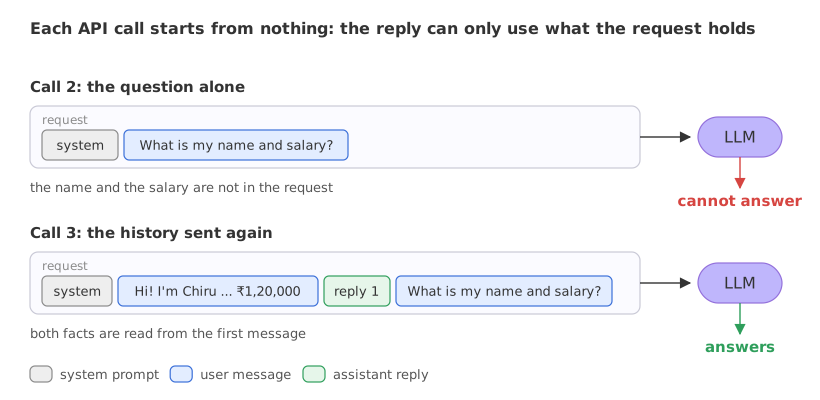
Calling the model with and without the history
The notebooks in the video call gpt-4o through OpenAI's API. The code here uses the same OpenAI SDK pointed at Groq, with the model openai/gpt-oss-120b, so only the client line and the model line differ. The example uses the first message of the video's demo conversation with FinCoach, a personal-finance advisor.
The client and the model
base_url sends the SDK's requests to Groq, and the key comes from the GROQ_API_KEY environment variable set up in Installing Python for AI security.
import os
from openai import OpenAI

client = OpenAI(base_url="https://api.groq.com/openai/v1", api_key=os.environ["GROQ_API_KEY"])
MODEL = "openai/gpt-oss-120b"
One helper for a call
ask() sends a list of messages after a short system prompt and returns the text of the reply. openai/gpt-oss-120b is a reasoning model: it thinks before it answers, and that hidden reasoning counts inside max_tokens, so even a two-sentence reply gets a roomy limit of 600. temperature=0 keeps the reply as steady as the provider allows.
def ask(messages):
    response = client.chat.completions.create(
        model=MODEL, max_tokens=600, temperature=0, messages=[SYSTEM] + messages)
    return response.choices[0].message.content
Sending the history again
The third call builds the history by hand: the first user message, the reply the model gave to it, then the question.
history = [intro, {"role": "assistant", "content": first_reply}, question]Three calls to one model
Call 1 introduces Chiru and the salary. Call 2 asks for both in a fresh request. Call 3 asks the same question with the history in front of it.
import os
from openai import OpenAI

client = OpenAI(base_url="https://api.groq.com/openai/v1", api_key=os.environ["GROQ_API_KEY"])
MODEL = "openai/gpt-oss-120b"
SYSTEM = {"role": "system", "content": "You are FinCoach, a personal financial advisor assistant. "
                                       "Reply in at most two sentences."}

def ask(messages):
    response = client.chat.completions.create(
        model=MODEL, max_tokens=600, temperature=0, messages=[SYSTEM] + messages)
    return response.choices[0].message.content

intro = {"role": "user", "content": "Hi! I'm Chiru. My monthly take-home salary is ₹1,20,000."}
question = {"role": "user", "content": "What is my name and my monthly take-home salary?"}

first_reply = ask([intro])
print("Call 1:", first_reply)
print()
print("Call 2, the question alone:", ask([question]))
print()
history = [intro, {"role": "assistant", "content": first_reply}, question]
print("Call 3, the history sent again:", ask(history))Call 1: Nice to meet you, Chiru! With a ₹1,20,000 take‑home, aim to allocate roughly 50% to essentials, 20% to savings/investments (e.g., EPF, PPF, diversified mutual funds), 20% to lifestyle, and 10% to discretionary or debt repayment. Call 2, the question alone: I don’t have that information on file; could you please tell me your name and your monthly take‑home salary? Call 3, the history sent again: Your name is Chiru, and your monthly take‑home salary is ₹1,20,000.
What the three replies show
- Call 1 has the introduction in its request and greets Chiru by name. The budget split it adds (50, 20, 20 and 10 %) is the model's own suggestion: nobody asked for it and no message supplies it.
- Call 2 gets the question alone. The reply is "I don’t have that information on file", followed by a request for the name and the salary. Nothing from call 1 reached this request.
- Call 3 sends the history again and answers with both facts: the name Chiru and ₹1,20,000.
- The model is the same in all three calls. The only difference between call 2 and call 3 is the list of messages.
Short-term and long-term memory
Short-term memory lives inside one conversation: it is the part of the conversation that is sent again in the prompt. Long-term memory is stored outside the prompt, in a database or a vector store. It survives the end of the conversation and is searched to bring back the few pieces that matter for the current message.
The video works through thirteen notebooks in a fixed order and calls that order the agent memory lineage: each technique exists to fix a problem the one before it leaves open. The first five are short-term techniques. Vector store memory is where the long-term part begins.
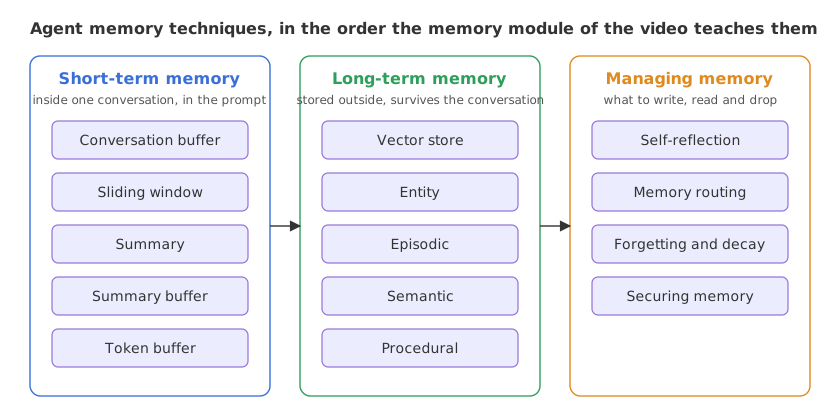
The video opens the module with a survey paper, "Memory in the Age of AI Agents" (arXiv 2512.13564, December 2025, revised January 2026). The survey sorts agent memory three ways: by form (what carries the memory: tokens in the prompt, model parameters, or latent states), by function (factual, experiential or working memory) and by dynamics (how memory is formed, how it evolves and how it is retrieved). In those terms the five techniques of this part are token-level working memory: text in the prompt of one conversation.
Short-term memory vs long-term memory
| Short-term memory | Long-term memory | |
|---|---|---|
| Where it lives | In the message list of the current request | In a store outside the prompt (database, vector store) |
| How long it lasts | One conversation | Across conversations and restarts |
| How it reaches the model | Sent again on every call | Searched, and the matching pieces are added to the prompt |
| What limits it | Tokens per request | Storage and the quality of retrieval |
| Techniques | Buffer, sliding window, summary, summary buffer, token buffer | Vector store, entity, episodic, semantic, procedural |
Where you use agent memory
- Multi-turn assistants. FinCoach has to use the salary from turn 1 when it answers a budgeting question in turn 5.
- Agents that call tools. Each tool result is one more message that later steps must be able to read.
- Returning users. A user who comes back next week expects their goals and constraints to be known, which needs long-term memory.
Related
- Previous: Evals in CI
- Next: Conversation buffer memory
- Reference: Memory in the Age of AI Agents (arXiv 2512.13564)
- See also: the LangMem tutorial
- Delete the assistant message from
history, so that it holds onlyintroandquestion, and run call 3 again: the name and the salary are still in the request, in the first user message. - Change
questionto "What did I tell you a moment ago?" and run call 2: the request holds no earlier message for the model to find. - Add
print(len([SYSTEM] + history))at the end: call 3 sent 4 messages, call 2 sent 2.
Little by little, you're building something great.