
Installing Python for AI security
The Python setup for AI security is one environment with the OpenAI SDK, NeMo Guardrails, RAGAS and a few helper libraries, plus two free API keys, a Groq key for chat models and a Gemini key for embeddings, kept in environment variables.
Last updated: 09 Oct, 2026 · OpenAI SDK 3.3
Every lesson with code calls a hosted model, so the setup has two halves: libraries on your computer and keys for two services. Both services have a free tier that is enough for every example. Nothing here downloads a model, and no OpenAI key or cloud account is needed.
Checking your Python version
The libraries need Python 3.12 or 3.13. NumPy 2.5 does not install on anything older than 3.12, and NeMo Guardrails 0.24.1 does not install on 3.14. Open a terminal (on Windows, PowerShell from the Start menu; on macOS, the Terminal app) and ask Python for its version:
python3 --versionIf it prints 3.12 or 3.13, you are set. If it prints another version, or the command is not found, either install Python 3.12 from python.org (on Windows, tick Add python.exe to PATH in the installer), or take the uv route below, which downloads Python 3.12 for the project by itself.
Installing the libraries
Pick one route. On your own computer, uv is the one to prefer: it makes a project folder with its own environment, so these pinned versions never clash with other Python work. pip installs into the Python you already have. Colab needs no local install. Every library is pinned, so your output matches the lessons as closely as a live model allows.
curl -LsSf https://astral.sh/uv/install.sh | sh
uv init ai-security --python 3.12
cd ai-security
uv add openai==3.3.0 nemoguardrails==0.24.1 ragas==0.4.3 "langchain-community<0.4" langchain==1.4.3 langchain-groq==1.1.3 google-genai==2.29.0 chromadb==1.5.9 tiktoken==0.14.0 rank-bm25==0.2.2 logfire==5.1.1 langfuse==4.15.6 fastapi==0.143.0 numpy==2.5.3 pandas==3.0.6 matplotlib==3.11.2
What each library is for
| Library | Used for | First used in |
|---|---|---|
openai | The chat client. Pointed at Groq with base_url, it runs every live example | This lesson |
google-genai | Gemini embeddings: turning a text into a list of numbers | This lesson |
nemoguardrails | Input and output rails written in Colang | NeMo Guardrails |
logfire | Traces and spans of each request | LLM observability with Pydantic Logfire |
ragas, langchain-community | The RAG evaluation metrics and their LLM judge | LLM as a judge |
tiktoken | Counting tokens in a conversation | Conversation buffer memory |
chromadb | A local vector store for memories | Vector store memory |
langchain, langchain-groq, fastapi | The agent graph and the API around it | Agentic RAG API with FastAPI and LangGraph |
langfuse | Agent traces and scores | Tracing agents with Langfuse |
rank-bm25 | Keyword search scores | Hybrid search with BM25 and vector search |
numpy, pandas, matplotlib | Vectors, result tables and plots | Most lessons with numbers |
Why langchain-community is pinned below 0.4
RAGAS 0.4.3 imports a class that langchain-community removed in its 0.4 release. With the newest langchain-community, import ragas stops with ModuleNotFoundError: No module named 'langchain_community.chat_models.vertexai'. The pin "langchain-community<0.4" in the install line keeps the last version RAGAS can import. The quotes matter: without them the shell reads < as a redirect.
What the uv, pip and Colab routes do
uv init ai-security --python 3.12creates the folderai-securitywith apyproject.tomlfile and pins the project to Python 3.12.uv addcreates a private environment inai-security/.venv, installs the libraries into it and records the exact versions inuv.lock. Run code withuv run python check_setup.py; there is no activation step.python3 -m pip(orpy -m pipon Windows) installs into the same Python that thepython3(orpy) command runs, which avoids installing into one Python and running another.- Colab comes with some of these libraries in its own versions. The
%pipline replaces them with the pinned ones. Restart the session afterwards (Runtime, Restart session) so the new versions load. If pip prints a warning that another preinstalled Colab package expects a different version, the lessons are not affected.
Checking the installed versions
Save this as check_setup.py in the project folder and run it with uv run python check_setup.py (uv), python3 check_setup.py or py check_setup.py (pip), or paste it into a notebook cell. It reads the installed versions without importing the libraries, so it is quick:
import sys
from importlib.metadata import version

print("Python", sys.version.split()[0])
for name in ["openai", "nemoguardrails", "ragas", "langchain-community", "langchain", "langchain-groq",
             "google-genai", "chromadb", "tiktoken", "rank-bm25", "logfire", "langfuse", "fastapi",
             "numpy", "pandas", "matplotlib"]:
print(f"{name:20}{version(name)}")Python 3.12.0 openai 3.3.0 nemoguardrails 0.24.1 ragas 0.4.3 langchain-community 0.3.31 langchain 1.4.3 langchain-groq 1.1.3 google-genai 2.29.0 chromadb 1.5.9 tiktoken 0.14.0 rank-bm25 0.2.2 logfire 5.1.1 langfuse 4.15.6 fastapi 0.143.0 numpy 2.5.3 pandas 3.0.6 matplotlib 3.11.2
Reading the version check
- Python 3.12 or 3.13 is the range the whole set installs on.
- openai 3.3.0 is the client behind every live example, and nemoguardrails 0.24.1 and ragas 0.4.3 are the versions the guardrails and evaluation lessons describe.
- langchain-community is below 0.4, the version line RAGAS 0.4.3 can import.
- A different version of any of these can still run most lessons, but an import, a default or a printed number may differ.
Getting a Groq key and a Gemini key
Both keys are free and take a minute each. A key is shown in full only once, at the moment it is created, so copy it then.
- Groq. Open console.groq.com/keys and sign in with a Google or GitHub account. Choose Create API Key, give it a name such as
ai-security, and copy the key. It starts withgsk_. Groq serves open models at high speed; the lessons useopenai/gpt-oss-120band the smalleropenai/gpt-oss-20b. - Gemini. Open aistudio.google.com/apikey, sign in with a Google account, choose Create API key and copy it. The lessons use it only for embeddings, with
gemini-embedding-2.
The free tiers have daily limits that change over time. The examples are small so that a full day of lessons fits inside them; if a call stops with a 429 error, the fixes at the end of this lesson say what to do.
Setting the keys as environment variables
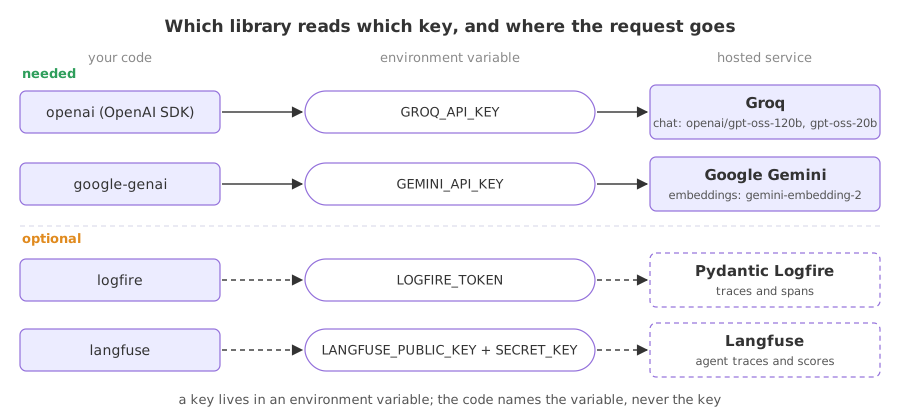
A program should read a key from an environment variable, a named value that the terminal passes to every program it starts. The code then contains the variable's name, never the key. Set both variables in the terminal you run Python from:
export GROQ_API_KEY=gsk_...
export GEMINI_API_KEY=AIza...
These lines last until the terminal window closes. To keep them, add the two export lines to ~/.zshrc or ~/.bashrc on macOS and Linux; on Windows, run setx GROQ_API_KEY "gsk_..." and setx GEMINI_API_KEY "AIza..." once and open a new terminal.
This check prints which variables Python can see. It prints the word set or missing, never the key:
import os

for name in ["GROQ_API_KEY", "GEMINI_API_KEY", "LOGFIRE_TOKEN", "LANGFUSE_PUBLIC_KEY", "LANGFUSE_SECRET_KEY"]:
print(f"{name:20}", "set" if os.environ.get(name) else "missing")GROQ_API_KEY set GEMINI_API_KEY set LOGFIRE_TOKEN missing LANGFUSE_PUBLIC_KEY missing LANGFUSE_SECRET_KEY missing
The first two must say set. The last three are for the optional tools further down, and missing is the normal state for them.
Keeping API keys safe
A course about security starts with its own keys. An API key is a password that spends your quota, and with a paid account, your money. These habits cost nothing:
- Keep keys in environment variables, never in code. A key typed into a
.pyfile or a notebook cell travels with every copy of that file: a commit, a shared notebook, a pasted traceback. If you keep keys in a.envfile, add.envto.gitignorebefore the first commit. - Do not paste a key into a hosted app you do not run. The demo app in the video asks for a Groq key in its sidebar. A hosted app receives whatever is typed into it: the key travels to that app's server, which then makes the calls. If you try such an app, create a key for that one visit and delete it afterwards.
- Hide keys before you share a screen or record. A key console, a terminal history and an app sidebar can all show a key in clear text. Anyone who pauses the recording can copy it.
- A tracing token exposes prompts. If several people send traces with one person's observability token, that person can read every prompt and reply the others send. Use your own project and your own token.
- Rotate a key the moment it leaks. Open the provider's key page, delete the key and create a new one. A deleted key is no use to whoever copied it; hoping nobody saw it protects nothing.
- One key per project, with a clear name. When one leaks, you delete one key and one project stops, not all of them.
Checking both keys with a real call
One short chat call to each Groq model and one embedding call to Gemini. Groq speaks the same API as OpenAI, so the OpenAI SDK works once base_url points at Groq and api_key is the Groq key.
The chat client
import os
from openai import OpenAI

client = OpenAI(base_url="https://api.groq.com/openai/v1", api_key=os.environ["GROQ_API_KEY"])
MODEL = "openai/gpt-oss-120b"
These four lines open most live examples from here on. temperature=0 asks the model for its most likely reply, which keeps runs close to each other. The gpt-oss models reason before they answer and the reasoning counts as output tokens, so even a one-word reply gets max_tokens=300 of room.
The embedding client
import os
from google import genai

gemini = genai.Client(api_key=os.environ["GEMINI_API_KEY"])
result = gemini.models.embed_content(model="gemini-embedding-2", contents="What is a guardrail?")
vector = result.embeddings[0].values      # a list of floats
An embedding is a list of numbers that stands for the meaning of a text; texts with similar meanings get lists that point in similar directions. gemini-embedding-2 returns one vector per call, so the lessons embed one text at a time.
Both checks in one file
Save this as check_keys.py and run it the same way as check_setup.py:
import os

from google import genai
from openai import OpenAI

client = OpenAI(base_url="https://api.groq.com/openai/v1", api_key=os.environ["GROQ_API_KEY"])

for MODEL in ["openai/gpt-oss-120b", "openai/gpt-oss-20b"]:
    reply = client.chat.completions.create(
        model=MODEL,
        messages=[{"role": "user", "content": "Reply with the single word: ready"}],
        temperature=0,
        max_tokens=300,
    )
    print(MODEL, "->", reply.choices[0].message.content)

gemini = genai.Client(api_key=os.environ["GEMINI_API_KEY"])
result = gemini.models.embed_content(model="gemini-embedding-2", contents="What is a guardrail?")
print("gemini-embedding-2 ->", len(result.embeddings[0].values), "numbers in one embedding")openai/gpt-oss-120b -> ready openai/gpt-oss-20b -> ready gemini-embedding-2 -> 3072 numbers in one embedding
Reading the live check
- Both Groq models print
ready. SoGROQ_API_KEYworks, and both model ids the lessons use answer today. gemini-embedding-2returns 3072 numbers for one sentence. That list is the embedding, and its length provesGEMINI_API_KEYworks.- A model reply can differ between runs, even at temperature 0. When your output is worded differently from a lesson's, read what your own run printed.
Logfire and Langfuse keysOptional
Two lessons use tracing tools that have hosted dashboards. Both lessons run without an account: the traces print in the terminal. The keys are only for seeing the same traces in a browser, and each lesson walks through the setup when it gets there.
| Variable | Service | Where to create it | Set up in |
|---|---|---|---|
LOGFIRE_TOKEN | Pydantic Logfire | A project's settings, under Write tokens, at logfire.pydantic.dev | LLM observability with Pydantic Logfire |
LANGFUSE_PUBLIC_KEY, LANGFUSE_SECRET_KEY | Langfuse | A project's settings, under API keys, at cloud.langfuse.com | Tracing agents with Langfuse |
Fixing a failed call
Three errors account for most failed first calls. Each is shown here as it fails in a real run, so you can match yours.
A retired model id
Providers retire models. The demo app in the video ran llama-3.3-70b-versatile, which Groq has since retired. Code copied from the video or from an older tutorial fails like this:
import os

from openai import OpenAI

client = OpenAI(base_url="https://api.groq.com/openai/v1", api_key=os.environ["GROQ_API_KEY"])

client.chat.completions.create(
    model="llama-3.3-70b-versatile",      # the model the video's demo app ran
    messages=[{"role": "user", "content": "Reply with the single word: ready"}],
    max_tokens=20,
)Traceback (most recent call last):
File "main.py", line 7, in <module>
client.chat.completions.create(
openai.NotFoundError: Error code: 404 - {'error': {'message': 'The model `llama-3.3-70b-versatile` does not exist or you do not have access to it.', 'type': 'invalid_request_error', 'code': 'model_not_found'}}The last line is the one to read. 404 and model_not_found say the request reached Groq and the key was accepted, but no model has that id any more. The fix is the model line, not the key: use openai/gpt-oss-120b or openai/gpt-oss-20b. To see every model your key can call, run for m in client.models.list(): print(m.id).
A wrong variable name
The variable set in the terminal and the name in the code must match letter for letter. Here the code asks for GROQ_KEY, a name that was never set:
import os

from openai import OpenAI

client = OpenAI(base_url="https://api.groq.com/openai/v1", api_key=os.environ["GROQ_KEY"])Traceback (most recent call last):
File "main.py", line 5, in <module>
client = OpenAI(base_url="https://api.groq.com/openai/v1", api_key=os.environ["GROQ_KEY"])
KeyError: 'GROQ_KEY'KeyError with the variable's name means Python found no such variable. The same error with 'GROQ_API_KEY' means the key was set in a different terminal window, or the terminal was not reopened after setx. The key check above tells you which variables this terminal has.
Other messages and their fixes
Error code: 401withInvalid API Key: the variable is set, but its value is not a working key. A space or a quote was copied with it, or the key was deleted. Create a new key and set it again.Error code: 429: a rate limit. If the message names tokens per minute, wait a minute and run again. If it names tokens per day, that model is used up for today on your key: switchMODELtoopenai/gpt-oss-20b, which has its own daily allowance, or continue tomorrow.ModuleNotFoundError: No module named 'langchain_community.chat_models.vertexai'onimport ragas:langchain-community0.4 or newer is installed. Reinstall with"langchain-community<0.4".No matching distribution found for numpy==2.5.3: the Python running pip is older than 3.12. Check the version, then use Python 3.12 oruv init --python 3.12.ModuleNotFoundError: No module named 'openai': the code runs with a different Python from the one you installed into. In the uv project, run it withuv run; in VS Code, select the.venvinterpreter; in Colab, rerun the install cell after a restart.
uv vs pip vs Colab
| uv | pip | Colab | |
|---|---|---|---|
| Where it runs | Your computer | Your computer | A browser, on Google's machines |
| Install line | uv add ... inside a project | python3 -m pip install ... | %pip install ... in a cell |
| Keeps versions per project | Yes, in pyproject.toml and uv.lock | No, one shared Python | Per session; reinstall after a reset |
| Keys set with | export or $env: | export or $env: | Secrets and userdata.get |
| Good for | A project you keep | A quick start | No local install |
Where you use each setup
- Following the lessons in a notebook or a
.pyfile: every example runs with these libraries and the two keys. - A guardrail or an evaluation of your own app: the uv route records the exact versions, so a teammate, or a CI job, gets the same install with
uv sync. - A computer you cannot install on, such as a locked work laptop: Colab runs everything on Google's machines, with the keys in its Secrets panel.
model_not_found, list the models your key can use before you change anything else.Related
- Previous: AI security
- Next: LLM security risks (OWASP Top 10)
- Reference: Groq models, Groq deprecations and the uv documentation
- Add
for m in client.models.list(): print(m.id)to the end ofcheck_keys.pyand find the two gpt-oss models in the list. - In
check_keys.py, changeos.environ["GROQ_API_KEY"]to"gsk_wrong"and run it: the call fails withError code: 401andInvalid API Key. Change it back. - Add
print(result.embeddings[0].values[:5])to see the first five of the 3072 numbers.
Little by little, you're building something great.