
Conversation buffer memory
Conversation buffer memory is a short-term memory technique that stores every message of a conversation in a list and sends the whole list to the model on every call.
Last updated: 09 Oct, 2026 · OpenAI SDK 3.3
It is the simplest answer to the statelessness shown in Agent memory: keep everything, resend everything. Nothing is dropped, and the price is that every request is larger than the one before.
How the buffer grows
The notebook in the video states the idea in one sentence: "Store every message in the conversation as a list, and re-send the entire list to the LLM on every API call." A turn is one user message plus one assistant reply. The request of turn N holds the system prompt, every earlier turn and the new user message.
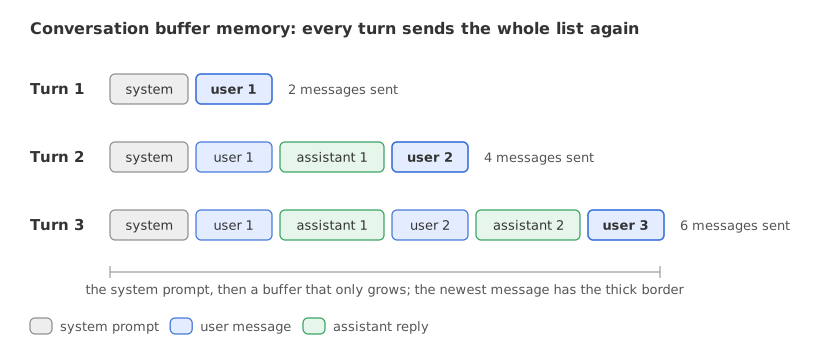
The request has 2 messages at turn 1, 4 at turn 2 and 6 at turn 3. The model does not remember the earlier turns. It is handed the transcript and reads it again. Nothing in the model changes between turns; only the list your code sends grows.
This part of the video starts at 3:09:17. It walks through the chat() helper of 1_conversational_buffer_memory.ipynb and sets up the five turns of the demo with FinCoach, a personal-finance advisor.
The notebook's run used gpt-4o at temperature 0.7 with max_tokens=1024. In its saved output the prompt grows from 162 tokens at turn 1 to 782 at turn 5; both are the API's usage figures.
Building the buffer class
The notebook's ConversationBufferMemory also carries a token budget, a session id and save and load methods. The class here keeps the three methods the technique needs. The model is openai/gpt-oss-120b on Groq through the same OpenAI SDK, and the temperature is 0 instead of the notebook's 0.7 so that a rerun stays close to the output shown.
The buffer
The buffer is a Python list. add_message appends to it, and get_messages_for_api puts the system prompt in front of the whole list. The system prompt is stored apart from the conversation so that it is always the first message.
class ConversationBufferMemory:
    def __init__(self, system_prompt):
        self.system_prompt = system_prompt
        self.messages = []                    # the buffer: every message, in order

    def add_message(self, role, content):
        self.messages.append({"role": role, "content": content})

    def get_messages_for_api(self):
        return [{"role": "system", "content": self.system_prompt}] + self.messages
The four steps of chat()
The video's chat() has four steps: add the user message to the buffer, send the full buffer, read the reply, add the reply to the buffer. The reply appended in step 4 is sent again on the next call.
def chat(buffer, user_message):
    buffer.add_message("user", user_message)                 # step 1
    request = buffer.get_messages_for_api()
    response = client.chat.completions.create(               # step 2
        model=MODEL, max_tokens=1024, temperature=0, messages=request)
    reply = response.choices[0].message.content              # step 3
    buffer.add_message("assistant", reply)                   # step 4
    return reply
Counting the tokens of a request
The notebook counts tokens with tiktoken's o200k_base encoding, the tokenizer of gpt-4o. tiktoken's encodings are OpenAI's, so for another model the count is an estimate. The billed number is usage.prompt_tokens in the reply, which also covers the chat template the provider wraps around the messages. On gpt-oss, usage.completion_tokens includes the hidden reasoning tokens, so it is larger than the visible reply, and a reply needs a roomy max_tokens.
import tiktoken

TOKENISER = tiktoken.get_encoding("o200k_base")
counted = sum(len(TOKENISER.encode(m["content"])) for m in request)
Running five turns of FinCoach
The system prompt and the five user messages are the notebook's. Each turn prints how many messages the request held, the tiktoken count of their contents, and the two usage numbers the API returned.
import os
import tiktoken
from openai import OpenAI

client = OpenAI(base_url="https://api.groq.com/openai/v1", api_key=os.environ["GROQ_API_KEY"])
MODEL = "openai/gpt-oss-120b"
TOKENISER = tiktoken.get_encoding("o200k_base")

FINCOACH_SYSTEM_PROMPT = """You are FinCoach, a personal financial advisor assistant.
You serve users in India who want guidance on savings, investments, budgeting, and financial planning.

Your principles:
- Always personalise advice using information the user has shared in this conversation.
- Be specific with numbers when the user has provided their financial details.
- Flag when you are making assumptions due to missing information.
- Keep responses concise: 3 to 5 sentences unless the user asks for detail.
- Never provide specific buy/sell recommendations on individual stocks.
- Always recommend consulting a SEBI-registered advisor for major financial decisions.

Use all context in the conversation history to provide personalised, consistent advice."""

class ConversationBufferMemory:
    def __init__(self, system_prompt):
        self.system_prompt = system_prompt
        self.messages = []                    # the buffer: every message, in order

    def add_message(self, role, content):
        self.messages.append({"role": role, "content": content})

    def get_messages_for_api(self):
        return [{"role": "system", "content": self.system_prompt}] + self.messages

def chat(buffer, user_message):
    buffer.add_message("user", user_message)
    request = buffer.get_messages_for_api()
    response = client.chat.completions.create(
        model=MODEL, max_tokens=1024, temperature=0, messages=request)
    reply = response.choices[0].message.content
    buffer.add_message("assistant", reply)
    counted = sum(len(TOKENISER.encode(m["content"])) for m in request)
    print(f"[Turn {len(buffer.messages) // 2}] messages sent: {len(request):>2} | "
          f"tiktoken: {counted:>4} | prompt_tokens: {response.usage.prompt_tokens:>4} | "
          f"completion_tokens: {response.usage.completion_tokens}")
    return reply

fincoach_buffer = ConversationBufferMemory(FINCOACH_SYSTEM_PROMPT)
demo_turns = [
    "Hi! I'm Chiru. My monthly take-home salary is ₹1,20,000.",
    "I have monthly expenses of about ₹60,000: rent, groceries, transport, and utilities.",
    "I currently have no investments except a small FD of ₹50,000 that matures in 3 months.",
    "What should I do with the FD maturity amount? I'm a bit risk-averse.",
    "Based on everything I've told you, what's the most important financial action I should take this month?",
]
for user_message in demo_turns:
    reply = chat(fincoach_buffer, user_message)
print()
print("FinCoach, turn 5:", reply)[Turn 1] messages sent: 2 | tiktoken: 151 | prompt_tokens: 225 | completion_tokens: 269 [Turn 2] messages sent: 4 | tiktoken: 362 | prompt_tokens: 446 | completion_tokens: 334 [Turn 3] messages sent: 6 | tiktoken: 638 | prompt_tokens: 732 | completion_tokens: 285 [Turn 4] messages sent: 8 | tiktoken: 891 | prompt_tokens: 995 | completion_tokens: 302 [Turn 5] messages sent: 10 | tiktoken: 1127 | prompt_tokens: 1241 | completion_tokens: 262 FinCoach, turn 5: The single most important step this month is **to start building your emergency fund**. Take the ₹50,000 FD maturity amount + about **₹12,000 – ₹15,000** from this month’s discretionary cash and deposit it into a high‑interest savings account or a short‑term (3‑month) FD so the money stays liquid and earns a modest return. Aim to reach a cash reserve of 3‑6 months of expenses (≈₹1.8 L‑₹3.6 L) as quickly as possible; once that cushion is in place you can shift any extra savings into low‑risk, tax‑efficient options like PPF or a debt‑mutual‑fund SIP. *(Assuming you have no high‑interest debt; if you do, prioritize paying it off first.)* For exact product choices and to confirm the plan fits your risk profile, please consult a SEBI‑registered financial advisor.
What the five turns show
- The request grows by two messages per turn: 2, 4, 6, 8 and 10 messages.
prompt_tokensgoes from 225 to 1,241 in five turns, about 5.5 times, while the system prompt stays the same. Every earlier message is in every later request.- The tiktoken count is below the billed count on every turn: 151 against 225 at turn 1, 1,127 against 1,241 at turn 5. The gap is the provider's chat template. It is 74 tokens at turn 1 and grows by 10 per turn, 5 for each added message.
completion_tokensis more than the visible reply. Reply 1 is 191 tokens by tiktoken (362 − 151 − 20 for the next user message), and the API counted 269 completion tokens for it. Most of the rest is hidden reasoning. Only the visible reply is stored in the buffer.- Turn 5 uses the earlier turns. The reply names the ₹50,000 FD from turn 3 and an emergency fund of 3 to 6 months of expenses, ₹1.8 L to ₹3.6 L, which is the ₹60,000 of turn 2 multiplied out. The ₹12,000 to ₹15,000 it suggests adding is the model's own figure, not something the user said.
Measuring token growth without a model
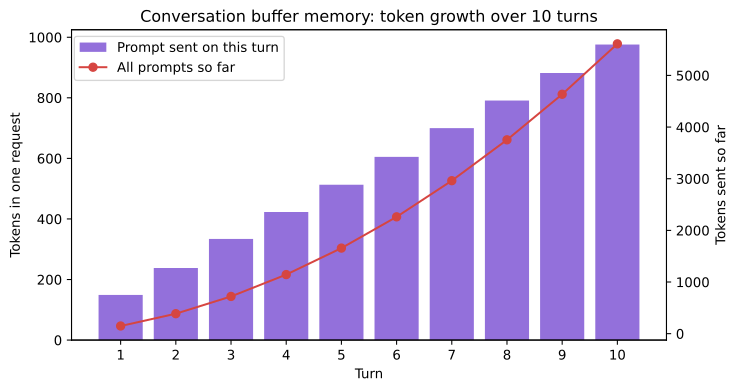
The notebook then simulates ten turns with no API call: each user message is counted with tiktoken, and every reply is assumed to be 80 tokens long. FINCOACH_SYSTEM_PROMPT is the prompt from the example above. The request of turn n holds the system prompt, the n user messages so far and the n − 1 replies before it:
import tiktoken
import matplotlib.pyplot as plt

TOKENISER = tiktoken.get_encoding("o200k_base")
simulated_turns = [
    "Hi, I'm Chiru. My monthly salary is ₹1,20,000.",
    "My monthly expenses are ₹60,000.",
    "I have an FD of ₹50,000 maturing in 3 months.",
    "I'm risk-averse and prefer stable returns.",
    "Should I invest in mutual funds or fixed deposits?",
    "What about SIPs? How much should I invest monthly?",
    "Is ₹10,000 per month in SIPs realistic given my expenses?",
    "Which fund categories would you recommend for a conservative investor?",
    "How long should I stay invested to see meaningful returns?",
    "Can you give me a complete monthly budget breakdown based on my salary?",
]
avg_response_tokens = 80                      # assumed length of every reply

system_prompt_tokens = len(TOKENISER.encode(FINCOACH_SYSTEM_PROMPT))
history, sent_so_far, prompts, totals = 0, 0, [], []
print(f"System prompt: {system_prompt_tokens} tokens on every call\n")
print(f"{'Turn':>4} | {'Msg tokens':>10} | {'Conv history':>12} | {'Prompt to API':>13} | {'Sent so far':>11}")
for i, user_msg in enumerate(simulated_turns, start=1):
    msg_tokens = len(TOKENISER.encode(user_msg))
    history += msg_tokens if i == 1 else msg_tokens + avg_response_tokens
    prompt = system_prompt_tokens + history
    sent_so_far += prompt
    prompts.append(prompt)
    totals.append(sent_so_far)
    print(f"{i:>4} | {msg_tokens:>10} | {history:>12} | {prompt:>13} | {sent_so_far:>11,}")
print(f"\nGrowth factor, turn 10 over turn 1: {prompts[-1] / prompts[0]:.2f}x")

turns = range(1, len(prompts) + 1)
fig, ax = plt.subplots(figsize=(8, 4.2))
ax.bar(turns, prompts, color="#9370DB", label="Prompt sent on this turn")
ax.set_xlabel("Turn")
ax.set_ylabel("Tokens in one request")
ax.set_xticks(list(turns))
ax2 = ax.twinx()
ax2.plot(turns, totals, color="#d64541", marker="o", label="All prompts so far")
ax2.set_ylabel("Tokens sent so far")
ax.set_title("Conversation buffer memory: token growth over 10 turns")
fig.legend(loc="upper left", bbox_to_anchor=(0.12, 0.88))
plt.show()System prompt: 132 tokens on every call Turn | Msg tokens | Conv history | Prompt to API | Sent so far 1 | 17 | 17 | 149 | 149 2 | 9 | 106 | 238 | 387 3 | 16 | 202 | 334 | 721 4 | 9 | 291 | 423 | 1,144 5 | 10 | 381 | 513 | 1,657 6 | 12 | 473 | 605 | 2,262 7 | 15 | 568 | 700 | 2,962 8 | 11 | 659 | 791 | 3,753 9 | 11 | 750 | 882 | 4,635 10 | 14 | 844 | 976 | 5,611 Growth factor, turn 10 over turn 1: 6.55x
What the growth table shows
- The system prompt costs 132 tokens on every call. It is sent 10 times in 10 turns.
- One request grows in a straight line. The prompt goes from 149 tokens at turn 1 to 976 at turn 10, a factor of 6.55, about 92 tokens more per turn. These are the values of the table the video shows.
- The whole conversation grows faster. The ten prompts together are 5,611 tokens, because every old message is paid for again on each later call. Per call the growth is linear; summed over the conversation it is quadratic.
- The numbers are tiktoken counts of message contents. The provider adds its chat template on top, as the live run above shows.
Conversation buffer memory vs a stateless call
| Stateless call | Conversation buffer memory | |
|---|---|---|
| What the request holds | System prompt and the new message | System prompt, every earlier message and the new message |
| Earlier facts | Not available | All available, word for word |
| Tokens per request | Constant | Grow with every turn |
| Extra model calls | None | None |
| What stops it | No limit to hit | The model's context window, and the cost before that |
Where you use conversation buffer memory
- Short sessions. A support chat of five or ten turns fits in any context window, and a plain buffer is the easiest thing to debug: the same turns always give the same request.
- The active part of a larger memory. The video's verdict is that no production system uses a raw buffer as its only memory layer, and that every one keeps something like a buffer for the current session, bounded by a token budget.
- A baseline. When a cheaper technique loses a fact, the buffer run tells you whether the model could answer with everything in view.
Related
- Previous: Agent memory
- Next: Sliding window memory
- Reference: tiktoken
- In the growth example, change
avg_response_tokens = 80to200: the prompt of turn 10 becomes 2,056 tokens, the growth factor 13.80x and the ten prompts together 11,011 tokens. - After the five live turns, add
print(len(fincoach_buffer.get_messages_for_api())): it prints 11, the system prompt plus ten stored messages. - Add a sixth message to
demo_turns, "What is my monthly surplus?", and watchprompt_tokensrise once more while the answer uses the salary and expenses from turns 1 and 2.
You understood something today that you didn't yesterday.