
Entity memory
Entity memory is a long-term memory technique that extracts structured facts about named things, such as a person, an employer or a salary, from the conversation and keeps them in a profile whose fields are updated in place.
Last updated: 09 Oct, 2026 · OpenAI SDK 3.3
At the end of Vector store memory one question brought back two answers: the old job and the new job, almost equally close. Vector store memory only adds rows. Entity memory keeps one current value per fact, so a changed fact replaces the old one.
As with every memory technique here, the model itself does not change. The profile is a small record kept outside the model, and its text is placed in the prompt on each call.
This part of the video starts at 4:45:16. It reads the opening of the notebook: when entity memory is needed, its trade-off, the contact-card picture, what gets stored, and the CRM record that updates itself.
A record of facts that stays current
The notebook on screen, 7_entity_memory.ipynb, states it in three lines. What it is: entity memory extracts named entities from conversation and maintains a living knowledge base of facts about each one. When you need it: the agent must track and update structured information about specific people, organisations or projects over time. The trade-off: extraction is imperfect, and telling apart entities with similar names is hard.
The video's picture is a personal assistant who keeps a contact card for every person, place and object you mention. When you say "Sarah got promoted", the assistant pulls out Sarah's card and updates it. The name is how the card is found; the fact that changes is her role.
What is stored is a plain dictionary, or a JSON file. A sentence such as "Chiru earns ₹1,20,000 per month" becomes two fields, a name and a salary. An earnings-call transcript becomes fields such as the organisation, the profit and the loss. The video sums it up as a simple CRM record that updates itself: when a customer says "I changed jobs", the old job is replaced and the record shows the current state.
An entity is a named thing: a person, an organisation, a place, an amount. Finding entities in text is an older language-processing task called named entity recognition (NER), and the video shows why context matters for it: "Amazon is expanding rapidly" is about a company, "The Amazon is the largest rainforest" is about a place. Here the extraction is done by a prompted LLM call that fills a fixed set of fields. The notebook keeps one profile with a fixed schema for one user; it does not keep a separate card per person.
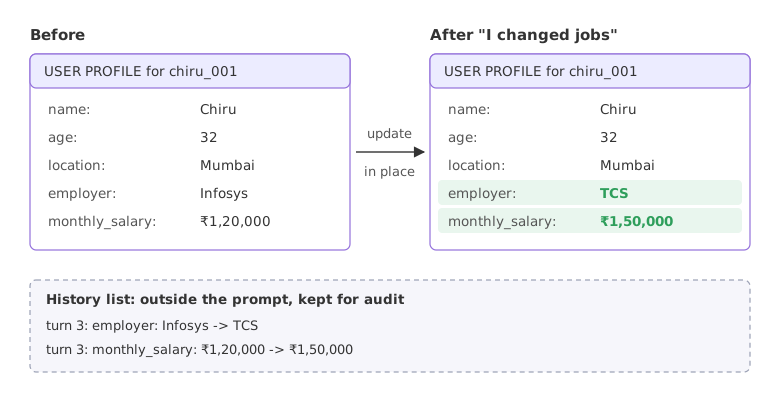
Updating a profile in place
The schema: which facts to track
The schema lists the fields the agent is allowed to remember, each with a short description. These eight are taken from the notebook's 20-field FINCOACH_ENTITY_SCHEMA.
SCHEMA = {
    "name": "User's first name or preferred name",
    "age": "User's current age in years",
    "location": "City or region where the user lives",
    "employer": "Current employer or company name",
    "monthly_salary": "Monthly take-home salary after tax (include currency symbol)",
    "monthly_expenses": "Total monthly expenses (rent, food, transport, etc.)",
    "risk_profile": "Investment risk tolerance: conservative / moderate / aggressive",
    "investment_constraints": "Hard constraints on investments (e.g. 'never equity', 'no crypto')",
}
The profile and its update
Every field starts as None. update takes a dictionary of facts, overwrites the fields that changed, and notes each change in a history list. A fact for a field that is not in the schema is ignored.
class EntityProfile:
    def __init__(self, user_id):
        self.user_id = user_id
        self.fields = dict.fromkeys(SCHEMA)        # every field starts as None
        self.history = []                          # every change: turn, field, old, new

    def update(self, facts, turn):
        changed = []
        for field, new in facts.items():
            if field in self.fields and self.fields[field] != new:
                self.history.append((turn, field, self.fields[field], new))
                self.fields[field] = new           # replaced in place, never appended
                changed.append(field)
        return changed
The profile as prompt text
This method belongs to the same class. Only known fields are written out, since a line that says a field is unknown spends tokens and tells the model nothing.
    def format_for_injection(self):
        known = {k: v for k, v in self.fields.items() if v is not None}
        lines = [f"  {k}: {v}" for k, v in known.items()]
        return f"USER PROFILE for {self.user_id}:\n" + "\n".join(lines)
Four updates, one of them a job change
Put the three pieces above in one file and add these lines. The dictionaries are typed by hand here, so no model is involved yet.
profile = EntityProfile("chiru_001")
print("turn 1 changed:", profile.update({"name": "Chiru", "monthly_salary": "₹1,20,000"}, turn=1))
print("turn 2 changed:", profile.update({"age": 32, "employer": "Infosys", "location": "Mumbai"}, turn=2))
print("turn 3 changed:", profile.update({"employer": "TCS", "monthly_salary": "₹1,50,000"}, turn=3))
print("turn 4 changed:", profile.update({"employer": "TCS", "pet": "a dog"}, turn=4))
print()
print(profile.format_for_injection())
print()
for turn, field, old, new in profile.history:
    print(f"turn {turn}: {field}: {old} -> {new}")
known = sum(value is not None for value in profile.fields.values())
print(f"\n{known} of {len(SCHEMA)} fields known")turn 1 changed: ['name', 'monthly_salary'] turn 2 changed: ['age', 'employer', 'location'] turn 3 changed: ['employer', 'monthly_salary'] turn 4 changed: [] USER PROFILE for chiru_001: name: Chiru age: 32 location: Mumbai employer: TCS monthly_salary: ₹1,50,000 turn 1: name: None -> Chiru turn 1: monthly_salary: None -> ₹1,20,000 turn 2: age: None -> 32 turn 2: employer: None -> Infosys turn 2: location: None -> Mumbai turn 3: employer: Infosys -> TCS turn 3: monthly_salary: ₹1,20,000 -> ₹1,50,000 5 of 8 fields known
What the four updates did to the profile
- Turns 1 and 2 fill empty fields. Each change is logged with the old value
None. - Turn 3 replaces two values.
employergoes from Infosys to TCS andmonthly_salaryfrom ₹1,20,000 to ₹1,50,000. The profile text, which is what the model will read, shows only TCS and ₹1,50,000. - The old values are kept in the history, which is never sent to the model. It is the audit trail.
- Turn 4 changes nothing. The employer is already TCS, and
petis not a field of the schema, so it is dropped. - 5 of 8 fields are known. Expenses, risk profile and constraints are still
Noneand are left out of the prompt text.
This part of the video starts at 4:50:30. It follows the hot path on a figure from the LangMem documentation's Hot Path Quickstart: a user message, a memory update, then the reply, with the "call me Alex" example and the latency this costs. The same figure shows a second way, which the documentation calls "in the background": the agent replies first, and the memory is updated "30 minutes later".
Writing memory in the hot path or in the background
- In the hot path. The memory is written while the conversation is running, before the reply. In LangMem's words, the agent consciously saves notes using tools. In the video's example the user says "From now onwards, you're going to call me Alex"; the memory is updated and the same reply already says "Hi Alex". The price is latency: every turn waits for the write.
- In the background. The agent replies at once and a separate process updates the memory later, after a set window (30 minutes in the figure). The reply is fast, but for a while the agent still uses the old name.
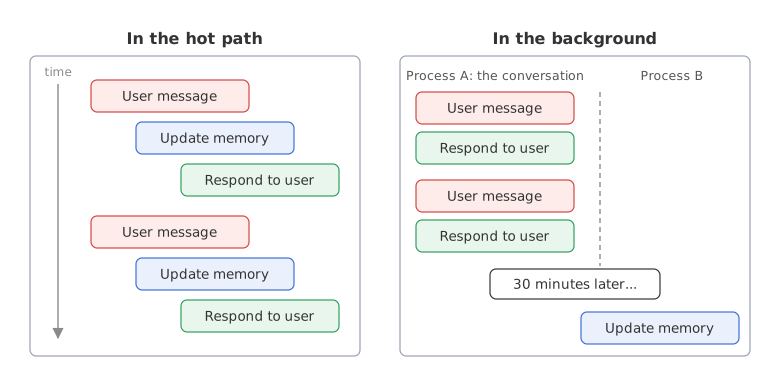
Entity memory is usually written in the hot path, as the video says, because a profile that lags behind the conversation gives wrong answers. The LangMem tutorial builds both kinds with LangMem's own tools.
Extracting entities with a model
The profile does not fill itself. After each user message, an LLM call reads the message and returns the facts it found as JSON. The notebook makes this call to gpt-4o-mini with max_tokens=400; the code here calls openai/gpt-oss-120b on Groq with the same OpenAI SDK.
The client
import json
import os
from openai import OpenAI

client = OpenAI(base_url="https://api.groq.com/openai/v1", api_key=os.environ["GROQ_API_KEY"])
MODEL = "openai/gpt-oss-120b"
The extraction prompt, built from the schema
The field list in the prompt is generated from SCHEMA, so adding a field to the schema also teaches the extractor about it. The rules are the notebook's: only fields that are explicitly mentioned, and an empty object when there is nothing to extract.
field_list = "\n".join(f'  - "{name}": {about}' for name, about in SCHEMA.items())
EXTRACTION_PROMPT = f"""You are a financial data extraction assistant for FinCoach.
Read the user message and extract any facts that match the fields below.
FIELDS TO EXTRACT:
{field_list}
STRICT RULES:
1. Return ONLY a valid JSON object.
2. Include ONLY fields explicitly mentioned in the message. Do NOT infer or guess.
3. If no relevant facts are present, return an empty object: {{}}
4. Preserve currency symbols (₹) and units exactly as stated."""
The extract function
response_format={"type": "json_object"} asks for JSON. gpt-oss is a reasoning model and counts its reasoning tokens inside max_tokens; if the limit is reached before the JSON is complete, Groq returns an HTTP 400 error. So the call sets reasoning_effort="low" and a roomy max_tokens. The last line keeps only keys that are in the schema.
def extract(message):
    reply = client.chat.completions.create(
        model=MODEL, temperature=0, max_tokens=1000, reasoning_effort="low",
        response_format={"type": "json_object"},
        messages=[{"role": "system", "content": EXTRACTION_PROMPT},
                  {"role": "user", "content": f"Extract facts from: {message}"}])
    found = json.loads(reply.choices[0].message.content)
    return {k: v for k, v in found.items() if k in SCHEMA and v is not None}
Three user messages and a question
The messages are from the notebook's demo conversation. Add the client, the prompt and extract to the file with the profile class, with the imports at the top, and replace the lines at the end with these. The extraction runs before the reply, in the hot path.
profile = EntityProfile("chiru_001")
turns = ["Hi! I'm Chiru. My monthly take-home salary is ₹1,20,000.",
         "I'm 32 years old and work at Infosys in Mumbai. I have no dependents.",
         "I changed jobs. I now work at TCS and my new salary is ₹1,50,000 per month."]
for turn, message in enumerate(turns, start=1):
    facts = extract(message)                       # one model call per user message
    print(f"Turn {turn}: {message}")
    print("  extracted:", json.dumps(facts, ensure_ascii=False))
    print("  changed  :", profile.update(facts, turn))

print()
print(profile.format_for_injection())
question = "Where do I work, and what is my monthly salary?"
reply = client.chat.completions.create(model=MODEL, temperature=0, max_tokens=600, messages=[
    {"role": "system", "content": "You are FinCoach, a personal finance assistant for users in India. "
     "Answer in one sentence, using the known user facts."},
    {"role": "system", "content": "KNOWN USER FACTS (always current):\n" + profile.format_for_injection()},
    {"role": "user", "content": question}])
print("\nUser:", question)
print("FinCoach:", reply.choices[0].message.content)Turn 1: Hi! I'm Chiru. My monthly take-home salary is ₹1,20,000.
extracted: {"name": "Chiru", "monthly_salary": "₹1,20,000"}
changed : ['name', 'monthly_salary']
Turn 2: I'm 32 years old and work at Infosys in Mumbai. I have no dependents.
extracted: {"age": 32, "employer": "Infosys", "location": "Mumbai"}
changed : ['age', 'employer', 'location']
Turn 3: I changed jobs. I now work at TCS and my new salary is ₹1,50,000 per month.
extracted: {"employer": "TCS", "monthly_salary": "₹1,50,000"}
changed : ['employer', 'monthly_salary']
USER PROFILE for chiru_001:
name: Chiru
age: 32
location: Mumbai
employer: TCS
monthly_salary: ₹1,50,000
User: Where do I work, and what is my monthly salary?
FinCoach: You work at TCS and your monthly salary is ₹1,50,000.What the model extracted and answered
- Each message came back as a small JSON object that uses the schema's field names. From turn 1 the model returned the name and the salary, with the rupee sign and the digit grouping kept as written.
- "I have no dependents" was not stored. The schema has no field for it. This is the first trade-off on the notebook's list: a fact the schema does not expect has nowhere to go.
- Turn 3 came back as
{"employer": "TCS", "monthly_salary": "₹1,50,000"}, andupdateoverwrote both fields. The three extractions are the same dictionaries that were typed by hand in the example before. - The answer uses the current values only: "You work at TCS and your monthly salary is ₹1,50,000." Infosys and ₹1,20,000 are no longer in the prompt, so the model cannot mix them in. Compare this with the two near-equal distances at the end of Vector store memory.
- The price was one extra model call per user message: three extraction calls and one answer.
This part of the video starts at 4:54:35. It names what in-place updates buy: the profile is always current, and the stale fact problem of vector stores does not arise.
Entity memory vs vector store memory
| Vector store memory | Entity memory | |
|---|---|---|
| Storage unit | Raw message text | Structured key-value facts |
| Retrieval | Semantic similarity search | Direct key lookup, such as profile["monthly_salary"] |
| Update model | Append-only | In-place update: the old value is replaced |
| Stale facts | Old and new are both retrieved | Only the current value is stored |
| Token cost | Varies with the search results | Fixed by the size of the profile |
| Best for | Fuzzy recall, open-ended retrieval | Structured facts that change over time |
The lookup in entity memory is a dictionary key. No embedding, no similarity search and no metadata filter is involved, which is why the token cost of the profile is fixed and predictable.
The notebook lists what entity memory costs in return:
- The schema must be defined in advance. A new kind of fact has nowhere to go.
- Extraction adds a model call, and its latency, to every turn.
- Extraction can hallucinate a fact that is not in the conversation.
- No relationships between entities. The profile cannot say who owns what; that needs a knowledge graph.
- The profile grows with the number of fields, and all of it is sent on every call.
Where you use entity memory
- Facts that change. A salary, an employer, an address, a plan: anything where only the current value should be used. The video names HR systems as one such case.
- Records an agent maintains. A CRM entry or a row in a spreadsheet that an agent keeps up to date from conversations.
- Together with a vector store. The notebook's verdict is to combine them: the profile answers "who is this user", the vector store answers "what did we discuss".
temperature=0 reduces variation without removing it. Check every key the model returns against the schema, as extract does, and keep the history so a wrong extraction can be traced and undone.Related
- Previous: Vector store memory
- Next: Episodic memory
- Reference: Groq structured outputs and JSON mode, LangMem: writing memories
- Add
print("turn 5 changed:", profile.update({"employer": "Infosys"}, turn=5))to the four-updates example: it prints['employer'], and the history gets an eighth entry, from TCS back to Infosys. - In the same example, change the turn 4 dictionary to
{"age": "32"}: the string "32" is not the number 32, soagecounts as changed and the history showsage: 32 -> 32. Extracted values need one agreed type per field. - Add
"dependents": "Number of financial dependents (family members)"toSCHEMAand run the three messages again: in a run of this change, turn 2 also returned"dependents": 0.
Slow is fine. Stopping is the only problem.