
Deploying on Amazon EKS
Amazon EKS (Elastic Kubernetes Service) is a managed Kubernetes service: AWS runs the control plane, and Kubernetes keeps the containers you describe in manifest files running on a group of EC2 machines called nodes.
Last updated: 09 Oct, 2026 · Kubernetes Python client 37.0
On a laptop the whole project of AgentOps starts with one Docker Compose command. In production it has to survive a dead machine, take a new version without downtime and be reachable from outside. The video deploys the API from MCP server for an agentic RAG API on EKS, and the files it applies are short enough to read line by line.
This part of the video starts at 7:11:26. The minSize: 2 and maxSize: 4 lines on screen set the number of nodes; the 2 to 6 pods of the autoscaler are set in another file, hpa.yaml, and that horizontal autoscaler is the only scaling the project configures.
The EKS cluster: control plane, nodes and pods
A pod is one running copy of a container. A node is a machine that runs pods. The control plane is the part of Kubernetes that decides which pod goes on which node and notices when one dies. On EKS the control plane is AWS's job and the nodes are EC2 instances in your account.
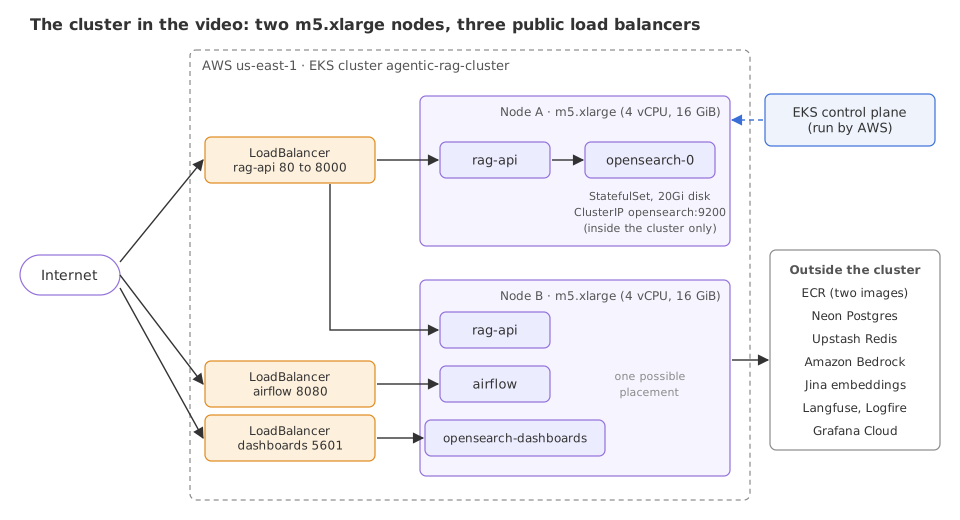
The video creates the cluster with eksctl from one file. The video names Terraform, the AWS CDK and Pulumi as other ways to do the same.
Shown as it ran in the video, not run here: it needs an AWS account and the eksctl tool.
apiVersion: eksctl.io/v1alpha5
kind: ClusterConfig

metadata:
  name: agentic-rag-cluster
  region: us-east-1
  version: "1.31"

iam:
  withOIDC: true

managedNodeGroups:
  - name: rag-workers
    instanceType: m5.xlarge   # 4 vCPU, 16 GB RAM
    minSize: 2                # Keep 2 nodes for pod anti-affinity spread
    maxSize: 4
    desiredCapacity: 2
    volumeSize: 50
privateNetworking: truemanagedNodeGroupsasks for twom5.xlargemachines, each with 4 vCPUs and 16 GiB of memory.maxSize: 4is only a ceiling: nothing in the project adds a third node by itself.withOIDC: truelets a pod take an AWS role through its service account (IRSA) instead of carrying access keys.privateNetworking: truegives the nodes no public address. Traffic comes in through a load balancer.version: "1.31"is the Kubernetes version. The EKS console in the video shows a banner that extended support for 1.31 ends on November 26, 2026, so choose a version in standard support for a new cluster.
Deployment: the API pods
A Deployment says "keep N copies of this container running" and replaces them one by one when the image changes. This is the Deployment of the API, with the labels and the health checks trimmed to the lines discussed here.
apiVersion: apps/v1
kind: Deployment
metadata:
  name: rag-api
  namespace: production
spec:
  replicas: 2   # HPA (hpa.yaml) scales this between 2 and 6
  strategy:
    type: RollingUpdate
    rollingUpdate:
      maxUnavailable: 0
      maxSurge: 1
  template:
    spec:
      serviceAccountName: rag-api-sa
      containers:
        - name: rag-api
          image: <ACCOUNT_ID>.dkr.ecr.us-east-1.amazonaws.com/agentic-rag/api:latest
          envFrom:
            - secretRef:
                name: rag-app-secrets
          resources:
            requests:
              memory: "6Gi"
              cpu: "500m"
            limits:
              memory: "8Gi"
              cpu: "2000m"
          readinessProbe:
            httpGet:
              path: /api/v1/health
              port: 8000
            initialDelaySeconds: 40
            periodSeconds: 15
replicas: 2keeps two API pods, so one node can fail and the API still answers.maxUnavailable: 0,maxSurge: 1is a rolling update that never drops below two pods: a third pod starts, passes its check, and only then an old one stops.readinessProbecalls/api/v1/health. A pod gets traffic only after this check passes, first tried 40 seconds after start.envFrom.secretRefloads every key of the Secretrag-app-secretsas an environment variable, the cluster's version of an.envfile.imagepoints at a private registry (ECR). The account id in the address is replaced by<ACCOUNT_ID>here.
Requests and limits
The resources block holds the two numbers that decide how the cluster behaves under load.
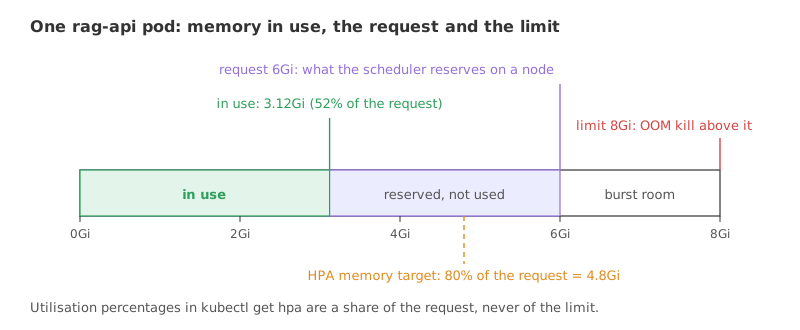
- A request is a reservation. The scheduler places a pod only on a node that still has the requested amount unreserved, whether or not the pod ever uses it. Autoscaler percentages are a share of the request.
- A limit is a cap. A container that goes over its memory limit is killed (OOM kill). One that goes over its CPU limit is slowed down.
- Between the two is burst room. A pod with a request below its limit may use more than it reserved when the node has memory to spare.
- Neither number resizes anything. A request of 6Gi with a limit of 8Gi describes one pod of a fixed size. Changing a pod's size is a different operation, covered in Horizontal pod autoscaling (HPA).
Service types: how traffic reaches a pod
Pods come and go, and each new one has a new address. A Service is a stable name and port in front of all pods that carry a label.
apiVersion: v1
kind: Service
metadata:
  name: rag-api
  namespace: production
spec:
  type: LoadBalancer
  selector:
    app: rag-api         # Routes to pods with this label
  ports:
    - name: http
      port: 80           # clients connect here
targetPort: 8000 # uvicorn listens here| Service type | Reachable from | In the project |
|---|---|---|
ClusterIP | Inside the cluster only | opensearch on port 9200, used by the API and Airflow |
ClusterIP with clusterIP: None (headless) | Inside the cluster, one DNS name per pod | opensearch-headless, which the StatefulSet needs |
NodePort | A fixed port on every node | Not used |
LoadBalancer | The internet, through a cloud load balancer | Three: rag-api (80 to 8000), airflow (8080), opensearch-dashboards (5601) |
StatefulSet: OpenSearch and its disk
An API pod holds no data, so any copy can replace any other. A search index is different: its pod needs the same disk and the same name after every restart. A StatefulSet gives each pod a fixed name (opensearch-0) and, through volumeClaimTemplates, its own disk that outlives the pod.
kind: StatefulSet
metadata:
  name: opensearch
spec:
  serviceName: opensearch-headless
  replicas: 1
  volumeClaimTemplates:
    - metadata:
        name: opensearch-data
      spec:
        accessModes: [ReadWriteOnce]
        storageClassName: gp3
        resources:
          requests:
            storage: 20Gi
The claim asks for a 20Gi gp3 volume. On EKS that needs the EBS CSI driver add-on and a gp3 storage class, and the project's setup script has a step for both.
This part of the video starts at 7:14:30. In the TARGETS column the 70% is the CPU target and the 80% is the memory target.
Reading the running cluster with kubectl
The outputs of two commands are on screen in the clip, both taken before any load. The first lists what each node is using.
kubectl top nodesNAME CPU(cores) CPU(%) MEMORY(bytes) MEMORY(%) node-a 263m 6% 6184Mi 42% node-b 52m 1% 6578Mi 44%
The second watches the autoscaler of the API. Both pods are idle: CPU is at 2% to 3% of its request and memory at 52%.
kubectl get hpa -n production -wNAME REFERENCE TARGETS MINPODS MAXPODS REPLICAS AGE rag-api-hpa Deployment/rag-api cpu: 3%/70%, memory: 52%/80% 2 6 2 3h46m rag-api-hpa Deployment/rag-api cpu: 2%/70%, memory: 52%/80% 2 6 2 3h46m
Checking the manifests without a cluster
None of the files above can be applied without AWS, but they can be checked on any machine. The video applies its files with kubectl apply; the code below loads the same three objects into the typed classes of the official Kubernetes Python client, with no cluster and no network, to read the values back and to see which typing mistakes it catches. It needs the client and a YAML parser.
pip install kubernetes==37.0.0 pyyaml==6.0.3One line per object
Each class has a from_dict method that takes the parsed YAML and returns a typed object, or raises an error.
import yaml
from kubernetes import client

doc = yaml.safe_load(open("deployment.yaml"))
dep = client.V1Deployment.from_dict(doc)
dep.spec.replicas # a typed attribute, not a dict lookupimport yaml
from kubernetes import client
MANIFESTS = """
apiVersion: apps/v1
kind: Deployment
metadata: {name: rag-api, namespace: production}
spec:
replicas: 2
selector: {matchLabels: {app: rag-api}}
strategy:
type: RollingUpdate
rollingUpdate: {maxUnavailable: 0, maxSurge: 1}
template:
metadata: {labels: {app: rag-api}}
spec:
containers:
- name: rag-api
image: <ACCOUNT_ID>.dkr.ecr.us-east-1.amazonaws.com/agentic-rag/api:latest
resources:
requests: {memory: 6Gi, cpu: 500m}
limits: {memory: 8Gi, cpu: 2000m}
readinessProbe:
httpGet: {path: /api/v1/health, port: 8000}
initialDelaySeconds: 40
---
apiVersion: v1
kind: Service
metadata: {name: rag-api, namespace: production}
spec:
type: LoadBalancer
selector: {app: rag-api}
ports: [{port: 80, targetPort: 8000}]
---
apiVersion: autoscaling/v2
kind: HorizontalPodAutoscaler
metadata: {name: rag-api-hpa, namespace: production}
spec:
scaleTargetRef: {apiVersion: apps/v1, kind: Deployment, name: rag-api}
minReplicas: 2
maxReplicas: 6
metrics:
- type: Resource
resource: {name: cpu, target: {type: Utilization, averageUtilization: 70}}
- type: Resource
resource: {name: memory, target: {type: Utilization, averageUtilization: 80}}
"""
MODELS = {"Deployment": client.V1Deployment, "Service": client.V1Service,
"HorizontalPodAutoscaler": client.V2HorizontalPodAutoscaler}
objs = {}
for doc in yaml.safe_load_all(MANIFESTS):
objs[doc["kind"]] = MODELS[doc["kind"]].from_dict(doc) # typed object, or an error
print(f"{doc['apiVersion']:15} {doc['kind']:24} -> {type(objs[doc['kind']]).__name__}")
dep, svc, hpa = objs["Deployment"], objs["Service"], objs["HorizontalPodAutoscaler"]
box = dep.spec.template.spec.containers[0]
roll = dep.spec.strategy.rolling_update
print("replicas :", dep.spec.replicas, "| surge", roll.max_surge, "| unavailable", roll.max_unavailable)
print("requests :", box.resources.requests)
print("limits :", box.resources.limits)
print("readiness :", box.readiness_probe.http_get.path, "after", box.readiness_probe.initial_delay_seconds, "s")
print("service :", svc.spec.type, [(p.port, p.target_port) for p in svc.spec.ports])
print("autoscaler:", hpa.spec.min_replicas, "to", hpa.spec.max_replicas, "pods,",
[(m.resource.name, m.resource.target.average_utilization) for m in hpa.spec.metrics])
first = MANIFESTS.split("---")[0]
try:
client.V1Deployment.from_dict(yaml.safe_load(first.replace("replicas: 2", "replicas: two")))
except ValueError as err:
lines = str(err).splitlines()
print("wrong type:", lines[0], "|", lines[2].strip())
misspelt = client.V1Deployment.from_dict(yaml.safe_load(first.replace("replicas: 2", "replcas: 2")))
print("wrong key : replicas is", misspelt.spec.replicas)apps/v1 Deployment -> V1Deployment
v1 Service -> V1Service
autoscaling/v2 HorizontalPodAutoscaler -> V2HorizontalPodAutoscaler
replicas : 2 | surge 1 | unavailable 0
requests : {'memory': '6Gi', 'cpu': '500m'}
limits : {'memory': '8Gi', 'cpu': '2000m'}
readiness : /api/v1/health after 40 s
service : LoadBalancer [(80, 8000)]
autoscaler: 2 to 6 pods, [('cpu', 70), ('memory', 80)]
wrong type: 1 validation error for V1DeploymentSpec | Input should be a valid integer [type=int_type, input_value='two', input_type=str]
wrong key : replicas is NoneWhat the typed objects show
- All three kinds load:
apps/v1Deployment,v1Service andautoscaling/v2HorizontalPodAutoscaler are current API versions in this client. - The numbers read back as written: 2 replicas, a surge of 1, requests of 6Gi and 500m, limits of 8Gi and 2000m, a Service from port 80 to 8000, and an autoscaler from 2 to 6 pods on CPU 70 and memory 80.
- A wrong type is caught:
replicas: tworaises a validation error that names the field's class and the bad value. - A misspelt key is not:
replcas: 2loads without complaint andreplicasreadsNone. The client ignores keys it does not know, so a typed load is a first check, not a full one.
What two pods reserve on two nodes
With the requests known, a few lines of arithmetic show how full the cluster already is before any test. The requests and limits are those of the four manifests of the namespace.
# requests and limits per pod, as the four manifests set them (cpu cores, memory GiB)
PODS = {
    "rag-api":               {"count": 2, "req": (0.5, 6.0), "lim": (2.0, 8.0)},
    "airflow":               {"count": 1, "req": (0.5, 2.0), "lim": (2.0, 5.0)},
    "opensearch":            {"count": 1, "req": (0.5, 2.0), "lim": (2.0, 3.0)},
    "opensearch-dashboards": {"count": 1, "req": (0.2, 0.5), "lim": (0.5, 1.0)},
}


def total(kind, i):
    return sum(p["count"] * p[kind][i] for p in PODS.values())


print("namespace totals")
print(f"  cpu    requests {total('req', 0):.2f} cores   limits {total('lim', 0):.1f} cores")
print(f"  memory requests {total('req', 1):.1f} GiB    limits {total('lim', 1):.0f} GiB")

# kubectl top nodes in the video: memory in use and its share of what pods may use
nodes = {"node-a": (6184, 42), "node-b": (6578, 44)}
low = max(used / ((pct + 0.5) / 100) for used, pct in nodes.values())
high = min(used / ((pct - 0.5) / 100) for used, pct in nodes.values())
print(f"allocatable memory per node: {low / 1024:.2f} to {high / 1024:.2f} GiB of the 16 GiB instance")

node = (low + high) / 2 / 1024
print(f"both nodes together: {2 * node:.1f} GiB, of which the requests reserve {total('req', 1):.1f} GiB")
used = sum(u for u, _ in nodes.values()) / 1024
print(f"memory in use on both nodes: {used:.1f} GiB")
print(f"one API pod: request 6 GiB, in use at 52% of the request: {0.52 * 6:.2f} GiB")
print(f"reserved and unused by the two API pods: {2 * (6 - 0.52 * 6):.2f} GiB")namespace totals cpu requests 2.20 cores limits 8.5 cores memory requests 16.5 GiB limits 25 GiB allocatable memory per node: 14.44 to 14.55 GiB of the 16 GiB instance both nodes together: 29.0 GiB, of which the requests reserve 16.5 GiB memory in use on both nodes: 12.5 GiB one API pod: request 6 GiB, in use at 52% of the request: 3.12 GiB reserved and unused by the two API pods: 5.76 GiB
- The totals match the dashboard. The Grafana panel in the video shows 16.5 GiB of memory requests, 25 GiB of memory limits and 2.20 cores of CPU requests for the namespace, the same sums.
- A node offers about 14.5 GiB, not 16: the system keeps a share. The two nodes together offer about 29.0 GiB.
- More than half is already reserved. 16.5 of 29.0 GiB is spoken for by four workloads, while the nodes report 12.5 GiB in use. One API pod uses about 3.12 GiB of the 6 GiB it reserves, so the two API pods hold 5.76 GiB that is reserved and unused.
The CD pipeline: from a push to a rollout
The video does not run kubectl apply by hand for each release. A GitHub Actions workflow in the repository builds the images and applies the manifests on every push to a deploy branch.
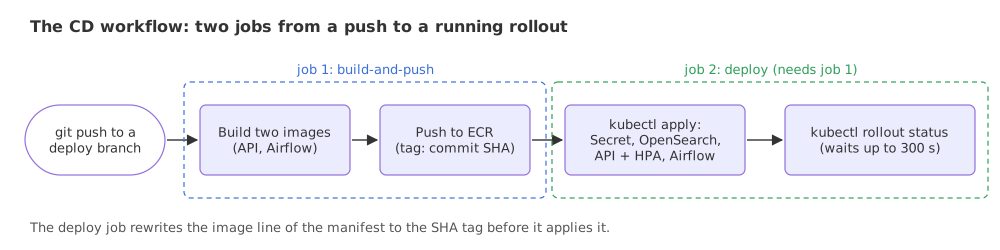
Shown as it ran in the video, not run here: it needs GitHub Actions and AWS credentials stored as repository secrets.
jobs:
  build-and-push:
    name: Build & Push Docker Images to ECR
    # builds ./Dockerfile and ./airflow/Dockerfile, tags each with the commit SHA
  deploy:
    name: Deploy to EKS Production
    needs: build-and-push
    steps:
      - run: kubectl apply -f deployment/eks/namespace.yaml
      - run: kubectl apply -f deployment/k8s/api/service.yaml
      - run: kubectl apply -f deployment/k8s/api/deployment.yaml
      - run: kubectl apply -f deployment/k8s/api/hpa.yaml
      - run: kubectl rollout status deployment/rag-api -n production --timeout=300s
The run shown in the video lists the deploy job as succeeded in 34 seconds. kubectl rollout status is what makes a failed release visible: it waits until the new pods are ready and fails the job after 300 seconds if they are not. To go back, kubectl rollout undo deployment/rag-api returns to the previous version.
What this deployment leaves open
Reading the same files as an attacker would gives a short list. Each line is in the repository's manifests.
- Three public doors over plain HTTP. The API, the Airflow UI and OpenSearch Dashboards each get their own internet-facing load balancer with no TLS. One Ingress with a certificate in front of
ClusterIPServices is the usual design, and the repository's own comments recommend it for production. - No authentication on the API, including the
/mcpendpoint from MCP server for an agentic RAG API. - OpenSearch runs with its security plugin disabled (
DISABLE_SECURITY_PLUGIN=true), which is acceptable only while it stays unreachable from outside the cluster. - Long-lived AWS keys. The Secret still carries a Bedrock access key although the service account can take a role, and the workflow signs in with static keys instead of a short-lived OIDC role.
- A Kubernetes Secret is only base64-encoded unless encryption at rest is turned on, so who can read Secrets in the namespace matters.
Deployment vs StatefulSet
| Deployment | StatefulSet | |
|---|---|---|
| Pod names | Random suffix, such as rag-api-7948f7fb7-hq8lq | Fixed and numbered, such as opensearch-0 |
| Storage | None of its own | One disk per pod, kept across restarts |
| Replacing a pod | Any new copy will do | The same name and the same disk come back |
| In the project | rag-api, airflow, opensearch-dashboards | opensearch |
Where you use Amazon EKS
- Several services that scale differently, as here: an API with two or more copies, a scheduler with one, a search index with a disk.
- Teams that already run Kubernetes and want the same manifests on AWS.
- Not for one small container. The video itself says a simpler service such as ECS with Fargate is enough for many applications; a cluster adds a control plane to pay for and to keep patched.
Related
- Previous: MCP server for an agentic RAG API
- Next: Load testing with Locust
- See also: Horizontal pod autoscaling (HPA)
- Reference: Resource management for pods and containers in the Kubernetes docs, and What is Amazon EKS
- In the first example, change
memory: 6Giunderrequeststomemory: 3Giand run it again: the typed object now prints'memory': '3Gi'. - In the second example, change the
countofrag-apifrom 2 to 3: memory requests rise from 16.5 to 22.5 GiB and limits from 25 to 33 GiB. - Replace
type: LoadBalancerwithtype: ClusterIPin the Service and run the first example: theserviceline changes, and on a real cluster the API would no longer be reachable from outside.
Slow is fine. Stopping is the only problem.