
Redis caching for RAG
Redis caching for RAG is a technique that stores each finished answer in Redis under a key built from the request, so an identical request is answered from memory without running search and generation again.
Last updated: 09 Oct, 2026 · Python 3.12 · google-genai 2.29
Every answer of the pipeline in Hybrid search with BM25 and vector search costs an embedding call, a search and a model call. Many users ask the same things. A cache pays that cost once per question and serves the stored answer afterwards, until the entry expires. Redis is an in-memory key-value store, which makes a lookup by key a matter of milliseconds.
Setting a time to live
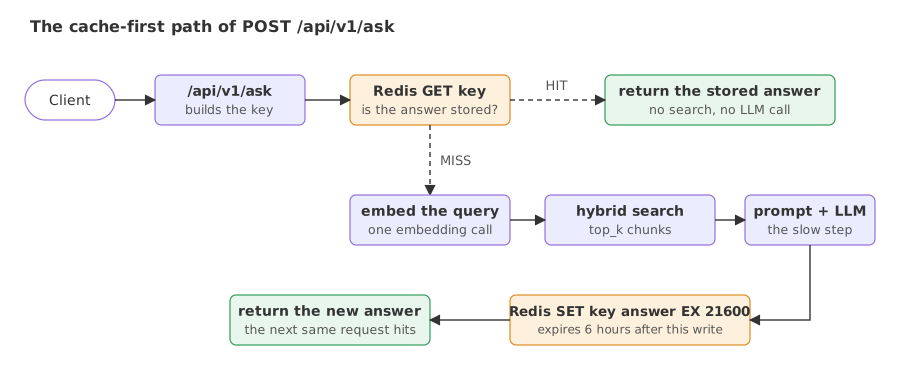
This part of the video starts at 6:44:58. The project's RAG flow document shows Redis at the top of the diagram, with a TTL, time to live, of six hours that is set by one line in the .env file.
self.ttl = timedelta(hours=settings.ttl_hours)       # REDIS__TTL_HOURS=6 in the .env file

success = self.redis.set(cache_key, response.model_dump_json(), ex=self.ttl)
Shown as it ran in the video, not run here: it needs a Redis server; the project uses Upstash, a hosted Redis reached over TLS.
The ex argument is the expiry. Each key carries its own timer: an answer written at 10:00 is gone at 16:00, one written at 11:30 at 17:30. The Redis command behind the call is SET key value EX 21600, and the value is a string holding the JSON of the whole response. A TTL bounds how stale an answer can get. Here the index is refilled every weekday morning, so an answer can lag the index by up to six hours.
The cache-first request path
This part of the video starts at 6:46:48. It follows one request through the diagram: the client calls the API, the API asks Redis, and only on a miss does the query get embedded, searched and sent to the model.
cached_response = await cache_client.find_cached_response(request)
if cached_response:
    logger.info("Returning cached response for exact query match")
    return cached_response

# ... embed the query, search, build the prompt, call the model ...

await cache_client.store_response(request, response)
return response
These are the cache lines of the /api/v1/ask handler with the pipeline between them left out. A hit returns before any other service is touched. A failed cache call is caught and logged, and the request carries on without the cache.
Building the cache key
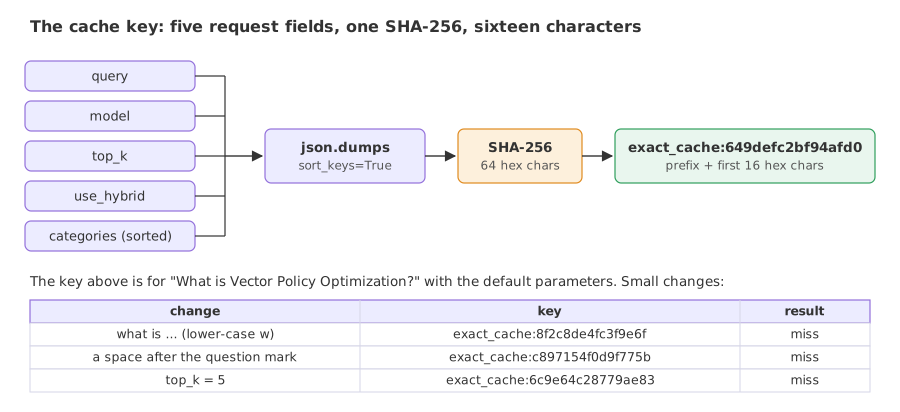
The project's caching document has a diagram of how the key is made: five fields of the request go through a hash, and the key is a prefix plus the first 16 characters of the result.
def _generate_cache_key(self, request: AskRequest) -> str:
    """Generate exact cache key based on request parameters."""
    key_data = {
        "query": request.query,
        "model": request.model,
        "top_k": request.top_k,
        "use_hybrid": request.use_hybrid,
        "categories": sorted(request.categories) if request.categories else [],
    }
    key_string = json.dumps(key_data, sort_keys=True)
    key_hash = hashlib.sha256(key_string.encode()).hexdigest()[:16]
return f"exact_cache:{key_hash}"- Everything that changes the answer has to be in the key. The same question with
top_k=5reads different chunks, so it must not get the answer computed fortop_k=3. sort_keys=Trueandsorted(...)make the key stable. The same request always produces the same JSON string, whatever order the categories arrived in.- SHA-256 turns that string into 64 hex characters; the key keeps the first 16. A changed character in the question gives a different hash, and that is a cache miss: the pipeline runs and a second entry is stored.
A TTL cache in plain Python
The project keeps its answers in Redis. The example uses a dictionary with an expiry time per entry, which behaves like SET ... EX and GET for one process, and the project's key function word for word. A 0.3 second sleep stands in for embedding, search and generation. The TTL is one second so that the expiry can be seen.
import hashlib
import json
import time

def cache_key(query, model=None, top_k=3, use_hybrid=True, categories=None):
    key_data = {"query": query, "model": model, "top_k": top_k, "use_hybrid": use_hybrid,
                "categories": sorted(categories) if categories else []}
    key_string = json.dumps(key_data, sort_keys=True)
    return "exact_cache:" + hashlib.sha256(key_string.encode()).hexdigest()[:16]

class TTLCache:
    """A dict that behaves like Redis SET key value EX ttl and GET key."""
    def __init__(self, ttl_seconds):
        self.ttl, self.data = ttl_seconds, {}

    def get(self, key):
        value, expires = self.data.get(key, (None, 0.0))
        if value is not None and time.monotonic() >= expires:
            del self.data[key]               # the entry outlived its TTL
            return None
        return value

    def set(self, key, value):
        self.data[key] = (value, time.monotonic() + self.ttl)

def slow_pipeline(query):                    # stands in for embed + search + LLM
    time.sleep(0.3)
    return json.dumps({"query": query, "answer": "VPO is an RL algorithm ...", "chunks_used": 3})

cache = TTLCache(ttl_seconds=1.0)

def ask(query, **params):
    key = cache_key(query, **params)
    start = time.perf_counter()
    answer = cache.get(key)
    result = "HIT " if answer else "MISS"
    if answer is None:
        answer = slow_pipeline(query)
        cache.set(key, answer)
    return result, key, time.perf_counter() - start

Q = "What is Vector Policy Optimization?"
calls = [("first call", Q, {}), ("same again", Q, {}), ("lower-case w", Q.replace("W", "w"), {}),
         ("trailing space", Q + " ", {}), ("top_k=5", Q, {"top_k": 5}),
         ("categories LG, AI", Q, {"categories": ["cs.LG", "cs.AI"]}),
         ("categories AI, LG", Q, {"categories": ["cs.AI", "cs.LG"]})]
for label, query, params in calls:
    result, key, seconds = ask(query, **params)
    print(f"{label:18} {result} {key}  {seconds:.1f} s")
time.sleep(1.1)                              # wait past the 1 second TTL
result, key, seconds = ask(Q)
print(f"{'after the TTL':18} {result} {key}  {seconds:.1f} s")
print("the project's TTL: 6 hours =", 6 * 3600, "seconds")first call MISS exact_cache:649defc2bf94afd0 0.3 s same again HIT exact_cache:649defc2bf94afd0 0.0 s lower-case w MISS exact_cache:8f2c8de4fc3f9e6f 0.3 s trailing space MISS exact_cache:c897154f0d9f775b 0.3 s top_k=5 MISS exact_cache:6c9e64c28779ae83 0.3 s categories LG, AI MISS exact_cache:fa75b153d5e4ae79 0.3 s categories AI, LG HIT exact_cache:fa75b153d5e4ae79 0.0 s after the TTL MISS exact_cache:649defc2bf94afd0 0.3 s the project's TTL: 6 hours = 21600 seconds
What the eight calls show
- The identical second call is a HIT: same key, 0.0 s against 0.3 s.
- A lower-case w and a trailing space each produce a new key and a MISS. Nothing fails; the pipeline runs again and a second and a third entry are stored for what a person would call the same question.
top_k=5is a MISS, as it should be: the answer would be built from different chunks.- Category order does not matter.
[cs.LG, cs.AI]and[cs.AI, cs.LG]share the key ending infa75b153d5e4ae79, because the function sorts the list; the second of the two calls is a HIT. - After the TTL the first key is a MISS again. The entry expired and the answer is recomputed and stored afresh. In the project the same happens after 21600 seconds.
- The 0.3 s is a sleep, so the ratio between the two times says nothing about a real pipeline. The pattern of hits and misses is what carries over.
Exact match vs semantic lookup
A viewer in the video asks what happens when the same question arrives in different words. With an exact-match key it is a miss. A semantic cache compares meanings: it embeds the incoming question, finds the nearest stored question, and returns its answer when the similarity is above a threshold. The project does not have one. The example measures what such a lookup would decide for four incoming questions against one cached question.
import hashlib
import json
import os

import numpy as np
from google import genai

client = genai.Client(api_key=os.environ["GEMINI_API_KEY"])

def embed(text):                             # one text per call, scaled to length 1
    reply = client.models.embed_content(model="gemini-embedding-2", contents=text)
    vector = np.array(reply.embeddings[0].values)
    return vector / np.linalg.norm(vector)

def cache_key(query):                        # the project's key with its default parameters
    key_data = {"query": query, "model": None, "top_k": 3, "use_hybrid": True, "categories": []}
    return "exact_cache:" + hashlib.sha256(json.dumps(key_data, sort_keys=True).encode()).hexdigest()[:16]

cached = "What is Vector Policy Optimization?"
incoming = ["What is Vector Policy Optimization?",
            "Explain Vector Policy Optimization",
            "What is Proximal Policy Optimization?",
            "What is the best pasta recipe?"]

cached_vector = embed(cached)
print(f"cached question: {cached}")
print(f"{'incoming question':40} exact hit  cosine  hit at 0.90  hit at 0.80")
for question in incoming:
    cosine = float(embed(question) @ cached_vector)
    exact = cache_key(question) == cache_key(cached)
print(f"{question:40} {exact!s:9} {cosine:.4f} {cosine >= 0.90!s:11} {cosine >= 0.80}")cached question: What is Vector Policy Optimization? incoming question exact hit cosine hit at 0.90 hit at 0.80 What is Vector Policy Optimization? True 1.0000 True True Explain Vector Policy Optimization False 0.9393 True True What is Proximal Policy Optimization? False 0.8248 False True What is the best pasta recipe? False 0.5415 False False
What the similarities show
- The identical question is an exact hit, with cosine 1.0000.
- "Explain Vector Policy Optimization" is an exact miss with cosine 0.9393. The exact-match cache computes the answer again; a semantic cache with a threshold of 0.90 or 0.80 would reuse it.
- "What is Proximal Policy Optimization?" scores 0.8248. It shares two of three words with the cached question and asks about a different algorithm. At a threshold of 0.80 it would be served the answer about Vector Policy Optimization.
- The recipe question scores 0.5415 and misses at both thresholds.
- On these four questions 0.90 separates the right reuse from the wrong one. Four questions are not enough to choose a threshold: collect pairs from your own traffic, label which ones may share an answer, and pick the threshold from those.
A semantic cache needs vector search in the cache store, plus a client library that embeds and compares, or a gateway that does both; LLM gateways covers the gateway side.
Which routes the cache covers
| Route | Reads the cache | Writes the cache |
|---|---|---|
POST /api/v1/ask | yes | yes, after a full answer |
POST /api/v1/stream | yes | yes, when the stream has finished |
POST /api/v1/ask-agentic | no | no |
POST /api/v1/hybrid-search/ | no | no |
The cache client is injected into two handlers only. The agent route, the one behind every guardrail test and the 25.16 second trace of this module, computes each answer again. The project's phase 6 notebook measures the cache on /api/v1/ask: the first request for "What is Vector Policy Optimization?" took 9.84 seconds and the identical second request 1.561 seconds.
first, second = 9.84, 1.561      # seconds: the two response times saved in the project's notebook

print(f"speed-up: {first / second:.1f} times")
print(f"time saved: {first - second:.2f} s")speed-up: 6.3 times time saved: 8.28 s
The cached request was 6.3 times faster and saved 8.28 seconds. It still took 1.561 seconds. A cache hit removes the search and the model call; the request itself and the trip to a hosted cache remain. Measure the hit time of your own setup before promising a number.
Cache safety
| Risk | What goes wrong | What to do |
|---|---|---|
| No user or tenant in the key | One user's cached answer is served to everyone who asks the same question | Add the tenant, or the user's access level, to the key whenever answers depend on it |
| No index version in the key | A re-ingested index keeps returning old answers until the TTL runs out | Put an index version in the key, or delete the cache after ingestion |
| No prompt or model version in the key | A changed prompt or provider still serves answers written by the old one | Add both to the key; in this project model is empty unless the client sends it |
| No normalisation | "What is X?" and "what is X?" are two entries | Trim and lower-case the question before hashing, if case never changes the answer |
| Caching everything | Refusals, errors and answers that quote personal data are replayed | Store only successful answers that passed the output check |
| Short keys | 16 hex characters are 64 bits; two requests can share a key in a very large cache | Keep more of the hash when the number of entries is very large |
Exact-match cache vs semantic cache
| Exact-match cache | Semantic cache | |
|---|---|---|
| Lookup | One GET by key | Embed the question, then a nearest-neighbour search |
| Hit when | Every keyed field is identical | Similarity is above a threshold |
| Wrong answers | Only through a missing key field | Also through a threshold that is too low |
| Cost of a lookup | One Redis call | One embedding call and one vector search |
| Fits | Repeated identical requests: dashboards, suggested questions, retries | Free-text questions that repeat in other words |
Where you use Redis caching
- Frequently asked questions. A help page with suggested questions sends the same strings again and again.
- Retries and double clicks. A client that repeats a request gets the stored answer and the model is not billed twice.
- Expensive fixed steps. The same idea caches embeddings of repeated queries or search results, each under its own key.
Related
- Previous: Hybrid search with BM25 and vector search
- Next: MCP server for an agentic RAG API
- See also: LLM gateways, Agentic RAG API with FastAPI and LangGraph
- Reference: Redis: SET, Python: hashlib
- In the TTL cache example, lower-case and strip the query inside
cache_key(query.strip().lower()) and run it again: the lower-case and trailing-space lines change from MISS to HIT. - Add a
user_idargument tocache_keyand put it inkey_data: the same question from two users now has two keys. - In the semantic example, add "Tell me about VPO" to
incomingand see on which side of 0.90 an abbreviation lands.
Little by little, you're building something great.