
MCP server for an agentic RAG API
An MCP server is a program that offers tools, resources and prompts to AI applications over the Model Context Protocol (MCP), so that any MCP client can discover and call them in the same way.
Last updated: 09 Oct, 2026 · MCP specification 2026-07-28
The API built in Agentic RAG API with FastAPI and LangGraph answers plain HTTP requests, and Redis caching for RAG made its repeat answers fast. A chat app or a coding agent cannot use that API until someone writes glue code for it. The project in the video adds an MCP server to the same FastAPI app, so a client such as Claude Desktop can list its tools and call them with no glue code. The server is also one more door into the system, so it needs a lock of its own.
Tools, resources and prompts in an MCP server
An MCP server can offer three kinds of things. The specification separates them by who decides when each one is used.
| Kind | Who controls it | What it is | In the project |
|---|---|---|---|
| Tools | The model | Functions the model may call to act or to fetch something | Six: ask_question, search_papers, get_paper_details, list_recent_papers, get_index_stats, submit_feedback |
| Resources | The application | Data the client attaches as context, addressed by a URI | Two: papers://{arxiv_id} and index://stats |
| Prompts | The user | Ready-made templates a user picks, such as a slash command | None |
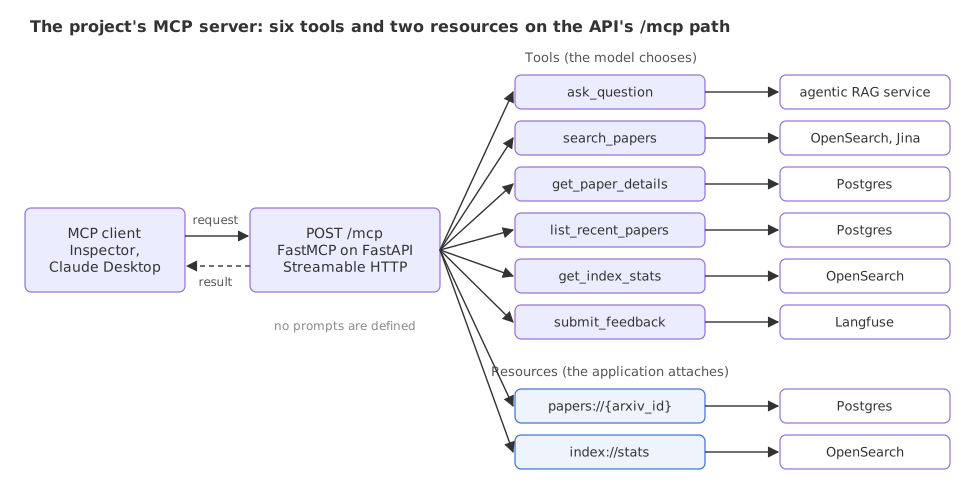
Each tool is a thin function over a service the API already has. ask_question runs the whole agentic RAG pipeline, search_papers runs the hybrid search from Hybrid search with BM25 and vector search, two tools read the papers table in Postgres, one reads the OpenSearch index statistics and submit_feedback writes a score to Langfuse.
The project's MCP server code
Shown as it ran in the video, not run here: it needs the fastmcp package and the project's services (OpenSearch, Postgres, an embedding API and an LLM).
Creating the server
src/mcp_server/server.py creates one FastMCP object. The instructions text is sent to clients as a description of the whole server.
from fastmcp import FastMCP

mcp = FastMCP(
    name="arxiv-rag",
    instructions=(
        "Search and query arXiv CS/AI/ML papers using a production-grade hybrid RAG system. "
        "Available tools: search_papers (BM25+vector), ask_question (full agentic pipeline), "
        "get_paper_details, list_recent_papers, submit_feedback, get_index_stats."
    ),
)
A tool is a decorated function
@mcp.tool() registers a coroutine as a tool. FastMCP builds the tool's input schema from the type hints and its description from the docstring, so the docstring is what a model reads when it chooses a tool. The line limit = min(limit, 50) caps what a caller can ask for, whatever number the model sends.
@mcp.tool()
async def list_recent_papers(
    limit: int = 10,
    offset: int = 0,
    processed_only: bool = False,
) -> List[Dict[str, Any]]:
    """List recently ingested arXiv papers from the database, ordered by publish date descending.

    Args:
        limit: Number of papers to return (default 10, max 50)
        offset: Pagination offset (default 0)
        processed_only: If True, return only papers with parsed PDF content
    """
    with logfire.span("mcp:list_recent_papers", limit=limit, offset=offset, processed_only=processed_only):
        ctx = get_mcp_context()
        limit = min(limit, 50)

        with ctx.database.get_session() as session:
            repo = PaperRepository(session)
            if processed_only:
                papers = repo.get_processed_papers(limit=limit, offset=offset)
            else:
                papers = repo.get_all(limit=limit, offset=offset)
            return [_paper_to_dict(p) for p in papers]
A resource has a URI
@mcp.resource registers data under a URI. index://stats is a fixed address. The second resource, papers://{arxiv_id}, is a resource template: the client fills in the id.
@mcp.resource("index://stats")
async def get_index_stats_resource() -> Dict[str, Any]:
    """Read current OpenSearch index statistics.

    URI: index://stats
    """
    ctx = get_mcp_context()
    return ctx.opensearch_client.get_index_stats()
Mounting the server on the FastAPI app
src/main.py turns the server into a small web app and mounts it at the path from the settings, /mcp by default. The MCP__ENABLED setting switches the mount on or off.
# path="/" places the route at "/" inside the sub-app so it matches when mounted at /mcp.
_mcp_http_app = mcp.http_app(path="/", stateless_http=True)

# inside the app's lifespan function
async with _mcp_http_app.lifespan(app):
    ...

_mcp_settings = get_settings().mcp
if _mcp_settings.enabled:
    app.mount(_mcp_settings.path, _mcp_http_app)
stateless_http=True matters once the API runs as several copies. The container starts four uvicorn workers and the cluster runs two or more pods behind a load balancer, so two requests from one client can land on different processes. A session kept in one process's memory would be missing in the next. In stateless mode each request stands alone.
What the MCP Inspector showed in the video
The video connects the MCP Inspector, a test client that runs with npx @modelcontextprotocol/inspector http://localhost:8000/mcp, to the API running on the laptop. These are the readings from its screen.
| On the Inspector screen | Value |
|---|---|
| Transport Type | Streamable HTTP |
| URL | http://localhost:8000/mcp |
| Server | arxiv-rag, Version 3.3.1 (the FastMCP version) |
| Tools listed | 6 |
| History | initialize, logging/setLevel, tools/list, then one tools/call per tool run |
ask_question with "What is Vector Policy Optimization?" | execution_time_seconds: 22.84, guardrail_score: 100, a trace_id, and an answer naming the paper arXiv 2605.22817v1 |
The video then adds the same server to Claude Desktop as a local server with the command npx -y mcp-remote http://localhost:8000/mcp. Asked to explain vector policy optimization, the app loads the tools, calls ask_question, and stops to ask the user: "Claude wants to use Get paper details from arxiv-rag", with the buttons Always allow and Deny. That prompt is the human check on a tool call.
Transports: stdio and Streamable HTTP
A transport is how the JSON messages travel. The current specification defines two standard ones.
| stdio | Streamable HTTP | |
|---|---|---|
| How messages travel | Lines of JSON on the standard input and output of a process the client starts | Each message is an HTTP POST to one endpoint, such as /mcp |
| Where the server runs | On the user's machine, as a child process | Anywhere a URL can reach, serving many clients |
| The reply | A line of JSON | One JSON object, or a stream of events for that request |
| Fits | Local tools: files, a local database, a CLI | A service you host, like this API |
| Who can connect | Only the program that started it | Anyone who can reach the URL, so it needs authentication |
An older transport, HTTP+SSE from the 2024-11-05 revision, has been deprecated since 2025-03-26. The project uses Streamable HTTP.
What the 2026-07-28 revision changed
The video's Inspector history starts with initialize and logging/setLevel, the flow of protocol revision 2025-11-25 and earlier; the current revision, 2026-07-28, removed both, so a current client's history starts at the first real request.
- No handshake. The
initializeexchange is gone. Every request carries its protocol version and the client's capabilities. - No sessions. The
Mcp-Session-Idheader was removed. A server that needs state between calls returns its own handle and takes it back as a tool argument. - No GET stream. A server answers GET on the MCP endpoint with
405 Method Not Allowed. - Three headers on every POST.
MCP-Protocol-Version,Mcp-Method, andMcp-Namefortools/call,resources/readandprompts/get. They repeat fields of the body, and a server rejects a request where header and body disagree. resultTypein every result."complete"for an ordinary result.logging/setLevelandpingwere removed, andserver/discoverwas added so a client can ask what a server supports.
The project's tools are plain functions and its server already runs stateless. Which revision is spoken on the wire is decided by the FastMCP release and by the client.
The tools/list and tools/call messages on a FastAPI stand-in
The video's server is built with FastMCP. The code below is a stand-in written with plain FastAPI, not an MCP SDK, so that the messages themselves are visible and it runs with fastapi and httpx alone. It follows the 2026-07-28 shapes for two methods and skips the rest of the specification, such as the _meta request fields, the ttlMs and cacheScope cache fields of a list result, and server/discover.
A request with its headers
A tool call is one POST. The headers repeat the method and the tool name from the body, so a load balancer can route or log the call without parsing JSON.
POST /mcp HTTP/1.1
Content-Type: application/json
MCP-Protocol-Version: 2026-07-28
Mcp-Method: tools/call
Mcp-Name: list_recent_papers

{"jsonrpc": "2.0", "id": 2, "method": "tools/call",
 "params": {"name": "list_recent_papers", "arguments": {"limit": 2}}}
A stand-in server with one tool
The tool decorator below does by hand what @mcp.tool() does: it reads the function's name, docstring and type hints and stores a tool definition. The endpoint then checks who is calling before it does any work. The three papers are made-up rows that stand in for the database.
import inspect
import json

from fastapi import FastAPI, Request
from fastapi.responses import JSONResponse
from fastapi.testclient import TestClient

VERSION = "2026-07-28"
PAPERS = [  # made-up rows that stand in for the Postgres table
    {"arxiv_id": "2605.00001v1", "title": "Paper A", "published_date": "2026-05-20"},
    {"arxiv_id": "2605.00002v1", "title": "Paper B", "published_date": "2026-05-18"},
    {"arxiv_id": "2605.00003v1", "title": "Paper C", "published_date": "2026-05-11"},
]
TOOLS = {}


def tool(fn):
    """Turn a typed function into a tool definition: name, description, input schema."""
    types = {int: "integer", str: "string", bool: "boolean"}
    props = {name: {"type": types[p.annotation]} for name, p in inspect.signature(fn).parameters.items()}
    TOOLS[fn.__name__] = {"fn": fn, "definition": {
        "name": fn.__name__, "description": inspect.getdoc(fn),
        "inputSchema": {"type": "object", "properties": props}}}
    return fn


@tool
def list_recent_papers(limit: int = 10) -> list:
    """List recently ingested papers, newest first."""
    return PAPERS[: min(limit, 50)]


def error(status, request_id, code, message):
    return JSONResponse({"jsonrpc": "2.0", "id": request_id, "error": {"code": code, "message": message}}, status)


app = FastAPI()


@app.post("/mcp")
async def mcp_endpoint(request: Request):
    msg, head = await request.json(), request.headers
    if head.get("origin", "http://localhost") != "http://localhost":
        return error(403, None, -32600, "Origin not allowed")
    if head.get("authorization") != "Bearer demo-token":
        return error(401, None, -32600, "Missing or wrong bearer token")
    if head.get("mcp-protocol-version") != VERSION or head.get("mcp-method") != msg["method"]:
        return error(400, msg["id"], -32020, "Header mismatch")
    if msg["method"] == "tools/list":
        result = {"resultType": "complete", "tools": [t["definition"] for t in TOOLS.values()]}
    elif msg["method"] == "tools/call":
        chosen = TOOLS.get(msg["params"]["name"])
        if chosen is None:
            return error(200, msg["id"], -32602, "Unknown tool: " + msg["params"]["name"])
        rows = chosen["fn"](**msg["params"].get("arguments", {}))
        result = {"resultType": "complete", "content": [{"type": "text", "text": json.dumps(rows)}],
                  "structuredContent": rows, "isError": False}
    else:
        return error(404, msg["id"], -32601, "Method not found")
    return {"jsonrpc": "2.0", "id": msg["id"], "result": result}


client = TestClient(app)
GOOD = {"Authorization": "Bearer demo-token", "MCP-Protocol-Version": VERSION}


def send(label, method, params=None, headers=None, mcp_method=None):
    body = {"jsonrpc": "2.0", "id": 1, "method": method, "params": params or {}}
    sent = {"Mcp-Method": mcp_method or method, **(GOOD if headers is None else headers)}
    reply = client.post("/mcp", json=body, headers=sent)
    data = reply.json()
    shown = data["result"] if "result" in data else data["error"]
    print(f"{label}\n  HTTP {reply.status_code}  {json.dumps(shown)}")


call = {"name": "list_recent_papers", "arguments": {"limit": 2}}
send("1. tools/list", "tools/list")
send("2. tools/call", "tools/call", call)
send("3. no token", "tools/call", call, headers={"MCP-Protocol-Version": VERSION})
send("4. another site's page", "tools/call", call, headers={**GOOD, "Origin": "https://evil.example"})
send("5. header says tools/list, body says tools/call", "tools/call", call, mcp_method="tools/list")
send("6. a method this server lacks", "prompts/list")
print("7. GET /mcp\n HTTP", client.get("/mcp").status_code)1. tools/list
HTTP 200 {"resultType": "complete", "tools": [{"name": "list_recent_papers", "description": "List recently ingested papers, newest first.", "inputSchema": {"type": "object", "properties": {"limit": {"type": "integer"}}}}]}
2. tools/call
HTTP 200 {"resultType": "complete", "content": [{"type": "text", "text": "[{\"arxiv_id\": \"2605.00001v1\", \"title\": \"Paper A\", \"published_date\": \"2026-05-20\"}, {\"arxiv_id\": \"2605.00002v1\", \"title\": \"Paper B\", \"published_date\": \"2026-05-18\"}]"}], "structuredContent": [{"arxiv_id": "2605.00001v1", "title": "Paper A", "published_date": "2026-05-20"}, {"arxiv_id": "2605.00002v1", "title": "Paper B", "published_date": "2026-05-18"}], "isError": false}
3. no token
HTTP 401 {"code": -32600, "message": "Missing or wrong bearer token"}
4. another site's page
HTTP 403 {"code": -32600, "message": "Origin not allowed"}
5. header says tools/list, body says tools/call
HTTP 400 {"code": -32020, "message": "Header mismatch"}
6. a method this server lacks
HTTP 404 {"code": -32601, "message": "Method not found"}
7. GET /mcp
HTTP 405What the seven replies show
- Reply 1 is the menu.
tools/listreturns each tool's name, description and input schema. This is the text a client hands to the model. - Reply 2 is the call. The result carries the rows twice: as text in
content, and as JSON instructuredContent.limit: 2returned two of the three papers. - Reply 3 is 401. No bearer token, so no tool ran. The video's endpoint has no such check.
- Reply 4 is 403. The request came with the
Originof another web site. The specification says a server must validateOrigin, to stop a web page from driving a local server through the user's own machine. - Reply 5 is 400 with code -32020. The header said
tools/listand the body saidtools/call. A proxy that trusted the header would have logged a harmless listing. - Replies 6 and 7 are the two not-found cases. An unknown method is 404 with the JSON-RPC code -32601, and GET is 405.
Securing an MCP endpoint
The project's MCP server has no authentication. Once the API is deployed behind a public load balancer, as in Deploying on Amazon EKS, anyone who learns the host name can call /mcp. Every ask_question call spends model tokens, and submit_feedback writes into the team's Langfuse scores.
- Authenticate every request. The specification says servers should implement proper authentication for all connections, and defines an OAuth 2.1 flow for it. The bearer token in the stand-in is the smallest version of the idea.
- Validate
Originand, for a server on your own machine, listen on 127.0.0.1 only. - Treat tool text as untrusted input. A tool description or a tool result is text that reaches the model. A paper abstract returned by
search_paperscan carry an instruction, which is the indirect injection from Prompt injection and jailbreaks. - Keep tools narrow. Cap arguments as the project does with
min(limit, 50)andmin(top_k, 20), and mark read-only tools with thereadOnlyHintannotation. The project sets no annotations, so the Inspector labels even the read-onlyget_paper_detailsas destructive. - Keep a human in the loop for actions. The Always allow and Deny prompt in Claude Desktop is that check. Always allow removes it for that tool.
- Rate limit and log. Each call is already a span named
mcp:<tool>in the project, as set up in LLM observability with Pydantic Logfire.
MCP tool vs REST endpoint
| REST endpoint of the API | MCP tool on the same API | |
|---|---|---|
| Who calls it | Code a developer wrote for this API | A model, through any MCP client |
| How it is found | Docs or an OpenAPI page | tools/list at run time |
| What describes it | Route, parameters, response model | Name, description and input schema, read by the model |
| Main risk | A caller without permission | The same, plus a model steered by injected text into calling it |
Where you use an MCP server
- Giving a coding agent or a desktop chat app access to an internal system, such as this paper search, without writing a plugin per client.
- Sharing one set of tools across agent frameworks. LangGraph, the OpenAI Agents SDK and others can all load MCP tools.
- Wrapping a service you already run. The project keeps its MCP code in one small package beside the FastAPI routes and reuses every service object.
tools/list and normally puts every tool's name, description and schema into the model's context on every turn; the model picks one, and only that one runs. Six tools cost little. Sixty tools from ten servers fill the context and give injected text more functions to aim at, so connect only the servers a task needs.Related
- Previous: Redis caching for RAG
- Next: Deploying on Amazon EKS
- See also: the MCP tutorial, which builds servers and clients with the SDK
- Reference: MCP specification, revision 2026-07-28 and its list of changes
- In the stand-in, change
{"limit": 2}to{"limit": 500}: all three papers come back, and with a real table themin(limit, 50)line would stop at 50. - Add a second function under
@tool, for exampledef count_papers() -> intwith a docstring, and run again: reply 1 lists two tools. - Change the token in
GOODto"Bearer wrong": replies 1, 2, 5 and 6 turn into 401, and no tool runs.
You understood something today that you didn't yesterday.