
Embedding layer in Keras
An embedding layer is a trainable lookup table that maps each word index to a dense vector of a chosen size, and learns those vectors together with the rest of the network.
Last updated: 07 Oct, 2026 · TensorFlow 2 / Keras · NumPy
Word2Vec learns word vectors from its own prediction task, before any model uses them. In a Keras model the first layer can learn the vectors instead, from the loss of the task the model is trained on. Every LSTM practical that follows starts with this layer.
Turning sentences into vectors in four steps
The video sets out the pipeline before any code:
- Sentences, each made of words.
- One-hot encoding, which first needs a vocabulary size: the number of distinct words the model will know, 500 here.
- Padding, post or pre, so that every sentence has the same length.
- Vectors: the embedding layer turns each encoded word into a vector.
With two sentences, "Krish likes pizza" and "Shyam likes burgers", and a vocabulary of 500, each word becomes a vector of 500 zeros with a single 1 at the word's index, for example index 325 for the first word (One-hot encoding for text). The index is only the word's id in the vocabulary; its position says nothing about spelling or meaning.
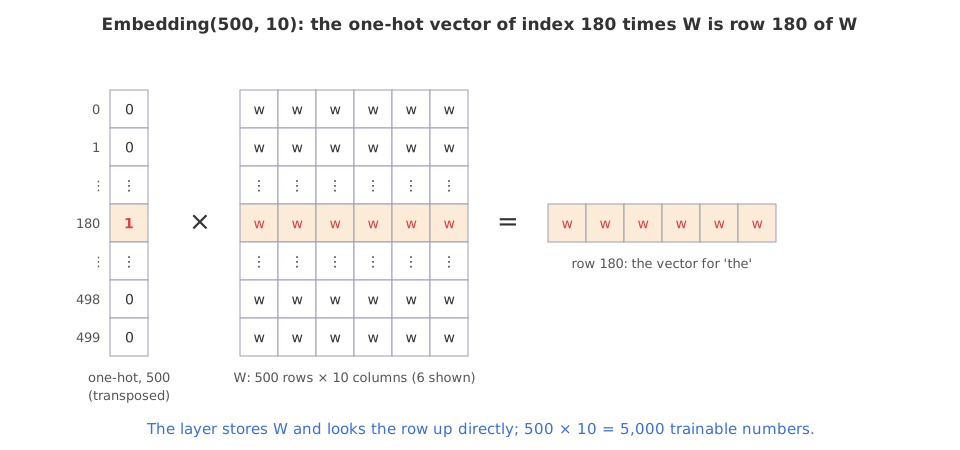
Multiplying a one-hot vector by a 500 × d matrix W picks out one row of W. An embedding layer stores W and does that lookup directly from the index, so the 500-long one-hot vector is never built.
Encoding the seven sentences with one_hot
The notebook uses seven short sentences and a vocabulary size of 500. Keras's one_hot gives each word an integer:
import tensorflow as tf
print(tf.__version__)2.9.1
##tensorflow >2.0
from tensorflow.keras.preprocessing.text import one_hot
### sentences
sent=[  'the glass of milk',
     'the glass of juice',
     'the cup of tea',
    'I am a good boy',
     'I am a good developer',
     'understand the meaning of words',
     'your videos are good']
### Vocabulary size
voc_size=500
onehot_repr=[one_hot(words,voc_size)for words in sent]
print(onehot_repr)[[180, 405, 264, 53], [180, 405, 264, 8], [180, 92, 264, 33], [291, 43, 307, 242, 275], [291, 43, 307, 242, 98], [362, 180, 144, 264, 188], [354, 52, 496, 242]]
Despite its name, one_hot returns one integer per word, not a one-hot vector: it hashes each lowercased word into a number from 1 to voc_size − 1 (the hashing trick). Two words can land on the same number, and Python's string hash changes with every new session, so a rerun gives different numbers; in this run "the" is 180, "glass" 405, "of" 264 and "milk" 53.
The video installs tensorflow-gpu; TensorFlow 2.12 removed that package, and today pip install tensorflow is the one package (Colab has it already). Keras 3, which TensorFlow 2.16 and later use, no longer has keras.preprocessing.text, so one_hot is gone; the last section shows the replacement.
Padding every sentence to length 8
A network trained on batches needs every sentence to have the same size. The longest sentence here has five words, so a length of 8 leaves room. pad_sequences makes every list 8 long by adding zeros: at the start with padding='pre', at the end with padding='post'. A four-index sentence gets four zeros and a five-index sentence three.
from tensorflow.keras.layers import Embedding
from tensorflow.keras.preprocessing.sequence import pad_sequences
from tensorflow.keras.models import Sequential
## pre padding
sent_length=8
embedded_docs=pad_sequences(onehot_repr,padding='pre',maxlen=sent_length)
print(embedded_docs)[[ 0 0 0 0 180 405 264 53] [ 0 0 0 0 180 405 264 8] [ 0 0 0 0 180 92 264 33] [ 0 0 0 291 43 307 242 275] [ 0 0 0 291 43 307 242 98] [ 0 0 0 362 180 144 264 188] [ 0 0 0 0 354 52 496 242]]
![The seven example sentences as hashed indices padded to length 8: with padding='pre' the zeros come first, as in [0, 0, 0, 0, 180, 405, 264, 53] for 'the glass of milk', and with padding='post' they come last; four-word sentences get four zeros and five-word ones three.](https://d14omfvx1qlabb.cloudfront.net/krishnaik.in/media/tutorials/nlp/8a0d080aa51548c6969b4f1a55bf511d.svg)
pad_sequences still exists in Keras 3, imported today as from keras.utils import pad_sequences. A sentence longer than maxlen is cut, and the default truncating='pre' drops its first words.
Building the Embedding layer in Keras
Each index gets a vector of 10 features, small because the sentences are small; with a large dataset 300 dimensions is a common choice, the size of the pretrained Word2Vec vectors. The layer takes three settings: the vocabulary size (500), the number of dimensions (10) and the input length (8). Like Word2Vec it gives every word a dense vector; unlike Word2Vec, those vectors are trained by the loss of whatever model the layer is part of.
## 10 feature dimesnions
dim=10
model=Sequential()
model.add(Embedding(voc_size,10,input_length=sent_length))
model.compile('adam','mse')
model.summary()Model: "sequential"
_________________________________________________________________
Layer (type) Output Shape Param #
=================================================================
embedding (Embedding) (None, 8, 10) 5000
=================================================================
Total params: 5,000
Trainable params: 5,000
Non-trainable params: 0
_________________________________________________________________The summary shows an output of (None, 8, 10), a batch of sentences of 8 positions with 10 numbers each, and 5,000 parameters: 500 rows × 10 columns. The model is compiled with Adam and mean squared error only so that it can run; it has no target and is never trained.
Keras 3 warns that input_length is deprecated: drop it and give the shape with keras.Input(shape=(8,)).
Looking at the vectors of "the glass of milk"
##'the glass of milk',
embedded_docs[0]array([ 0, 0, 0, 0, 180, 405, 264, 53], dtype=int32)
model.predict(embedded_docs[0])WARNING:tensorflow:Model was constructed with shape (None, 8) for input KerasTensor(type_spec=TensorSpec(shape=(None, 8), dtype=tf.float32, name='embedding_input'), name='embedding_input', description="created by layer 'embedding_input'"), but it was called on an input with incompatible shape (None,).
1/1 [==============================] - 0s 72ms/step
array([[ 0.03938437, -0.02009605, -0.03878935, -0.04955565, 0.00419912,
-0.01431773, 0.02523251, 0.01653036, 0.04291571, -0.00864979],
[ 0.03938437, -0.02009605, -0.03878935, -0.04955565, 0.00419912,
-0.01431773, 0.02523251, 0.01653036, 0.04291571, -0.00864979],
[ 0.03938437, -0.02009605, -0.03878935, -0.04955565, 0.00419912,
-0.01431773, 0.02523251, 0.01653036, 0.04291571, -0.00864979],
[ 0.03938437, -0.02009605, -0.03878935, -0.04955565, 0.00419912,
-0.01431773, 0.02523251, 0.01653036, 0.04291571, -0.00864979],
[ 0.03059326, -0.04286614, 0.00899569, 0.00743791, -0.000781 ,
0.04186494, 0.03977301, 0.00326709, 0.00619651, -0.01993654],
[ 0.02512412, -0.0087087 , 0.03144198, 0.00704668, -0.00177735,
-0.03415867, -0.00100178, 0.01562483, 0.03178963, 0.02784893],
[-0.00653008, 0.02340979, -0.01967902, -0.00494973, -0.02693756,
-0.03746525, 0.01460877, -0.00449115, -0.00130982, -0.0039017 ],
[-0.03150218, 0.01950303, -0.01415605, -0.00183152, 0.01207731,
0.02444079, 0.0140041 , 0.0070256 , 0.04950741, -0.03602346]],
dtype=float32)The first sentence is [0, 0, 0, 0, 180, 405, 264, 53]. Each of its 8 positions comes back as 10 numbers; the four zeros share one identical row, and "the", "glass", "of" and "milk" each have their own. Nothing has been trained, so every value is the layer's random starting value, between −0.05 and 0.05. The warning appears because a single sentence was passed as a 1-D array; model.predict(embedded_docs[:1]) passes one sentence as a batch of one and returns shape (1, 8, 10).
Looking up rows by hand in NumPy
The same lookup without Keras: a random 500 × 10 table, the padded indices of "the glass of milk", and one row per index.
import numpy as np

rng = np.random.default_rng(0)
voc_size, dim = 500, 10
W = rng.uniform(-0.05, 0.05, (voc_size, dim))     # the Embedding layer's table before training
doc = np.array([0, 0, 0, 0, 180, 405, 264, 53])  # 'the glass of milk', pre-padded to 8

one_hot = np.zeros(voc_size)
one_hot[180] = 1                                   # the word with index 180 ('the')
print("one-hot row times W equals row 180:", np.allclose(one_hot @ W, W[180]))

vectors = W[doc]                                   # what Embedding(500, 10) does to one sentence
print("output shape:", vectors.shape)
print("the four padding rows are identical:", np.allclose(vectors[:4], vectors[0]))
print("largest |value| before training:", round(float(np.abs(W).max()), 4))
print("trainable numbers:", W.size)one-hot row times W equals row 180: True output shape: (8, 10) the four padding rows are identical: True largest |value| before training: 0.05 trainable numbers: 5000
- A one-hot vector times W equals row 180 of W, so the lookup and the matrix product are the same operation.
- The output is 8 × 10, one row per padded position, as in the notebook's run.
- The four padding rows are identical, because they are all row 0.
- Every starting value is within 0.05 of zero, matching Keras's default uniform start, and 5,000 numbers are trainable.
Writing the same steps with today's Keras
Keras 3 replaces the hashing one_hot with TextVectorization, which builds a real vocabulary from the data, keeps 0 for padding and 1 for unknown words, and pads at the end:
import keras
from keras import layers

vectorize = layers.TextVectorization(max_tokens=500, output_sequence_length=8)
vectorize.adapt(sent)                        # build the vocabulary from the sentences
embedded_docs = vectorize(sent)              # 0 = padding, 1 = unknown word

model = keras.Sequential([keras.Input(shape=(8,)), layers.Embedding(500, 10)])
model.summary()                              # output (None, 8, 10), 5,000 parameters
Indices from TextVectorization are ranked by word frequency in the data, so they stay the same from one run to the next.
Embedding layer vs Word2Vec
| Embedding layer | Word2Vec | |
|---|---|---|
| How vectors are learned | by the loss of the model it sits in | by its own CBOW or skip-gram task |
| When | while the model trains | before, as a separate step |
| Starts from | random values (or pretrained vectors) | random values |
| Output for a sentence | one vector per word, in order | one vector per word; averaging gives one per sentence |
| Size in this lesson | 500 × 10 = 5,000 numbers | vocabulary × vector size |
Where you use an embedding layer
- The first layer of every Keras text model: LSTM, GRU, bidirectional LSTM and transformer models.
- Loading pretrained vectors (Word2Vec, GloVe) into the table and freezing it with
trainable=Falsewhen the dataset is small. - Categorical features with many values, such as product or user ids.
mask_zero=True to Embedding so that LSTM and GRU layers skip the padded positions.Related
- Previous: GRU (gated recurrent unit)
- Next: LSTM text classification (fake news)
- See also: One-hot encoding for text
- Reference: Embedding layer in the Keras API
- Change
dimto 300 in the NumPy example and recompute the number of trainable values. - Change
docto post padding, [180, 405, 264, 53, 0, 0, 0, 0], and check which rows ofvectorsare now identical. - Set
one_hot[405] = 1as well and look at whatone_hot @ Wreturns: the sum of two rows.
Little by little, you're building something great.