
Tokenization with NLTK
NLTK's tokenizers are functions that split text into sentence tokens (sent_tokenize) or word tokens (word_tokenize, wordpunct_tokenize, TreebankWordTokenizer), each with its own rule for punctuation.
Last updated: 07 Oct, 2026 · NLTK 3.10 · scikit-learn 1.9
Tokenization split text with hand-written regular expressions. NLTK's tokenizers are tested on real English: they know that "Dr." does not end a sentence and that "don't" is two words.
The corpus is the video's own. Its two lines are written to test the tokenizers: a comma with no space after it, a possessive, and a lower-case word after the exclamation mark:
corpus = """Hello Welcome,to Krish Naik's NLP Tutorials.
Please do watch the entire course! to become expert in NLP.
"""
Downloading the sentence model
sent_tokenize and word_tokenize need the Punkt model, downloaded once:
import nltk
nltk.download("punkt_tab")    # once per machine: the Punkt sentence model
Splitting a paragraph into sentences with sent_tokenize
sent_tokenize(text) converts a paragraph into a list of sentences, with NLTK's recommended sentence tokenizer for the language (English by default), currently the PunktSentenceTokenizer. Punkt is a trained model: it learned from English text which full stops end a sentence and which belong to abbreviations such as "Dr." and "p.m.". It splits at ., ! and ? when they end a sentence. A line break alone does not end a sentence.
from nltk.tokenize import sent_tokenize

documents = sent_tokenize(corpus)    # paragraph -> list of sentences
for sentence in documents:
print(sentence)corpus = """Hello Welcome,to Krish Naik's NLP Tutorials.
Please do watch the entire course! to become expert in NLP.
"""
from nltk.tokenize import sent_tokenize
documents = sent_tokenize(corpus)
print(type(documents), len(documents))
for sentence in documents:
print(repr(sentence))
print(sent_tokenize("Hello Welcome to the tutorial\nPlease do watch the course"))
print(sent_tokenize("Dr. Smith went to Washington. He arrived at 3 p.m. on Monday! Was it late? Yes."))<class 'list'> 3 "Hello Welcome,to Krish Naik's NLP Tutorials." 'Please do watch the entire course!' 'to become expert in NLP.' ['Hello Welcome to the tutorial\nPlease do watch the course'] ['Dr. Smith went to Washington.', 'He arrived at 3 p.m. on Monday!', 'Was it late?', 'Yes.']
What sent_tokenize did
- Three sentences from the corpus, in a Python list. The full stop after Tutorials ends the first and the exclamation mark ends the second, so "to become expert in NLP." is a sentence of its own.
- The line break is kept inside the text: with no full stop before it, "tutorial\nPlease" stays one sentence. The split in the corpus came from the full stop, not from the new line.
- Abbreviations survive: "Dr." and "p.m." do not end a sentence, while "!" and "?" do.
Splitting words with word_tokenize
word_tokenize splits a paragraph, or each sentence from sent_tokenize, into words. The comma, the full stops and the exclamation mark become separate tokens. Every word is a separate token because each one has a different importance and gets its own preprocessing.
wordpunct_tokenize treats punctuation as separate words too, and goes one step further: the apostrophe s that word_tokenize keeps as one token, 's, is split into ' and s.
TreebankWordTokenizer differs in one small way, the video's quiz. A full stop in the middle of the text is not treated as a separate word: it stays in the previous word, as in "Tutorials.". Only the last full stop becomes a separate token. Most of the time word_tokenize and sent_tokenize are the ones to use.
Why the three tokenizers differ
word_tokenizerunssent_tokenizefirst, then an improved Treebank tokenizer on each sentence. Every sentence's final full stop is therefore split off, and possessives and contractions are split the Penn Treebank way: Naik's becomes Naik + 's, don't becomes do + n't.wordpunct_tokenizeis one regular expression,\w+|[^\w\s]+: every run of letters and digits, and every run of punctuation, is a token.TreebankWordTokenizerexpects one sentence at a time, so it only detaches the full stop at the very end of the string it is given.
from nltk.tokenize import word_tokenize, wordpunct_tokenize, TreebankWordTokenizer

word_tokenize(corpus)                        # Treebank rules, sentence by sentence
wordpunct_tokenize(corpus)                   # every punctuation run is a token
TreebankWordTokenizer().tokenize(corpus)     # one sentence assumed
Comparing the three word tokenizers on the corpus
corpus = """Hello Welcome,to Krish Naik's NLP Tutorials.
Please do watch the entire course! to become expert in NLP.
"""

from nltk.tokenize import sent_tokenize, word_tokenize, wordpunct_tokenize, TreebankWordTokenizer

for name, tokens in [("word_tokenize", word_tokenize(corpus)),
                     ("wordpunct_tokenize", wordpunct_tokenize(corpus)),
                     ("TreebankWordTokenizer", TreebankWordTokenizer().tokenize(corpus))]:
    print(f"{name} ({len(tokens)}):", tokens)

for sentence in sent_tokenize(corpus):
    print(word_tokenize(sentence))

print(word_tokenize("I don't think it's late, isn't it?"))
print(wordpunct_tokenize("I don't think it's late, isn't it?"))word_tokenize (23): ['Hello', 'Welcome', ',', 'to', 'Krish', 'Naik', "'s", 'NLP', 'Tutorials', '.', 'Please', 'do', 'watch', 'the', 'entire', 'course', '!', 'to', 'become', 'expert', 'in', 'NLP', '.'] wordpunct_tokenize (24): ['Hello', 'Welcome', ',', 'to', 'Krish', 'Naik', "'", 's', 'NLP', 'Tutorials', '.', 'Please', 'do', 'watch', 'the', 'entire', 'course', '!', 'to', 'become', 'expert', 'in', 'NLP', '.'] TreebankWordTokenizer (22): ['Hello', 'Welcome', ',', 'to', 'Krish', 'Naik', "'s", 'NLP', 'Tutorials.', 'Please', 'do', 'watch', 'the', 'entire', 'course', '!', 'to', 'become', 'expert', 'in', 'NLP', '.'] ['Hello', 'Welcome', ',', 'to', 'Krish', 'Naik', "'s", 'NLP', 'Tutorials', '.'] ['Please', 'do', 'watch', 'the', 'entire', 'course', '!'] ['to', 'become', 'expert', 'in', 'NLP', '.'] ['I', 'do', "n't", 'think', 'it', "'s", 'late', ',', 'is', "n't", 'it', '?'] ['I', 'don', "'", 't', 'think', 'it', "'", 's', 'late', ',', 'isn', "'", 't', 'it', '?']
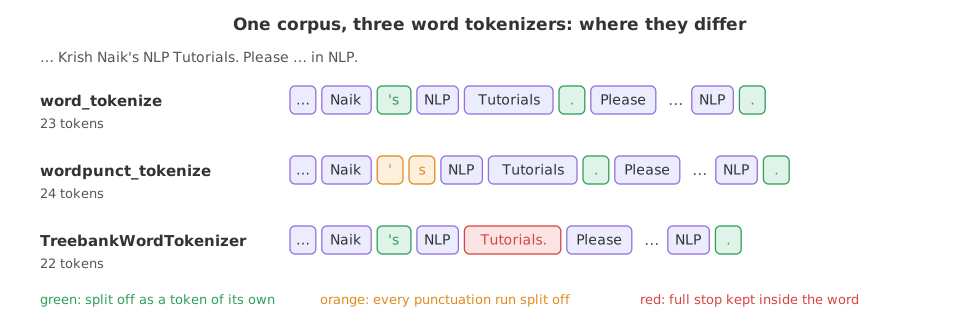
Reading the token lists
- 23, 24 and 22 tokens, the same counts as in the video's notebook.
- word_tokenize gives Naik and 's as two tokens and every full stop as its own token.
- wordpunct_tokenize has one token more: ' and s.
- TreebankWordTokenizer has one token less: Tutorials. keeps its full stop.
- Sentence by sentence, word_tokenize gives the three lists the video prints in its loop.
- Contractions: word_tokenize gives do and n't, is and n't; wordpunct_tokenize gives don, ', t, which loses the negation's shape.
word_tokenize vs wordpunct_tokenize vs TreebankWordTokenizer
| word_tokenize | wordpunct_tokenize | TreebankWordTokenizer | |
|---|---|---|---|
| Method | sent_tokenize, then improved Treebank rules | One regular expression | Treebank rules on the whole string |
| Naik's | Naik, 's | Naik, ', s | Naik, 's |
| Full stop inside the text | Split off | Split off | Kept: Tutorials. |
| don't | do, n't | don, ', t | do, n't |
| Needs punkt_tab | Yes | No | No |
| Tokens on the corpus | 23 | 24 | 22 |
Where you use NLTK's tokenizers
- Before stemming, lemmatization and stopword removal: each of them works on word tokens.
- Sentence-level tasks: summarising, translating or tagging one sentence at a time starts with
sent_tokenize. - Counting: word frequencies for the bag of words in part 3.
sent_tokenize and word_tokenize stop with LookupError: Resource 'punkt_tab' not found. Run nltk.download('punkt_tab') once. wordpunct_tokenize and TreebankWordTokenizer need no data, which is why they still run when the others fail.Related
- Previous: Tokenization
- Next: Text cleaning and normalisation
- Notebook: 4-Tokenization Example Using NLTK
- Reference: nltk.tokenize
- Pass
language="german"tosent_tokenizeon a German sentence pair such as "Ich bin Dr. Meyer. Wer sind Sie?" and count the sentences. - Add a space after the comma in "Welcome,to" and check whether any token list changes.
- Run
TreebankWordTokenizer().tokenizeon each sentence fromsent_tokenizeand compare the result withword_tokenize(corpus).
This is what real progress feels like.