
One-hot encoding for text
One-hot encoding is a text representation that turns each word into a vector as long as the vocabulary, with a 1 in that word's position and 0 everywhere else.
Last updated: 07 Oct, 2026 · NLTK 3.10 · scikit-learn 1.9
Named entity recognition (NER) closed the preprocessing steps: the text is now clean tokens. A model needs numbers, so the next step turns words into vectors. One-hot encoding is the simplest way to do it, and its weaknesses explain the techniques that follow.
Building the vocabulary of unique words
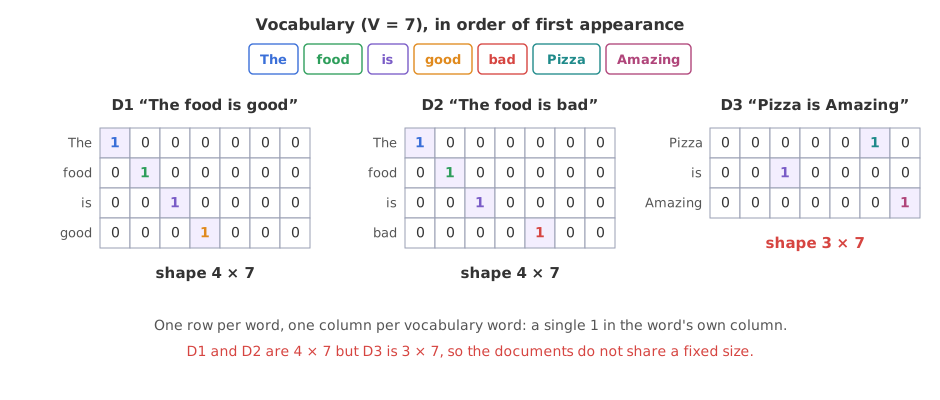
The video's dataset has three documents, each with an output label: D1 “The food is good” (1), D2 “The food is bad” (0) and D3 “Pizza is Amazing” (1). The words stay as written, without lower-casing.
The vocabulary is the set of unique words across the whole corpus. Reading the documents in order gives seven of them: The, food, is, good, bad, Pizza and Amazing. The vocabulary size is V = 7.
Encoding each word as a vector of size V
Every word becomes a vector of length 7 with a single 1 in its own position: “The” is [1 0 0 0 0 0 0] and “food” is [0 1 0 0 0 0 0]. A document is the stack of its words' vectors, one row per word. D1 has four words, so it becomes a 4 × 7 matrix.
D2, “The food is bad”, shares its first three rows with D1. Its last row puts the 1 in the column of “bad”: [0 0 0 0 1 0 0]. D3 has three words, so its matrix is 3 × 7.
Encoding the three documents with NumPy
The code builds the vocabulary in order of first appearance, as on the board, then places one 1 per row at the index of each word.
import numpy as np

docs = ["The food is good", "The food is bad", "Pizza is Amazing"]

vocab = []                                   # unique words, in order of first appearance
for d in docs:
    for w in d.split():
        if w not in vocab:
            vocab.append(w)
print("vocabulary:", vocab, "V =", len(vocab))

def one_hot(doc):
    m = np.zeros((len(doc.split()), len(vocab)), dtype=int)
    for row, w in enumerate(doc.split()):
        m[row, vocab.index(w)] = 1           # a single 1 in the word's own column
    return m

for name, d in zip(["D1", "D2", "D3"], docs):
    m = one_hot(d)
    print(name, repr(d), "shape", m.shape)
print(m)vocabulary: ['The', 'food', 'is', 'good', 'bad', 'Pizza', 'Amazing'] V = 7 D1 'The food is good' shape (4, 7) [[1 0 0 0 0 0 0] [0 1 0 0 0 0 0] [0 0 1 0 0 0 0] [0 0 0 1 0 0 0]] D2 'The food is bad' shape (4, 7) [[1 0 0 0 0 0 0] [0 1 0 0 0 0 0] [0 0 1 0 0 0 0] [0 0 0 0 1 0 0]] D3 'Pizza is Amazing' shape (3, 7) [[0 0 0 0 0 1 0] [0 0 1 0 0 0 0] [0 0 0 0 0 0 1]]
What the three matrices show
- D1 and D2 are 4 × 7, D3 is 3 × 7. The number of rows follows the number of words, so the documents do not share one shape.
- Each row has exactly one 1. D1 holds 4 ones among 28 cells; every other value is 0.
- D2 differs from D1 only in its last row, where the 1 moves from the column of good to the column of bad.
Measuring the distance between food, pizza and burger
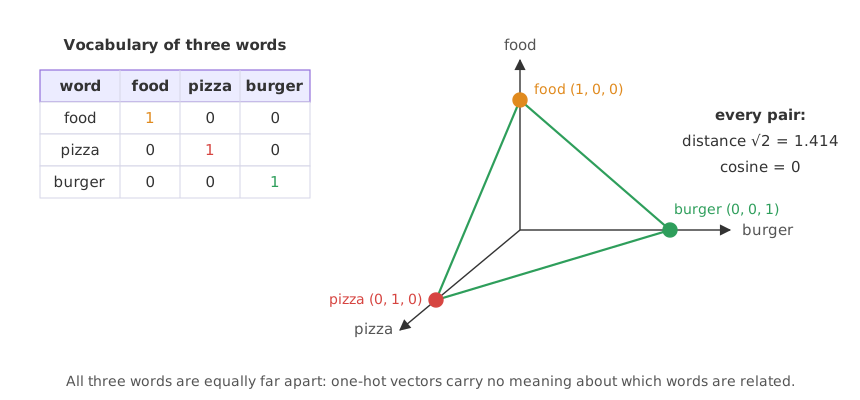
The third disadvantage on the board is that no semantic meaning is captured: the vectors say nothing about how close two words are in meaning. The video takes a vocabulary of three words, food, pizza and burger, encoded as [1 0 0], [0 1 0] and [0 0 1].
Drawn on three axes, each word sits at the end of its own axis. The distance between any two of them is the same, so the encoding cannot say that pizza is closer to food than to burger. Every pair looks equally unrelated.
The code measures both the straight-line distance and the cosine of the angle between each pair. The cosine is 1 for vectors pointing the same way and 0 for vectors at right angles; Cosine similarity for documents covers it in full.
import numpy as np
from itertools import combinations

vectors = {"food": np.array([1, 0, 0]), "pizza": np.array([0, 1, 0]), "burger": np.array([0, 0, 1])}

for a, b in combinations(vectors, 2):
    u, v = vectors[a], vectors[b]
    distance = np.linalg.norm(u - v)
    cosine = u @ v / (np.linalg.norm(u) * np.linalg.norm(v))
print(f"{a:6} - {b:6} distance {distance:.4f} cosine {cosine:.1f}")food - pizza distance 1.4142 cosine 0.0 food - burger distance 1.4142 cosine 0.0 pizza - burger distance 1.4142 cosine 0.0
Every pair is √2 = 1.4142 apart with a cosine of 0.0: one-hot vectors are always at right angles to each other, whatever the words mean.
Listing the advantages and disadvantages of one-hot encoding
The board lists one advantage and four disadvantages.
- Easy to implement. scikit-learn has
OneHotEncoderand pandas haspd.get_dummies(). - Sparse matrix. Almost every value is 0. With a vocabulary of 50,000 words, every word is a vector of 50,000 numbers holding a single 1. That costs memory and computation, and so many dimensions compared with the number of training examples raise the risk of overfitting.
- No fixed size. D1 is 4 × 7 but D3 is 3 × 7. A machine learning algorithm needs every input to have the same number of features.
- No semantic meaning. All words are equally far apart, as the food, pizza and burger vectors show.
- Out of vocabulary (OOV). The test sentence “Burger is bad” contains Burger, which is not in the vocabulary, so it has no vector at all.
Encoding words with scikit-learn's OneHotEncoder
OneHotEncoder is built for categorical columns, so each token goes in its own row. It sorts the categories, and the sort is case-sensitive, so the column order differs from the board's.
Unknown words raise an error by default
Fitting on the three documents and then encoding the test sentence “Burger is bad” shows the out-of-vocabulary problem as a real error.
import numpy as np
from sklearn.preprocessing import OneHotEncoder

tokens = np.array("The food is good The food is bad Pizza is Amazing".split()).reshape(-1, 1)
encoder = OneHotEncoder().fit(tokens)        # one token per row, like a categorical column
print(encoder.categories_[0])

encoder.transform([["Burger"], ["is"], ["bad"]]) # the test sentence "Burger is bad"['Amazing' 'Pizza' 'The' 'bad' 'food' 'good' 'is']
Traceback (most recent call last):
File "main.py", line 8, in <module>
encoder.transform([["Burger"], ["is"], ["bad"]]) # the test sentence "Burger is bad"
ValueError: Found unknown categories ['Burger'] in column 0 during transformIgnoring unknown words
handle_unknown="ignore" turns an unknown word into a row of zeros instead. pd.get_dummies makes one column per word that appears in the text it is given.
import pandas as pd

encoder = OneHotEncoder(handle_unknown="ignore").fit(tokens)
print(encoder.transform([["Burger"], ["is"], ["bad"]]).toarray().astype(int))

print(pd.get_dummies(pd.Series("The food is good".split()), dtype=int))[[0 0 0 0 0 0 0] [0 0 0 0 0 0 1] [0 0 0 1 0 0 0]] The food good is 0 1 0 0 0 1 0 1 0 0 2 0 0 0 1 3 0 0 1 0
What the encoder printed
- The categories are sorted: Amazing, Pizza, The, bad, food, good, is. Capital letters sort before lower-case ones, so the columns are not in the board's order.
- Burger raises
ValueError: Found unknown categories ['Burger']with the defaulthandle_unknown='error'. - With
handle_unknown="ignore"the Burger row is all zeros, while is and bad get their usual single 1. get_dummieson D1 gives only the four columns The, food, good and is, because it sees only the words of that one document.
One-hot encoding vs bag of words
| One-hot encoding | Bag of words | |
|---|---|---|
| Unit | one vector per word | one vector per sentence |
| Shape of a document | words × V, changes with length | V, the same for every sentence |
| Values | a single 1 per row | counts of each word (or 1/0) |
| Word meaning | none: every pair at right angles | none: each word is its own column |
| Typical use | the index fed to an embedding layer | features for a text classifier |
Where you use one-hot encoding
- Input to an embedding layer: a one-hot vector times an embedding matrix picks one row, which is how Embedding layer in Keras looks up a word's vector.
- Class labels for a softmax output, compared with Categorical cross-entropy.
- Small categorical features next to text, such as the day of the week a message was sent.
OneHotEncoder raises ValueError on any word it did not see during fit, which stops a prediction on new text. Pass handle_unknown="ignore", and remember that the unknown word then adds nothing to the input.Related
- Previous: Named entity recognition (NER)
- Next: Bag of words (BoW)
- Reference: OneHotEncoder in the scikit-learn API
- Add a fourth document, “Burger is bad”, to
docsin the NumPy example. What is V now, and what shape does it get? - Lower-case every document with
d.lower()before building the vocabulary. Does V change for these three documents? - Change
["Burger"]to["Pizza"]in the OneHotEncoder example and check that the error goes away.
Little by little, you're building something great.