
CI/CD for a model service
CI/CD is a pair of practices that move the work after a commit onto a server: continuous integration builds and tests every change as it lands, and continuous deployment takes a change that passed and ships it to an environment without anyone running commands by hand.
Last updated: 19 Oct, 2026 · MLOps
The Pushing to a container registry lesson ended with an image in a registry and a person typing the commands that put it there. Every one of those steps is the same after every change: install, test, build, tag, push, pull on the server, restart the container. CI/CD is where that list stops being a list you follow and becomes a file the repository runs for you.
Reading the two halves apart
- Continuous integration is the half that runs on the way in. Developers merge their changes into a shared branch often, and each merge sets off an automated build and test, so a change that breaks what already worked is caught at the merge rather than in production.
- Continuous deployment is the half that runs on the way out. Once the checks on the merged change pass, the same automation builds the artifact and puts it on an environment: a development server first, then a staging server, then production.
- A workflow is the list of steps either half runs, and an event is what sets it off. A push to the main branch and an opened pull request are the two events a model repository uses most.
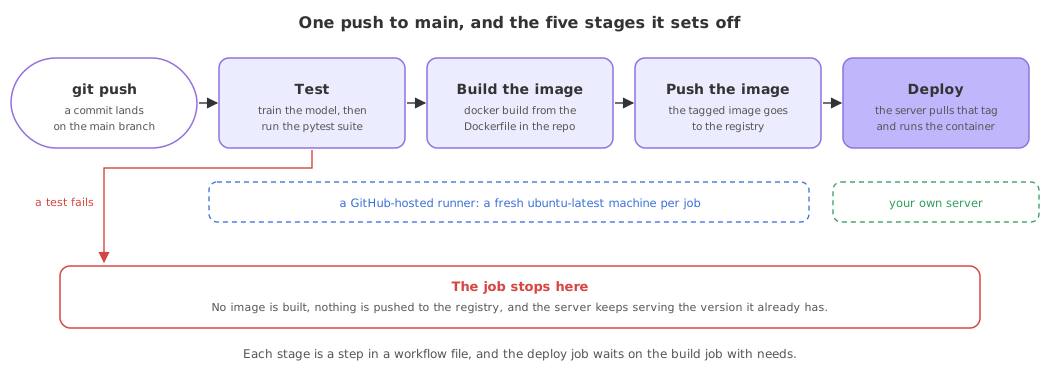
What a model service adds to an ordinary pipeline
A web application's pipeline installs, tests, builds and deploys. A model service has the same five stages and three extra problems inside them.
- The model file is not in the repository. Git holds the code that trains the model, not the trained model, so a fresh checkout on the runner has no
artifacts/directory. Either the pipeline trains the model before it tests, or it pulls the model from wherever it is versioned. - The tests need a prediction, not only an import. A service that answers with a number is tested by asking it for a number and checking the shape and the range of the answer.
- The artifact that ships is an image, not a package. The thing deployed is the container image from the Dockerising the service lesson, which carries the Python version, the pinned libraries and the model together, so the build step is a
docker buildand the deploy step is a pull and a restart.
Choosing a CI/CD tool
Any of these runs the pipeline above. The one this part uses is GitHub Actions, because the repository is already on GitHub and the runners, the logs and the stored credentials come with it.
| Tool | Where it runs | Why a team picks it |
|---|---|---|
| GitHub Actions | Hosted by GitHub, or on your own machines | The repository is already there, so no second service has to be connected |
| Jenkins | A server you install and maintain | Open source, highly customisable, and an old large plugin ecosystem |
| GitLab CI | Built into GitLab | The team already uses GitLab for code and issues |
| CircleCI | Cloud hosted | Easy to set up and scales out, common in startups |
| Travis CI | Cloud hosted | Long used by open source projects on GitHub, Bitbucket and GitLab |
| Azure DevOps | Microsoft hosted | The rest of the stack is already on Azure |
Where an automated pipeline earns its keep
- More than one person on the repository. Two people editing the same transformation break each other's work quietly; a test job on every pull request says so before the merge.
- A retrained model. New data gives new metrics, and the pipeline is where a model that scores worse than the one in production can be stopped before it ships.
- A deploy nobody dreads. When shipping is a commit rather than a sequence of eleven commands on a server, a small fix goes out the same day instead of waiting for a release evening.
Related
- Previous: Pushing to a container registry
- Next: A GitHub Actions workflow
- The same pipeline for an LLM app: CI/CD for an LLM app
- Reference: Continuous integration, GitHub Actions docs
- Write down every command you ran by hand to put the image in the registry, and mark which of them a server could run instead.
- Decide which branch of your repository should trigger a deploy, and which should only trigger tests.
- Name the step in the list above that would have caught the last bug you shipped.
This is what real progress feels like.