
The training pipeline
The training pipeline is a function that builds the configuration manager once and runs each stage component in order, so a whole training run is one command instead of a sequence of cells executed by hand.
Last updated: 19 Oct, 2026 · MLOps
Stage components built one stage and ran it. Three more stages follow it, each needing what the one before produced, and nothing so far says in which order they go. The pipeline is where that order is written down, once, in code, and it is the last file of the architecture: after it, adding a stage is an edit in one place.
View the code here
TARGET_COLUMN: math_score
TEST_SIZE: 0.2
RANDOM_STATE: 42
N_ESTIMATORS: 100
MAX_DEPTH: 12
COLUMNS:
  gender: object
  race_ethnicity: object
  parental_level_of_education: object
  lunch: object
  test_preparation_course: object
  math_score: int64
  reading_score: int64
  writing_score: int64
import logging, sys

logging.basicConfig(level=logging.INFO, format="[%(asctime)s] %(levelname)s %(name)s - %(message)s",
                    handlers=[logging.StreamHandler(sys.stdout)])
logger = logging.getLogger("sp")
data_ingestion:
  root_dir: artifacts/data_ingestion
  source_url: https://raw.githubusercontent.com/krishnaik06/mlproject/main/notebook/data/stud.csv
  local_data_file: artifacts/data_ingestion/stud.csv
  train_file: artifacts/data_ingestion/train.csv
  test_file: artifacts/data_ingestion/test.csv

data_validation:
  root_dir: artifacts/data_validation
  status_file: artifacts/data_validation/status.json

data_transformation:
  root_dir: artifacts/data_transformation
  preprocessor_file: artifacts/data_transformation/preprocessor.joblib

model_trainer:
  root_dir: artifacts/model_trainer
  model_file: artifacts/model_trainer/model.joblib
  metrics_file: artifacts/model_trainer/metrics.json
import json, os
from pathlib import Path

import joblib
import yaml
from box import ConfigBox
from ensure import ensure_annotations


@ensure_annotations
def read_yaml(path: Path) -> ConfigBox:
    """Load a YAML file so its keys can be read with dots, not brackets."""
    with open(path) as f:
        return ConfigBox(yaml.safe_load(f))


@ensure_annotations
def create_directories(paths: list):
    for p in paths:
        os.makedirs(p, exist_ok=True)


@ensure_annotations
def save_json(path: Path, data: dict):
    with open(path, "w") as f:
        json.dump(data, f, indent=4)


@ensure_annotations
def save_object(path: Path, obj):
    joblib.dump(obj, path)


@ensure_annotations
def load_object(path: Path):
    return joblib.load(path)
from pathlib import Path

from sp.entity.config_entity import (
    DataIngestionConfig,
    DataTransformationConfig,
    DataValidationConfig,
    ModelTrainerConfig,
)
from sp.utils.common import create_directories, read_yaml


class ConfigurationManager:
    """Reads the YAML files once, then hands each stage its own typed config."""

    def __init__(
        self,
        config_path=Path("config/config.yaml"),
        params_path=Path("params.yaml"),
        schema_path=Path("schema.yaml"),
    ):
        self.config = read_yaml(config_path)
        self.params = read_yaml(params_path)
        self.schema = read_yaml(schema_path)

    def get_data_ingestion_config(self) -> DataIngestionConfig:
        c = self.config.data_ingestion
        create_directories([c.root_dir])
        return DataIngestionConfig(
            root_dir=Path(c.root_dir),
            source_url=c.source_url,
            local_data_file=Path(c.local_data_file),
            train_file=Path(c.train_file),
            test_file=Path(c.test_file),
            test_size=self.params.TEST_SIZE,
            random_state=self.params.RANDOM_STATE,
        )

    def get_data_validation_config(self) -> DataValidationConfig:
        c = self.config.data_validation
        create_directories([c.root_dir])
        return DataValidationConfig(
            root_dir=Path(c.root_dir),
            status_file=Path(c.status_file),
            expected_columns=dict(self.schema.COLUMNS),
        )

    def get_data_transformation_config(self) -> DataTransformationConfig:
        c = self.config.data_transformation
        create_directories([c.root_dir])
        return DataTransformationConfig(
            root_dir=Path(c.root_dir),
            preprocessor_file=Path(c.preprocessor_file),
            target_column=self.params.TARGET_COLUMN,
        )

    def get_model_trainer_config(self) -> ModelTrainerConfig:
        c = self.config.model_trainer
        create_directories([c.root_dir])
        return ModelTrainerConfig(
            root_dir=Path(c.root_dir),
            model_file=Path(c.model_file),
            metrics_file=Path(c.metrics_file),
            target_column=self.params.TARGET_COLUMN,
            n_estimators=self.params.N_ESTIMATORS,
            max_depth=self.params.MAX_DEPTH,
            random_state=self.params.RANDOM_STATE,
        )
from dataclasses import dataclass
from pathlib import Path


@dataclass(frozen=True)
class DataIngestionConfig:
    root_dir: Path
    source_url: str
    local_data_file: Path
    train_file: Path
    test_file: Path
    test_size: float
    random_state: int


@dataclass(frozen=True)
class DataValidationConfig:
    root_dir: Path
    status_file: Path
    expected_columns: dict


@dataclass(frozen=True)
class DataTransformationConfig:
    root_dir: Path
    preprocessor_file: Path
    target_column: str


@dataclass(frozen=True)
class ModelTrainerConfig:
    root_dir: Path
    model_file: Path
    metrics_file: Path
    target_column: str
    n_estimators: int
    max_depth: int
    random_state: int
import pandas as pd
from sklearn.model_selection import train_test_split

from sp.entity.config_entity import DataIngestionConfig
from sp.logger import logger


class DataIngestion:
    def __init__(self, config: DataIngestionConfig):
        self.config = config

    def download(self) -> pd.DataFrame:
        """Pull the raw CSV once and keep a copy on disk."""
        df = pd.read_csv(self.config.source_url)
        df.to_csv(self.config.local_data_file, index=False)
        logger.info("downloaded %d rows to %s", len(df), self.config.local_data_file)
        return df

    def split(self, df: pd.DataFrame):
        train, test = train_test_split(
            df, test_size=self.config.test_size, random_state=self.config.random_state
        )
        train.to_csv(self.config.train_file, index=False)
        test.to_csv(self.config.test_file, index=False)
        logger.info("split into train=%d test=%d", len(train), len(test))
        return train, test
Running a stage out of order
Order is not a style question. The split step reads the file the download step writes, so calling it first fails on a file that does not exist yet.
import shutil

import pandas as pd

from sp.config.configuration import ConfigurationManager
from sp.components.data_ingestion import DataIngestion

shutil.rmtree("artifacts", ignore_errors=True)   # start with no artifacts, as a fresh clone has

cfg = ConfigurationManager().get_data_ingestion_config()
ingestion = DataIngestion(cfg)

# the split step, called before anything has downloaded the file it reads
ingestion.split(pd.read_csv(cfg.local_data_file))Traceback (most recent call last):
File "main.py", line 14, in <module>
ingestion.split(pd.read_csv(cfg.local_data_file))
FileNotFoundError: [Errno 2] No such file or directory: 'artifacts/data_ingestion/stud.csv'FileNotFoundError, naming the file the config promised would be there. In a notebook this is the error you get for running cells out of order, and it is the error a new contributor gets for guessing. Writing the order down removes the guess.
The clip wires the deep-learning project's stages; this pipeline wires the four student-performance stages, and each one is still built from the manager's config and then run.
Wiring the stages in order
The pipeline file imports the four components and the manager. It holds no settings and does no work of its own.
from sp.components.data_ingestion import DataIngestion
from sp.components.data_transformation import DataTransformation
from sp.components.data_validation import DataValidation
from sp.components.model_trainer import ModelTrainer
from sp.config.configuration import ConfigurationManager
from sp.logger import logger
The manager is built once at the top. Every stage below asks it for its own settings, so the three YAML files are read once per run, not once per stage.
def main():
    cfg = ConfigurationManager()          # the three YAML files, read once

    ingestion = DataIngestion(cfg.get_data_ingestion_config())
    df = ingestion.download()
    train, test = ingestion.split(df)
Validation comes next, and it is allowed to stop the run. If the incoming data does not match schema.yaml, there is no point transforming it, so the pipeline raises instead of training on something unexpected.
    validation = DataValidation(cfg.get_data_validation_config())
    report = validation.validate(df)
    if not report["passed"]:
        raise ValueError(f"data validation failed: {report}")

    transformation = DataTransformation(cfg.get_data_transformation_config())
    Xtr, ytr, Xte, yte = transformation.run(train, test)
The trainer is last, and the function returns what it produced. Returning the metrics rather than printing them is what lets a tracking run, a pipeline tool or a scheduled job read the result of a training run.
    trainer = ModelTrainer(cfg.get_model_trainer_config())
    metrics = trainer.train(Xtr, ytr, Xte, yte)
    logger.info("pipeline finished")
    return metrics


if __name__ == "__main__":
    print(main())        # one command, every stage, in this order
Each of the four stages is built the same way: ask the manager for a config, construct the component with it, call its methods, hand the result on. That sameness is what makes a fifth stage a three-line addition rather than a redesign.
Running the whole pipeline from the terminal
The module guard makes the file runnable on its own. With the package on the import path, one command runs the four stages and prints what the trainer returned.
$ PYTHONPATH=src python -m sp.pipeline.train_pipeline
[2026-10-19 11:17:29,183] INFO sp - downloaded 1000 rows to artifacts/data_ingestion/stud.csv
[2026-10-19 11:17:29,189] INFO sp - split into train=800 test=200
[2026-10-19 11:17:29,190] INFO sp - validation passed=True
[2026-10-19 11:17:29,192] INFO sp - preprocessor over 5 text and 2 numeric columns
[2026-10-19 11:17:29,227] INFO sp - transformed shapes train=(800, 19) test=(200, 19)
[2026-10-19 11:17:29,377] INFO sp - trained, metrics={'r2': 0.8485, 'mae': 4.6996, 'rmse': 6.0721}
[2026-10-19 11:17:29,377] INFO sp - pipeline finished
{'r2': 0.8485, 'mae': 4.6996, 'rmse': 6.0721}
What the run's log says it did
- Seven log lines for four stages, each one written by the component that did the work, so the log is a record of how far the run got and in what order.
- 1000 rows in, split 800 and 200, the same numbers the ingestion stage produced on its own, because the settings came from the same files.
- Validation passed, which is the gate: a false here would have raised and the two stages below would never have run.
- Seven feature columns became 19, because the five text columns were one-hot encoded and the two numeric ones were scaled, which is the preprocessor's doing rather than the pipeline's.
- The run scored r2 0.8485, MAE 4.6996 and RMSE 6.0721, returned as a dict and printed by the module guard, and they are the numbers a tracking tool would record against this configuration.
- The timestamps are different on every run, so compare the messages and the metrics between runs, never the clock.
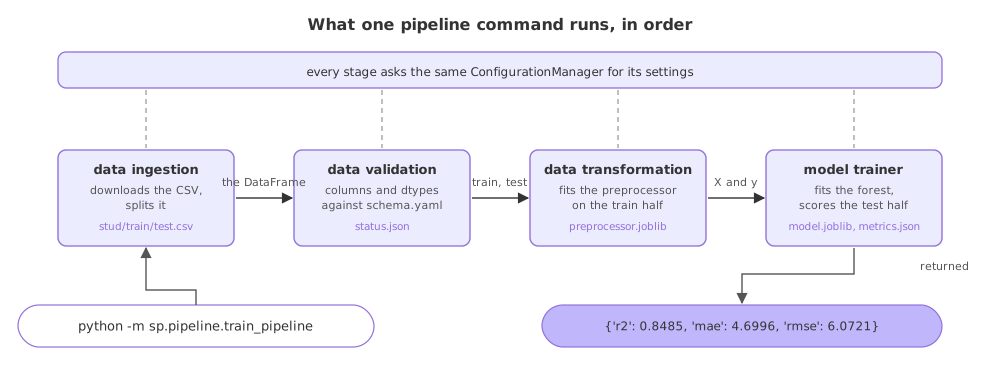
Stages run by hand against one pipeline command
| Running the stages by hand | One pipeline function | |
|---|---|---|
| The order | In the runner's head | Written once, in code |
| Starting a run | Several calls, in sequence | One command |
| A stage's settings | Fetched again each time | One manager, built once |
| A failed stage | Whatever the console shows | A raise, with the stage's log above it |
| The result | Printed somewhere | Returned as a dict |
Where a single entry point pays off
- A scheduled retrain, where whatever runs it needs one command and gets the metrics back.
- A tracked experiment, where the returned dict is what is logged against the configuration that produced it.
- A reproduced run on another machine, where a clone, the three YAML files and that one command are the whole recipe, which is also what dvc.yaml stages, deps and outs turns into tracked stages.
params.yaml of its own, the stages stop being the full story and the run can no longer be reproduced from the components and the files alone.Related
- Previous: Stage components
- Next: Data ingestion
- See also: dvc.yaml stages, deps and outs
- Reference: __main__ in the Python standard library
- Swap the validation block above the ingestion block in
main()and read the error the run gives. - Change
MAX_DEPTHto4inparams.yaml, run the command again, and compare the metrics dict with the one above. - Add a line to
main()that printslen(train)between the ingestion and validation stages, to see where the pipeline can look without doing the work itself.
Little by little, you're building something great.