
Pushing to a container registry
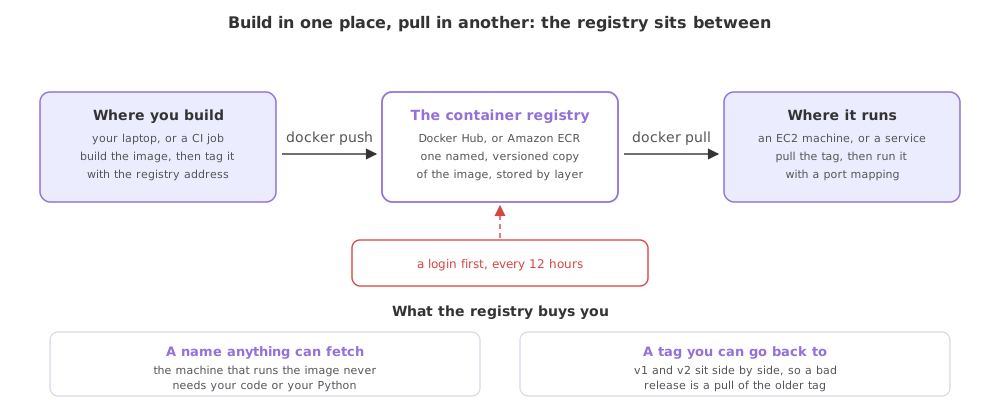
A container registry is a server that stores named, tagged images, so the machine that runs your service pulls the image instead of building it: Docker Hub is the public one, and Amazon ECR is the private one the deployment in the project videos uses.
Last updated: 19 Oct, 2026 · MLOps
The Smaller images with layer caching lesson left an image sitting on one machine. That is where it stops being useful: the host that will serve traffic is a different computer, and copying a file of several hundred megabytes around by hand is not a deployment. A registry is the agreed place in the middle.
The end-to-end project video names the service it uses and what it is: ECR means Elastic Container Registry, it is the service from AWS, it is a kind of Docker Hub, and it is where you store a Docker image. The commands below are the ones the AWS documentation gives for that flow. They are shown rather than run here, because every one of them needs an AWS account and charges it, so the output under the push is the documentation's own expected output rather than a run on this machine.
The five steps the project's deployment takes
The video writes the deployment down as a short list before touching the console, and the list is worth having in front of you because the next part automates one of its lines.
- Build the image of the whole source, which is what the
Dockerfileis for. - Push the image to ECR, the registry that holds it.
- Launch an EC2 machine, the virtual machine that will run it.
- Pull the image from ECR onto that machine.
- Run the image there with a port mapping, and the service answers on the machine's address.
A registry is the hinge in the middle. The two halves never meet: the machine that builds has your source, the machine that runs has an image name, and neither needs what the other holds.
Logging in to the registry
A private registry refuses an anonymous push, and the Docker command line does not speak AWS identity on its own. The AWS CLI bridges the two: get-login-password fetches a token and pipes it straight into docker login, with AWS as the username and the registry address as the target. The token is good for twelve hours, after which the login is run again.
aws ecr get-login-password --region region \
  | docker login --username AWS --password-stdin \
      aws_account_id.dkr.ecr.region.amazonaws.com
aws_account_id and region are the placeholders the Amazon ECR private registry authentication page uses; yours are the twelve-digit account number and a region name such as ap-south-1. Passing the token on standard input rather than as an argument keeps it out of your shell history.
Tagging the image with the registry address
A push sends an image to wherever its name points, and student-performance:v1 points nowhere. Tagging adds a second name for the same image, this one carrying the registry host and the repository, and the repository has to exist in the account first.
docker tag student-performance:v1 \
  aws_account_id.dkr.ecr.region.amazonaws.com/student-performance:v1
The clip pushes to and pulls from Docker Hub; these commands make the same round trip against Amazon ECR, the registry the end-to-end project uses, so only the login step and the image name differ.
Pushing it
With a login and a name that resolves, the push uploads whatever layers the registry does not already hold. The output below is the expected output from the Amazon ECR getting-started walkthrough, shown for the documentation's own hello-repository example.
docker push \
aws_account_id.dkr.ecr.region.amazonaws.com/student-performance:v1The push refers to a repository [aws_account_id.dkr.ecr.region.amazonaws.com/hello-repository] (len: 1)
e9ae3c220b23: Pushed
a6785352b25c: Pushed
0998bf8fb9e9: Pushed
0a85502c06c9: Pushed
latest: digest: sha256:215d7e4121b30157d8839e81c4e0912606fca105775bb0636EXAMPLE size: 6774One line per layer, then one digest for the image as a whole. A layer the registry already has is skipped, which is why a second push of a rebuilt image moves only the layers that changed, the same economy the cache gives a build.
Pulling it where it runs
On the EC2 machine the flow is the mirror image: the same login, then a pull of the same name, then the run command from Dockerising the service. No Python and no packages are installed there, and the machine never sees the source.
docker pull \
  aws_account_id.dkr.ecr.region.amazonaws.com/student-performance:v1

docker run -d -p 8000:8000 \
  aws_account_id.dkr.ecr.region.amazonaws.com/student-performance:v1
An orchestrator such as Kubernetes does the same two things on your behalf, on many machines at once, from the same image name. The registry is what makes that possible, and it is the reason the name matters more than the file.
What this flow needs beyond the commands
- An AWS account and a user for the deployment, with the permissions for the registry and the machine attached to it rather than full access.
- A repository in the registry, created before the first push, whose address is the one the tag carries.
- A machine to pull onto, with Docker installed on it, which is the EC2 instance the project video launches.
- Somewhere safe for the keys, because the access key and the secret belong in a secret store, never in the image and never in the repository.
Docker Hub against Amazon ECR
| Docker Hub | Amazon ECR | |
|---|---|---|
| Who can pull | Anyone, for a public repository | Only identities you allow |
| Logging in | A Docker account | A token from the AWS CLI, valid 12 hours |
| The image name | user/name:tag | account.dkr.ecr.region.amazonaws.com/name:tag |
| Fits | Sharing an image publicly | A private service and its deployment |
| Cost | Free for public images | Storage and transfer on the account |
Where a registry is the step you cannot skip
- Any deploy to another machine, where the host pulls a name and runs it rather than building your project.
- An automated pipeline, where the job that builds the image and the machine that serves traffic are different computers and the registry is their only contact.
- A rollback, where the previous tag is still in the registry and going back is a pull and a run.
get-login-password as part of the deploy, not by hand beforehand. And resist pushing everything as latest: a tag that always moves leaves you no way to say which image is running or to go back to the one that worked.Related
- Previous: Smaller images with layer caching
- Next: CI/CD for a model service
- Where the login and the push are automated: Building the image in CI
- Reference: Pushing a Docker image to an Amazon ECR private repository
- Tag the local image for a Docker Hub account you own and push it there, which needs no AWS account.
- Read the ECR getting-started walkthrough and match each of its steps to the five deployment steps above.
- Work out which of the five steps a pipeline could run for you, and which one a person has to do once.
Slow is fine. Stopping is the only problem.