
Tracking data with DVC
dvc add is a command that moves a file's content into the DVC cache and leaves a small pointer file in its place for git to commit.
Last updated: 19 Oct, 2026 · MLOps
The previous lesson, Why git cannot hold data, ended on the split DVC makes: content in a cache, a pointer in git. This lesson does it, on the student-performance dataset the course has been training on, in a repository built from nothing so every file that appears is one you can see.
Starting DVC inside a git repository
DVC keeps its pointers and its config as files in git, so git comes first. dvc init then writes the .dvc folder and a .dvcignore file next to it.
mkdir sp && cd sp
git init -q                        # DVC stores its pointers in git, so git comes first
git config user.email reader@example.com
git config user.name Reader
export DVC_NO_ANALYTICS=1   # keeps the usage-analytics notice out of the output below
dvc init # writes .dvc/ and .dvcignoreInitialized DVC repository. You can now commit the changes to git. What's next? ------------ - Check out the documentation: <https://dvc.org/doc> - Get help and share ideas: <https://dvc.org/chat> - Star us on GitHub: <https://github.com/treeverse/dvc>
Without DVC_NO_ANALYTICS=1, dvc init also prints a short box saying DVC has enabled anonymous aggregate usage analytics and how to turn it off. It is set here so the output stays to the point; leaving it unset changes nothing except that notice.
The command stages what it wrote, so the first commit of the project carries it:
git status --shortA .dvc/.gitignore A .dvc/config A .dvcignore
Putting the raw data in the repository
The dataset is the one the ingest stage downloads, 1000 student records with their maths, reading and writing scores. Writing it out with pandas gives the same bytes the pipeline works with later, which keeps one hash for one file across the whole project.
mkdir data
RAW=https://raw.githubusercontent.com/krishnaik06/mlproject/main/notebook/data/stud.csv
python -c "import pandas as pd; pd.read_csv('$RAW').to_csv('data/stud.csv', index=False)"

wc -c < data/stud.csv56020
Handing the file to DVC with dvc add
One command moves the content into the cache, writes the pointer and tells git to ignore the file itself.
dvc add data/stud.csvTo track the changes with git, run: git add data/stud.csv.dvc data/.gitignore To enable auto staging, run: dvc config core.autostage true
The two paths it names are the whole of what git needs: the pointer, and the .gitignore entry that keeps git's hands off the data.
cat data/stud.csv.dvc
cat data/.gitignoreouts: - md5: 6d115d14c94179771445fc28b66232cc size: 56020 hash: md5 path: stud.csv /stud.csv
Reading the pointer
- md5 is the hash of the file's content. Change one row and the hash changes, which is how DVC knows one version from another.
- size is the file's length in bytes, kept so DVC can spot a changed file without rehashing every byte.
- path is the file's name relative to the pointer, so
data/stud.csv.dvcstands fordata/stud.csv. - data/.gitignore holds the single line
/stud.csv. Git sees the pointer in that folder and no data file at all.
The hash and the size are the file's own, so they change whenever the dataset is regenerated from a different source.
Finding the content in the cache
The bytes went into .dvc/cache, filed under the same md5 the pointer names. The first two characters are the folder and the remaining thirty are the file name, which keeps any one directory from filling up.
find .dvc/cache/files -type f.dvc/cache/files/md5/6d/115d14c94179771445fc28b66232cc
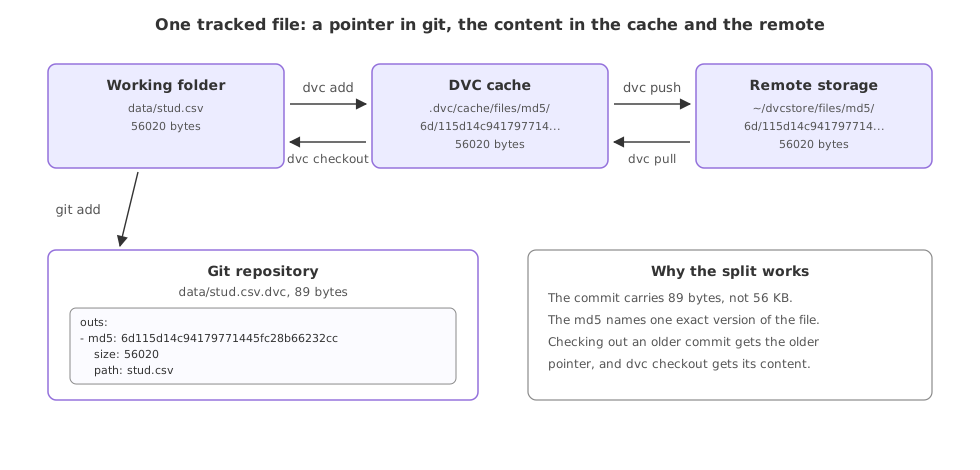
The right half of that picture, the copy kept outside the repository, is the next lesson, DVC remote storage.
Committing the pointer, not the data
With the pointer written, the commit is an ordinary git commit of two small text files.
git add data/.gitignore data/stud.csv.dvc
git commit -qm "Track the raw data with DVC"

git ls-files datadata/.gitignore data/stud.csv.dvc
Git is holding 89 bytes of pointer and 10 bytes of ignore rule for a 56 KB file, and it would hold the same two files for a 56 GB one.
Restoring a deleted file with dvc checkout
Delete the data and git says nothing, because git was never tracking it. DVC does say something, because the pointer no longer matches what is on disk.
rm data/stud.csv
dvc statusdata/stud.csv.dvc: changed outs: deleted: data/stud.csv
dvc checkout reads the pointers in the working folder and puts back whatever the cache holds for them.
dvc checkout
wc -c < data/stud.csvA data/stud.csv 56020
dvc add vs git add
| git add | dvc add | |
|---|---|---|
| Moves | The file into git's index | The content into .dvc/cache |
| Leaves behind | The file, tracked by git | The file, plus a .dvc pointer for git |
| Writes | Nothing you read | data/stud.csv.dvc and data/.gitignore |
| Undone by | git restore | dvc checkout |
| Good for | Code and small text | Datasets and model files |
Where dvc add fits a project
- A raw dataset that arrives once a month. Each drop is one
dvc addand one commit of the pointer, so the repository keeps a dated history of the data. - A trained model file. The same split works for a joblib or a weights file that a release needs to be able to fetch again.
- Anything a reviewer should not read in a diff. A 50 MB CSV in a pull request is noise; a four-line pointer is a change somebody can review.
dvc add on a file git is already tracking and DVC refuses, with output 'data/stud.csv' is already tracked by SCM (e.g. Git) and the git rm -r --cached line that undoes it. Take the file out of git's index first, commit that removal, then hand it to DVC. Note that this clears the index, not the history: the old copies stay in past commits.Related
- Previous: Why git cannot hold data
- Next: DVC remote storage
- Reference: dvc add
- Reference: .dvc files
- Add a row to
data/stud.csv, rundvc add data/stud.csvagain and read the new md5 in the pointer. - Delete
.dvc/cacheand rundvc checkout. The error names the file it cannot rebuild, which is the case the next lesson's remote covers. - Run
dvc statuswith nothing changed and read what it prints when everything matches.
This is what real progress feels like.