
The MLOps lifecycle
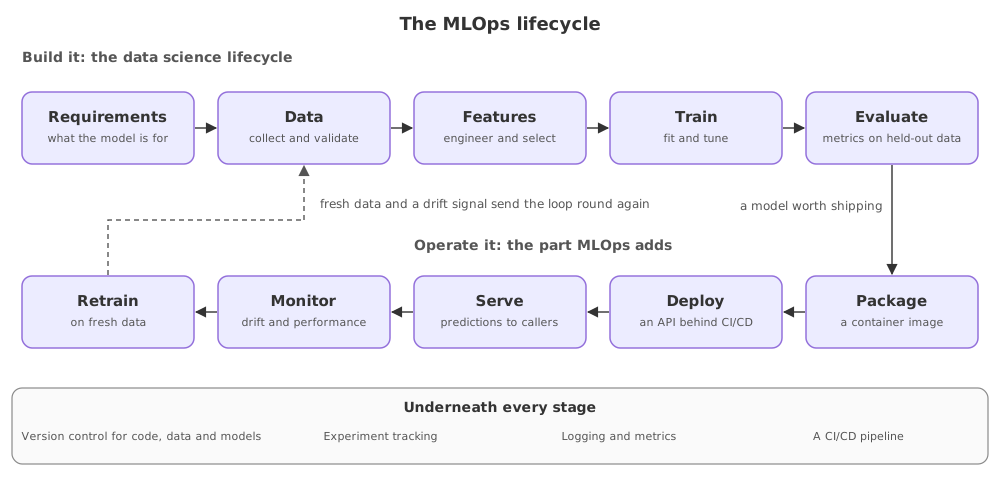
The MLOps lifecycle is two bands joined into a loop: a build band that runs from requirements through data, features, training and evaluation, and an operate band that packages, deploys, serves, monitors and retrains, feeding what it learns back into the data stage.
Last updated: 19 Oct, 2026 · MLOps
MLOps vs DevOps set out what a model project adds. This lesson is the map of all of it, and every later part of the course is one band of it taught in depth. The MLOps architecture video draws the same picture in two halves: a development half, which is the data science lifecycle ending in a trained pipeline, and a pre-production and production half, which adds a model registry, model serving and model performance monitoring on top.
Building it: the data science lifecycle
- Requirements. What the model is for and what counts as good enough. The number agreed here is the one the pipeline later checks against.
- Data. Collect it, and validate it against a schema so a renamed column fails the run rather than the model.
- Features. Engineer and select them, as a transformer that can be saved and re-applied, not as cells that ran once.
- Train. Fit the model and tune its parameters, with every run recorded so two runs can be compared.
- Evaluate. Score it on data it has not seen. This is the gate: a model that does not beat the one in production does not go to the next band.
Operating it: the part MLOps adds
- Package. Put the model and the code that serves it in a container image, so the stack that ran on your machine is the stack that runs in production.
- Deploy. Ship that image through a pipeline rather than by hand, with the same steps every time.
- Serve. Answer requests over HTTP with a schema on the way in and on the way out, so a bad request is rejected instead of predicted on.
- Monitor. Watch the live data against the training data, and watch the service: latency, errors and the shape of what is being asked.
- Retrain. When drift or a schedule says so, run the build band again on fresh data and compare before replacing anything.
What runs underneath every stage
Four things are not stages at all. They sit under the whole picture, which is why they are taught where they first bite rather than in one block: version control for code, data and models; experiment tracking, so a run can be found again; logging and metrics, so a failure at three in the morning leaves a record; and a CI/CD pipeline, which is how any of the stages reach production without a person repeating steps.
How the lifecycle maps to this course
| Stage | Taught in |
|---|---|
| Project structure for the build band | Config files, not constants |
| Data, features, train, evaluate | Data ingestion |
| Recording a run | Experiment tracking |
| Versioning the data a run used | Tracking data with DVC |
| Serve and package | Serving the model with FastAPI |
| Deploy | CI/CD for a model service |
| Monitor and retrain | Why a live model decays |
Where the lifecycle is the useful tool
- Scoping a project, where the stages become a checklist and the ones nobody owns become visible before they are skipped.
- Reviewing someone else's project, where you can place each gap in a band instead of guessing at what is missing.
- Deciding what to automate next, which is the question the maturity levels in the next lesson answer.
Related
- Previous: MLOps vs DevOps
- Next: MLOps maturity levels
- Reference: MLOps: continuous delivery and automation pipelines in machine learning
- Write the ten stages down the side of a page and mark, for a project you know, who owns each one.
- Find the stage in your own work that is still a person doing it by hand, and name what would automate it.
- Trace the arrow back from monitoring to data for one live model and say what would trigger it.
Slow is fine. Stopping is the only problem.