
Serving the model with FastAPI
Serving a model with FastAPI is the step that puts a trained model behind an HTTP endpoint: the service loads the saved preprocessor and forest once when it starts, and every request posts one student record and reads back one predicted maths score.
Last updated: 19 Oct, 2026 · MLOps
Earlier in the course, The prediction pipeline ended with a class that loads the two saved files and turns a record into a number, and the DVC part made the training that produces those files repeatable. Both still need a person at a terminal. A service removes that person: it starts once, holds the loaded model in memory, and answers whatever calls it.
The end-to-end project video serves its prediction pipeline from a Flask app with an HTML form. This page serves the same kind of pipeline from FastAPI with a JSON endpoint, because the API a model service exposes is called by other programs rather than typed into a form, and because the Build RESTful APIs with FastAPI video is the current teaching on the channel for exactly this job.
What one API call carries
The FastAPI video opens on a restaurant: you ask for something, something comes back, and the exchange of information is the whole idea. An HTTP call names a path and a method, and the method says which direction the information travels.
- GET asks for data from a path and sends no body. The video's words for it: get is used to request data from a specified resource.
- POST sends data to the server. To add a task you must send the task, so a route that needs a record to work on is a POST.
- The path, such as
/healthor/predict, picks which function runs. One service can hold as many as you like.
The service here needs one of each: a GET that reports whether it is alive, and a POST that carries a student record in and a score out.
The clip's two routes read a fixed item out of a dictionary; these two report whether the service is alive and return a predicted maths score, and the app object and the decorators are the same.
Creating the app and loading the model once
A FastAPI app is an object you create at the top of the file and then decorate functions onto. The second line that matters is the one that builds the prediction pipeline: it runs at import, so the preprocessor and the forest are read from disk once for the life of the process, not once per request.
from fastapi import FastAPI

from sp.pipeline.predict_pipeline import PredictPipeline

app = FastAPI(title="Student Performance API")

# load the preprocessor and the model once, at import, not per request
pipeline = PredictPipeline()
Adding the health route
A health route is the cheapest thing a service can own: it takes no body, touches no model, and answers a fixed object. Anything watching the service calls it to ask whether the process is up, which makes it the first route to write and the first to call when something looks wrong.
@app.get("/health")
def health():
    return {"status": "ok"}
Adding the predict route
The predict route takes the record as the request body, hands it to the pipeline, and returns the score rounded to two decimals. The decorator carries the method and the path; the function carries the work.
@app.post("/predict")
def predict(record: dict):
    score = pipeline.predict(record)
    return {"math_score": round(score, 2)}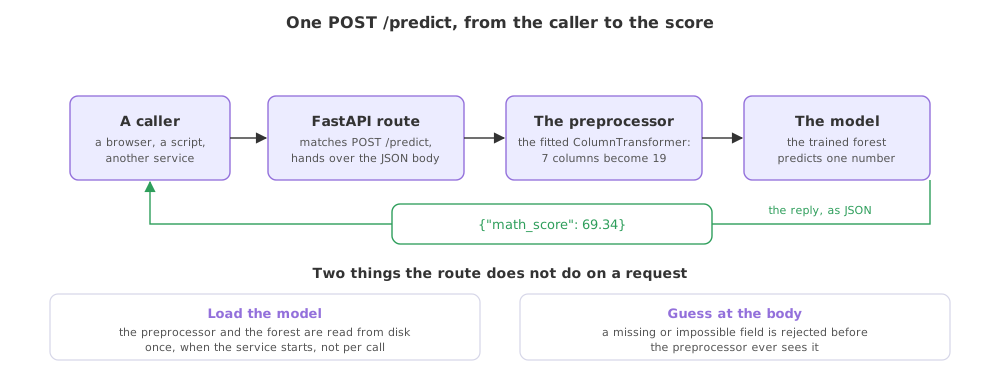
Calling both routes with TestClient
FastAPI ships a test client that drives the app in the same process, with no server to start and no port to pick. It is the quickest way to prove a route works, and it is the same object a test suite would use later. The record posted here is the first row of the dataset, so the score that comes back can be read against a row you have already seen.
from fastapi.testclient import TestClient
from app import app

client = TestClient(app)
print(client.get("/health").status_code, client.get("/health").json())

# the first row of the dataset, so the score can be read against a known row
record = {"gender": "female", "race_ethnicity": "group B",
          "parental_level_of_education": "bachelor's degree", "lunch": "standard",
          "test_preparation_course": "none", "reading_score": 72, "writing_score": 74}
reply = client.post("/predict", json=record)
print(reply.status_code, reply.json())200 {'status': 'ok'}
200 {'math_score': 69.34}Reading the two replies
- 200 on the health route means the process answered, so the service is up and the import of the model did not fail.
- 200 on the predict route means the body was accepted and the function ran to the end.
- The score 69.34 is the same number the prediction pipeline returns for that record when called directly, because the route is a thin wrapper over it and nothing in between changes the maths.
- The status code and the body are separate, so a caller can decide what to do from the code alone before it looks at the JSON.
A prediction script against a model service
| A script you run | A service you call | |
|---|---|---|
| Starting it | Every prediction | Once, and it stays up |
| Loading the model | On every run | Once, at startup |
| Who can use it | Whoever has the code and the artifacts | Anything that can make an HTTP call |
| The input | Arguments you edit in the file | A JSON body in the request |
| Next step | Nothing to deploy | An image, a registry and a host |
Where a model service fits
- A product calling the model, where a web or mobile backend posts a record and shows the score to a user.
- A batch job in another language, where the caller has no Python and reaching the model over HTTP is the only practical route.
- A container you hand to someone else, where the service is the thing that gets packaged and run on a host that holds none of your code.
PredictPipeline() created on each request reads two files from disk every call, which turns a few milliseconds of work into hundreds, and under load it reads them again for every concurrent request. The service exists to pay that cost once.Related
- Previous: DVC metrics and plots
- Next: Request and response schemas
- The class the route wraps: The prediction pipeline
- Reference: FastAPI first steps
- Add a third route,
GET /version, that returns the model file's path, and call it with the test client. - Move
PredictPipeline()inside the predict function, call the route twice, and watch how much longer each call takes. - Post a record with a higher
reading_scoreand see which way the predicted maths score moves.
This is what real progress feels like.