
Data ingestion
Data ingestion is the first stage of a training pipeline: it pulls the raw data from its source once, writes a copy under the project's artifacts folder, and splits that copy into the training and test files every later stage reads.
Last updated: 19 Oct, 2026 · MLOps
The training pipeline lesson wired four stages together and left each of them empty. This part fills them one at a time, against a dataset of 1000 student records, and ends with a single record going through the finished model. Ingestion comes first because every other stage reads a file this one writes.
The component code on this page is the project's own, under src/sp/components/. The runnable blocks after it do the same work with the paths and numbers written in, so each one runs on its own in an empty folder. In the project those values come from config/config.yaml and params.yaml.
Naming the source and the artifact paths
The video starts a component by writing its settings into config.yaml rather than into the component, so a new data URL is a one-line edit to a file. The ingestion stage needs a source, a folder to own, and three file names.
data_ingestion:
  root_dir: artifacts/data_ingestion
  source_url: https://raw.githubusercontent.com/krishnaik06/mlproject/main/notebook/data/stud.csv
  local_data_file: artifacts/data_ingestion/stud.csv
  train_file: artifacts/data_ingestion/train.csv
  test_file: artifacts/data_ingestion/test.csv
The numbers that shape the split live in params.yaml, next to the model's own settings, because they are the knobs a run is tuned with.
TARGET_COLUMN: math_score
TEST_SIZE: 0.2
RANDOM_STATE: 42
Downloading the CSV once
The component takes its typed config in the constructor and reads no other source. download pulls the file, writes the copy named in the config, and logs how many rows arrived.
import pandas as pd
from sklearn.model_selection import train_test_split

from sp.entity.config_entity import DataIngestionConfig
from sp.logger import loggerclass DataIngestion:
def __init__(self, config: DataIngestionConfig):
self.config = config
def download(self) -> pd.DataFrame:
"""Pull the raw CSV once and keep a copy on disk."""
# the copy is what every later run reads, so the source is hit once
df = pd.read_csv(self.config.source_url)
df.to_csv(self.config.local_data_file, index=False)
logger.info("downloaded %d rows to %s", len(df), self.config.local_data_file)
return dfSplitting into a train file and a test file
split takes the frame the download returned and writes two more files. The test fraction and the seed both come from the config, so the same split comes back on every machine that runs the stage.
    def split(self, df: pd.DataFrame):
        # the fraction and the seed are config, so the split is the same everywhere
        train, test = train_test_split(
            df, test_size=self.config.test_size, random_state=self.config.random_state
        )

        train.to_csv(self.config.train_file, index=False)
        test.to_csv(self.config.test_file, index=False)
        logger.info("split into train=%d test=%d", len(train), len(test))
        return train, test
Reading the student dataset
Before running the stage, look at what it is pulling. The file is a thousand students with five text columns describing them and three exam scores. math_score is the column the model will predict; reading_score and writing_score are the two numeric features.
import pandas as pd

URL = "https://raw.githubusercontent.com/krishnaik06/mlproject/main/notebook/data/stud.csv"

df = pd.read_csv(URL)
print("shape:", df.shape)
print(df.columns.tolist())
print(df.head(3).to_string())shape: (1000, 8) ['gender', 'race_ethnicity', 'parental_level_of_education', 'lunch', 'test_preparation_course', 'math_score', 'reading_score', 'writing_score'] gender race_ethnicity parental_level_of_education lunch test_preparation_course math_score reading_score writing_score 0 female group B bachelor's degree standard none 72 72 74 1 female group C some college standard completed 69 90 88 2 female group B master's degree standard none 90 95 93
- The frame is 1000 rows by 8 columns, small enough that every run on this page finishes in seconds and large enough for a split to mean something.
- Five columns hold text, such as
group Bandbachelor's degree, which no model takes as it is. Turning them into numbers is the transformation stage's job. - Three columns hold scores. One of them,
math_score, is the target, which leaves seven feature columns.
Running the ingestion stage
The stage itself is three writes: the raw copy, the training file and the test file. Keeping the raw copy matters because every later run then reads from disk instead of the network, and the file that produced a model is still there to look at.
import os
from sklearn.model_selection import train_test_split

# the stage owns its folder under artifacts, so a run can be deleted and repeated
os.makedirs("artifacts/data_ingestion", exist_ok=True)
df.to_csv("artifacts/data_ingestion/stud.csv", index=False)

# the same seed every run, so next week's test rows are this week's test rows
train, test = train_test_split(df, test_size=0.2, random_state=42)
train.to_csv("artifacts/data_ingestion/train.csv", index=False)
test.to_csv("artifacts/data_ingestion/test.csv", index=False)
print("rows:", len(df), "train:", len(train), "test:", len(test))rows: 1000 train: 800 test: 200
- 800 rows went to the training file and 200 to the test file, which is what
TEST_SIZE: 0.2asks for on 1000 rows. - The seed is fixed at 42, so the same 200 rows land in the test file every time. Without it, this week's model is scored on different rows from last week's and the two numbers cannot be compared.
- The raw copy is written before the split, so the exact bytes a run trained on can be checked later, even if the source file changes.
Run through the pipeline rather than on its own, the stage's logger writes the same facts into the day's log file. The timestamp changes on every run.
[2026-10-19 11:03:05,829] INFO sp - downloaded 1000 rows to artifacts/data_ingestion/stud.csv
[2026-10-19 11:03:05,838] INFO sp - split into train=800 test=200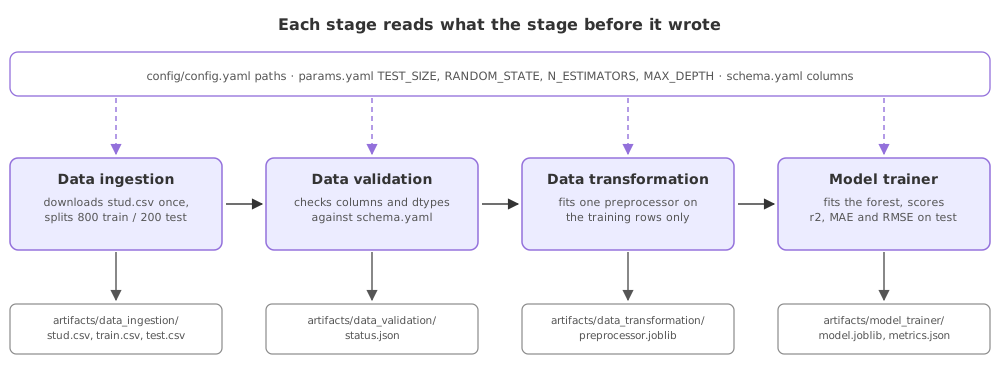
A notebook cell against an ingestion stage
| Reading the data in a notebook | An ingestion stage | |
|---|---|---|
| The source | A path typed into a cell | A URL in config.yaml |
| The copy | Whatever is in the folder | Written to artifacts/ on every run |
| The split | Re-run with a new seed | One seed from params.yaml |
| Re-running it | Scroll and click | One call, same result |
| What the next step gets | A variable in memory | Two files with known names |
Where a separate ingestion stage pays off
- A scheduled retrain, where the stage runs unattended and the next stage finds its files by name rather than by a notebook being open.
- Tracing a model back to its data, where the raw copy under
artifacts/is the file that run trained on. - A second person running the project, who changes the source by editing one line of YAML instead of reading the component.
Related
- Previous: The training pipeline
- Next: Data validation
- Reference: train_test_split in the scikit-learn documentation
- Change
test_sizeto0.3and confirm the two counts become 700 and 300. - Drop
random_state=42, run the split twice, and comparetest.head(1)from each run. - Point
URLat the copy underartifacts/data_ingestion/stud.csvand watch the stage work with no network at all.
You understood something today that you didn't yesterday.