
Stage components
A stage component is a class that does the work of one stage and takes that stage's entity object in its constructor, so its settings arrive from outside and its results are files on disk the next stage can read.
Last updated: 19 Oct, 2026 · MLOps
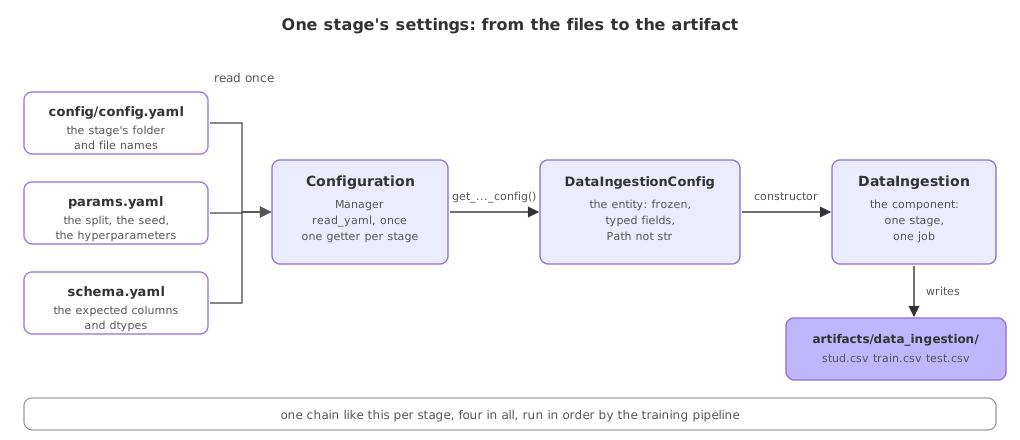
The configuration manager can now hand out a filled, typed object for any stage. A component is what receives one. The rule is one class per stage, in its own file, doing that stage's job and no more: no YAML reading, no knowledge of which stage runs next, and no values of its own. The worked example here is the ingestion stage, which downloads the raw CSV and splits it.
The clip's component downloads and unzips the deep-learning project's image archive; this one reads stud.csv from a URL and splits it, and the constructor-takes-its-entity shape is identical.
One class, one stage, one constructor argument
The imports say what the stage needs: pandas and scikit-learn for the work, its own entity class for the annotation, and the project's logger.
import pandas as pd
from sklearn.model_selection import train_test_split

from sp.entity.config_entity import DataIngestionConfig
from sp.logger import logger
The logger is the one the project configured once, so every stage writes the same kind of line to the same place.
import logging, sys

logging.basicConfig(level=logging.INFO, format="[%(asctime)s] %(levelname)s %(name)s - %(message)s",
                    handlers=[logging.StreamHandler(sys.stdout)])
logger = logging.getLogger("sp")
The constructor is two lines. It takes the entity and keeps it, and the annotation says which entity, so handing it the trainer's settings is a mistake a reader and a type checker both see.
class DataIngestion:
    def __init__(self, config: DataIngestionConfig):
        self.config = config
Downloading the raw file
The first method pulls the CSV from the URL in the config and keeps a copy at the path in the config. Neither value appears in this code, which is the point: the same class downloads a different file in a different environment with no edit.
    def download(self) -> pd.DataFrame:
        """Pull the raw CSV once and keep a copy on disk."""
        df = pd.read_csv(self.config.source_url)
        df.to_csv(self.config.local_data_file, index=False)
        logger.info("downloaded %d rows to %s", len(df), self.config.local_data_file)
        return df
It returns the DataFrame as well as saving it, so the caller can pass the data straight on without reading the file back.
Splitting into train and test
The second method splits what it is given, using the size and the seed from the config, and writes both halves.
    def split(self, df: pd.DataFrame):
        train, test = train_test_split(
            df, test_size=self.config.test_size, random_state=self.config.random_state
        )

        # the next stage reads these two files, not a DataFrame in memory
        train.to_csv(self.config.train_file, index=False)
        test.to_csv(self.config.test_file, index=False)
        logger.info("split into train=%d test=%d", len(train), len(test))
        return train, test
random_state comes from params.yaml through the entity, so the split is the same split on every machine and in every rerun. That is what makes two runs comparable at all.
View the code here
TARGET_COLUMN: math_score
TEST_SIZE: 0.2
RANDOM_STATE: 42
N_ESTIMATORS: 100
MAX_DEPTH: 12
COLUMNS:
  gender: object
  race_ethnicity: object
  parental_level_of_education: object
  lunch: object
  test_preparation_course: object
  math_score: int64
  reading_score: int64
  writing_score: int64
data_ingestion:
  root_dir: artifacts/data_ingestion
  source_url: https://raw.githubusercontent.com/krishnaik06/mlproject/main/notebook/data/stud.csv
  local_data_file: artifacts/data_ingestion/stud.csv
  train_file: artifacts/data_ingestion/train.csv
  test_file: artifacts/data_ingestion/test.csv

data_validation:
  root_dir: artifacts/data_validation
  status_file: artifacts/data_validation/status.json

data_transformation:
  root_dir: artifacts/data_transformation
  preprocessor_file: artifacts/data_transformation/preprocessor.joblib

model_trainer:
  root_dir: artifacts/model_trainer
  model_file: artifacts/model_trainer/model.joblib
  metrics_file: artifacts/model_trainer/metrics.json
import json, os
from pathlib import Path

import joblib
import yaml
from box import ConfigBox
from ensure import ensure_annotations


@ensure_annotations
def read_yaml(path: Path) -> ConfigBox:
    """Load a YAML file so its keys can be read with dots, not brackets."""
    with open(path) as f:
        return ConfigBox(yaml.safe_load(f))


@ensure_annotations
def create_directories(paths: list):
    for p in paths:
        os.makedirs(p, exist_ok=True)


@ensure_annotations
def save_json(path: Path, data: dict):
    with open(path, "w") as f:
        json.dump(data, f, indent=4)


@ensure_annotations
def save_object(path: Path, obj):
    joblib.dump(obj, path)


@ensure_annotations
def load_object(path: Path):
    return joblib.load(path)
from pathlib import Path

from sp.entity.config_entity import (
    DataIngestionConfig,
    DataTransformationConfig,
    DataValidationConfig,
    ModelTrainerConfig,
)
from sp.utils.common import create_directories, read_yaml


class ConfigurationManager:
    """Reads the YAML files once, then hands each stage its own typed config."""

    def __init__(
        self,
        config_path=Path("config/config.yaml"),
        params_path=Path("params.yaml"),
        schema_path=Path("schema.yaml"),
    ):
        self.config = read_yaml(config_path)
        self.params = read_yaml(params_path)
        self.schema = read_yaml(schema_path)

    def get_data_ingestion_config(self) -> DataIngestionConfig:
        c = self.config.data_ingestion
        create_directories([c.root_dir])
        return DataIngestionConfig(
            root_dir=Path(c.root_dir),
            source_url=c.source_url,
            local_data_file=Path(c.local_data_file),
            train_file=Path(c.train_file),
            test_file=Path(c.test_file),
            test_size=self.params.TEST_SIZE,
            random_state=self.params.RANDOM_STATE,
        )

    def get_data_validation_config(self) -> DataValidationConfig:
        c = self.config.data_validation
        create_directories([c.root_dir])
        return DataValidationConfig(
            root_dir=Path(c.root_dir),
            status_file=Path(c.status_file),
            expected_columns=dict(self.schema.COLUMNS),
        )

    def get_data_transformation_config(self) -> DataTransformationConfig:
        c = self.config.data_transformation
        create_directories([c.root_dir])
        return DataTransformationConfig(
            root_dir=Path(c.root_dir),
            preprocessor_file=Path(c.preprocessor_file),
            target_column=self.params.TARGET_COLUMN,
        )

    def get_model_trainer_config(self) -> ModelTrainerConfig:
        c = self.config.model_trainer
        create_directories([c.root_dir])
        return ModelTrainerConfig(
            root_dir=Path(c.root_dir),
            model_file=Path(c.model_file),
            metrics_file=Path(c.metrics_file),
            target_column=self.params.TARGET_COLUMN,
            n_estimators=self.params.N_ESTIMATORS,
            max_depth=self.params.MAX_DEPTH,
            random_state=self.params.RANDOM_STATE,
        )
from dataclasses import dataclass
from pathlib import Path


@dataclass(frozen=True)
class DataIngestionConfig:
    root_dir: Path
    source_url: str
    local_data_file: Path
    train_file: Path
    test_file: Path
    test_size: float
    random_state: int


@dataclass(frozen=True)
class DataValidationConfig:
    root_dir: Path
    status_file: Path
    expected_columns: dict


@dataclass(frozen=True)
class DataTransformationConfig:
    root_dir: Path
    preprocessor_file: Path
    target_column: str


@dataclass(frozen=True)
class ModelTrainerConfig:
    root_dir: Path
    model_file: Path
    metrics_file: Path
    target_column: str
    n_estimators: int
    max_depth: int
    random_state: int
Running the ingestion stage
Ask the manager for the stage's settings, build the component with them, and call its two methods. Run this from the project root.
from sp.config.configuration import ConfigurationManager
from sp.components.data_ingestion import DataIngestion

ingestion = DataIngestion(ConfigurationManager().get_data_ingestion_config())

df = ingestion.download()
train, test = ingestion.split(df)

# the stage's artifacts are files now, which is how the next stage will find them
print(sorted(p.name for p in ingestion.config.root_dir.iterdir()))[2026-10-19 11:32:40,385] INFO sp - downloaded 1000 rows to artifacts/data_ingestion/stud.csv [2026-10-19 11:32:40,391] INFO sp - split into train=800 test=200 ['stud.csv', 'test.csv', 'train.csv']
Reading the stage's two log lines
- 1000 rows were downloaded to the path the config named, which is the whole raw dataset, and the log line records where it went rather than leaving you to guess.
- The split came out 800 and 200, which is the 0.2 in
params.yamlapplied to 1000 rows, and it will be the same two numbers on the next run because the seed is fixed. - Three files are in the stage's folder: the raw copy, the train half and the test half. The stage's output is its folder, so a later stage needs nothing from this process's memory.
- The timestamp at the front of each line changes every run, so read the message, not the clock.
A notebook cell against a stage component
| A notebook cell | A stage component | |
|---|---|---|
| Where its settings come from | Literals in the cell | Its entity, in the constructor |
| How it is run again | Scroll up and re-execute | Build it and call a method |
| What it leaves behind | Variables in memory | Files in its own folder |
| What else it can reach | Every variable in the notebook | Only what it was handed |
| Testing it | Run the notebook | Build it with a config you made |
Where the one-class-per-stage rule pays off
- A failing stage, where the log line and the stage's folder together say exactly how far the run got.
- Changing one stage, such as reading from a database instead of a URL, which touches one file and leaves the other stages untouched.
- Running a stage alone, to redo a download without retraining, because the stage needs only its own config object.
config.yaml itself, or defines a default for a setting it was not given, has taken back the job the manager exists to do. Once two places decide the same value, the one that wins depends on import order, and a run stops being reproducible from the files.Related
- Previous: The configuration manager
- Next: The training pipeline
- See also: Data ingestion
- Reference: train_test_split in the scikit-learn docs
- Change
TEST_SIZEto0.3inparams.yaml, rerun, and read the new numbers in the split log line. - Point
train_fileatartifacts/data_ingestion/train_raw.csvand confirm the file name in the folder listing changes with no code edit. - Call
splitondf.head(50)and watch the log line report the smaller counts.
Every expert started right here.