
A remote tracking server
A remote tracking server is an MLflow backend running off your machine, so every run a team logs lands in one shared store instead of in each person's private mlruns folder.
Last updated: 19 Oct, 2026 · MLOps
The registry built in The model registry is one nobody else can read, because the store is a folder on one laptop. The video solves that first rather than last: it connects its GitHub repository to DagsHub, opens the experiment tab there to get an MLflow tracking URI, and sets that URI with a username and a token in the environment before logging anything. The logging calls on these pages do not change at all; the tracking URI and the credentials do.
Setting the URI and credentials in the environment
MLflow reads three variables. The URI names the server, and the username and token authorise the push. They belong in the shell or in a secrets store, never in the code, because anything in the code goes into git with it.
# the hosted server's URI, from the experiment tab of the repository on the host
export MLFLOW_TRACKING_URI="https://dagshub.com/<owner>/<repo>.mlflow"
export MLFLOW_TRACKING_USERNAME="<owner>"
export MLFLOW_TRACKING_PASSWORD="<your-access-token>"
The one line that changes in the code
set_tracking_uri reads the environment variable instead of naming a folder, and the file-store opt-in is no longer needed, because there is no local store to prepare. Everything after it, the runs, the params, the metrics, the logged model and the registry, is the code you already have. This block is shown rather than run, because it needs an account on a hosted server.
import os
import mlflow

# the server replaces file:./mlruns; nothing below this line has to change
mlflow.set_tracking_uri(os.environ["MLFLOW_TRACKING_URI"])
mlflow.set_experiment("student-performance")

with mlflow.start_run(run_name="depth-12"):
    mlflow.log_params({"n_estimators": 100, "max_depth": 12, "random_state": 42})
    mlflow.log_metrics({"r2": 0.8485, "mae": 4.6996, "rmse": 6.0721})
What a remote server needs
- An account and a repository on the host. On DagsHub the MLflow URI is shown on the repository's experiment tab, which is where the video copies it from.
- A username and an access token in the environment, exported in the same terminal that runs the training script. The video exports them in the shell as well as setting them in the notebook, because a notebook kernel does not share the shell's environment.
- Network access, since each run now travels over HTTPS rather than being written to disk, so a logging call can fail for reasons a folder never had.
- Somewhere to keep the token. It is a credential with write access to the store, so it never goes in the repository or in a notebook cell.
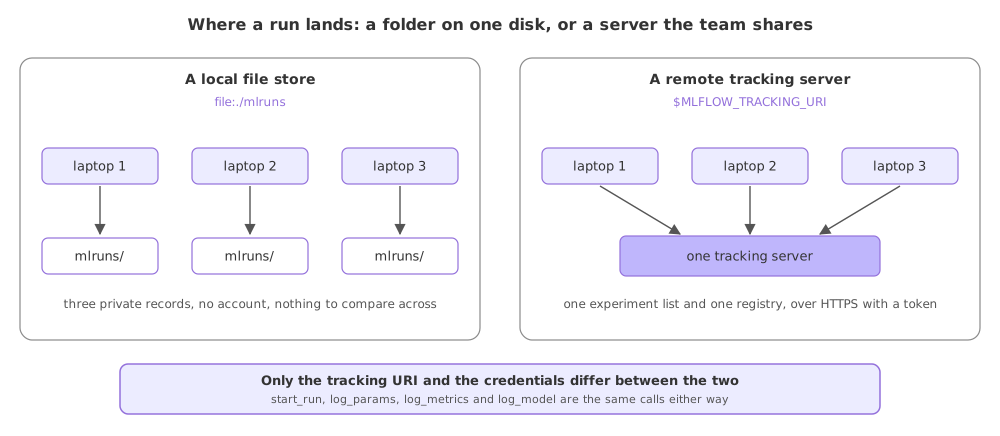
A local folder against a hosted server
| file:./mlruns | A hosted server | |
|---|---|---|
| Lives | On one machine | On a server the team reaches |
| Needs an account | No | Yes, with a token |
| Can fail because of | The file store being refused without MLFLOW_ALLOW_FILE_STORE | The network or a bad token |
| Logging calls | Identical | Identical |
Where a shared server is the right call
- A team, where one experiment list beats comparing screenshots of private folders.
- A training job on another machine, where the run has to be readable after the machine is gone.
- A registry other services load from, since serving code cannot resolve an alias in a folder on your laptop.
Related
- Previous: The model registry
- Next: Why git cannot hold data
- Reference: MLflow tracking setups
- Swap the local URI for
sqlite:///mlflow.dband confirm every logging call runs unchanged. - Print
mlflow.get_tracking_uri()before and afterset_tracking_urito see which store you are writing to. - List the credentials your training script reads and check that none of them is in a tracked file.
You understood something today that you didn't yesterday.