
The project template script
A project template script is a short Python file that creates every folder and empty file a project needs, so the layout is decided once, written down as a list, and rebuilt in one command instead of clicked together by hand.
Last updated: 19 Oct, 2026 · MLOps
With the libraries from Installing the MLOps toolkit in place, the next thing the end-to-end video does is write template.py. It is the first file of the project and the only one whose job is to make other files. The layout it creates is the one the rest of the course fills in: components under src, config in YAML at the top level, and a place for the notebook experiments.
The clip's script lays out the deep-learning project's cnnClassifier package; this one lays out the student-performance project's sp package, and the list-then-loop shape is the same.
Naming the project package
Two names decide everything else. PKG is the import name, the thing that appears in from sp.logger import logger once the project is installed. ROOT is the folder on disk.
from pathlib import Path

PKG = "sp"                            # the import name: "from sp.logger import logger"
ROOT = Path("student-performance")     # the project folder everything lives under
Listing the files the project needs
The list is the design. Reading it tells a newcomer where code goes before they open a single file, and adding a line is how the layout grows later.
FILES = [
    ".github/workflows/.gitkeep",      # git stores a folder only if it holds a file
    "requirements.txt", "setup.py", "app.py", "Dockerfile",
    "config/config.yaml", "params.yaml", "schema.yaml",
    "notebook/experiments.ipynb",

    # the package itself, which setup.py installs
    f"src/{PKG}/__init__.py", f"src/{PKG}/logger.py", f"src/{PKG}/exception.py",
    f"src/{PKG}/utils/common.py", f"src/{PKG}/entity/config_entity.py",
    f"src/{PKG}/config/configuration.py",
].github/workflows/.gitkeepholds the folder the CI/CD part writes its workflow into. Git stores files, not folders, so an empty marker file is what keeps the folder in the repository.config/config.yaml,params.yaml,schema.yamlare the three YAML files the project reads instead of hard-coding paths, numbers and column types.src/sp/logger.pyandsrc/sp/exception.pyare written in the next two lessons and imported by every component after that.notebook/experiments.ipynbis where a stage is tried out before it becomes a component, which is the order the videos work in.
Adding the components and pipelines
The component and pipeline files follow a pattern, so a comprehension writes them. Each folder also gets an __init__.py, which is the file that turns a folder into an importable package.
FILES += [f"src/{PKG}/components/{name}.py" for name in
          ("data_ingestion", "data_validation", "data_transformation", "model_trainer")]
FILES += [f"src/{PKG}/pipeline/{name}.py" for name in ("train_pipeline", "predict_pipeline")]

# a folder under src is a package only when it holds an __init__.py, and setup.py
# finds the packages by looking for exactly that file
FILES += [f"src/{PKG}/{folder}/__init__.py" for folder in
          ("components", "config", "entity", "pipeline", "utils")]
Creating the folder tree
One loop does the work. Each path gets its parent folders made, then the file itself is touched into existence. The size check is what makes the script safe to run again: a file that already holds code is left alone.
def make_tree():
    touched = []
    for item in FILES:
        path = ROOT / item
        path.parent.mkdir(parents=True, exist_ok=True)

        # a file that already holds code is left alone, so re-running is safe
        if not path.exists() or path.stat().st_size == 0:
            path.touch()
            touched.append(item)
    return touched
Running the script twice
The second run is the interesting one. Between the two, one line of code goes into logger.py, which is what the size check exists to protect:
import shutil

shutil.rmtree(ROOT, ignore_errors=True)   # start from nothing, so the run repeats
print("first run :", len(make_tree()), "files touched")

# a file with code in it is the one that must survive the next run
(ROOT / "src/sp/logger.py").write_text("logger = None")
print("second run:", len(make_tree()), "files touched")
print("logger.py :", (ROOT / "src/sp/logger.py").read_text().strip())first run : 26 files touched second run: 25 files touched logger.py : logger = None
- The first run touches every path in the list, folders included, because none of them existed.
- The second run touches one fewer.
logger.pynow holds a line of code, so the size check sends it down the leave-it-alone branch. - The empty files are touched again, which costs nothing: a zero-byte file rewritten as a zero-byte file is the same file.
- That is what makes the script safe to repeat: no file you have written into is ever opened for writing, so the script can stay in the repository and be re-run whenever the layout grows.
Reading the tree it made
Walking the folder shows what a reader checking out the repository sees:
# every path the script left behind, in sorted order
for path in sorted(ROOT.rglob("*")):
print(path.relative_to(ROOT), "/" if path.is_dir() else "", sep="").github/ .github/workflows/ .github/workflows/.gitkeep Dockerfile app.py config/ config/config.yaml notebook/ notebook/experiments.ipynb params.yaml requirements.txt schema.yaml setup.py src/ src/sp/ src/sp/__init__.py src/sp/components/ src/sp/components/__init__.py src/sp/components/data_ingestion.py src/sp/components/data_transformation.py src/sp/components/data_validation.py src/sp/components/model_trainer.py src/sp/config/ src/sp/config/__init__.py src/sp/config/configuration.py src/sp/entity/ src/sp/entity/__init__.py src/sp/entity/config_entity.py src/sp/exception.py src/sp/logger.py src/sp/pipeline/ src/sp/pipeline/__init__.py src/sp/pipeline/predict_pipeline.py src/sp/pipeline/train_pipeline.py src/sp/utils/ src/sp/utils/__init__.py src/sp/utils/common.py
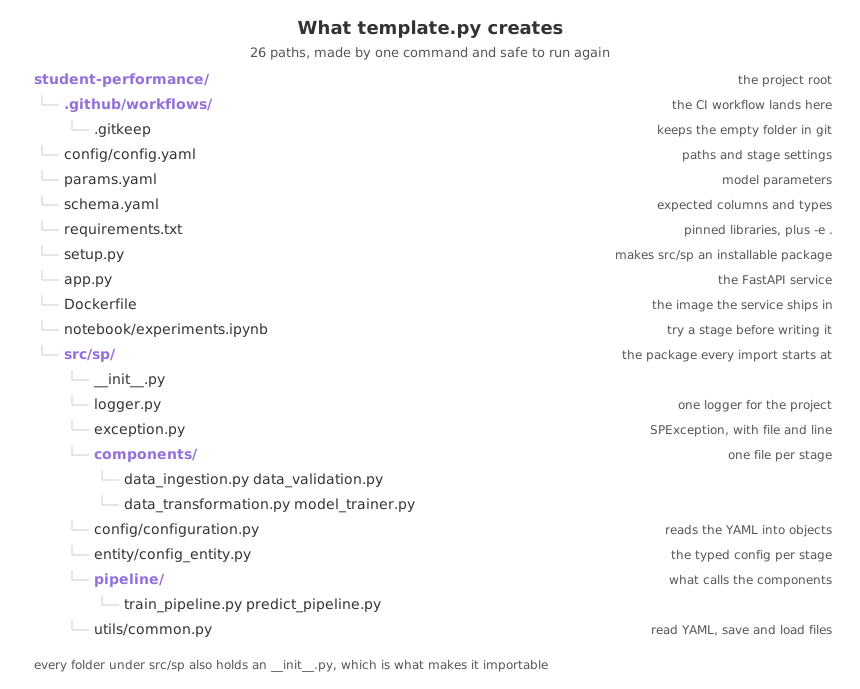
A template script against clicking folders together
| New folder, new file, by hand | template.py | |
|---|---|---|
| Time for a second project | The same clicking again | Change two names, run it |
| Layout written down | Only in the finished repository | As a list at the top of the file |
Missing __init__.py | Easy to forget, breaks the import later | In the list, so never forgotten |
| Adding a stage later | Remember where it goes | Add a line, re-run |
| Safe to repeat | Not a question that arises | Yes, files with content are kept |
Where a template script earns its keep
- Starting a new model project, where the first hour goes on layout and the script turns it into one command.
- A team with several projects, where the same tree in every repository means anyone can find the data ingestion code without asking.
- Growing a project, where a new component is one line in the list rather than four files created by hand in the right places.
data_ingestion.py back to empty. Keep the check, and keep the script in the repository so the layout and the code that makes it stay together.Related
- Previous: Installing the MLOps toolkit
- Next: Packaging with setup.py
- Reference: pathlib in the Python documentation
- Add
src/sp/components/model_evaluation.pyto the list and run the script again. - Write a line of code into one of the created files, run the script once more, and check the file still holds it.
- Change
PKGto a name of your own and read the tree the script builds.
You understood something today that you didn't yesterday.