
Smaller images with layer caching
Layer caching is Docker's rule that every Dockerfile instruction becomes a layer it can keep: a rebuild runs an instruction again only when that instruction or something above it changed, so the order of the lines decides how long every later build takes.
Last updated: 19 Oct, 2026 · MLOps
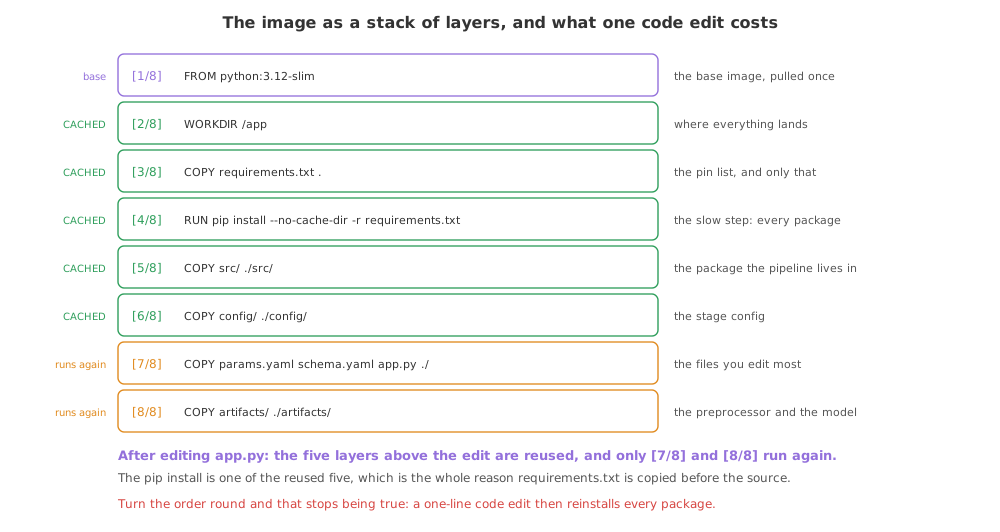
The Dockerising the service lesson built the image once and the install of pandas and scikit-learn was most of the wait. You will build it again on nearly every change, and the Docker basics video gives the reason it need not cost the same each time: an image is not one block but many layers stacked on each other, each one the result of a step.
Weighing the layers
Before changing anything, it helps to see where the size went. docker history lists an image's layers newest first with what each one added, and the first eight entries are the eight steps of this Dockerfile.
# what each of our own eight steps added to the image, newest first
docker history student-performance:v1 --no-trunc --format '{{.Size}}  {{.CreatedBy}}' \
| head -8 | sed 's/ # buildkit$//'0B CMD ["uvicorn" "app:app" "--host" "0.0.0.0" "--port" "8000"] 0B EXPOSE [8000/tcp] 0B ENV PYTHONPATH=/app/src 5.97MB COPY artifacts/ ./artifacts/ 20.5kB COPY params.yaml schema.yaml app.py ./ 16.4kB COPY config/ ./config/ 81.9kB COPY src/ ./src/ 413MB RUN /bin/sh -c pip install --no-cache-dir -r requirements.txt
The install dwarfs everything else: the project's own files, model included, add single-digit megabytes, and the packages add hundreds. That is the layer worth protecting from a rebuild, and the one a careless Dockerfile throws away on every commit.
Reading the cache off a rebuild
A code change is the everyday case. Editing app.py and building again prints CACHED against every layer Docker reused, and the listing below pulls out the steps those words belong to.
# one line changes in the service, which is what happens most days
echo "# a note for the next reader" >> app.py

# rebuild, and list the steps Docker reused instead of running again
docker build -t student-performance:v1 . 2>&1 \
| grep -B1 CACHED | sed -n 's/^#[0-9]* \(\[\)/\1/p' | sort[2/8] WORKDIR /app [3/8] COPY requirements.txt . [4/8] RUN pip install --no-cache-dir -r requirements.txt [5/8] COPY src/ ./src/ [6/8] COPY config/ ./config/
Which layers survived the edit
- Five of the eight steps were reused, every one of them above the line that changed.
- The pip install is one of them, so the packages were not touched and the rebuild took a second rather than minutes.
- Step 7 ran again because
app.pyis one of the files it copies, and its content is different now. - Step 8 ran again too, although
artifacts/did not change: a layer sits on top of the one before it, so once step 7 is new, everything after it is rebuilt as well. - Changing a file's timestamp alone does nothing. The cache key for a
COPYis the content, so touching a file and rebuilding reuses every layer.
Why requirements.txt is copied before the source
Put together, those two facts decide the order of the file. The pin list changes rarely and the source changes constantly, so the slow step belongs above the fast-changing one. Written the other way round the cache is useless.
# the wrong order: any edit to any file invalidates the install under it
COPY . .
RUN pip install --no-cache-dir -r requirements.txt
With COPY . . first, the layer under the install carries every file in the project. Change one character of app.py and that layer is new, so the install below it is new, so every package is downloaded and built again. The same edit against the right order costs two cheap copies.
Trimming what the image carries
Caching makes rebuilds fast; a few other habits keep the result small. Each one removes something the running service never reads.
- A slim base image.
python:3.12-slimis a stripped Debian with Python on it, rather than a full distribution with compilers and documentation. pip install --no-cache-dir, so pip's download cache is not baked into the layer it was created in. Nothing in the container will ever reinstall from it.- A
.dockerignore, so the caches, logs, virtual environment and git history named in.dockerignoreare not sent to the build at all, which also makes the build itself quicker. - Copying folders by name rather than
COPY . ., so a stray notebook or dataset in the project root never reaches the image.
The right order against the wrong one
| After a one-line code edit | requirements first | COPY . . first |
|---|---|---|
| Steps reused | The five above the edit | Only the base and the workdir |
| pip install | Reused | Runs again, every package |
| What a rebuild costs | Two file copies | A full dependency install |
| Effect on a build server | A short job on every push | The same long job every push |
| Effect on the image | None; same contents | None; same contents |
Where the order pays you back
- A build server that rebuilds on every push, which the automation part sets up, where the cached install is the difference between a one-minute job and a ten-minute one.
- A tight edit loop, where you change a route, rebuild and call the container several times an hour.
- A slow or metered connection, where re-downloading the packages on every build is the real cost.
Related
- Previous: Dockerising the service
- Next: Pushing to a container registry
- Where the slow build shows up again: Building the image in CI
- Reference: Docker build cache
- Edit
requirements.txtinstead ofapp.py, rebuild, and count how many steps are cached now. - Move
COPY src/ ./src/above the pip install, edit a file insrc/, and watch the install run again. - Run
docker historyafter a rebuild and find the layer your edit created.
You understood something today that you didn't yesterday.