
The MLOps toolchain
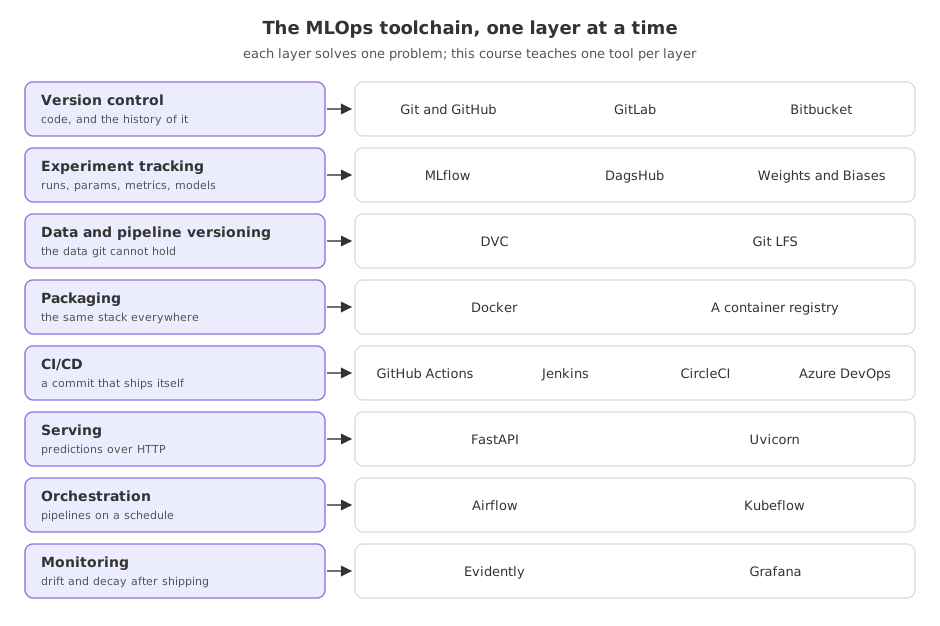
The MLOps toolchain is a stack of layers, each solving one problem the lifecycle raises: version control, experiment tracking, data versioning, packaging, CI/CD, serving, orchestration and monitoring. The names in each layer are interchangeable; the layers are not.
Last updated: 19 Oct, 2026 · MLOps
MLOps maturity levels said what to automate next. This lesson says what to automate it with. The MLOps roadmap video orders the learning the same way: versioning tools first, then CI/CD pipelines and their tools, then cloud and the automation around it, containers included. A tool is worth learning when you can name the layer it sits in.
The clip names Kubeflow and Ansible among the next things to learn; this course teaches Airflow for orchestration, names Kubernetes as vocabulary only, and leaves Kubeflow and infrastructure-as-code out with the reason given in the lesson on what the course left out.
The layers, and why each exists
- Version control keeps the code and its history, and is the thing every other layer hangs off. Git and GitHub are the default; GitLab and Bitbucket do the same job, and older teams may still be on Subversion or TFS.
- Experiment tracking stores a run: its parameters, its metrics and the model it produced, so two runs can be compared months later. MLflow is the one this course teaches; DagsHub hosts it, and Weights and Biases is the common alternative.
- Data and pipeline versioning holds what git cannot. DVC keeps a small pointer file in the repository and the data itself in storage, and describes the pipeline stages so a run can be reproduced.
- Packaging makes the stack portable. A Docker image carries the Python version, the libraries and the model together, which is what ends the argument about it working on one machine and not another.
- CI/CD turns a commit into a deploy. GitHub Actions is the one this course teaches; Jenkins, CircleCI, GitLab CI, Travis CI and Azure DevOps all do the same work, and the concepts carry between them.
- Serving puts the model behind an address. FastAPI with Uvicorn is the current choice on the channel and in this course.
- Orchestration runs pipelines on a schedule and in order. Airflow is the one taught here; Kubeflow is the Kubernetes-native option.
- Monitoring watches the data and the model after release. Evidently produces the drift reports this course uses, and dashboards such as Grafana are where service metrics end up.
Which tool this course teaches, and where
| Layer | The tool taught here | First used in |
|---|---|---|
| Experiment tracking | MLflow 3.17 | Experiment tracking |
| Data and pipeline versioning | DVC 3.67 | Tracking data with DVC |
| Serving | FastAPI | Serving the model with FastAPI |
| Packaging | Docker | Dockerising the service |
| CI/CD | GitHub Actions | A GitHub Actions workflow |
| Monitoring | Evidently 0.7 | Data drift with Evidently |
| Orchestration | Airflow 3.3 | Orchestrating with Airflow |
The six tools are still the landscape, but Travis CI's free tier for open-source projects closed in 2020 and it is no longer a default pick; this course uses GitHub Actions because the repository already lives on GitHub.
Choosing between tools in a layer
- Start with what your repository already lives on. If the code is on GitHub, GitHub Actions costs nothing to adopt and the workflow file sits beside the code.
- Prefer the tool your team can run. Kubeflow is a strong orchestrator and a heavy commitment: it wants a Kubernetes cluster and someone to keep it alive.
- Count the layers you are adding at once. Each one is a service to run, a set of credentials and a thing that can break. Adding tracking and versioning in the same month is usually enough.
- Learn one well. The roadmap video's advice is to pick one CI/CD tool rather than collecting them, because the shape of the work is the same everywhere and moving between them is a matter of syntax.
Where a layer is missing
- Two model files and no idea which is better is a missing experiment tracking layer.
- A pipeline that cannot be rerun on last month's data is a missing data versioning layer.
- A deploy that only one person knows how to do is a missing CI/CD layer.
- A model that was wrong for three weeks before anyone said so is a missing monitoring layer.
Related
- Previous: MLOps maturity levels
- Next: Installing the MLOps toolkit
- Reference: MLflow documentation
- Reference: DVC documentation
- List the eight layers and write, for your own project, the tool in each one or the word none.
- For every layer marked none, write the symptom you would expect to see.
- Pick one CI/CD tool and find where its workflow files live in a repository you already have.
Every expert started right here.