
Data drift with Evidently
Evidently is an open-source monitoring library that compares two datasets, a reference window and a current one, and reports column by column whether the distribution has moved. It needs no true values, so it answers the day the traffic arrives rather than months later.
Last updated: 19 Oct, 2026 · MLOps
Why a live model decays measured decay the slow way, by waiting for the true marks. This lesson measures the cause instead of the effect: the inputs themselves, two windows at a time.
What a drift report compares
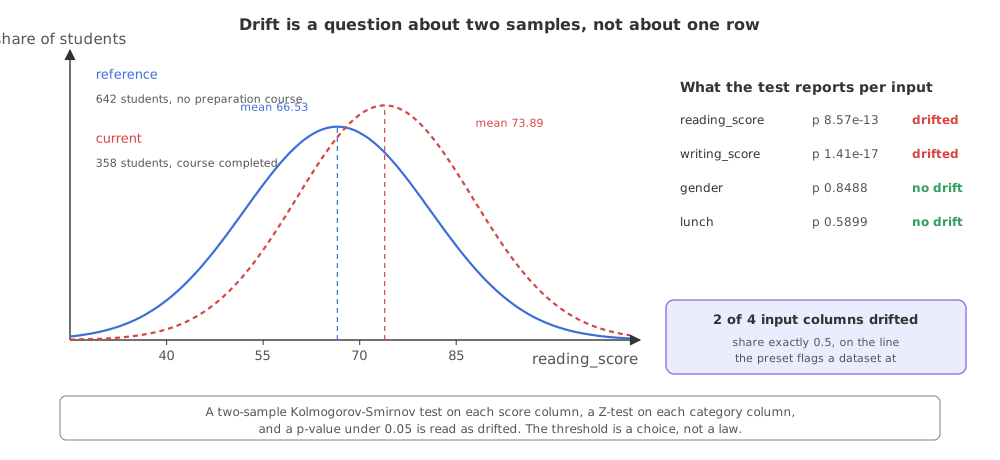
A drift check is always a comparison of two samples. The reference window is the data the model was fitted on, or a stretch of traffic you were happy with. The current window is what has arrived since. Evidently takes both, picks a statistical test per column, and reports the verdict per column plus how many columns moved. The split used here is the one from the decay lesson: reference is the 642 students who did no preparation course, current is the 358 who completed one.
Choosing the reference window and the current window
import pandas as pd

URL = "https://raw.githubusercontent.com/krishnaik06/mlproject/main/notebook/data/stud.csv"
df = pd.read_csv(URL)

# the window the model learned from, and the window arriving now
ref = df[df.test_preparation_course == "none"]
cur = df[df.test_preparation_course == "completed"]

# only what a request carries: math_score is the target, so it is not an input to watch
COLS = ["reading_score", "writing_score", "gender", "lunch"]
Describing the columns with DataDefinition
Evidently 0.7 asks which columns hold numbers and which hold categories before it will compare anything, because the test it chooses depends on the answer. That description is a DataDefinition, and each frame is wrapped in a Dataset that carries it.
from evidently import DataDefinition, Dataset

# the kind of a column decides the test, so the kinds are declared, never guessed
definition = DataDefinition(
    numerical_columns=["reading_score", "writing_score"],
    categorical_columns=["gender", "lunch"],
)

reference = Dataset.from_pandas(ref[COLS], data_definition=definition)
current = Dataset.from_pandas(cur[COLS], data_definition=definition)ColumnMapping object described the columns and two DataFrames went straight into the report. The 0.7 release rewrote that API: the mapping is a DataDefinition, the frames are wrapped in Dataset objects, and the presets live in evidently.presets. The older code raises an import error on this release, so the page follows 0.7.The clip's window runs a target drift report: it asks whether the distribution of the predicted column moved, reads the Spearman and Kendall correlations, and concludes that the target did not change while the input data did. This lesson asks the other half of that question, drift in the input columns, which is the report the clip builds on either side of that one. The API moved as well: the clip's Report comes from evidently.report and takes two DataFrames, while on 0.7 the preset goes into Report([...]) and the two arguments, still named current_data and reference_data, are Dataset objects rather than frames.
Running the drift report
DataDriftPreset is a bundle: one drift test per column, plus a count of how many drifted. Calling run() hands back a snapshot, and .dict() turns that snapshot into plain Python with two keys, metrics and tests. Each entry in metrics carries its label under metric_name. include_tests=True fills the second list, so the dataset-level pass or fail is printed rather than worked out by hand.
from evidently import Report
from evidently.presets import DataDriftPreset

# include_tests fills result["tests"], so the dataset-level verdict comes back with the numbers
snapshot = Report(metrics=[DataDriftPreset()], include_tests=True).run(
    current_data=current, reference_data=reference)
result = snapshot.dict()

print(len(ref), "reference rows,", len(cur), "current rows")
for metric in result["metrics"]:
    print(metric["metric_name"], "->", metric["value"])
for test in result["tests"]:
    if test["id"] == "lt":            # the one test about the dataset, not about a column
print(test["status"].value, "|", test["description"])642 reference rows, 358 current rows
DriftedColumnsCount(drift_share=0.5) -> {'count': 2.0, 'share': 0.5}
ValueDrift(column=reading_score,method=K-S p_value,threshold=0.05) -> 8.571302542281242e-13
ValueDrift(column=writing_score,method=K-S p_value,threshold=0.05) -> 1.40586980765461e-17
ValueDrift(column=gender,method=Z-test p_value,threshold=0.05) -> 0.8488228721237676
ValueDrift(column=lunch,method=Z-test p_value,threshold=0.05) -> 0.589899758946627
FAIL | Share of Drifted Columns: Actual value 0.500 >= 0.500Reading the p-values and the share
- Each column reports a p-value, not a distance. For the two score columns Evidently ran a two-sample Kolmogorov-Smirnov test, and for the two category columns a Z-test, each against a threshold of 0.05. A value under the threshold is read as drifted.
- Both score columns drifted hard. 8.57e-13 for reading and 1.41e-17 for writing: far below 0.05, which says the two samples are most unlikely to have come from the same distribution.
- Gender and lunch did not move. 0.8488 and 0.5899 are nowhere near the threshold, and that is the right answer: the preparation course split the data by study habits, not by who was in the room.
- Two of four inputs is a share of exactly 0.5, which lands on the preset's own
drift_share. The dataset check is written as share less than 0.5, so a share sitting on the line counts as drifted: the verdict readsFAILand the description spells out why,0.500 >= 0.500. - One column either way would flip it. That is the honest shape of a threshold: it is a judgement you made in advance, not an oracle. Two drifted inputs out of four is worth a human look whichever side of 0.5 the arithmetic lands on, and 0.05 and 0.5 are both defaults you can and should argue about for your own data.
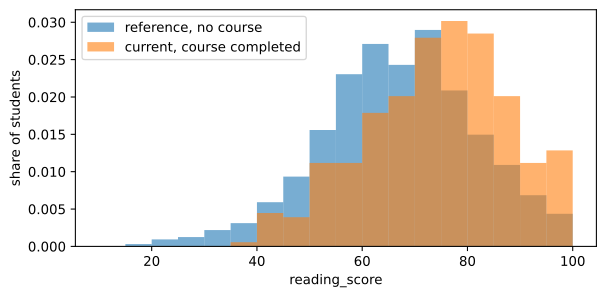
Seeing the shift the test found
A p-value of 8.57e-13 is a verdict, not a picture. Drawing the two windows as histograms over the same bins shows what the test reacted to, and it is the plot to paste into the ticket when you ask for a retrain.
import matplotlib.pyplot as plt

# the same bins for both windows, and density because the two windows differ in size
bins = range(10, 105, 5)
fig, ax = plt.subplots(figsize=(7, 3.2))
ax.hist(ref.reading_score, bins=bins, range=(10, 100), density=True, alpha=0.6, label="reference, no course")
ax.hist(cur.reading_score, bins=bins, range=(10, 100), density=True, alpha=0.6, label="current, course completed")
ax.set_xlabel("reading_score")
ax.set_ylabel("share of students")
ax.legend()

print("reference mean", round(ref.reading_score.mean(), 2),
"| current mean", round(cur.reading_score.mean(), 2))reference mean 66.53 | current mean 73.89
Evidently 0.4 against Evidently 0.7
| 0.4, the release in the video | 0.7.23, the release here | |
|---|---|---|
| Describing columns | ColumnMapping() | DataDefinition(numerical_columns=..., categorical_columns=...) |
| What goes into the report | Two DataFrames | Two Dataset objects built with Dataset.from_pandas |
| Where the presets live | evidently.metric_preset | evidently.presets |
| What run() gives back | The report object itself | A snapshot; call .dict() to read it |
| The label on a metric | Not exposed this way | metric_name on each entry of result['metrics'] |
Running a drift check on a schedule
- Nightly over yesterday's requests, with the training set as the fixed reference. The simplest version, and the one most teams start with.
- Per batch, before a batch scoring job runs. If the batch has drifted away from training, the predictions are worth less and somebody should know before they are written to a table.
- As a gate in the retraining pipeline. The drift share decides whether the retrain is worth the compute, which is the trigger the retraining lesson builds on.
Related
- Previous: Why a live model decays
- Next: The signals to monitor
- Reference: Evidently documentation
- Add race_ethnicity to COLS and to categorical_columns and run the report again. Its p-value comes back at 0.0637, a shade over the threshold, so the share falls to 0.4 and the dataset verdict turns to SUCCESS: one more quiet column is enough to move it.
- Pass
DataDriftPreset(drift_share=0.6). Every column's p-value is unchanged, but 0.500 is now under the threshold and the dataset verdict reads SUCCESS instead of FAIL. - Swap reference and current around. The p-values are unchanged, because the test asks whether two samples match, not which came first.
Every expert started right here.