
Logging params and metrics
Logging params and metrics is the pair of calls that put the settings you chose and the numbers you measured into the same run, so a score is never separated from the configuration that produced it.
Last updated: 19 Oct, 2026 · MLOps
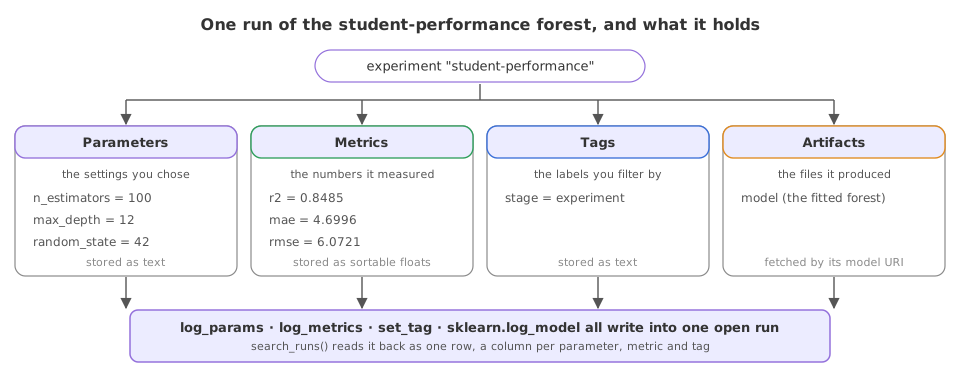
The Experiment tracking lesson logged a single metric to prove the run survived. A run worth comparing carries more: the video logs all the parameters of its parameter file first, then the metrics it measured, into one open run. The three calls are log_params, log_metrics and set_tag, and the difference between them is what this lesson is about.
Which value is which
- A parameter is an input you chose.
n_estimators,max_depthandrandom_stateare parameters: they decide what the run does. - A metric is a number the run measured. r2, MAE and RMSE are metrics: they are the result, so MLflow stores them as floats you can sort and chart.
- A tag is a label on the run. A lifecycle stage or an owner is a tag: you filter by it and you never compute with it.
Logging many values at once
Syntax: the plural calls take a dictionary, so the parameter file and the metrics dictionary go in whole. log_param and log_metric remain for a single value.
mlflow.log_params({"n_estimators": 100, "max_depth": 12})   # the settings, as a dict
mlflow.log_metrics({"r2": 0.8485, "mae": 4.6996})           # the measurements, as a dict
mlflow.set_tag("stage", "experiment")                       # one label on the run
Pointing MLflow at a local store
The same two required lines open every tracked run: the opt-in MLflow 3.17 wants before it will use a file store, and the tracking URI that names the folder.
import os, shutil

os.environ["MLFLOW_ALLOW_FILE_STORE"] = "true"   # 3.17 refuses a local file store without this
shutil.rmtree("mlruns", ignore_errors=True)      # each lesson starts from an empty store
os.makedirs("mlruns/.trash", exist_ok=True)      # MLflow keeps deleted runs in .trash

import mlflow
mlflow.set_tracking_uri("file:./mlruns")
mlflow.set_experiment("student-performance")The clip logs the deep-learning project's settings and its accuracy and loss, and branches on the tracking store to register the model on a hosted server; this run logs the forest's settings and its three regression metrics against the local file store.
Recording one run's settings and scores
fit is the student-performance trainer from the Experiment tracking lesson: it returns the fitted forest and a dictionary of its three scores. Those scores go straight into log_metrics, so no number is retyped on the way into the store.
model, scores = fit(max_depth=12)# the settings go in as params, the measurements as metrics, the label as a tag
with mlflow.start_run(run_name="depth-12"):
mlflow.log_params({"n_estimators": 100, "max_depth": 12, "random_state": 42})
mlflow.log_metrics(scores)
mlflow.set_tag("stage", "experiment")
row = mlflow.search_runs(experiment_names=["student-performance"]).iloc[0]
print("params :", row["params.n_estimators"], row["params.max_depth"], row["params.random_state"])
print("metrics:", row["metrics.r2"], row["metrics.mae"], row["metrics.rmse"])
print("tag :", row["tags.stage"])params : 100 12 42 metrics: 0.8485 4.6996 6.0721 tag : experiment
Reading the row back
- The parameters came back as strings,
100,12and42, because MLflow stores a parameter as text: it is a label for the configuration, not a quantity. - The metrics came back as floats, r2 0.8485, MAE 4.6996 and RMSE 6.0721, which is what lets a query sort by r2 or threshold on it.
- The tag came back under
tags.stage, in its own namespace, so a tag never collides with a parameter of the same name. - One row holds the whole run. The configuration and its result are read together, which is the point of logging them together.
Params against metrics against tags
| Parameter | Metric | Tag | |
|---|---|---|---|
| Holds | A setting you chose | A number you measured | A label |
| Example here | max_depth 12 | r2 0.8485 | stage experiment |
| Stored as | Text | A float, with a history per step | Text |
| Logged with | log_param, log_params | log_metric, log_metrics | set_tag |
Where the three calls earn their keep
- A sweep, where every run logs the same parameter names so the rows line up in one table.
- A long training job, where
log_metricis called once per epoch and MLflow keeps the whole curve rather than the last value. - A filtered search, where a tag such as the owner or the data version narrows thousands of runs to the ones you care about.
"0.8485" with "0.8374" as strings. If the run produced it, it is a metric.Related
- Previous: Experiment tracking
- Next: Logging a model with MLflow
- Reference: MLflow logging functions
- Move
random_stateout oflog_paramsand intoset_tag, then find it under a different column name. - Log
r2withlog_paraminstead and watch the value come back as a string. - Add a second tag naming the dataset, then filter with
mlflow.search_runs(filter_string="tags.stage = 'experiment'").
Slow is fine. Stopping is the only problem.